当前位置:网站首页>MySQL offline deployment
MySQL offline deployment
2022-07-25 10:24:00 【Puffiness is also strong】
1. Software preparation
Mysql5.7.24tar
link :https://pan.baidu.com/s/1W21ew4LY_i3AGMzALho1zw?pwd=1234
Extraction code :1234
Linux CentOS7 7.6_1810
link :https://pan.baidu.com/s/1NV4MjfORIj290Q3scy6iYQ?pwd=pzse
Extraction code :pzse
Mind mapping tools
free , Succinct can be “ Mind mapping ” Copy and paste the article to get a mind map ( No joy, no spray. )

2. Installation steps
adopt scp The order will mysql The compressed package is uploaded to root root directory

Get into root Root directory decompression mysql Compressed package :tar -xvf mysql-5.7.24-linux-glibc2.12-x86_64.tar.gz

Query the system's own database
rpm -qa | grep -i mariadb
Uninstall the built-in database
rpm -e --nodeps mariad-libs ( Or bring the query name with the name of the database )

take mysql Unzipped files are moved to /usr/local/mysql In file
mv mysql-5.7.24-linux-glibc2.12-x86_64 /usr/local/mysql

establish mysql User group and change permissions
groupadd mysql
useradd -r -g mysql mysql

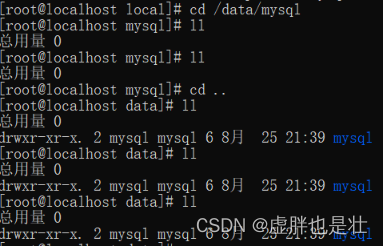
Create a data directory and give permissions
mkdir -p /data/mysql
chown mysql:mysql -R /data/mysql
cd ..
To configure my.cnf
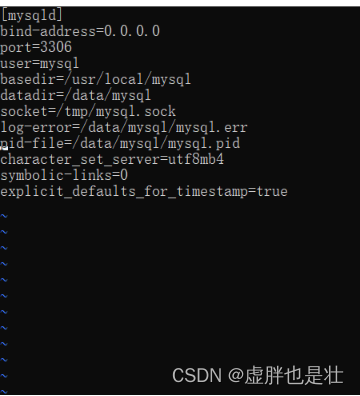
vim /etc/my.cnf
[mysqld]
bind-address=0.0.0.0
port=3306
user=mysql
basedir=/usr/local/mysql
datadir=/data/mysql
socket=/tmp/mysql.sock
log-error=/data/mysql/mysql.err
pid-file=/data/mysql/mysql.pid
character_set_server=utf8mb4
symbolic-links=0
explicit_defaults_for_timestamp=true
Initialize database
Get into mysql Of bin Catalog
cd /usr/local/mysql/bin

initialization mysql
./mysqld --defaults-file=/etc/my.cnf --basedir=/usr/local/mysql/ --datadir=/data/mysql/ --user=mysql --initialize

Check the password
cat /data/mysql/mysql.err

start-up mysql
First the mysql.server Placed in /etc/init.d/mysql in
cp /usr/local/mysql/support-files/mysql.server /etc/init.d/mysql

start-up mysql( restart :service mysql restart)
service mysql start

ps -ef|grep mysql

Mysql Installation successful !
Sign in mysql And change the password
stay bin Under the document ./mysql -u root -p

Enter the password you inquired before

Change Password
SET PASSWORD = PASSWORD('123456');
Mysql8.0 Then set the password format to :ALTER USER 'root'@'localhost' IDENTIFIED WITH mysql_native_password BY '123456';

ALTER USER 'root'@'localhost' PASSWORD EXPIRE NEVER;

FLUSH PRIVILEGES;

Set up remote connection database
stay mysql Middle input finger :use mysql

update user set host = '%' where user = 'root';

FLUSH PRIVILEGES;

Turn off firewall
systemctl stop firewalld
systemctl disable firewalld

systemctl status firewalld

Verify remote connection
open Navicat
边栏推荐
猜你喜欢

Pow(x,n)

Angr (V) - angr_ ctf

PyTorch 代码模板 (CNN)

Vscode latex workshop set xelatex compilation

Angr (VIII) -- angr_ ctf

数论--约数研究

复现 SSL_Anti-spoofing, 使用 wav2vec 2.0 和数据增强的自动说话人认证的欺骗攻击与深度伪造检测

升级 GLIBC 2.29 checking LD_LIBRARY_PATH variable... contains current directory error 解决方案

IDEA整体字体大小修改
11.iptables 防火墙
随机推荐
Chrome开发者工具详解
4、 Testfixture test fixture, or test firmware
三、unittest测试用例五种运行方式
集合的创建,及常用方法
Ansible Deployment Guide
FRP reverse proxy deployment
Basic concepts of testing
存储、计算、分布式存储篇(收集整理适合小白)
IO流中的输出流
二、unittest框架主要做什么
21. Merge Two Sorted Lists
shortest-unsorted-continuous-subarray
Open virtual private line network load balancing
Storage, computing and distributed computing (collection and sorting is suitable for Xiaobai)
Swing component
TCP transmission
Use of mongodb
Output stream in io stream
Notes on building dompteur container
语音自监督预训练模型 CNN Encoder 调研总结