当前位置:网站首页>4. esp8266 displays DHT11 temperature and humidity parameters in real time through OLED
4. esp8266 displays DHT11 temperature and humidity parameters in real time through OLED
2022-06-21 22:57:00 【Zhang San programming sharing】
List of articles
Hardware environment
1、ESP8266 Development board

2、OLED display
This screen is displayed by I2C Control by , A resolution of 128*65, The driver chip is SSD1306 0.96 Inch .
Pins are defined as follows :
| Pin number | Definition | describe |
|---|---|---|
| 1 | GND | Access the development board GND |
| 2 | VDD | Access the development board VCC(3.3V–5V) |
| 3 | SCK(SCL) | Access the development board I2C Of SCL |
| 4 | SDA | Access the development board I2C Of SDA |
3、DHT11 Temperature and humidity sensor
DHT11 It is a temperature and humidity sensor , Can pass 2 Foot's Singal(out) Transmit the detected ambient temperature to in real time ESP8266.
Pins are defined as follows :
| Pin number | Definition | describe |
|---|---|---|
| 1 | VCC | Access the development board VCC(3.3V) |
| 2 | Singal(out) | Access the development board D5(GPIO14) |
| 3 | NC | It's empty |
| 4 | GND | Access the development board GND |
4、 Wiring way
fritzing Sketch Map :
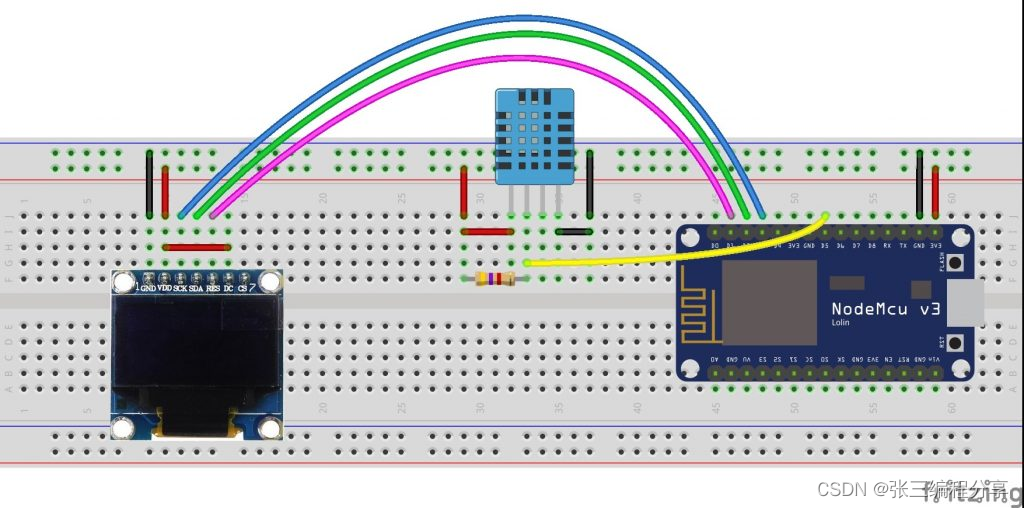
Connection physical drawing :
Software environment
1、 Online installation DHT sensor library for ESPx
Click on Tools --> Management of the library Search for DHT11, Choose to install DHT sensor library for ESPx.
2、 Experiment source code
/************************************************************************************** ESP8266 NodeMCU interfacing with SSD1306 OLED and DHT11 sensor This is a free software with NO WARRANTY. http://simple-circuit.com/ ***************************************************************************************/


#include <Wire.h>
#include <Adafruit_GFX.h>
#include <Adafruit_SSD1306.h>
#include <DHT.h> // Include DHT library code

#define OLED_RESET 5 // define SSD1306 OLED reset at ESP8266 GPIO5 (NodeMCU D1)
Adafruit_SSD1306 display(OLED_RESET);

#define DHTPIN 14 // DHT11 data pin is connected to ESP8266 GPIO14 (NodeMCU D5)
#define DHTTYPE DHT11 // DHT11 sensor is used
DHT dht(DHTPIN, DHTTYPE);             // Configure DHT library

char temperature[] = "00.0 C";
char humidity[]    = "00.0 %";

void setup(void)
{


 Serial.begin(9600);
 delay(1000);

 Wire.begin(4, 0);           // set I2C pins [SDA = GPIO4 (D2), SCL = GPIO0 (D3)], default clock is 100kHz

 // by default, we'll generate the high voltage from the 3.3v line internally! (neat!)
 display.begin(SSD1306_SWITCHCAPVCC, 0x3D);  // initialize with the I2C addr 0x3D (for the 128x64)
 // init done

 dht.begin();                // Initialize the DHT library

 // Clear the display buffer.
 display.clearDisplay();

 display.drawFastHLine(0, 32, SSD1306_LCDWIDTH, WHITE);

 display.setTextSize(1);
 display.setTextColor(WHITE, BLACK);
 display.setCursor(10, 5);
 display.print("DHT11 TEMPERATURE:");
 display.setCursor(19, 37);
 display.print("DHT11 HUMIDITY:");
 display.display();
}

void loop()
{

 // Read humidity
 byte RH = dht.readHumidity();
 //Read temperature in degree Celsius
 byte Temp = dht.readTemperature();

 temperature[0] = Temp / 10 + '0';
 temperature[1] = Temp % 10 + '0';
 humidity[0]    = RH / 10   + '0';
 humidity[1]    = RH % 10   + '0';

 // print data on serial monitor
 Serial.printf("Temperature = %02u°C\r\n", Temp);
 Serial.printf("Humidity = %02u %%\r\n\r\n", RH);

 // print data on the SSD1306 display
 display.setCursor(46, 20);
 display.print(temperature);
 display.setCursor(46, 52);
 display.print(humidity);
 display.drawRect(71, 20, 3, 3, WHITE);     // Put degree symbol ( ° )
 display.display();

 delay(1000);

}
Temperature and humidity display experiment
Effect display video
ESP8266 Development version passed OLED real-time display DHT11 Temperature and humidity parameters
边栏推荐
猜你喜欢

The way of FPGA -- project scheme and FPGA design scheme of FPGA development process

Analysis of 43 cases of MATLAB neural network: Chapter 9 associative memory of discrete Hopfield Neural Network -- number recognition

Games101 job 7- detailed explanation of implementation steps of multi thread speed up
STM32F407程序移植到STM32F429
电脑屏幕分辨率怎么调?电脑屏幕修改分辨率SwitchResX

.bmp图片的文件头解析

UWP 阴影效果

分布式数据库使用逻辑卷管理存储之扩容

About LG (n!) Asymptotically compact supremum of

Specific methods of using cloud development to realize wechat payment
随机推荐
378. 有序矩阵中第 K 小的元素-常规法
个人的股票交易经验
C datatable converted to entity (reflection & generics)
Common options and commands of Synplify Pro
Left hand code, right hand open source, part of the open source road
Niuke month race - insectivores on the ring
Distributed database uses logical volume to manage storage expansion
WPF 启动带参数
WPF dependent properties
Flink real-time risk control rule engine
MATLAB在做图像处理时容易出现的一个误区:为提高运算速度使用预先声明的零矩阵存储图像数据
Go服务平台项目(一)数据库表的设计与Gendry库的使用
If you spend 200W to buy traffic, it is better to start at 0 cost and make an independent station with high private domain operation income!
WPF select Folder
UWP Dispatcher用法
《MATLAB 神经网络43个案例分析》:第19章 基于SVM的手写字体识别
WPF thread manipulation UI problem
WPF 数据绑定:数据源Source-目标Target
uni-app进阶之样式框架/生产环境【day10】
STM32 cannot download the program again after downloading it once, and the program cannot run.