当前位置:网站首页>『SignalR』.NET使用 SignalR 进行实时通信初体验
『SignalR』.NET使用 SignalR 进行实时通信初体验
2022-07-26 14:05:00 【华为云】

读完这篇文章里你能收获到
- 你将对SignalR有了初步的认识及体会
- 对于哪些场景适用SignalR以及如何接入使用
- SignalR的代码入门级Demo实际案例
- 感谢点赞+收藏,避免下次找不到~
一、概念篇
1 什么是 SignalR?
ASP.NET Core SignalR 是一个开放源代码库,可用于简化向应用添加实时 Web 功能。 实时 Web 功能使服务器端代码能够将内容推送到客户端。
2 哪些场景适合使用SignalR?
- 需要实时通知的应用。 社交网络、电子邮件、
聊天、游戏、旅行警报和很多其他应用都需使用通知。 - 需要从服务器进行高频率更新的应用。 示例包括游戏、社交网络、投票、拍卖、地图和 GPS 应用。
- 仪表板和监视应用。 示例包括公司仪表板、即时销售更新或旅行警报。
- 协作应用。 协作应用的示例包括白板应用和团队会议软件。
SignalR 提供用于创建服务器到客户端远程过程调用 (RPC) 的 API。 RPC 从服务器端 .NET Core 代码调用客户端上的函数。 提供多个受支持的平台,其中每个平台都有各自的客户端 SDK。 因此,RPC 调用所调用的编程语言有所不同。
3 ASP.NET Core SignalR 有哪些功能?
- 自动处理连接管理。
- 同时向所有连接的客户端发送消息。 例如聊天室。
- 向特定客户端或客户端组发送消息。
- 对其进行缩放,以处理不断增加的流量。
- 源托管在 GitHub 上的存储库中SignalR。
4 SignalR支持哪些实时通信技术?
SignalR支持如下的方式实现实时通信:
WebSockets:是一种在单个TCP连接上进行全双工通信的协议,使得服务器和浏览器的通信更加简单,服务端可以主动发送信息。Server-Sent Events:SSE 与 WebSocket 作用相似,都是建立浏览器与服务器之间的通信渠道,然后服务器向浏览器推送信息。WebSocket是双向的,而SSE是单向的。Long Polling(长轮询) :和传统的轮询原理一样,只是服务端不会每次都返回响应信息,只有有数据或超时了才会返回,从而减少了请求次数。
SignalR
自动选择服务器和客户端能力范围内的最佳传输方法。
也可以手动指定。
5 服务端中的Hub是什么?
Hub是SignalR的一个组件, 它运行在ASP.NET Core应用里. 所以它是服务器端的
一个类Hub使用
RPC接受从客户端发来的消息, 也能把消息发送给客户端. 所以它就是一个通信用的Hub
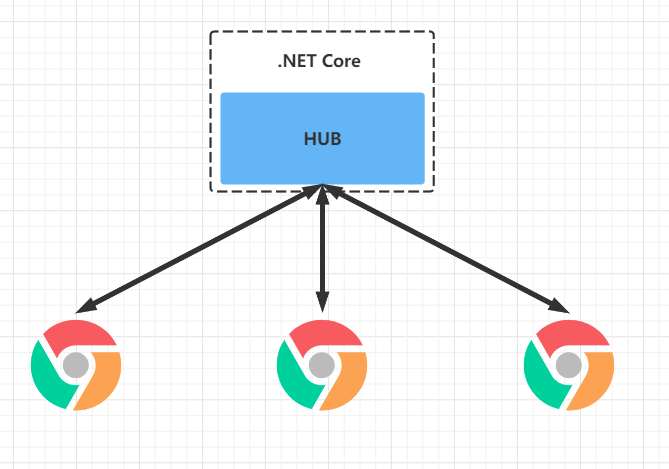
二、.NET服务端案例
提前创建好一个空的.Net Core Web项目
1 创建 SignalR 中心
中心是一个类,用作处理客户端 - 服务器通信的高级管道。
- 创建 Hubs 文件夹。
- 在 Hubs 文件夹中,使用以下代码创建 ChatHub.cs 文件:
using Microsoft.AspNetCore.SignalR;using System.Threading.Tasks;namespace SignalRChat.Hubs{ public class ChatHub : Hub { public async Task SendMessage(string user, string message) { await Clients.All.SendAsync("ReceiveMessage", user, message); } }}2 配置 SignalR
- 将以下注释1~3点的代码添加到 Startup.cs 文件。
using Microsoft.AspNetCore.Builder;using Microsoft.AspNetCore.Hosting;using Microsoft.Extensions.Configuration;using Microsoft.Extensions.DependencyInjection;using Microsoft.Extensions.Hosting;// 1 引入命名空间using SignalRChat.Hubs;namespace Cyf.SignalR{ public class Startup { public Startup(IConfiguration configuration) { Configuration = configuration; } public IConfiguration Configuration { get; } public void ConfigureServices(IServiceCollection services) { services.AddRazorPages(); // 2 添加服务注入 services.AddSignalR(); } public void Configure(IApplicationBuilder app, IWebHostEnvironment env) { if (env.IsDevelopment()) { app.UseDeveloperExceptionPage(); } else { app.UseExceptionHandler("/Error"); app.UseHsts(); } app.UseHttpsRedirection(); app.UseStaticFiles(); app.UseRouting(); app.UseAuthorization(); app.UseEndpoints(endpoints => { endpoints.MapRazorPages(); // 3 添加服务映射 endpoints.MapHub<ChatHub>("/chatHub"); }); } }}- 到此服务端的代码就已经写好了,如图改了以下代码

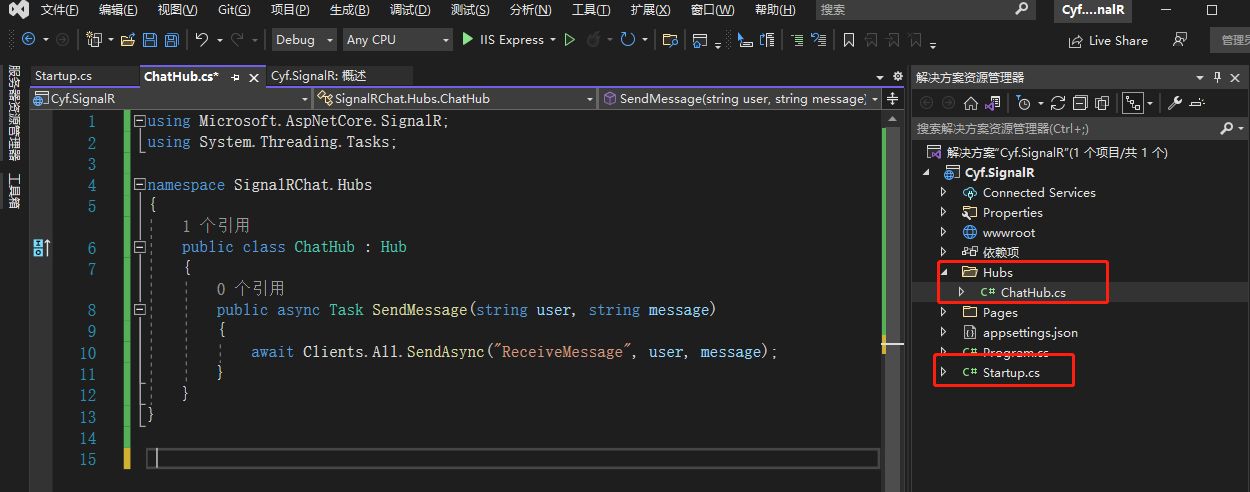
三、JavaScript客户端
1 安装包
- 方式一:通过Visual Studio安装包
- 在“解决方案资源管理器”>中,右键单击项目,然后选择“添加”“客户端库”。
- 在“添加客户端库”对话框中,对于“提供程序”,选择“unpkg”。
- 对于“库”,输入 @microsoft/[email protected]。
- 选择“选择特定文件”,展开“dist/browser”文件夹,然后选择 signalr.js 和 signalr.js。
- 将“目标位置”设置为 wwwroot/js/signalr/
- 选择“安装”
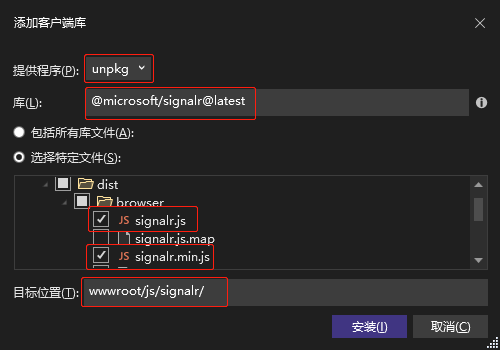
- 方式二:通过npm安装包
npm init -ynpm install @microsoft/signalr2 添加客户端代码
- 使用以下代码替换
Pages/Index.cshtml中的内容:
@page <div class="container"> <div class="row"> </div> <div class="row"> <div class="col-2">User</div> <div class="col-4"><input type="text" id="userInput" /></div> </div> <div class="row"> <div class="col-2">Message</div> <div class="col-4"><input type="text" id="messageInput" /></div> </div> <div class="row"> </div> <div class="row"> <div class="col-6"> <input type="button" id="sendButton" value="Send Message" /> </div> </div> </div> <div class="row"> <div class="col-12"> <hr /> </div> </div> <div class="row"> <div class="col-6"> <ul id="messagesList"></ul> </div> </div><script src="~/js/signalr/dist/browser/signalr.js"></script><script src="~/js/chat.js"></script>Index代码解释:
- 创建名称以及消息文本的文本框和“提交”按钮。
- 使用 id=“messagesList” 创建一个列表,用于显示从 SignalR 中心接收的消息。
- 包含对 SignalR 的脚本引用以及在下一步中创建的 chat.js 应用程序代码。
- 在 wwwroot/js 文件夹中,使用以下代码创建 chat.js 文件:
"use strict";var connection = new signalR.HubConnectionBuilder().withUrl("/chatHub").build();//Disable send button until connection is establisheddocument.getElementById("sendButton").disabled = true;connection.on("ReceiveMessage", function (user, message) { var li = document.createElement("li"); document.getElementById("messagesList").appendChild(li); // We can assign user-supplied strings to an element's textContent because it // is not interpreted as markup. If you're assigning in any other way, you // should be aware of possible script injection concerns. li.textContent = `${user} says ${message}`;});connection.start().then(function () { document.getElementById("sendButton").disabled = false;}).catch(function (err) { return console.error(err.toString());});document.getElementById("sendButton").addEventListener("click", function (event) { var user = document.getElementById("userInput").value; var message = document.getElementById("messageInput").value; connection.invoke("SendMessage", user, message).catch(function (err) { return console.error(err.toString()); }); event.preventDefault();});JS代码解释:
- 创建并启动连接。
- 向“提交”按钮添加一个用于向中心发送消息的处理程序。
- 向连接对象添加一个用于从中心接收消息并将其添加到列表的处理程序。
- 到这里JS客户端代码就写完了,主要修改了以下两个文件
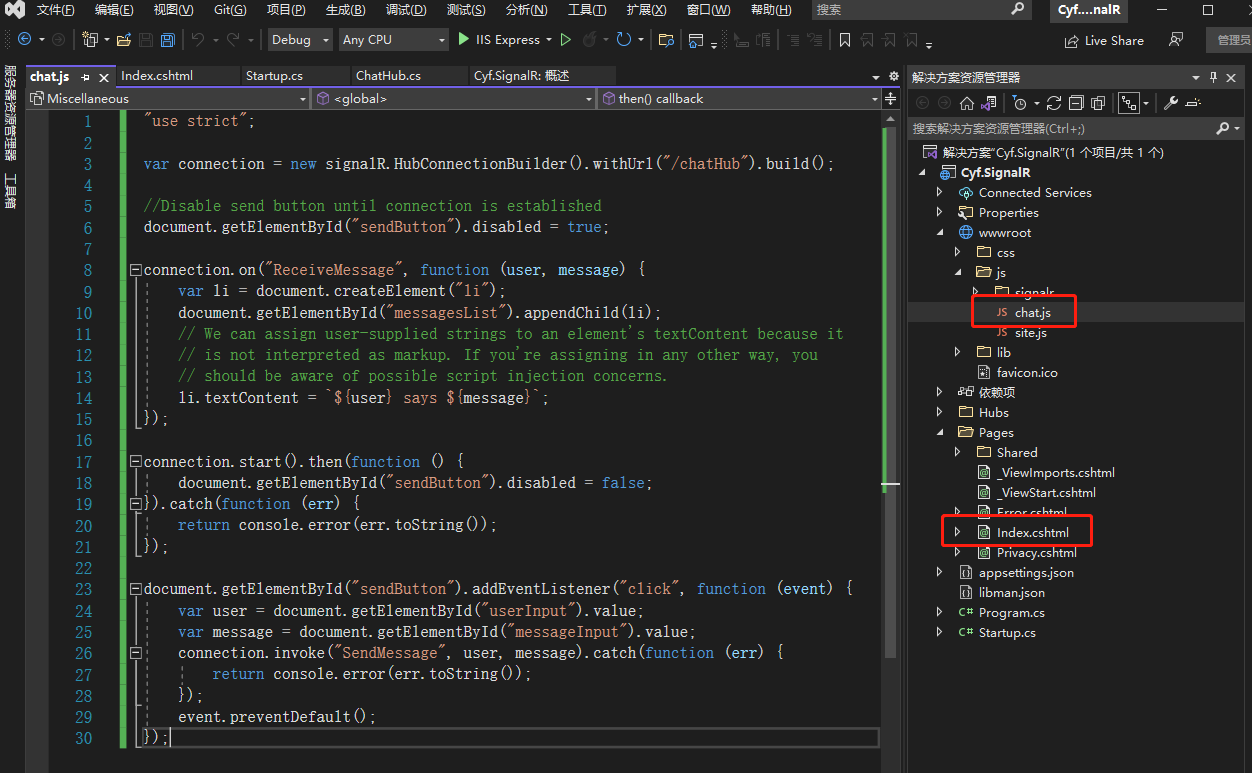
四、效果
- 选择任一浏览器,输入名称和消息,然后选择“发送消息”按钮。
- 两个页面上立即显示名称和消息。

边栏推荐
- Segmentation fault (core dumped)
- 基于标签嵌入注意力机制的多任务文本分类模型
- My meeting of OA project
- Pytoch learning notes (II) the use of neural networks
- POM file details
- C language_ Combination of structure and array
- 关于存储芯片的入门基础知识
- Zhou Wei: look for non consensual investment opportunities to accompany the founding team that delays satisfaction
- JS get the current time, time and timestamp conversion
- C language_ Structure pointer variable introduction
猜你喜欢

@A thousand lines of work, ride the cloud together!

基于双层主题模型的技术演化分析框架及其应用

Inspiration from brain: introduction to synaptic integration principle in deep neural network optimization

【深度学习】全连接网络

关于存储芯片的入门基础知识
![[paper reading] raw+:a two view graph propagation method with word coupling for readability assessment](/img/14/1a02d564c59724d04fce340b6b227d.png)
[paper reading] raw+:a two view graph propagation method with word coupling for readability assessment
![[noip2003 popularity group] stack](/img/95/871b1c6f492b467bffd25912304b44.gif)
[noip2003 popularity group] stack
Technology evolution analysis framework based on two-level topic model and its application

Ros2 learning (1) introduction to ros2

uni-app从创建到运行到微信开发者工具
随机推荐
ISCC2021 LOCKK题解
Propagation of transactions
[GYCTF2020]FlaskApp
UE4 智能指针和弱指针
基于标签嵌入注意力机制的多任务文本分类模型
Synchronization mechanism of go (sync.mutex)
Pytoch learning notes (I) installation and use of common functions
IDEA(warning)No artifacts configured
Tianyi cloud web application firewall (edge cloud version) supports the detection and interception of Apache spark shell command injection vulnerabilities
融合多自然语言处理任务的中医辅助诊疗方案研究——以糖尿病为例
Sequence traversal of binary tree (implemented in C language)
【论文阅读】GRAW+:A Two-View Graph Propagation Method With Word Coupling for Readability Assessment
在检测分割中一些轻量级网络模型(自己学习的笔记分享)
MySQL-03 数据库操作
Comparison between agile development and Devops
A survey of machine learning based technology term recognition
POM文件详解
php使用sqlserver
Re bet overseas: Alibaba, jd.com and SF again fight for "internal power"
Redis learning notes