当前位置:网站首页>Reading notes of Clickhouse principle analysis and Application Practice (3)
Reading notes of Clickhouse principle analysis and Application Practice (3)
2022-06-30 21:20:00 【Aiky WOW】
Begin to learn 《ClickHouse Principle analysis and application practice 》, Write a blog and take reading notes .
The whole content of this article comes from the content of the book , Personal refining .

The first 5 Chapter The data dictionary
A data dictionary is a storage medium , Define data in the form of key value and attribute mapping . It is suitable for saving constant or frequently used dimension table data .
The data in the dictionary will be active or passive ( Parameter control ) Load into memory , Support dynamic update .
The data dictionary is divided into built-in and extended forms , The built-in dictionary is ck Self contained , The external extension dictionary is defined by the user through configuration .
Under normal circumstances , The data in the dictionary can only be accessed through dictionary functions . The exception is the dictionary engine .
5.1 Built in dictionary
ck It only provides dictionary definition mechanism and retrieval function . There is no built-in ready-made data .
5.1.1 Built in dictionary configuration instructions
The built-in dictionary is disabled by default , It can only be used after it is turned on .
take config.xml In file path_to_regions_hierarchy_file and path_to_regions_names_files Open the two configurations to open the built-in dictionary .
【 The official website does not provide descriptions of these two parameters , But the code is full of two values . I don't think it's necessary to see , The built-in dictionary is also prohibited by default , Most scenarios should use an external Dictionary . Reference resources Internal Dictionaries | ClickHouse Docs】
5.1.2 Use the built-in dictionary
Yes regionToName function . There are many other functions like this , stay ClickHouse They are called Yandex.Metrica function . More usage of this set of functions , Please refer to the official manual .
5.2 External extension dictionary
Is registered to as a plug-in ClickHouse in .
Support 7 Two types of memory layout and 4 Class data source . More commonly used .
Reference resources External Dictionaries | ClickHouse Docs
5.2.1 Prepare dictionary data
Three copies of test data have been prepared in advance , They all use CSV Format . For demonstration .
#  Enterprise organization data
# flat、hashed、cache、complex_key_hashed and complex_key_cache A demonstration of the dictionary
#  Three fields  id、code and name
#-----------------------------------------------
1,"a0001"," R & D department "
2,"a0002"," Product department "
3,"a0003"," Data department "
4,"a0004"," Testing department "
5,"a0005"," Operation and maintenance department "
6,"a0006"," Planning Department "
7,"a0007"," The Marketing Department "
#-----------------------------------------------

#  Sales data
#  be used for range_hashed A demonstration of the dictionary
#  Four fields id、start、end and price
#-----------------------------------------------
1,2016-01-01,2017-01-10,100
2,2016-05-01,2017-07-01,200
3,2014-03-05,2018-01-20,300
4,2018-08-01,2019-10-01,400
5,2017-03-01,2017-06-01,500
6,2017-04-09,2018-05-30,600
7,2018-06-01,2019-01-25,700
8,2019-08-01,2019-12-12,800
#-----------------------------------------------

# asn data
#  be used for ip_trie A demonstration of the dictionary
#  Three fields ip、asn and country
#-----------------------------------------------
"82.118.230.0/24","AS42831","GB"
"148.163.0.0/17","AS53755","US"
"178.93.0.0/18","AS6849","UA"
"200.69.95.0/24","AS262186","CO"
"154.9.160.0/20","AS174","US"
#----------------------------------------------- 
5.2.2 Elements of the extended dictionary configuration file
The configuration file of the extension dictionary is provided by config.xml In the document dictionaries_config Configuration item assignment :
<!-- Configuration of external dictionaries. See:
https://clickhouse.yandex/docs/en/dicts/external_dicts/
-->
<dictionaries_config>*_dictionary.xml</dictionaries_config>
Server Settings | ClickHouse Docs
By default ,ck Will automatically identify and load /etc/clickhouse-server All under the directory _dictionary.xml Profile at the end .
meanwhile ck Support hot load update configuration file .
Multiple dictionaries can be defined in a single dictionary configuration file .
Each dictionary consists of a Group dictionary Element definition . stay dictionary The elements are divided into 5 Sub elements , All items are required , Their complete configuration structure is as follows :
<?xml version="1.0"?>
<dictionaries>
    <dictionary>
        <name>dict_name</name>
        <structure>
            <!— The data structure of the dictionary  -->
        </structure>
        <layout>
            <!— Data format type in memory  -->
        </layout>
        <source>
            <!— Data source configuration  -->
        </source>
        <lifetime>
            <!— How often the dictionary is automatically updated  -->
        </lifetime>
    </dictionary>
</dictionaries>
Meaning of main configuration :
- name: The name of the dictionary , Used to determine the unique identification of the dictionary , Must be global only One , Repetition between multiple dictionaries is not allowed .
- structure: The data structure of the dictionary ,5.2.3 The festival will introduce in detail .
- layout: Types of dictionaries , It determines how data is organized in memory And storage . At present, the extended dictionary has 7 Types ,5.2.4 The festival will introduce in detail .
- source: The data source of the dictionary , It determines where the data in the dictionary is loaded . Objective The former extension dictionary has files in common 、 Databases and three other data sources ,5.2.5 Detailed meeting Introduce .
- lifetime: Update time of Dictionary , Extended dictionary supports online data update , 5.2.6 The festival will introduce in detail .
5.2.3 Extend the data structure of the dictionary
The data structure consists of structure Element definition .
By key value key And attribute attribute Two parts , Describe the data identification and field attributes of the dictionary respectively .
<dictionary>
    <structure>
        <!— <id>  or  <key> -->
        <id>
            <!—Key attribute -->
        </id>
        <attribute>
            <!— Field properties -->
        </attribute>
        ...
    </structure>
</dictionary>
about key.
key Used to define the key value of the dictionary , Each dictionary must contain 1 Key value key Field , Used to locate data , A table primary key similar to a database .
Key value key It can be divided into numerical type and compound type .
Numerical type : Numerical type key from UInt64 Integer definition , Support flat、 hashed、range_hashed and cache Dictionary of type ( The extended dictionary type will be introduced later )
<structure>
    <id>
        <!— Name customization -->
        <name>Id</name>
    </id>
 Omit …
composite : composite key Use Tuple Tuple definition , Can be 1 To multiple fields , Similar to the composite primary key in the database . It only supports complex_key_hashed、 complex_key_cache and ip_trie Dictionary of type .
<structure>
    <key>
        <attribute>
            <name>field1</name>
            <type>String</type>
        </attribute>
        <attribute>
            <name>field2</name>
            <type>UInt64</type>
        </attribute>
         Omit …
    </key>
 Omit …
about attribute.
attribute Used to define the attribute fields of the dictionary , Dictionaries can have 1 To multiple attribute fields .
<structure>
     Omit …
    <attribute>
        <name>Name</name>
        <type>DataType</type>
        <!— An empty string -->
        <null_value></null_value>
        <expression>generateUUIDv4()</expression>
        <hierarchical>true</hierarchical>
        <injective>true</injective>
        <is_object_id>true</is_object_id>
    </attribute>
     Omit …
</structure>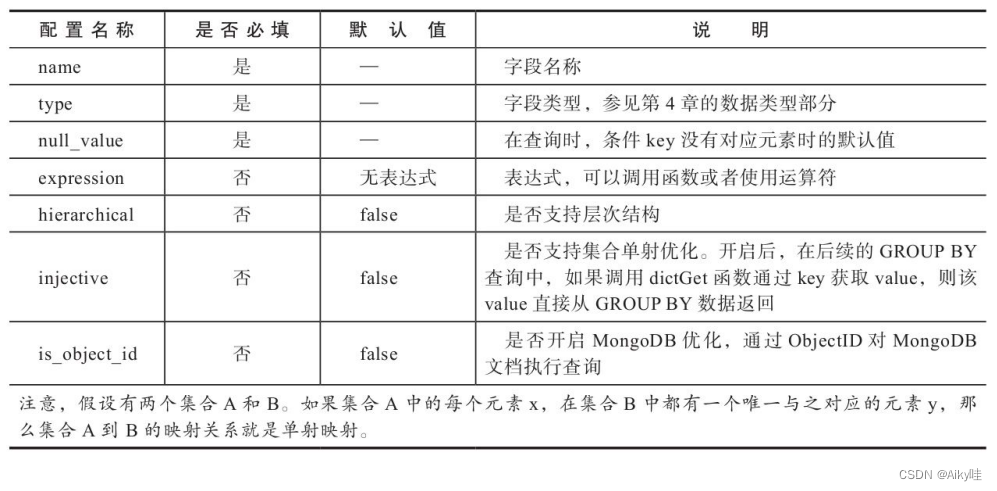
5.2.4 Type of extension Dictionary
layout Element determines the storage structure of its data in memory , It also determines what the dictionary supports key Key type .
Use layout Element definition , At present, there are 7 Types .
Single value key type , Use single numeric id:
- flat
- hashed
- range_hashed
- cache
Reunite with key type :
- complex_key_hashed
- complex_key_cache
- ip_trie
flat Type dictionary
flat Dictionary is the most powerful Dictionary of all types . Only use UInt64 Numerical type key.
Use an array structure in memory to save . The initial size is 1024, Cap of 500 000, Over the limit , Dictionary creation failed .
stay /etc/clickhouse-server Create flat_dictionary.xml file :
<?xml version="1.0"?>
<dictionaries>
       <dictionary>
              <name>test_flat_dict</name>
              <source>
                     <!--  Ready test data  -->
                     <file>
                            <path>/data/clickhouse/dictionaries/organization.csv</path>
                            <format>CSV</format>
                     </file>
              </source>
              <layout>
                     <flat/>
              </layout>
              <!--  Corresponding to the structure of the test data  -->
              <structure>
                     <id>
                            <name>id</name>
                     </id>
                     <attribute>
                            <name>code</name>
                            <type>String</type>
                            <null_value/>
                     </attribute>
                     <attribute>
                            <name>name</name>
                            <type>String</type>
                            <null_value/>
                     </attribute>
              </structure>
              <lifetime>
                     <min>300</min>
                     <max>360</max>
              </lifetime>
       </dictionary>
</dictionaries>
ck Configuration changes will be automatically identified , At this time, the data dictionary has been created .
View in the system table :
SELECT name, type, key, attribute.names, attribute.types FROM system.dictionaries
hashed Type dictionary
It can only be used UInt64 Numerical type key.
and flat Difference : Data is stored in memory in a hash structure . There is no storage limit .
Copy a copy of the above configuration file , Change it name and layout.
<name>test_hashed_dict</name>
<layout>
    <hashed/>
</layout>
range_hashed Type dictionary
hashed A variant of the dictionary .
Added the feature of specified time interval . Data hash structure is stored and sorted by time .
The time interval passes range_min and range_max Element designation , The specified field must be Date perhaps DateTime type .
<?xml version="1.0"?>
<dictionaries>
       <dictionary>
              <name>test_range_hashed_dict</name>
              <source>
                     <!--  Ready test data  -->
                     <file>
                            <path>/data/clickhouse/dictionaries/sales.csv</path>
                            <format>CSV</format>
                     </file>
              </source>
              <layout>
                     <range_hashed/>
              </layout>
              <!--  Corresponding to the structure of the test data  -->
              <structure>
                     <id>
                            <name>id</name>
                     </id>
                    <range_min>
                            <name>start</name>
                    </range_min>
                    <range_max>
                            <name>end</name>
                    </range_max>

                     <attribute>
                            <name>price</name>
                            <type>Float32</type>
                            <null_value/>
                     </attribute>
              </structure>
              <lifetime>
                     <min>300</min>
                     <max>360</max>
              </lifetime>
       </dictionary>
</dictionaries>
cache Type dictionary
Only use UInt64 Numerical type key.
The data in memory is saved with a fixed length vector array .
A vector array of fixed length is also called cells, Its array length is determined by size_in_cells (2 Multiple , Rounding up ) Appoint .
Not all data will be loaded into memory at once . Will be in cells Array to check whether the data has been cached . If the data is not cached , It will load data from the source and cache it to cells in .
The performance depends entirely on the hit rate of the cache ( cache hit rate = Number of hits / Query times ), If you can't do it 99% Or higher cache hit rate , It is best not to use this type .
<?xml version="1.0"?>
<dictionaries>
    <dictionary>
        <name>test_cache_dict</name>
        <source>
          	<!--  The local file needs to pass  executable form  -->
            <executable>
                <command>cat /data/clickhouse/dictionaries/organization.csv</command>
                <format>CSV</format>
            </executable>
        </source>
        <layout>
            <cache>
              	<!--  Cache size  -->
                <size_in_cells>10000</size_in_cells>
            </cache>
        </layout>
        <structure>
            <id>
                <name>id</name>
            </id>
            <attribute>
                <name>code</name>
                <type>String</type>
                <null_value/>
            </attribute>
            <attribute>
                <name>name</name>
                <type>String</type>
                <null_value/>
            </attribute>
        </structure>
        <lifetime>
            <min>300</min>
            <max>360</max>
        </lifetime>
    </dictionary>
</dictionaries>
If cache Dictionaries use local files as data sources , Must be used executable The form settings .
complex_key_hashed Type dictionary
The function is related to hashed The dictionary is exactly the same . Only a single numeric type key Replaced by the composite type .
<?xml version="1.0"?>
<dictionaries>
    <dictionary>
        <name>test_complex_key_hashed_dict</name>
        <source>
            <file>
                <path>/data/clickhouse/dictionaries/organization.csv</path>
                <format>CSV</format>
            </file>
        </source>
        <layout>
            <complex_key_hashed/>
        </layout>
        <structure>
            <!--  composite key -->
            <key>
                <attribute>
                    <name>id</name>
                    <type>UInt64</type>
                </attribute>
                <attribute>
                    <name>code</name>
                    <type>String</type>
                </attribute>
            </key>
            <attribute>
                <name>name</name>
                <type>String</type>
                <null_value/>
            </attribute>
        </structure>
        <lifetime>
            <min>300</min>
            <max>360</max>
        </lifetime>
    </dictionary>
</dictionaries>
complex_key_cache Type dictionary
And cache Dictionaries have exactly the same characteristics , Just put a single Numerical type key Replaced by the composite type .
<?xml version="1.0"?>
<dictionaries>
    <dictionary>
        <name>test_complex_key_cache_dict</name>
        <source>
            <executable>
                <command>cat /data/clickhouse/dictionaries/organization.csv</command>
                <format>CSV</format>
            </executable>
        </source>
        <layout>
            <complex_key_cache>
                <size_in_cells>10000</size_in_cells>
            </complex_key_cache>
        </layout>
        <structure>
          	<!--  composite Key -->
            <key>
                <attribute>
                    <name>id</name>
                    <type>UInt64</type>
                </attribute>
                <attribute>
                    <name>code</name>
                    <type>String</type>
                </attribute>
            </key>
            <attribute>
                <name>name</name>
                <type>String</type>
                <null_value/>
            </attribute>
        </structure>
        <lifetime>
            <min>300</min>
            <max>360</max>
        </lifetime>
    </dictionary>
</dictionaries>
ip_trie Type dictionary
composite key, Only a single can be specified String Type field , Refer to IP Prefix .
Data is used in memory trie Tree structure save . Dedicated to IP Prefix query scenario .
<?xml version="1.0"?>
<dictionaries>
    <dictionary>
        <name>test_ip_trie_dict</name>
        <source>
            <file>
                <path>/data/clickhouse/dictionaries/asn.csv</path>
                <format>CSV</format>
            </file>
        </source>
        <layout>
            <ip_trie/>
        </layout>
        <structure>
          	<!--  Although it is a composite type , But you can only set a single String Type field  -->
            <key>
                <attribute>
                    <name>prefix</name>
                    <type>String</type>
                </attribute>
            </key>
            <attribute>
                <name>asn</name>
                <type>String</type>
                <null_value/>
            </attribute>
            <attribute>
                <name>country</name>
                <type>String</type>
                <null_value/>
            </attribute>
        </structure>
        <lifetime>
            <min>300</min>
            <max>360</max>
        </lifetime>
    </dictionary>
</dictionaries>

In these dictionaries ,flat、hashed and range_hashed Have the highest performance in turn , and cache The performance is the most unstable .

5.2.5 Expand the data source of the dictionary
Data source use source Element definition . Extended dictionary support 3 The total number of categories is 9 Data sources .
Local file class :
#  Local files
<source>
    <file>
        <path>/data/dictionaries/organization.csv</path>
        <format>CSV</format>
    </file>
</source>

#  Executable file
<source>
    <executable>
        <command>cat /data/dictionaries/organization.csv</ command>
        <format>CSV</format>
    </executable>
</source>

#  Remote files
<source>
    <http>
        <url>http://10.37.129.6/organization.csv</url>
        <format>CSV</format>
    </http>
</source>
The database class :
It is more suitable for formal production environment .
# mysql type
<source>
    <mysql>
        <port>3306</port>          Database port
        <user>root</user>          Database user name
        <password></password>      Database password
        <replica>                  database host Address , Support MySQL colony
            <host>10.37.129.2</host>
            <priority>1</priority>
        </replica>
        <db>test</db>                     database database
        <table>t_organization</table>      The data table corresponding to the dictionary
        <!--
            <where>id=1</where>         Inquire about table Filter conditions for , Not required .
            <invalidate_query>SQL_QUERY</invalidate_query>     Specify a SQL sentence , It is used to judge whether the data needs to be updated , Not required .
        -->
    </mysql>
</source>

# Clickhouse type
<source>
    <clickhouse>
        <host>10.37.129.6</host>
        <port>9000</port>
        <user>default</user>
        <password></password>
        <db>default</db>
        <table>t_organization</table>
        <!--
            <where>id=1</where>
            <invalidate_query>SQL_QUERY</invalidate_query>
        -->
    </clickhouse>
</source>

# MongoDB type
<source>
    <mongodb>
        <host>10.37.129.2</host>
        <port>27017</port>
        <user></user>
        <password></password>
        <db>test</db>
        <collection>t_organization</collection>     Corresponding to a dictionary collection The name of .
    </mongodb>
</source>
Other types
The extended dictionary also supports ODBC Mode of connection PostgreSQL and MS SQL Server Database as data source .
5.2.6 Expand the data update strategy of the dictionary
The extended dictionary supports online updating of data , There is no need to restart the service after the update .
The update frequency of dictionary data is determined by lifetime Element designation , The unit is in seconds :
<lifetime>
    <min>300</min>
    <max>360</max>
</lifetime>
min And max The upper and lower limits of the update interval are specified respectively .
ck The update action will be triggered randomly during this time period , It can effectively stagger the update time .
When min and max All are 0 When , Dictionary updates will be disabled .
In the process of data update , The old version of the dictionary will continue to provide services , Only when the update is completely successful , The new version of the dictionary will replace the old version .
ClickHouse Background process of every 5 Seconds will start the judgment of a data refresh .
Different data sources have different implementation logic .
File data source
its previous The value comes from the modification time of the system file , The last two times previous The values of are different , Data update will be triggered .
MySQL(InnoDB)、ClickHouse and ODBC
previous Value comes from invalidate_query As defined in SQL sentence .
For example, in the following example , If you do it twice updatetime The value is different , It will determine that the source data has changed , The dictionary needs updating .
<source>
    <mysql>  Omit …
        <invalidate_query>select updatetime from t_organization where id = 8</invalidate_query>
    </mysql>
</source>
This has certain requirements for the source table , It must have a field that supports judging whether the data is updated .
MySQL(MyISAM)
stay MySQL in , Use MyISAM The data table of the table engine supports the SHOW TABLE STATUS Command to query the modification time .
SHOW TABLE STATUS WHERE Name = 't_organization'
Other data sources
At present, it is impossible to judge whether to skip the update according to the identity .
No matter whether the data has changed substantially , As long as you meet the current lifetime It's time to , They all perform update actions .
So the update efficiency is lower .
The data dictionary can also actively trigger updates .
SYSTEM RELOAD DICTIONARIES
SYSTEM RELOAD DICTIONARY [dict_name]
5.2.7 Basic operations of expanding Dictionary
Metadata query
adopt system.dictionaries The system tables .
- name: The name of the dictionary , When using dictionary functions, you need to access data through the dictionary name .
- type: The type of dictionary .
- key: Dictionary key value , Data is passed through key Value positioning .
- attribute.names: The attribute name , Save as an array .
- attribute.types: Attribute types , Save as an array , Its order is the same as attribute.names identical .
- bytes_allocated: Number of bytes in memory occupied by loaded data .
- query_count: The number of times the dictionary was queried .
- hit_rate: Hit rate of dictionary data query .
- element_count: Number of rows loaded with data .
- load_factor: Loading rate of data .
- source: Data source information .
- last_exception: Abnormal information , We need to focus on . If the dictionary generates an exception during loading , Then the exception information will be written to this field .last_exception Is the main way to get dictionary debugging information .
Data query
Under normal circumstances , Dictionary data can only be obtained through dictionary functions .
-- dictGet('dict_name','attr_name',key)
SELECT dictGet('test_flat_dict','name',toUInt64(1))
SELECT dictGet('test_ip_trie_dict', 'asn', tuple(IPv4StringToNum('82.118.230.0')))
dictGet Dictionary functions for prefixes :
- Function to get integer data :dictGetUInt8、dictGetUInt16、dictGetUInt32、 dictGetUInt64、dictGetInt8、dictGetInt16、dictGetInt32、dictGetInt64.
- Function to get floating point data :dictGetFloat32、dictGetFloat64.
- Function to get date data :dictGetDate、dictGetDateTime.
- Function to get string data :dictGetString、dictGetUUID.
Dictionary table
The dictionary table uses Dictionary The data table of the table engine .
CREATE TABLE tb_test_flat_dict (
    id UInt64,
    code String,
    name String
) ENGINE = Dictionary(test_flat_dict);
Use DDL Query create Dictionary
from 19.17.4.11 Version start ,ClickHouse Start to support the use of DDL Query create Dictionary
CREATE DICTIONARY test_dict(
    id UInt64,
    value String
)
PRIMARY KEY id
LAYOUT(FLAT())
SOURCE(FILE(PATH '/usr/bin/cat' FORMAT TabSeparated))
LIFETIME(1)
5.3 Summary of this chapter
Configuration of data dictionary 、 Basic operations of update and query .
In terms of expanding dictionary , Currently owned 7 Types .
Data dictionary can effectively help us eliminate unnecessary JOIN operation ( For example, according to ID Transfer name ), Optimize SQL Inquire about , Bring a qualitative improvement to query performance .
The next chapter will begin with MergeTree The core principle of the table engine .
【 Finally , Here comes the big dish 】
边栏推荐
- Ten security measures against unauthorized access attacks
- .netcore redis GEO类型
- SQL Server 提取字符串中的纯数字
- 文本生成模型退化怎么办?SimCTG 告诉你答案
- “信任机器”为发展赋能
- ICLR'22 Spotlight | 怎样度量神经网络权重中的信息量?
- CA I ah, several times Oh, ah, a sentence IU home Oh
- Introduction of 3D Max fine model obj model into ArcGIS pro (II) key points supplement
- 3Ds Max 精模obj模型导入ArcGIS Pro (二)要点补充
- ClickHouse distributed表引擎
猜你喜欢

申请Vector 总线协议彩图壁纸挂画,非常棒哦!

ArcGIS构建发布简单路网Network数据服务及Rest调用测试

qsort函数和模拟实现qsort函数

asp.net core JWT传递

片荒吗?不用下载直接在线免费看的资源来了!2022年收藏夹必须有它!

Iclr'22 spotlight | how to measure the amount of information in neural network weights?

Four Misunderstandings of Internet Marketing

开发技术-使用easyexcel导入文件(简单示例)

What about degradation of text generation model? Simctg tells you the answer

阿里kube-eventer mysql sink简单使用记录
随机推荐
元宇宙可能成为互联网发展的新方向
Introduction of 3D Max fine model obj model into ArcGIS pro (II) key points supplement
侧睡哈哈哈哈
对多态的理解
Deflection lock / light lock / heavy lock lock is healthier. How to complete locking and unlocking
大学生研究生毕业找工作,该选择哪个方向?
vncserver: Failed command ‘/etc/X11/Xvnc-session‘: 256!
微信小程序怎么实现圆心进度条
ncat详细介绍(转载)
ca i啊几次哦啊句iu家哦11111
uniapp-第三方网络请求
漫谈Clickhouse Join
雷达数据处理技术
How to move forward when facing confusion in scientific research? How to give full play to women's advantages in scientific research?
ClickHouse distributed表引擎
遇到“word在试图打开文件时遇到错误”怎么办?
CA I ah, how many times Oh, ah sentence IU home Oh 11111
开发技术-获取10分钟前的时间
stacking集成模型预测回归问题
Can flinksql two Kafka streams join?