当前位置:网站首页>C # use database to bind listview control data
C # use database to bind listview control data
2022-07-29 08:46:00 【InfoQ】
Preface
Once a day , Prevent decadence

1. Open the project of our last article , Delete static data . We use database processing. Students who can't need to read an article

2. Use database pair ListView Data display operation
2.1 Double click the form interface to automatically generate functions

2.2. Create the database we need and write the value

2.3. Use code to ListView Control establishes a connection with the database and binds data

2.4. Use database pair LIstVIew Control to display the effect of data binding query
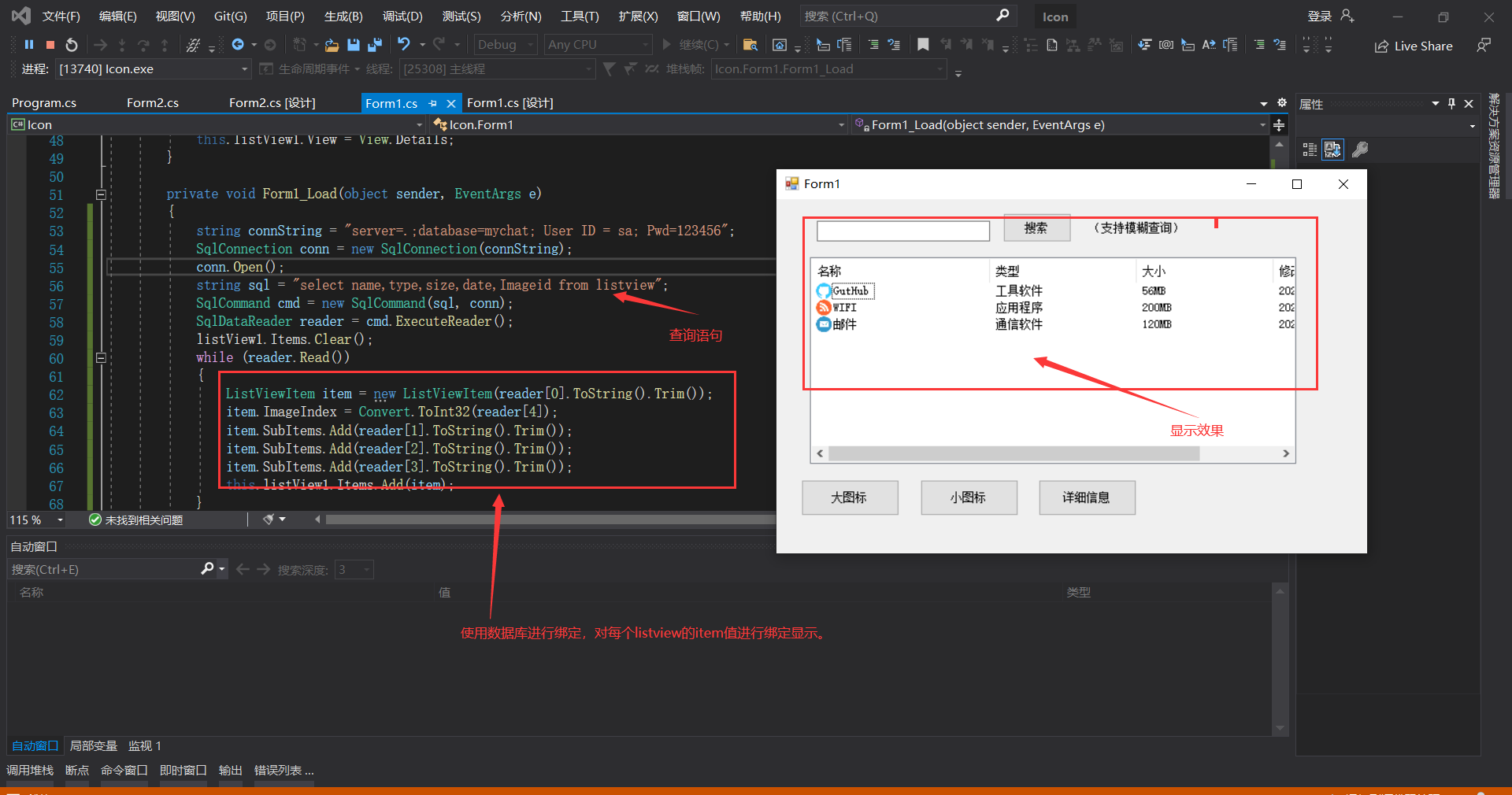
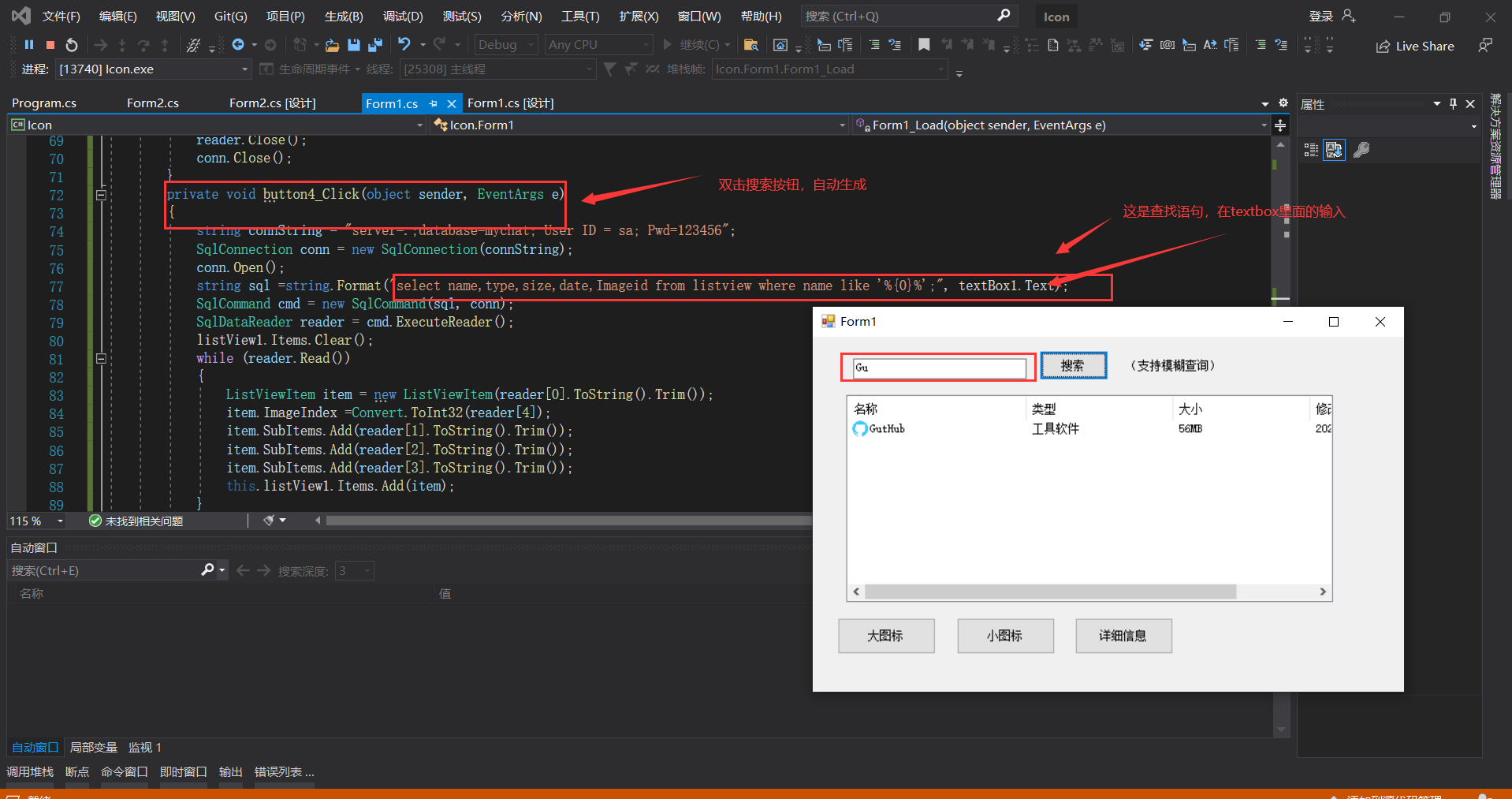
3. Use the dialog box to create a search query on the database
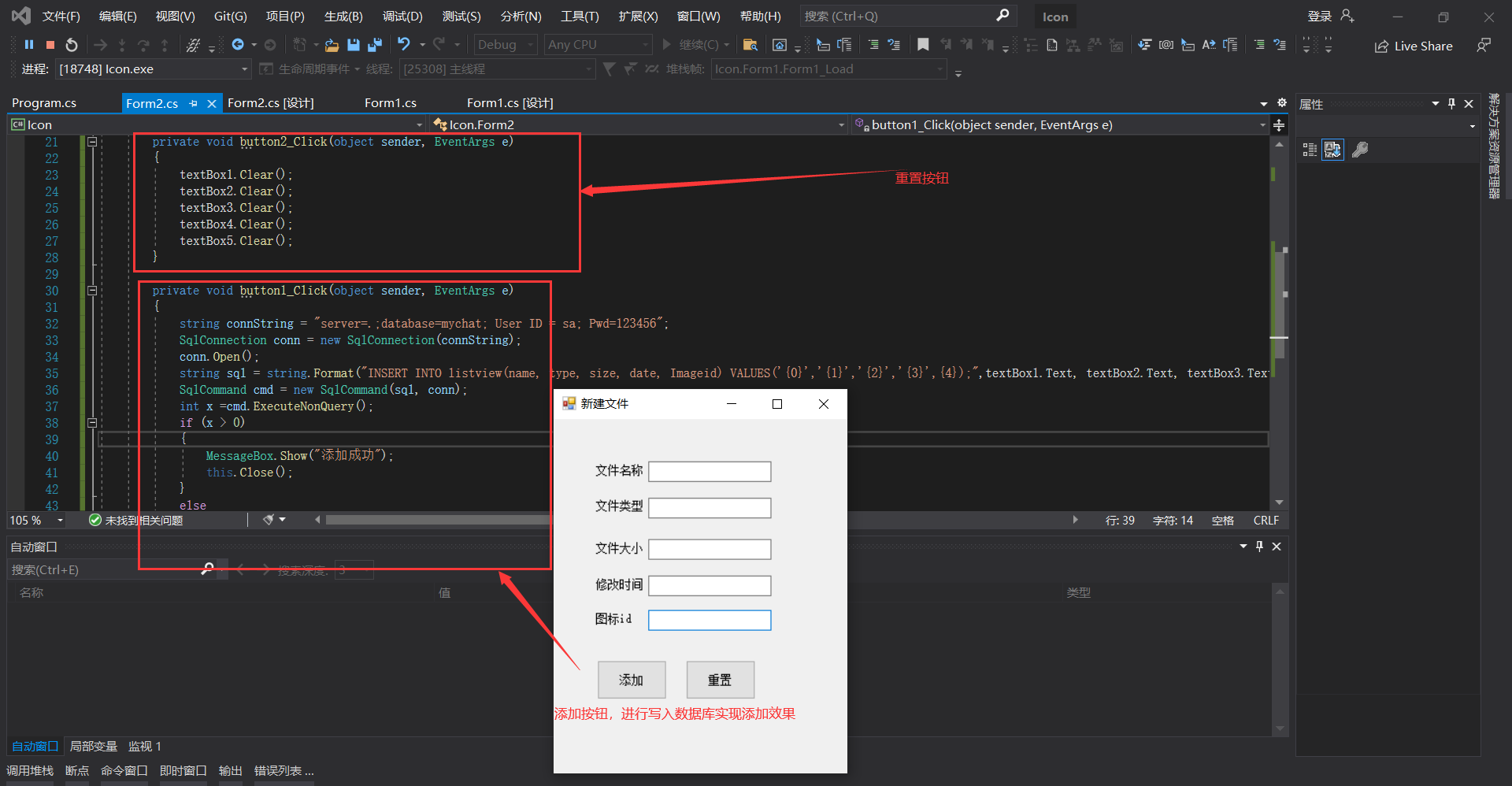
4. Add a form to realize the operation of creating a new file
4.1 Use conTextMenuStrip Control, right-click to create a new

4.2 Realize the jump between forms

4.3 Yes ” New file “ Form code processing
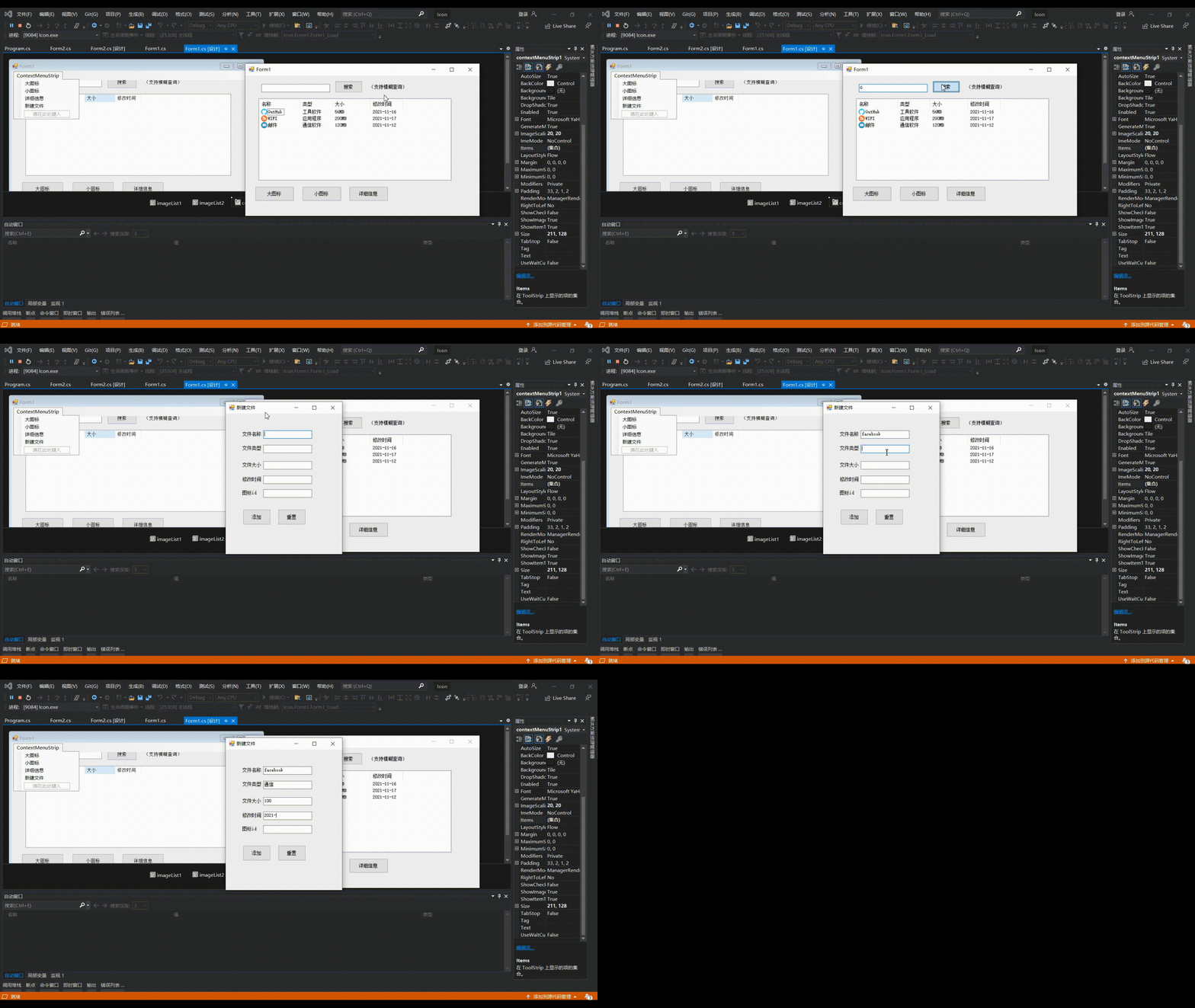
5. Overall code presentation , design sketch
5.1 forms 1 Core code :
 private void Form1_Load(object sender, EventArgs e)
 {
 string connString = "server=.;database=mychat; User ID = sa; Pwd=123456";// Write the database opening statement , Bloggers use SQL server database , If you are MySQL  You can see the previous article of the blogger, which explains .
 SqlConnection conn = new SqlConnection(connString);// Materialize
 conn.Open();// Open database
 string sql = "select name,type,size,date,Imageid from listview";// Query statement
 SqlCommand cmd = new SqlCommand(sql, conn);// Establishing a connection
 SqlDataReader reader = cmd.ExecuteReader();
 listView1.Items.Clear();// Empty listView
 while (reader.Read())// Query result traversal , And data binding
 {
 ListViewItem item = new ListViewItem(reader[0].ToString().Trim());//Trim() Clear the space
 item.ImageIndex = Convert.ToInt32(reader[4]);// Binding Icon id
 item.SubItems.Add(reader[1].ToString().Trim());// Data binding
 item.SubItems.Add(reader[2].ToString().Trim());
 item.SubItems.Add(reader[3].ToString().Trim());
 this.listView1.Items.Add(item);
 }
 reader.Close();
 conn.Close();
 }
 private void button4_Click(object sender, EventArgs e)
 {
 string connString = "server=.;database=mychat; User ID = sa; Pwd=123456";
 SqlConnection conn = new SqlConnection(connString);
 conn.Open();
 string sql =string.Format("select name,type,size,date,Imageid from listview where name like '%{0}%';", textBox1.Text);// Implement fuzzy query
 SqlCommand cmd = new SqlCommand(sql, conn);
 SqlDataReader reader = cmd.ExecuteReader();
 listView1.Items.Clear();
 while (reader.Read())// The added data is consistent with the above code
 {
 ListViewItem item = new ListViewItem(reader[0].ToString().Trim());
 item.ImageIndex =Convert.ToInt32(reader[4]);
 item.SubItems.Add(reader[1].ToString().Trim());
 item.SubItems.Add(reader[2].ToString().Trim());
 item.SubItems.Add(reader[3].ToString().Trim());
 this.listView1.Items.Add(item);
 }
 reader.Close();
 conn.Close();
 }

 private void  New file ToolStripMenuItem_Click(object sender, EventArgs e)
 {
 Form2 form2 = new Form2();
 form2.Show();
 }

 private void listView1_SelectedIndexChanged(object sender, EventArgs e)
 {

 }
5.2 Form 2 core code :
 private void button2_Click(object sender, EventArgs e)// Reset button
 {
 textBox1.Clear();// Yes textbox Empty
 textBox2.Clear();
 textBox3.Clear();
 textBox4.Clear();
 textBox5.Clear();
 }
 private void button1_Click(object sender, EventArgs e)// Add a button
 {
 string connString = "server=.;database=mychat; User ID = sa; Pwd=123456";
 SqlConnection conn = new SqlConnection(connString);
 conn.Open();
 string sql = string.Format("INSERT INTO listview(name, type, size, date, Imageid) VALUES('{0}','{1}','{2}','{3}',{4});",textBox1.Text, textBox2.Text, textBox3.Text+"MB", textBox4.Text,Convert.ToInt32(textBox5.Text));// Add data statement
 SqlCommand cmd = new SqlCommand(sql, conn);
 int x =cmd.ExecuteNonQuery();// Add operation , Successfully returned the number of data you added , Otherwise 0
 if (x > 0)
 {
 MessageBox.Show(" Add success ");
 this.Close();// Add success , Close this form
 }
 else
 MessageBox.Show(" Add failure ");
 }
 }
summary

边栏推荐
- Error reporting when adding fields to sap se11 transparent table: structural changes at the field level (conversion table xxxxx)
- Leetcode deduction topic summary (topic No.: 53, 3, 141, interview question 022, the entry node of the link in the sword finger offer chain, 20, 19, Niuke NC1, 103, 1143, Niuke 127)
- Sword finger offer 27. image of binary tree
- Is the sub database and sub table really suitable for your system? Talk about how to select sub databases, sub tables and newsql
- 6.2 function-parameters
- Fastjson's tojsonstring() source code analysis for special processing of time classes - "deepnova developer community"
- 谷歌浏览器免跨域配置
- To create a thread pool for the rate, start the core thread
- 2022 R2 mobile pressure vessel filling test question simulation test platform operation
- 2022年山东省安全员C证上岗证题库及答案
猜你喜欢

Week 1 task deep learning and pytorch Foundation

【Transformer】ATS: Adaptive Token Sampling For Efficient Vision Transformers

What is the difference between the pre training model and the traditional method in sorting?

Count the list of third-party components of an open source project

Week 2: convolutional neural network basics

Crawling JS encrypted data of playwright actual combat case

Application of matrix transpose

Day15 (day16 extension): file contains vulnerability

Chrony time synchronization

(视频+图文)机器学习入门系列-第3章 逻辑回归
随机推荐
Solve the problem of false Base64 character in Base64
Application of matrix transpose
不同数据库相同字段查不重复数据
Day4: the establishment of MySQL database and its simplicity and practicality
预训练模型与传统方法在排序上有啥不同?
Basic shell operations (Part 2)
[[first blog]p controller implementation instructions in UDA course]
RPC and rest
Clickhouse learning (I) Clickhouse?
(Video + graphic) introduction to machine learning series - Chapter 3 logical regression
Eggjs create application knowledge points
What are the backup and recovery methods of gbase 8s database
Google browser cross domain configuration free
Restful style details
Several ways of debugging support under oneos
6.3 references
[from_bilibili_dr_can][[advanced control theory] 9_ State observer design] [learning record]
Squareline partners with visual GUI development of oneos graphical components
ICMP message analysis
Chrony 时间同步