当前位置:网站首页>Use reflection to dynamically modify annotation attributes of @excel
Use reflection to dynamically modify annotation attributes of @excel
2022-07-27 07:20:00 【Son is not my fish】
Business scenario : We use poi When exporting data , Usually according to @Excel(name=“xxx”) To determine the column name . Usually, this will not change . But here are a few cases , When we need to make changes here according to certain situations , We need to use reflection .
AirQualityRankingResp.java
@Data
public class AirQualityRankingResp {

    /**  Site name  */
    @Excel(name = " Site name ")
    private String site;
    private String siteNumber;
    @Excel(name = " Analysis time ")
    private String dateTime;
    /**  Pollution factor  */
    private String pollutionFactor;
    @Excel(name = "AQI")
    private Double value;
    /**  ranking  */
    @Excel(name = " ranking ")
    private Integer ranking;
}
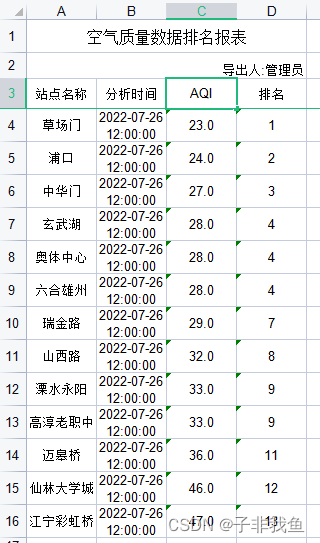
Normal use @Excel The exported data is as follows
Dynamic modification @Excel Properties of , Code implementation
  /** *  Exported through reflection dynamic settings Excel Name  * * @param annotatedColumnName: Entity class is @Excel The field name of the annotation  * @param annotationFieldName: Entity class is @Excel Attribute name of the annotation in  * @param newAnnotationFieldValue: New value of property  */
    private void setExcelAnnotationValue(String annotatedColumnName, String annotationFieldName, String newAnnotationFieldValue){

        try{

            Class<AirQualityRankingResp> airQualityRankingRespClass = AirQualityRankingResp.class;
            Field classDeclaredField =  airQualityRankingRespClass.getDeclaredField(annotatedColumnName);
            Excel excel = classDeclaredField.getAnnotation(Excel.class);
            InvocationHandler excelInvocationHandler = Proxy.getInvocationHandler(excel);
            Field excelInvocationHandlerField = excelInvocationHandler.getClass().getDeclaredField("memberValues");
            excelInvocationHandlerField.setAccessible(true);
            Map map = (Map) excelInvocationHandlerField.get(excelInvocationHandler);
            map.put(annotationFieldName, newAnnotationFieldValue);
        } catch (Exception e) {

            e.printStackTrace();
        }
    }
- Examples of use
   @RequestMapping(value = "/rankingAnalysisExportXls")
    public ModelAndView exportXls(HttpServletRequest request, AirRankingReq airRankingReq) {

        switch (airRankingReq.getName()){

            case "2":
                setExcelAnnotationValue("value","name","SO2");
                break;
            case "3":
                setExcelAnnotationValue("value","name","NO2");
                break;
            case "4":
                setExcelAnnotationValue("value","name","PM10");
                break;
            case "5":
                setExcelAnnotationValue("value","name","CO");
                break;
            case "6":
                setExcelAnnotationValue("value","name","O3");
                break;
            case "7":
                setExcelAnnotationValue("value","name","PM2.5");
                break;
        }
        List<AirQualityRankingResp> list = lrMonitorConcentrationService.rankingAnalysis(airRankingReq);
        // Step.3 AutoPoi  export Excel
        LoginUser sysUser = (LoginUser) SecurityUtils.getSubject().getPrincipal();
        ModelAndView mv = new ModelAndView(new JeecgEntityExcelView());
        mv.addObject(NormalExcelConstants.FILE_NAME, "lr_meteorological_data"); // Set here filename Invalid  , The front end will be updated and set again
        mv.addObject(NormalExcelConstants.CLASS, AirQualityRankingResp.class);
        //update-begin--Author:liusq Date:20210126 for: Image export error ,ImageBasePath Not set --------------------
        ExportParams exportParams = new ExportParams(" Ranking of air quality data " + " report form ", " Exporter :" + sysUser.getRealname(), " Air quality ranking ");
        exportParams.setImageBasePath(upLoadPath);
        //update-end--Author:liusq Date:20210126 for: Image export error ,ImageBasePath Not set ----------------------
        mv.addObject(NormalExcelConstants.PARAMS, exportParams);
        mv.addObject(NormalExcelConstants.DATA_LIST, list);
        return mv;
    }

I give it here according to the front end name Value to determine the column name of the generated table , You judge according to the actual business scenario , Just know how to use it here
边栏推荐
猜你喜欢




随机推荐
?实验 7 基于 Mysql 的 PHP 管理系统实现
零号培训平台课程-1、SQL注入基础
在mysql中同时使用left join on 和where 的查询结果分析
Linear table -- stack and queue
想sink 到 redis-hash 里面 把 对象的属性和值都写进去 ,大佬们有Demo 吗?
(转帖)eureka、consul、nacos的对比2
MySQL limit paging query optimization practice
Gbase 8C core technology
2021 interview questions for php+go of Zhongda factory (2)
Will Flink CDC constantly occupy Oracle's memory by extracting Oracle's data, and finally cause oracle-040
火狐浏览器,访问腾讯云服务器的时候,出现建立安全连接失败的问题。
Firefox browser, when accessing Tencent cloud server, failed to establish a secure connection.
Quartus:往别人的工程添加.v文件报错
Please ask the big guys a question. The pgsqlcdc task can't monitor changes after running for a period of time. Just restart it. What should I do
Synchronized锁
Ci framework learning of PHP
DDD Domain Driven Design Notes
Sort increment with typescript
Gbase 8C technical features
指令集 x 数澜科技丨加速政企数字化转型,打造DT领域独角兽企业联盟