当前位置:网站首页>The creation of "harmonyos" project and the use of virtual machines
The creation of "harmonyos" project and the use of virtual machines
2022-07-26 06:40:00 【Starry Luli】
Author's brief introduction : One likes to write , Sophomore rookie of planning major
Personal home page :starry Lu Li
First date :2022 year 7 month 11 Monday, Sunday
Last article :『HarmonyOS』DevEco Download, install and build the development environment
Subscription column :『HarmonyOS』
If the article helps you, remember to praise + Collect and support

『HarmonyOS』 Creation of project and use of virtual machine
1. Create a new project
When developing a HarmonyOS When applied , First, you need to create a wizard according to the project , Create a new project , The tool will automatically generate the corresponding code and resource template .
- Create and configure new projects
First , Open the project creation wizard interface in the following two ways .
- If no project is currently open , Can be in DevEco Studio Welcome page selection Create HarmonyOS Project Start creating a new project .
- If the project has been opened , You can choose... From the menu bar File–>New–>New Project To create a new project .
next , Select the equipment type to be developed according to the project creation wizard , Then choose the corresponding Ability Templates , As shown in the figure below :

single click Next Button , Enter the engineering configuration stage , Basic information of configuration project :
- Project name: The name of the project , You can customize .( Head nomenclature )
- Project type: The type of work , Mark that the project is a Atomic Services (Atomic Service) Or traditional installation application (Application).
- Bundle name: Package name , By default , application / service ID This name will also be used , application / When the service is released , application / service ID Need to be the only . If “Project Type” I chose Atomic Service, be Bundle Name The suffix of must be .hmservice.
- Save location: Local storage path of project files , Please note that , The project storage path cannot contain Chinese characters .
- Development mode: Select the development mode , Some templates support Low code development , Can choose Super Visual.
- Language: The development language supported by the project template , You can choose according to the language supported by the template JS or eTS or Java, among eTS stay DeEco Studio V3.0 Beta2 And above support .
- Compatible API version: Compatible SDK Minimum version .
- Device type: The equipment types supported by this project template , Support multiple choices , Check all by default . If multiple devices are checked , It means that the atomic service or traditional application that needs to be installed supports deployment on multiple devices .
- Show in service center: Whether it is exposed in the service center . If Project type by Atomic Service, A... Will be created synchronously 2 * 2 Service card template , At the same time, an entry card will be created ; If Project type by Application, Will only create one 2*2 Service card template .
- Use ArkCompiler: Turn on the switch , Indicates that the project is compiled and built , Use ArkCompiler The ark compiler compiles .

single click Finish Button , The tool automatically generates sample code and related resources , Wait for the project to be created .

2. Create a local virtual machine
DevEco Studio Provided Local Emulator be based on X86 framework , Can run and debug Phone、TV and Wearable The equipment HarmonyOS application / service . stay Local Emulator Run applications on / Services are compatible with signing and non signing HAP.
Local Emulator Compared with Remote Emulator,Local Emulator yes Create and run on the local computer Of , No login authorization is required , In running and debugging applications / The service , Because there is no exchange of network data , Therefore, it can maintain good fluency and stability ; however It requires a certain amount of computer disk resources .
Create and run Local Emulator Operation steps of
- Click on Files > Settings > SDK Manager > HarmonyOS Legacy SDK Tab , Check and download Platforms Under the System-image and Tools Under the EmulatorX86 resources .
You can see System-image Include phone,tv,wearable, Corresponding to mobile phones respectively , TV and wearable devices ; I c Only download if the disk is limited phone resources , Demonstrate local phone virtual machine


choice Phone, Then click Install request component library

installation is complete

stay Local Emulator In the TAB. , Click on the New Emulator Button , Create a local simulator . By default , The created local simulator resources will be stored in C:\Users\ user name \AppData\Local\Huawei\HarmonyOSEmulator\deployed Under the table of contents , It will occupy a large system storage space .

In the create simulator interface , You can choose a default device ; You can also click New Hardware Or the clone icon behind the default device , Add a new device , In order to customize the relevant parameters of the device , As size 、 The resolution of the 、 Memory and other parameters . Customize new devices , Currently only supported Phone equipment ,TV and Wearable Temporary does not support . establish New Hardware when , You can modify the name of the device 、 Size 、 The resolution of the 、 Memory and other parameters .

Click on Next, Verify and determine the simulator information that needs to be created , At the same time, you can also modify the simulator information in this interface , And then click Finish Create a local Simulator .


3. Use remote virtual machines ( recommend )
Remote Emulator Support Wearable、Tablet、TV And so on , But different areas ( Where the developer account is registered ) The supported device types may be different , Please refer to the type of equipment that can be applied for .
3.1 Single terminal
Remote Emulator The single device simulator in can run and debug Phone( Folding screen Mate X2、P40 and P40 Pro)、Tablet(MatePad Pro)、TV and Wearable The equipment HarmonyOS application / service , Compatible with signature and non signature HAP.
Remote Emulator The duration of each use is 1 Hours , Resources will be released automatically after expiration , Please complete it in time HarmonyOS application / Service debugging . If Remote Emulator After expiration and release , You can reapply for resources ( Login again ).
The specific steps are as follows :
- stay DevEco Studio menu bar , Click on Tools > Device Manager.
- stay Remote Emulator In the TAB. , Click on Login, The login interface of Huawei developer alliance account pops up in the browser , Please enter the user name and password of the Huawei developer alliance account with real name authentication to log in ( Check the remote emulator login FAQ ).
- After logging in , Please click the allow button on the interface to authorize , After successful authorization DevEco Studio The confirm authorization window will appear , Click on Agree that will do .
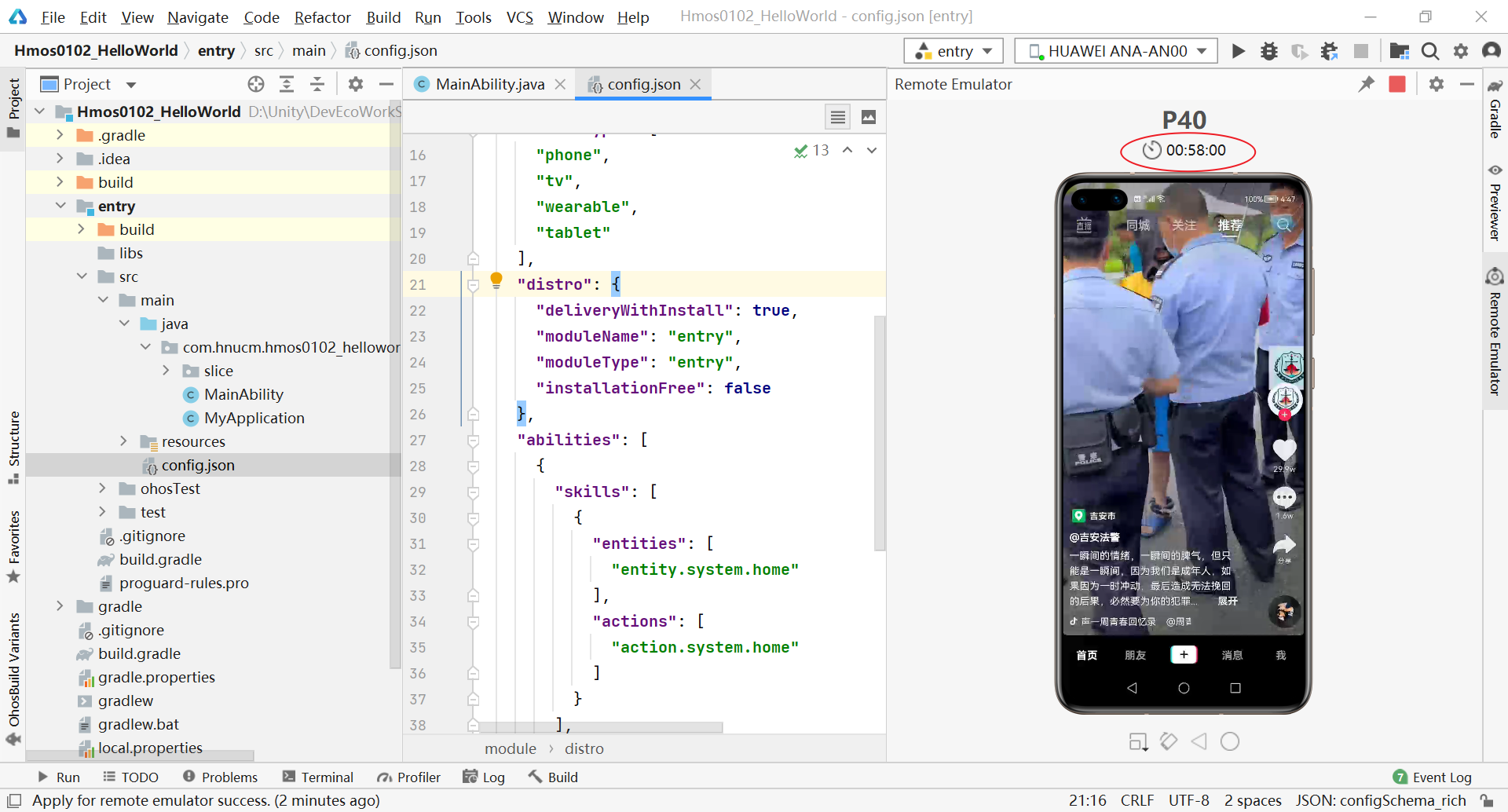
After login, you can see DevEco Created for us 6 Virtual machines , stay Single device in , Click the device operation button , Start the remote simulation device ( Only one device can be started at a time ).

Then you can experience it for free for an hour P40, Hee hee , Lightly brush Tiktok , Although it's a little stuck .
3.2 hyper terminal
At present, HyperTerminal simulator supports “Phone+Phone”、“Phone+Tablet” and “Phone+TV” Device networking mode , Developers can use the HyperTerminal simulator to test applications with cross device characteristics / service , Such as application / The circulation of services between different devices .

The specific steps are as follows :
stay DevEco Studio menu bar , Click on Tools > Device Manager.
stay Remote Emulator In the TAB. , Click on Login. The login interface of Huawei developer alliance account pops up in the browser , Please enter the user name and password of the Huawei developer alliance account with real name authentication to log in . If you are already logged in , You can jump directly to the 4) Step .
After logging in , Please click the allow button on the interface to authorize .
stay Super device in , Click the device operation button , Start the HyperTerminal simulator .
Running applications / In service , choice Super App, And then click Run > Run’ Module name ’ or , Or use the default shortcut Shift+F10(macOS by Control+R) Run the application / service

Operation can start two devices at the same time , Double happiness, okay

边栏推荐
- Heap sort
- C# 可以利用反射给只读属性赋值吗?
- PG Vacuum 杂谈之 auto vacuum
- Force buckle - 3. Longest substring without repeated characters
- Quick sort
- [day06_0423] C language multiple choice questions
- [nanny level] package volume optimization tutorial
- [day_070425] legal bracket sequence judgment
- Three skills are needed to engage in SAP related work
- 【毕业季_进击的技术er】送别过去两年迷茫的自己。重整旗鼓,大三我来啦
猜你喜欢

Experimental flags: --disable_ admission_ control=false --enable_ rm=false --llama_ callback_ port=28000

快速排序(quick-sort)

09 eth smart contract
力扣——3. 无重复字符的最长子串

【无标题】

The "darkest hour" has not come yet. Cherish every bullet 2020-03-22
信号处理系统综合设计-求解器函数的设计(连续和离散时间系统)

Facing the rebound market, how do we operate? 2020-03-21
"Harmonyos" explore harmonyos applications

Basis of multimodal semantic segmentation
随机推荐
Multi target detection
The "darkest hour" has not come yet. Cherish every bullet 2020-03-22
What are the main reasons for server crash
Merge_sort
【毕业季_进击的技术er】送别过去两年迷茫的自己。重整旗鼓,大三我来啦
[1] Basic knowledge of mathematical modeling
『牛客|每日一题』 栈的压入、弹出序列
C language introduction practice (8): switch case calculates the month, year and day of the next day (normal year / leap year calculation)
源代码加密技术发展阶段
Valid bracket sequence of "Niuke | daily question"
[day_050422] continuous maximum sum
[specified interval inversion in BM2 linked list]
[Hangzhou][15k-20k] medical diagnosis company recruits golang development engineers without overtime! No overtime! No overtime!
Quick sort
JS date details, string to date
Basis of multimodal semantic segmentation
『牛客|每日一题』逆波兰表达式
[image denoising] image denoising based on bicube interpolation and sparse representation matlab source code
Rust语言- Slice(切片)类型(&[u8])
Convert amount figures to uppercase