当前位置:网站首页>Evaluate:huggingface detailed introduction to the evaluation index module
Evaluate:huggingface detailed introduction to the evaluation index module
2022-06-26 15:24:00 【Brother muyao】
One 、 Introduce
evaluate yes huggingface stay 2022 year 5 A library for evaluating machine learning models and datasets was launched at the end of this month , Need to be python 3.7 And above . There are three types of assessment :
- Metric: It is used to evaluate the model through the predicted value and reference value , In the traditional sense indicators , such as f1、bleu、rouge etc. .
- Comparison: The same test set for two ( Multiple ) Model evaluation , For example, the results of the two models match Degree of .
- Measurement: be used for evaluation Data sets , For example, the number of words 、 Number of words after de duplication, etc .
Two 、 install
pip install :
pip install evaluate
Source code installation :
git clone https://github.com/huggingface/evaluate.git
cd evaluate
pip install -e .
Check that it's installed ( It will output the forecast results Dict):
python -c "import evaluate; print(evaluate.load('accuracy').compute(references=[1], predictions=[1]))"
3、 ... and 、 Use
3.1 load Method
evaluate Each indicator in is a separate Python modular , adopt evaluate.load()( Click to view the document ) Function fast load , among load The common parameters of the function are as follows :
- path: Mandatory ,str type . It can refer to the label ( Such as
accuracyor The iron juice of the community contributed Ofmuyaostudio/myeval), If the source installation can also be a pathname ( Such as./metrics/rougeor./metrics/rogue/rouge.py). I use the latter , Because the evaluation script will be downloaded online when the indicator name is directly transmitted , But the net of the unit is not awesome . - config_name: Optional ,str type . Configuration of indicators ( Such as GLUE Each subset of the metrics has a configuration )
- module_type: One of the three evaluation types mentioned above , Default
metric, Optionalcomparisonormeasurement - cache_dir: Optional , Path to store temporary predictions and references ( The default is
~/.cache/huggingface/evaluate/)
import evaluate

# module_type  The default is  'metric'
accuracy = evaluate.load("accuracy")

# module_type  Explicitly specify  'metric','comparison','measurement', Prevent duplicate names .
word_length = evaluate.load("word_length", module_type="measurement")
3.2 List available metrics
list_evaluation_modules List official ( And the community ) What are the indicators in , You can also see likes , There are three parameters :
- module_type: The type of evaluation module to list ,None It's all , Optional
metric,comparison,measurement. - include_community: Whether the community module is included , Default
True. - with_details: Returns the full details of the indicator Dict Information , instead of str Indicator name of type . Default
False.
print(evaluate.list_evaluation_modules(
	module_type="measurement",
	include_community=True,
	with_details=True)
)

3.3 Evaluation modules all have attributes
All evaluation modules come with a set of useful attributes , These attributes are useful for using stored in evaluate.EvaluationModuleInfo Object , Properties are as follows :
- description: Index Introduction
- citation:latex reference
- features: Input format and type , such as predictions、references etc.
- inputs_description: Input parameter description document
- homepage: Indicator official website
- license: Indicator license
- codebase_urls: The index is based on the code address
- reference_urls: The reference address of the indicator
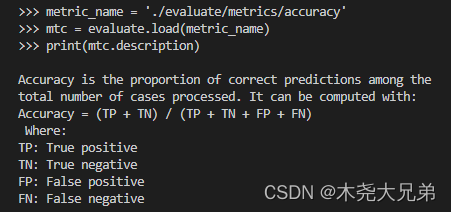
3.4 Calculate the index value ( One time calculation / Incremental calculation )
Mode one : One time calculation
function :EvaluationModule.compute(), Pass in list/array/tensor And so on references and predictions.
>>> import evaluate
>>> metric_name = './evaluate/metrics/accuracy'
>>> accuracy = evaluate.load(metric_name)
>>> accuracy.compute(references=[0,1,0,1], predictions=[1,0,0,1])

{
    'accuracy': 0.5}  #  Output results
Mode two : Incremental calculation of single increment
function : EvaluationModule.add(), be used for for loop One on one Add... To the field ref and pred, Calculate indicators uniformly after adding and exiting the cycle .
>>> for ref, pred in zip([0,0,0,1], [0,0,0,1]):
...     accuracy.add(references=ref, predictions=pred)
...
>>> accuracy.compute()

{
    'accuracy': 1.0}  #  Output results
Mode three : Multi increment incremental calculation
function : EvaluationModule.add_batch(), be used for for loop Many to many Add... To the field ref and pred( The following example is an addition 3 Yes ), Calculate indicators uniformly after adding and exiting the cycle .
>>> for refs, preds in zip([[0,1],[0,1],[0,1]], [[1,0],[0,1],[0,1]]):
...     accuracy.add_batch(references=refs, predictions=preds)
...
>>> accuracy.compute()

{
    'accuracy': 0.6666666666666666}  #  Output results
3.5 Save the evaluation results
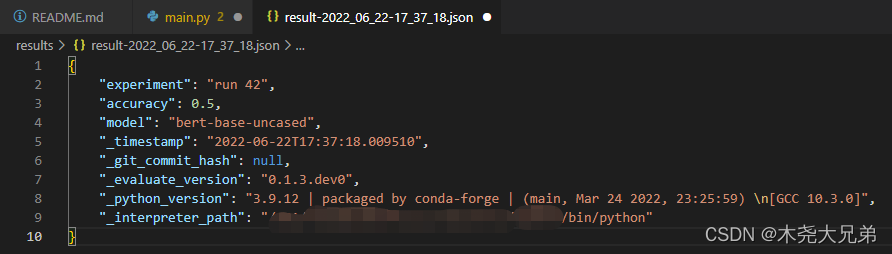
function :evaluate.save(), Parameter is path_or_file, The path or file used to store the file . If only folders are provided , Then the result file will be displayed in result-%Y%m%d-%H%M%S.json Save in the format of ; Biography dict Keyword parameter of type **result,**params.
>>> result = accuracy.compute(references=[0,1,0,1], predictions=[1,0,0,1])
>>> hyperparams = {
    "model": "bert-base-uncased"}
>>> evaluate.save("./results/", experiment="run 42", **result, **hyperparams)
3.6 Automatic assessment
It's kind of like Trainer Encapsulation , You can directly evaluate.evaluator() For automatic evaluation , And can pass strategy The parameters are adjusted to calculate the confidence interval and standard error , It helps to evaluate the stability of the value :
from transformers import pipeline
from datasets import load_dataset
from evaluate import evaluator
import evaluate

pipe = pipeline("text-classification", model="lvwerra/distilbert-imdb", device=0)
data = load_dataset("imdb", split="test").shuffle().select(range(1000))
metric = evaluate.load("accuracy")
results = eval.compute(model_or_pipeline=pipe, data=data, metric=metric,
                       label_mapping={
    "NEGATIVE": 0, "POSITIVE": 1},
                       strategy="bootstrap", n_resamples=200)

print(results)
>>> {
    'accuracy':
...     {

...       'confidence_interval': (0.906, 0.9406749892841922),
...       'standard_error': 0.00865213251082787,
...       'score': 0.923
...     }
... }
边栏推荐
- Function: crypto JS encryption and decryption
- Cluster addslots establish a cluster
- 夏令营来啦!!!冲冲冲
- TS common data types summary
- Comparative analysis of restcloud ETL and kettle
- [CEPH] cephfs internal implementation (IV): how is MDS started-- Undigested
- 10 minutes to understand bim+gis fusion, common BIM data formats and characteristics
- SAP 销售数据 实际发货数据导出 销量
- 评价——模糊综合评价
- Shell script multi process concurrent writing method example (high level cultivation)
猜你喜欢

【ceph】CephFS 内部实现(四):MDS是如何启动的?--未消化

BLE抓包调试信息分析
Mr. Du said that the website was updated with illustrations

【ceph】cephfs的锁 笔记

HR export data Excel VBA

【TcaplusDB知识库】TcaplusDB OMS业务人员权限介绍

RestCloud ETL抽取動態庫錶數據實踐

Halcon C # sets the form font and adaptively displays pictures

【小程序实战系列】小程序框架 页面注册 生命周期 介绍
Advanced operation of MySQL database basic SQL statement tutorial


随机推荐
Analysis of ble packet capturing debugging information
小程序:uniapp解决 vendor.js 体积过大的问题
Secure JSON protocol
在重新格式化时不要删除自定义换行符(Don‘t remove custom line breaks on reformat)
Is it safe to open a stock account through the account opening link of the broker manager? Or is it safe to open an account in a securities company?
【小程序实战系列】小程序框架 页面注册 生命周期 介绍
[tcapulusdb knowledge base] Introduction to tcapulusdb system management
The tablestack function of the epidisplay package of R language makes a statistical summary table (descriptive statistics of groups, hypothesis test, etc.), does not set the by parameter to calculate
同花顺注册开户安全吗,有没有什么风险?
SAP GUI 770 Download
Execution of commands in the cluster
[CEPH] cephfs internal implementation (I): Concept -- undigested
Sikuli automatic testing technology based on pattern recognition
Idea shortcut key
Unity C # e-learning (VIII) -- www
Unity C # e-learning (10) -- unitywebrequest (2)
1.会计基础--会计的几大要素(会计总论、会计科目和账户)
程序分析与优化 - 8 寄存器分配
使用卷积对数据进行平滑处理
The intersect function in the dplyr package of R language obtains the data lines that exist in both dataframes and the data lines that cross the two dataframes