当前位置:网站首页>OSPF comprehensive experiment
OSPF comprehensive experiment
2022-07-23 12:52:00 【Newcomer_ L】
OSPF Comprehensive experiment
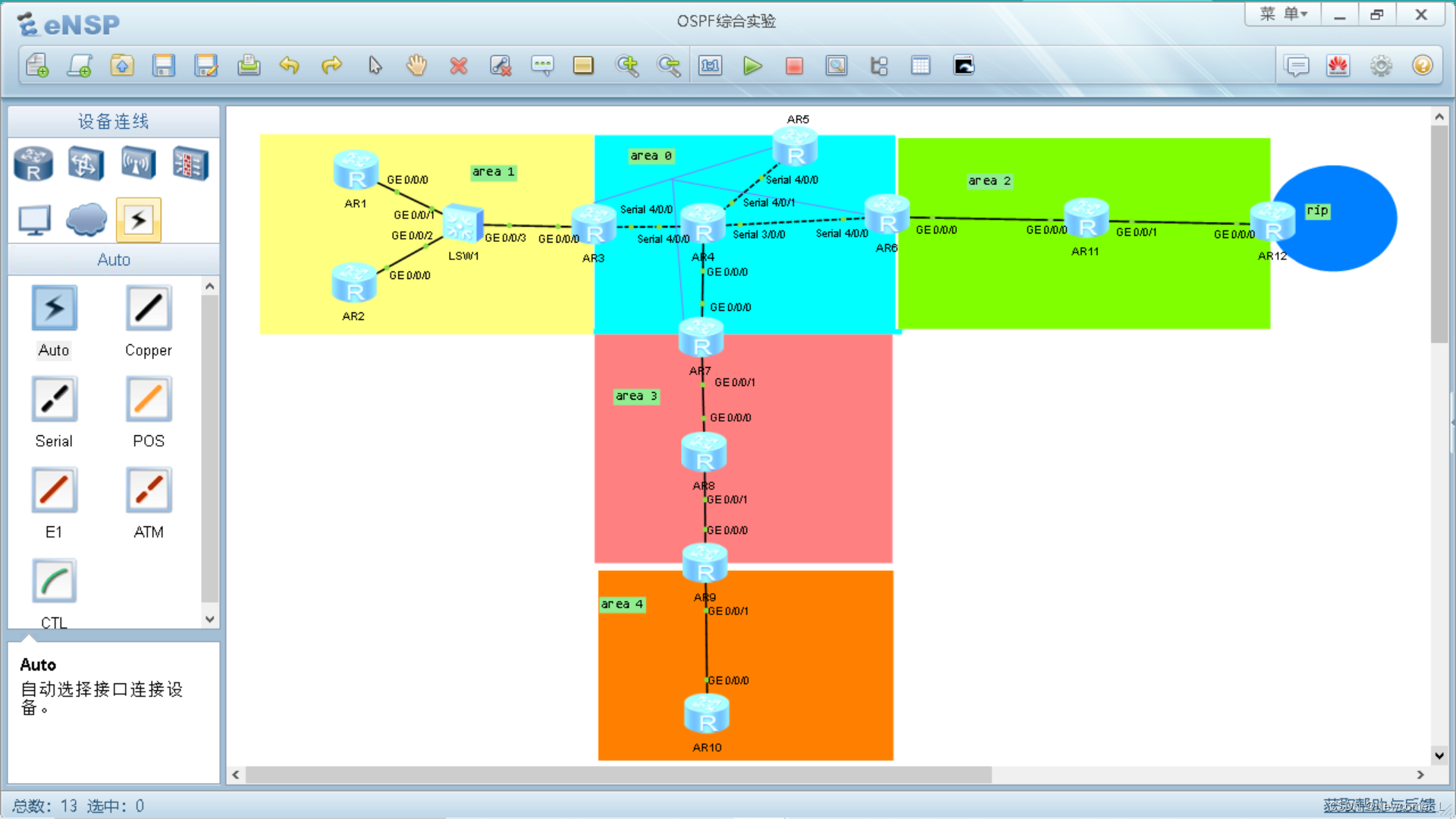
requirement :
(1)R4 by ISP, Above all You can only configure IP Address ;R4 It is used with all other directly connected equipment public IP Address
- R3、R5、R6、R7、( Private network boundary ) by MGRE Environmental Science ,R3 For the central site ;
- Whole OSPF Environmental Science IP be based on 172.16.0.0 /16 Divide 【RIP Also based on the division of the network segment 】;
- All devices are accessible R4 Loopback ;
- Reduce LSA Update quantity of , Speed up convergence , To ensure the security of updates (ospf Certification of ) ;
【 Make special areas ( And non backbone areas , No virtual link , non-existent ASBR equipment )( The terminal area : Ordinary peripheral areas are not learning 4 Classes and 5 class LSA Information ; Completely peripheral area 3、4、5 Classes no longer learn )( Incomplete ending area :NSSA Common incomplete terminal area : Refuse 4 and 5 class , It has ABR The device does not need 4 class ,4 Classes exist to find ASBR The location of ( Can be 1 and 2 Analogical calculation ASBR Location ) Seven categories only appear in ASBR among , And seven categories are equivalent to the strengthening of five categories ; Complete and incomplete peripheral regions :NSSA Area : Refuse 3,4,5 class , Use 3 Class default 】
- Network wide accessibility
Network division :
In large-scale network planning, priority should be given to dividing according to network protocols ;
But this is different ,RIP Topology small , So only divide it into six network segments .
172.16.00000000.0 /16
172.16.0.0 /19 ——A0
Generally in 24(254),25(126),26(62) Choose from
172.16.0.0 /24 ——P2P The backbone of
172.16.0.0 /30
172.16.0.4 /30
172.16.0.8 /30
...
172.16.1.0 /24 ——MA The backbone of
172.16.1.0 /29
172.16.1.8 /29
172.16.1.16 /29
...
172.16.2.0 /24
...
172.16.31.0 /24
Backbone links :P2P( Two IP Address )30 and MA( Multi node network )29
172.16.32.0 /19 ——A1
172.16.32.0 /24 ——P2P The backbone of
172.16.32.0 /30
172.16.32.4 /30
172.16.32.8 /30
...
172.16.33.0 /24 ——MA The backbone of
172.16.33.0 /29
172.16.33.8 /29
172.16.33.16 /29
...
172.16.34.0 /24
...
172.16.63.0 /24
172.16.64.0 /19 ——A2
172.16.96.0 /19 ——A3
172.16.128.0 /19 ——A4
172.16.160.0 /19 ——RIP
172.16.160.0 /20
172.16.176.0 /20
172.16.110 00000.0 /19
172.16.111 00000.0 /19
View historical configuration :
display history-command
Area 0:
R3:
[R3]int s 4/0/0
[R3-Serial4/0/0]ip ad 34.0.0.1 24
[R3]ip route-static 0.0.0.0 0 34.0.0.2
R4:
[R4]SYS ISP
[ISP]int s 4/0/0
[ISP-Serial4/0/0]ip ad 34.0.0.2 24
[ISP-Serial4/0/0]int s 4/0/1
[ISP-Serial4/0/1]ip ad 45.0.0.2 24
[ISP-Serial4/0/1]int s 3/0/0
[ISP-Serial3/0/0]ip ad 46.0.0.2 24
[ISP-Serial4/0/1]int s 3/0/0
[ISP-Serial3/0/0]ip ad 46.0.0.2 24
[ISP-Serial3/0/0]int g0/0/0
[ISP-GigabitEthernet0/0/0]ip ad 47.0.0.2 24
[ISP-GigabitEthernet0/0/0]int l0
[ISP-LoopBack0]ip ad 4.4.4.4 24
R5:
[R5]int s 4/0/0
[R5-Serial4/0/0]ip ad 45.0.0.1 24
[R5]ip route-static 0.0.0.0 0 45.0.0.2
R6:
[Huawei]SYS R6
[R6]int s 4/0/0
[R6-Serial4/0/0]ip ad 46.0.0.1 24
[R6]ip route-static 0.0.0.0 0 46.0.0.2
R7:
[Huawei]SYS R7
[R7]int g0/0/0
[R7-GigabitEthernet0/0/0]ip ad 47.0.0.1 24
[R7]ip route-static 0.0.0.0 0 47.0.0.2
test :


To configure MGRE Environmental Science
【R3】:
[R3-Tunnel0/0/0] ip address 172.16.1.1 29
[R3-Tunnel0/0/0]tunnel-protocol gre p2mp
[R3-Tunnel0/0/0]nhrp network-id 100
[R3-Tunnel0/0/0]nhrp entry multicast dynamic
【R5】:
[R5]int t 0/0/0
[R5-Tunnel0/0/0]ip ad 172.16.1.2 29
[R5-Tunnel0/0/0]tunnel-protocol gre p2mp
[R5-Tunnel0/0/0]source Serial 4/0/0
[R5-Tunnel0/0/0]nhrp network-id 100
[R5-Tunnel0/0/0]nhrp entry 172.16.1.1 34.0.0.1 register
[R5-Tunnel0/0/0]q
[R5]int l0
[R5-LoopBack0]ip ad 172.16.2.1 24
【R6】:
[R6]int t 0/0/0
[R6-Tunnel0/0/0]ip ad 172.16.1.3 29
[R6-Tunnel0/0/0]tunnel-protocol gre p2mp
[R6-Tunnel0/0/0]source Serial 4/0/0
[R6-Tunnel0/0/0]nhrp network-id 100
[R6-Tunnel0/0/0]nhrp entry 172.16.1.1 34.0.0.1 register
[R6-Tunnel0/0/0]q
[R6]int l0
[R6-LoopBack0]ip ad 172.16.3.1 24
【R7】:
<R7>sys
Enter system view, return user view with Ctrl+Z.
[R7]int t 0/0/0
[R7-Tunnel0/0/0]ip ad 172.16.1.4 29
[R7-Tunnel0/0/0]tunnel-protocol gre p2mp
[R7-Tunnel0/0/0]source GigabitEthernet 0/0/0
[R7-Tunnel0/0/0]nhrp network-id 100
[R7-Tunnel0/0/0]nhrp entry 172.16.1.1 34.0.0.1 register
[R7]int l0
[R7-LoopBack0]ip ad 172.16.4.1 24
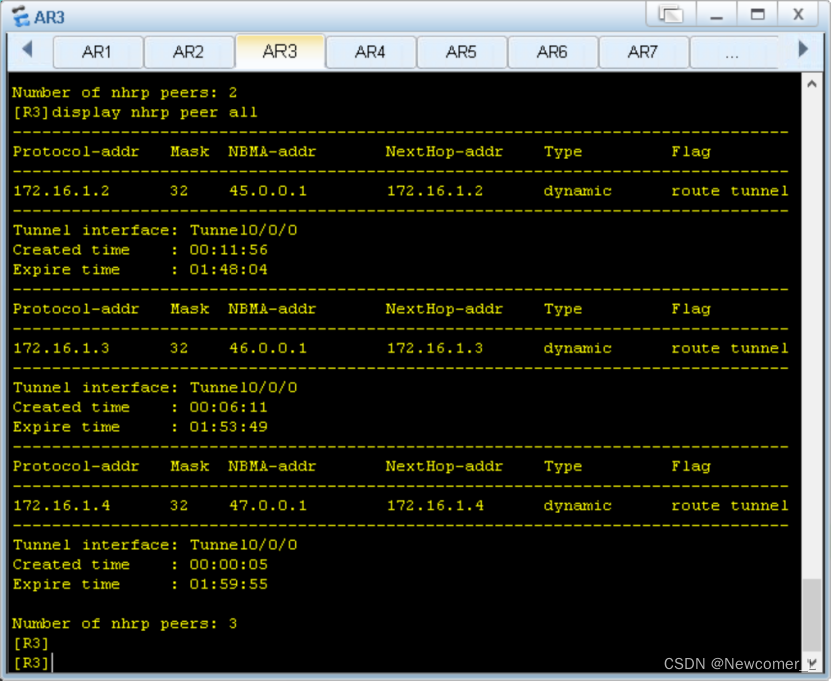
verification MGRE The success of :


Area 1:
【R1】:
[R1]int g0/0/0
[R1-GigabitEthernet0/0/0]ip ad 172.16.33.1 29
[R1-GigabitEthernet0/0/0]int l0
[R1-LoopBack0]ip ad 172.16.34.1 24
【R2】:
[R2]int g0/0/0
[R2-GigabitEthernet0/0/0]ip ad 172.16.33.2 29
[R2-GigabitEthernet0/0/0]int l0
[R2-LoopBack0]ip ad 172.16.35.1 24
【R3】:
[R3]int g0/0/0
[R3-GigabitEthernet0/0/0]ip ad 172.16.33.3 29
[R3-GigabitEthernet0/0/0]int l0
[R3-LoopBack0]ip ad 172.16.36.1 24
test :


Area 2
【R6】:
<R6>sys
[R6]int g0/0/0
[R6-GigabitEthernet0/0/0]ip ad 172.16.65.1 29
[R6-GigabitEthernet0/0/0]q
【R11】
[R11]int g0/0/0
[R11-GigabitEthernet0/0/0]ip ad 172.16.65.2 29
[R11-GigabitEthernet0/0/0]int l0
[R11-LoopBack0]ip ad 172.16.66.1 24
[R11-LoopBack0]int g0/0/1
[R11-GigabitEthernet0/0/1]ip ad 172.16.65.9 29
【R12】
[Huawei]sys R12
[R12]INT g0/0/0
[R12-GigabitEthernet0/0/0]ip ad 172.16.65.10 29
[R12-GigabitEthernet0/0/0]q
[R12]int l0
[R12-LoopBack0]ip ad 172.16.160.1 20
[R12-LoopBack0]int l1
[R12-LoopBack1]ip ad 172.16.176.1 20
[R12-LoopBack1]
test :

Area 3:
【R7】:
[R7-GigabitEthernet0/0/1]ip ad 172.16.97.1 29
【R8】:
[R8]int g0/0/0
[R8-GigabitEthernet0/0/0]ip ad 172.16.97.2 29
[R8-GigabitEthernet0/0/0]int l0
[R8-LoopBack0]ip ad 172.16.98.1 24
[R8-LoopBack0]int g 0/0/1
[R8-GigabitEthernet0/0/1]ip ad 172.16.97.9 29
【R9】:
[R9]int g0/0/0
[R9-GigabitEthernet0/0/0]ip ad 172.16.97.10 29
test :
Area 4:
【R9】:
[R9]int g0/0/0
[R9-GigabitEthernet0/0/0]ip ad 172.16.97.10 29
[R9-GigabitEthernet0/0/0]int g0/0/1
[R9-GigabitEthernet0/0/1]ip ad 172.16.129.1 29
[R9-GigabitEthernet0/0/1]int l0
[R9-LoopBack0]ip ad 172.16.130.1 24
【R10】:
[R10]int g0/0/0
[R10-GigabitEthernet0/0/0]ip ad 172.16.129.2 29
[R10-GigabitEthernet0/0/0]int l0
[R10-LoopBack0]ip ad 172.16.131.1 24
test :

- OSPF Configuration of
【R1】:
[R1]ospf 1 r
[R1]ospf 1 router-id 1.1.1.1
[R1-ospf-1]a 1
[R1-ospf-1-area-0.0.0.1]netw
[R1-ospf-1-area-0.0.0.1]network 172.16.0.0 0.0.255.255
【R2】:
[R2]ospf 1 r
[R2]ospf 1 router-id 2.2.2.2
[R2-ospf-1]a 1
[R2-ospf-1-area-0.0.0.1]network 172.16.0.0 0.0.255.255
【R3】:
[R3]ospf 1 r
[R3]ospf 1 router-id 3.3.3.3
[R3-ospf-1]a 1
[R3-ospf-1-area-0.0.0.1]netw
[R3-ospf-1-area-0.0.0.1]network 172.16.32.0 0.0.7.255
[R3-ospf-1-area-0.0.0.1]
The announcement here directly declares loopback and A1 The interface of , rejected A0 The interface of .( In the video 1:09:00)
[R3]ospf 1
[R3-ospf-1]a 0
[R3-ospf-1-area-0.0.0.0]net
[R3-ospf-1-area-0.0.0.0]network 172.16.1.1 0.0.0.0
【R5】:
[R5]ospf 1 r
[R5]ospf 1 router-id 5.5.5.5
[R5-ospf-1]a 0
[R5-ospf-1-area-0.0.0.0]net
[R5-ospf-1-area-0.0.0.0]network 172.16.0.0 0.0.255.255
【R6】:
[R6]ospf 1 rou
[R6]ospf 1 router-id 6.6.6.6
[R6-ospf-1]a 0
[R6-ospf-1-area-0.0.0.0]net
[R6-ospf-1-area-0.0.0.0]network 172.16.0.0 0.0.3.255
[R6-ospf-1-area-0.0.0.0]q
[R6-ospf-1]a 2
[R6-ospf-1-area-0.0.0.2]ne
[R6-ospf-1-area-0.0.0.2]network 172.16.65.1 0.0.0.0
[R6-ospf-1-area-0.0.0.2]
【R11】;
[R11]ospf 1 r
[R11]ospf 1 router-id 11.11.11.11
[R11-ospf-1]a 2
[R11-ospf-1-area-0.0.0.2]net
[R11-ospf-1-area-0.0.0.2]network 172.16.0.0 0.0.255.255
【R12】:
[R12]ospf 1 router-id 12.12.12.12
[R12-ospf-1]a 2
[R12-ospf-1-area-0.0.0.2]net
[R12-ospf-1-area-0.0.0.2]network 172.16.65.10 0.0.0.0
[R12-ospf-1-area-0.0.0.2]q
[R12-ospf-1]q
[R12]rip
[R12-rip-1]v 2
[R12-rip-1]ne
[R12-rip-1]network 172.16.0.0
【R7】
[R7]ospf 1 r
[R7]ospf 1 router-id 7.7.7.7
[R7-ospf-1]a 0
[R7-ospf-1-area-0.0.0.0]net
[R7-ospf-1-area-0.0.0.0]network 172.16.0.0 0.0.7.255
[R7-ospf-1-area-0.0.0.0]a 3
[R7-ospf-1-area-0.0.0.3]net
[R7-ospf-1-area-0.0.0.3]network 172.16.97.1 0.0.0.0
【R8】
[R8]ospf 1 r
[R8]ospf 1 router-id 8.8.8.8
[R8-ospf-1]a 3
[R8-ospf-1-area-0.0.0.3]ne
[R8-ospf-1-area-0.0.0.3]network 172.16.0.0 0.0.255.255
【R9】
[R9]ospf 1 r
[R9]ospf 1 router-id 9.9.9.9
[R9-ospf-1]a 3
[R9-ospf-1-area-0.0.0.3]n
[R9-ospf-1-area-0.0.0.3]network 172.16.97.10 0.0.0.0
[R9-ospf-1-area-0.0.0.3]q
[R9-ospf-1]a 4
[R9-ospf-1-area-0.0.0.4]n
[R9-ospf-1-area-0.0.0.4]ne
[R9-ospf-1-area-0.0.0.4]network
[R9-ospf-1-area-0.0.0.4]network 172.16.128.0 0.0.3.255
[R9-ospf-1-area-0.0.0.4]
【R10】
[R10]ospf 1 r
[R10]ospf 1 router-id 10.10.10.10
[R10-ospf-1]a 4
[R10-ospf-1-area-0.0.0.4]n
[R10-ospf-1-area-0.0.0.4]network 172.16.0.0 0.0.255.255
[R10-ospf-1-area-0.0.0.4]
3、 ... and 、 Details :
Modify the interface type :P2MP
[R3]int t0/0/0
[R3-Tunnel0/0/0]ospf n
[R3-Tunnel0/0/0]ospf network-type p2mp
[R5]int t0/0/0
[R5-Tunnel0/0/0]ospf network-type p2mp
[R6]int t0/0/0
[R6-Tunnel0/0/0]ospf network-type p2mp
[R7]int t0/0/0
[R7-Tunnel0/0/0]ospf network-type p2mp
Neighborhood information :
【R5】:
Routing information :
3、 ... and 、 Reissue :
[R12]ospf 1
[R12-ospf-1]im
[R12-ospf-1]import-route rip
Check whether to import :
Solve the problem of no route in area 4 :
Area 4 For irregular areas , Requirements exist ABR equipment , Next, link to area 0 below .
R9 Don't work ,1、 Use T The tunnel is complete ;( Repeat updates , Poor route selection )2、 Virtual link ;3、 Multi process bidirectional republication .
1,3 You can use . But it is best to use multi process one-way republishing .
【R9】
[R9]ospf 1
[R9-ospf-1]a 4
[R9-ospf-1-area-0.0.0.4]undo n
[R9-ospf-1-area-0.0.0.4]undo network 172.16.128.0 0.0.3.255
[R9-ospf-1-area-0.0.0.4]q
[R9-ospf-1]undo a 4
[R9-ospf-1]q
[R9]ospf 2
[R9-ospf-2]r
[R9-ospf-2]retransmission-limit
[R9-ospf-2]q
[R9]undo ospf 2
Warning: The OSPF process will be deleted. Continue? [Y/N]:y
[R9]ospf 2 r
[R9]ospf 2 router-id 9.9.9.9
[R9-ospf-2]undo a 3
[R9-ospf-2]a 4
[R9-ospf-2-area-0.0.0.4]n
[R9-ospf-2-area-0.0.0.4]network 172.16.128.0 0.0.3.255
[R9-ospf-2-area-0.0.0.4]
[R9-ospf-2-area-0.0.0.4]q
[R9-ospf-2]q
[R9]ospf 1
[R9-ospf-1]im
[R9-ospf-1]import-route ospf 2
[R9-ospf-1]
testing :


Four 、 Summary
One 、 Inter domain routing summary :
[R3-ospf-1-area-0.0.0.1]abr-summary 172.16.32.0 255.255.224.0
[R6-ospf-1-area-0.0.0.2]abr-summary 172.16.64.0 255.255.224.0
[R7-ospf-1-area-0.0.0.3]abr-summary 172.16.96.0 255.255.224.0

Two 、 Extraterritorial routing summary
[R12-ospf-1]asbr-summary 172.16.160.0 255.255.224.0
[R9-ospf-1]asbr-summary 172.16.128.0 255.255.224.0
testing :

Class III and class V repeatedly send routing information
resolvent :
[R1]os
[R1]ospf
[R1-ospf-1]a 1
[R1-ospf-1-area-0.0.0.1]stub
[R2]ospf
[R2-ospf-1]a 1
[R2-ospf-1-area-0.0.0.1]stub
[R3]ospf
[R3-ospf-1]a 1
[R3-ospf-1-area-0.0.0.1]stub
[R3-ospf-1-area-0.0.0.1]stub no-summary
testing :


Completely non terminal area :
[R6-ospf-1-area-0.0.0.2]nssa no-summary
[R7-ospf-1-area-0.0.0.3]nssa no-summary
[R8-ospf-1-area-0.0.0.3]nssa
[R9-ospf-1-area-0.0.0.3]nssa
testing :
Complement the default
[R9]ospf 2
[R9-ospf-2]de
[R9-ospf-2]default
[R9-ospf-2]default-route-advertise
[R9-ospf-2]

Test the intranet :

Modify the convergence rate :
[R3-Tunnel0/0/0]ospf timer hello 10
[R5-Tunnel0/0/0]ospf timer hello 10
[R6-Tunnel0/0/0]ospf timer hello 10
[R7-Tunnel0/0/0]ospf timer hello 10
Air interface anti loop routing :
[R3]ip route-static 172.16.32.0 255.255.224.0 NULL 0
[R6]ip route-static 172.16.64.0 255.255.224.0 NULL 0
[R7]ip route-static 172.16.96.0 255.255.224.0 NULL 0
[R9]ip route-static 172.16.128.0 255.255.224.0 NULL 0
[R12]ip route-static 172.16.160.0 255.255.224.0 NULL 0
NAT mapping :
[R3]acl 2000
[R3-acl-basic-2000]ru
[R3-acl-basic-2000]rule p
[R3-acl-basic-2000]rule permit s
[R3-acl-basic-2000]rule permit source 172.16.0.0 0.0.255.255
[R3-acl-basic-2000]q
[R3]int s 4/0/0
[R3-Serial4/0/0]nat ou
[R3-Serial4/0/0]nat outbound 2000
<R5>sys
Enter system view, return user view with Ctrl+Z.
[R5]acl 2000
[R5-acl-basic-2000]rule permit source 172.16.0.0 0.0.255.255
[R5-acl-basic-2000]q
[R5]int s4/0/0
[R5-Serial4/0/0]nat outbound 2000
[R5-Serial4/0/0]q
[R5]
<R6>sys
Enter system view, return user view with Ctrl+Z.
[R6]acl 2000
[R6-acl-basic-2000]rule permit source 172.16.0.0 0.0.255.255
[R6-acl-basic-2000]
[R6-acl-basic-2000]q
[R6]int s4/0/0
[R6-Serial4/0/0]nat outbound 2000
[R6-Serial4/0/0]q
[R6]
[R7]acl 2000
[R7-acl-basic-2000]ru
[R7-acl-basic-2000]rule p
[R7-acl-basic-2000]rule permit s
[R7-acl-basic-2000]rule permit source 172.16.0.0 0.0.255.255
[R7-acl-basic-2000]q
[R7]int t0/0/0
[R7-Tunnel0/0/0]q
[R7]int g0/0/0
[R7-GigabitEthernet0/0/0]nat ou
[R7-GigabitEthernet0/0/0]nat outbound 2000
[R7-GigabitEthernet0/0/0]
边栏推荐
- HCIP---GRE协议和MGRE环境,以及OSPF协议的相关知识点
- [memory understand the difference and function between ram flash and EEPROM memory]
- In depth analysis of replication in redis
- 第五周作业
- 详解TCP分段与IP分片
- Depth first find all simple paths from vertex u to vertex v in the graph
- Hcip - first experiment
- 详解各种网络协议
- Explain the interactive data flow and block data flow of TCP in detail
- 剖析Redis服务器
猜你喜欢

Unity3d:ugui source code eventsystem input system FAQ

深度优先找出图中顶点U到顶点V的所有简单路径

Do a Cisco experiment!

Hcip--- BGP related configuration

C # custom stack

学习日记(路由与交换技术)——浮动静态路由和缺省路由

路由与接口技术——直连网络总结

Hcip --- mGRE comprehensive experiment
Analysis of inheritablethreadlocal and Alibaba's transmittablethreadlocal design ideas

Hcip - first experiment
随机推荐
Unity shader missing problem
浅做一下思科实验吧!
超好用的抓包工具tcpdump
Design experience of log file IO system
LeetCode题解汇总
详解TCP的流量控制机制与拥塞控制机制
如何解决if语句太多
Hcip --- HCIA knowledge review (I)
[AUTOSAR DCM 1. module introduction (DSL, DSD, DSP)]
GameFramework:资源热更代码分析,检查版本信息,下载版本文件,校验版本文件,得到更新文件数量,下载文件,TaskPool
The correspondence between the concept of go ability and the concept of software development ability
如何用普通的文本编辑器写Web页面
Htpasswd action
剑指 Offer做题总结
浅析互联网协议(二)
htpasswd作用
Unity3d:ugui, UI and special effect particle level, bakemesh above 2018.2, particles between two images and in Scrollview
第一类错误离我们有多远
HCIP---HCIA知识回顾(一)
Post form submission data limit