当前位置:网站首页>Forwarding and sharing function of wechat applet
Forwarding and sharing function of wechat applet
2022-07-25 04:58:00 【richest_ qi】
List of articles
The forwarding and sharing function of wechat applet , There are two ways to do it :
- button Components
open-type="share", After clicking the button , Will triggerPage.onShareAppMessageevent . - Menu in the upper right corner of the page “ forward ” Button , After clicking the button , It will also trigger
Page.onShareAppMessageevent .
button Component's open-type=“share”
The files involved in the code are :
- app.json
- pages/about/about.wxml
- pages/about/about.wxss
- pages/about/about.js
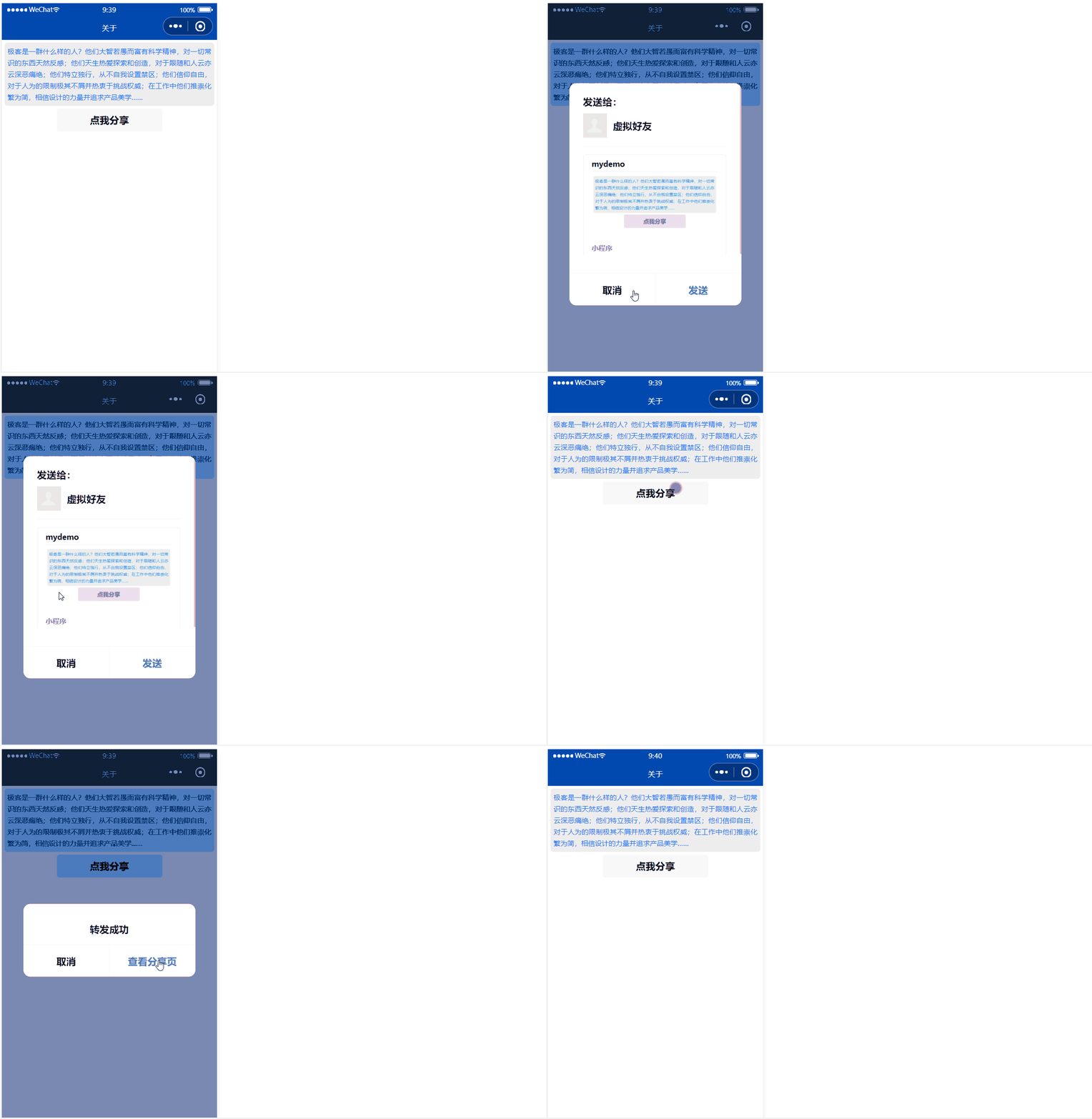
button Components open-type="share", Click this button , Trigger Page.onShareAppMessage event .
app.json
{

  "pages": [
    "pages/about/about"
  ],
  "window": {

    "navigationBarBackgroundColor": "#0149af",
    "navigationBarTitleText": " home page ",
    "navigationBarTextStyle": "white"
  },
  "style": "v2",
  "sitemapLocation": "sitemap.json"
}
pages/about/about.wxml
<view class="aboutContainer">
  <view class="content"> What kind of people are geeks ? They are as wise as fools and full of scientific spirit , Natural aversion to all common sense things ; They are born to love exploration and creation , I hate following and following others ; They have their own way , Never set a restricted area for yourself ; They believe in freedom , He disdains artificial restrictions and is keen to challenge authority ; In their work, they advocate reducing complexity to simplicity , Believe in the power of design and pursue product aesthetics ……</view>
  <button open-type="share"> Click me to share </button>
</view>
pages/about/about.wxss
.content{

  margin: 10rpx;
  padding: 10rpx;
  text-align: justify;
  line-height: 40rpx;
  background:#eee;
  color: #1a74f1;
  font-size: 24rpx;
  border-radius: 10rpx;
  margin-bottom: 10rpx;
}
pages/about/about.js
Page({
    })
The forward button in the upper right corner of the page
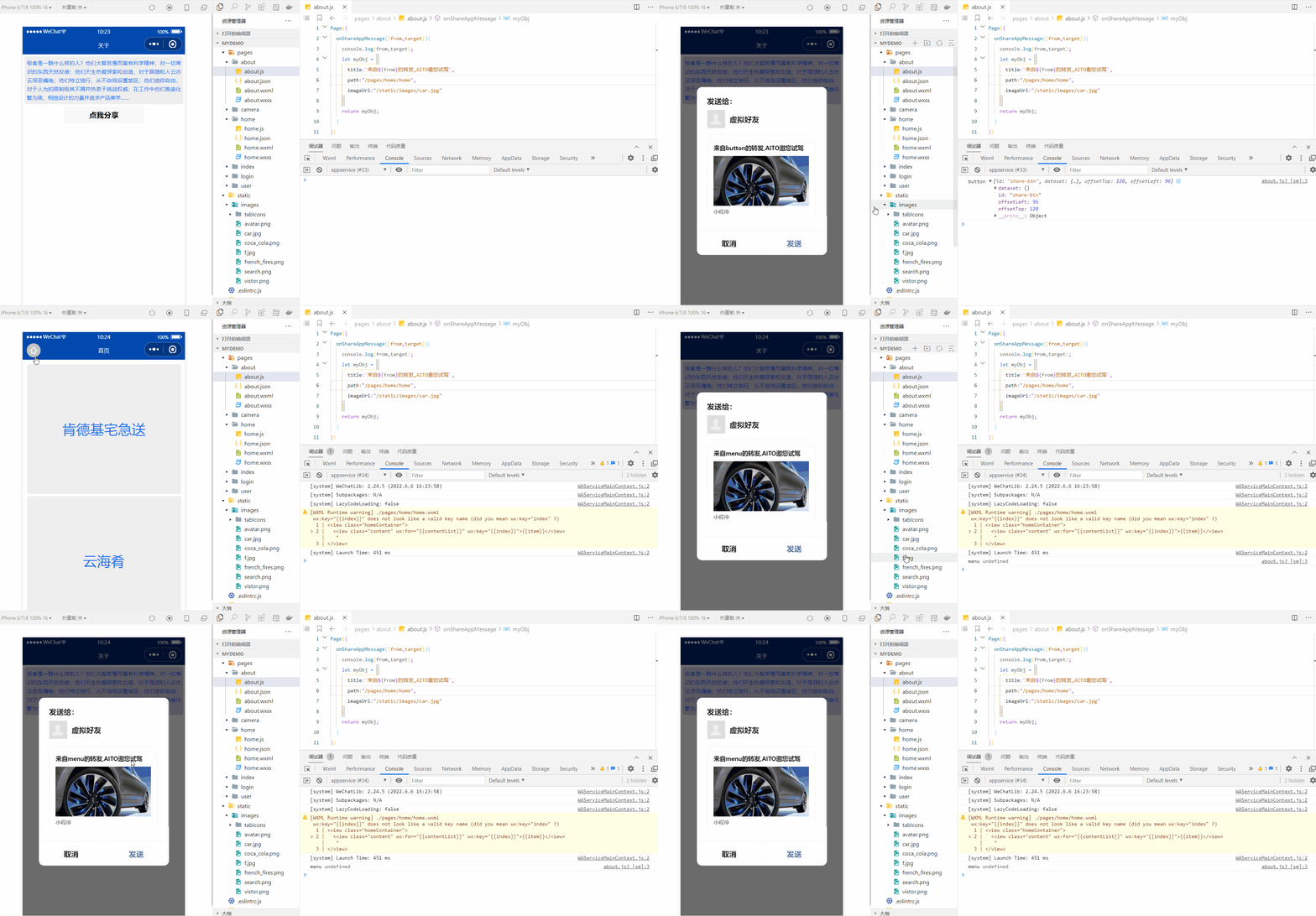
First , Only defined onShareAppMessage(), The menu in the upper right corner of the page will display “ forward ” Button .
then ,onShareAppMessage(Object object) Receive an object as a parameter , This object contains the following properties :
from, Forward event source ,string type , There are two values :"button", By clicking button Component forwarding ."menu", Forward by clicking the forward menu in the upper right corner of the page .
target, It's an object .- If
fromyes"button", betargetThis forwarding event is triggered button Components . - If
fromyes"menu", betargetyesundefined.
- If
Last ,onShareAppMessage(Object object) You can return an object , Used to customize the forwarding content . The returned object can contain the following properties :
title, Forward title , The default is the name of the current applet .path, Forwarding path , Must be based on/Full path at the beginning , The default is the current page path.imageUrl, Custom image path , It can be a local picture , You can also network pictures , The default is a snapshot of the current page .
The main files involved in the code are :
- app.json
- pages/about/about.wxml
- pages/about/about.wxss
- pages/about/about.js
- pages/home/home.wxml
- pages/home/home.wxss
- pages/home/home.js
app.json
{

  "pages": [
    "pages/about/about",
    "pages/home/home"
  ],
  "window": {

    "navigationBarBackgroundColor": "#0149af",
    "navigationBarTitleText": " home page ",
    "navigationBarTextStyle": "white"
  },
  "style": "v2",
  "sitemapLocation": "sitemap.json"
}
pages/about/about.wxml
<view class="aboutContainer">
  <view class="content"> What kind of people are geeks ? They are as wise as fools and full of scientific spirit , Natural aversion to all common sense things ; They are born to love exploration and creation , I hate following and following others ; They have their own way , Never set a restricted area for yourself ; They believe in freedom , He disdains artificial restrictions and is keen to challenge authority ; In their work, they advocate reducing complexity to simplicity , Believe in the power of design and pursue product aesthetics ……</view>
  <button open-type="share" id="share-btn"> Click me to share </button>
</view>
pages/about/about.wxss
.content{

  margin: 10rpx;
  padding: 10rpx;
  text-align: justify;
  line-height: 40rpx;
  background:#eee;
  color: #1a74f1;
  font-size: 24rpx;
  border-radius: 10rpx;
  margin-bottom: 10rpx;
}
pages/about/about.js
Page({

  onShareAppMessage({
     from,target}){

    console.log(from,target);
    let myObj = {

      title:` come from ${
      from} Forwarding ,AITO Invite you to test drive `,
      path:"/pages/home/home",
      imageUrl:"/static/images/car.jpg"
    }
    return myObj;
  }
})
pages/home/home.wxml
<view class="homeContainer">
  <view class="content" wx:for="{
     {contentList}}" wx:key="{
     {index}}">{
   {item}}</view>
</view>
pages/home/home.wxss
.homeContainer{

  padding: 20rpx;
}
.content{

  width: 100%;
  height: 600rpx;
  line-height: 600rpx;
  text-align: center;
  background:#eee;
  color: #1a74f1;
  font-size: 64rpx;
  border-radius: 10rpx;
  margin-bottom: 10rpx;
}
pages/home/home.js
Page({

  data:{

    contentList:[]
  },
  onLoad(){

    const contentList = this.getDataFromServer();
    this.setData({
    contentList});
  },
  getDataFromServer(){

    let result = [" KFC house express "," Sea of clouds food "," Xibei youmian village "," East slope of Meizhou "," Wallace "];
    return result;
  },
  onReachBottom(){

    console.log("on reach bottom");
    console.log(" Pull up and touch the bottom , Get the data and append it to the list ");
    const appendData = [" other "," other "," other "," other "," other "];
    const newContentList = [...this.data.contentList,...appendData];
    this.setData({
    contentList:newContentList});
  },
  onPullDownRefresh(){

    console.log("on pull down refresh");
    console.log(" The drop-down refresh , Get the latest list data ");
    this.getDataFromServer();
  }
})
边栏推荐
- Idea2021 installation
- 阿亚的角度思考
- Market regulation
- How to publish your own NPM package
- [live review] AI customer service "changes according to the situation", and man-machine dialogue can be easier
- [analysis of GPIO register (crl/crh) configuration of STM32]
- [the most comprehensive and detailed] how to design a database and table splitting scheme that can dynamically expand and shrink capacity?
- 市场的调节
- [no title] 1
- Why does the official not recommend using UUID as MySQL primary key
猜你喜欢

Salt and ice particles cannot be distinguished
![[ CTF 学习 ] CTF 中的隐写集合 —— 图片隐写术](/img/32/2da78bd5866cfab9ee64dfcb1c1204.png)
[ CTF 学习 ] CTF 中的隐写集合 —— 图片隐写术

Gradle test and idea test
![[untitled]](/img/6c/df2ebb3e39d1e47b8dd74cfdddbb06.gif)
[untitled]

Information System Project Manager --- Chapter IX examination questions of project human resource management over the years
![[literature notes] pointmlp](/img/8f/654dc6e2f4770b7f12aab49098d3d7.png)
[literature notes] pointmlp

If you don't know these 20 classic redis interview questions, don't go to the interview!
Getting started with scratch

Dark king | analysis of zego low illumination image enhancement technology

I will write some Q & A blogs recently, mainly focusing on the points that are easy to have doubts.
随机推荐
[wechat applet] picker scroll selector (85/100)
tiny-emitter.js:一个小型的事件订阅发布库
Thinking of reading
Construction of Seata multilingual system
How to ensure data consistency between MySQL and redis?
[ CTF 学习 ] CTF 中的隐写集合 —— 图片隐写术
# 1. Excel的IF函数
[small program practice] first day
Unity LOD
2022-7-18 summary
It we media shows off its wealth in a high profile, and is targeted by hacker organizations. It is bound to be imprisoned
[live review] AI customer service "changes according to the situation", and man-machine dialogue can be easier
Chart is code: build a new generation of graphics library in a coded way -- feekin
自然的状态最好
Leetcode55. Jumping game
STM32 Development Notes 121: Kalman filter I understand
ESWC 2018 | R-GCN:基于图卷积网络的关系数据建模
[CTF learning] steganography set in CTF -- picture steganography
Completed project series Tutorials - smart campus management system
Pyg builds GCN to realize link prediction