@
Common functions
1. Statistics -> Capture properties
You can view various properties of the capture package , Such as time , length , Interface, etc. 
2. Statistics -> Protocol classification
View packages classified by protocol , Compared with looking through a large number of bags , The statistical results are clearer 

3. Filter package Apply as filter
Want to filter out qualified packets , Just add a specific syntax to the input box . When we are not familiar with a particular grammar, we can choose to generate it automatically , The method is as follows :
E1: Filter out packets with a specific sequence number
for example : To filter out 512 Bag No , The filter condition we limit is the sequence number of the package , First, click to open a bag , find Frame Number, And then right-click “ Prepare the filter -> Choose ” The rule will appear in the filter input box
  Then you can modify the numbers yourself
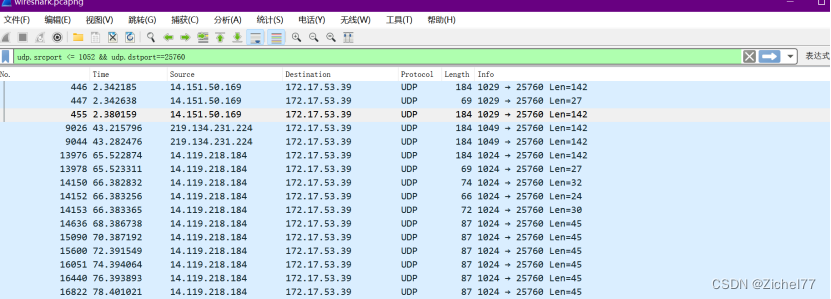
E2: Filter out a IP Address or port
for example : Click to open a package , Find... In the package details Internet Protocol Version4(IPV4) agreement , Click on it to see Source Source IP, Choose this trip , Right click “ Prepare the filter -> Choose ”
 Then you can see that the syntax automatically appears in the filter box
Here we choose the source IP namely src, If you want to filter general IP, Then change the rule to addr
If the filter port is the same , Find the port details , Right click “ Prepare the filter -> Choose ”

 If you want to limit to a range rather than a single port , Select the greater than less than symbol and the and symbol
E3: export php file
choice “ file -> Export object ” You can export 
E4: View active packages
choice “ Statistics ->conversation”
 You can see the communication information between packets , Use it again Packets Sort , It will be arranged according to the number of packages from large to small , It can be seen that the objects with the most frequent communication , Commonly used in DDoS Investigation of