当前位置:网站首页>Jenkins - data sharing and transfer between copy artifact plug-in builds
Jenkins - data sharing and transfer between copy artifact plug-in builds
2022-06-28 02:18:00 【wumingxiaoyao】
introduction
Realization CICD In the process of ,Jenkins Pipeline Job Build Need to transfer shared data between , such as , There is one Test Job Used to run test cases , After running, a test result file will be generated , Another one Report Job Is used to notify test results by email , Test result file is required , So you need to start with Test Job in Copy the test result file . Or for historical statistics , This time Build The results need to be based on the last Build Add new data to your data , Then you need to copy the previous one Build Results file for .Copy Artifact Plugin Can meet this demand , This article will introduce the plug-in .
Summary :
- Copy Artifact Plugin Introduction and installation
- Copy Artifact Plugin application
Copy Artifact Plugin Introduction and installation
Copy Artifact be applied to Jenkins Job Copy Archive the artifacts The archive , You can specify which Build ( for example :the last successful/stable build, by build number, or by a build parameter), You can also filter and control which files are copied and to which destination folder . Can also from workspace Directory copy file .
This plug-in is not available Jenkins The recommended plug-ins to install are listed in , So I want to use this plug-in , Separate installation required .
Manage Jenkins -> Plugin Manger
After successful installation , open Job Configure, Add build step You can see in the options Copy artifacts from another project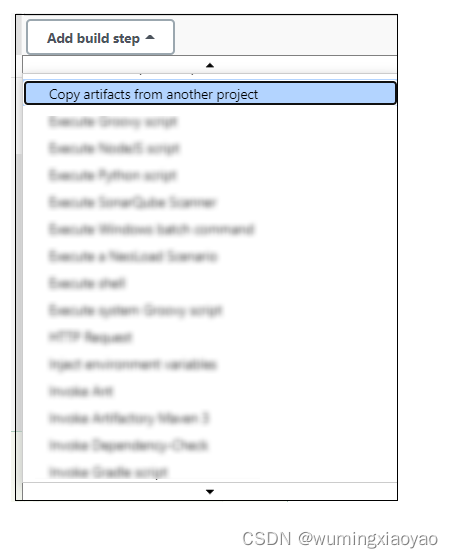
Copy Artifact Plugin application
File Archive the artifacts
Apply this Plugin Before , The shared files need to be archived . adopt Post-build Actions add to Archive the artifacts Options .

take workspace File in the directory , The files that have been successfully archived can be archived through URL To visit :JenkinsURL/…JobPath/BuildNo/artifact/
Copy artifacts from another project application
After filing , You can access the copy
For example, the following configuration , From the target job the last one build Copy all archived in the archive directory csv File to current Job Of workspace The root directory .

Build After success ,workspace You can see the copied file .
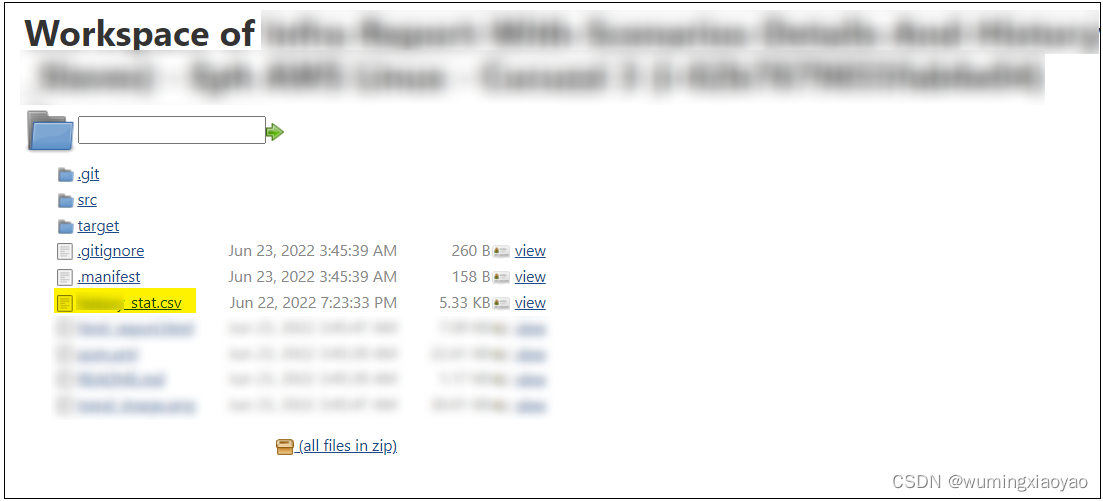
Here's a reminder , Default Job Configure in , Will delete workspace, If you need to keep workspace Don't check . To save storage space , It is suggested to check , It can be done by Arhicve the artifacts Archive some required documents .
Copy artifacts from another project Detailed settings
To the goal Build, There are many options , Some can be seen from their names , You can choose according to your needs .
Specific build Options
Give a specific example Build No Example , It can be accessed dynamically through variables .
Of course, it can also be Pipeline Groovy Script setting variables .
give an example : One Jenkins Pipeline Job, Parallel trigger Smoke and Regression Job, The final trigger Report job Mail notification , Parameters are passed to each other .
#!groovy

pipeline {


    options {

        buildDiscarder(logRotator(numToKeepStr: '15', daysToKeepStr: '15'))
    }

    agent {
     label "Linux1" }

    parameters {

        string(name: 'branch', defaultValue: 'master', description: 'example : master')
        string(name: 'env', defaultValue: 'dev', description: 'example : dev')
		string(name: 'project_name', defaultValue: 'Project XXX', description: 'example : Project XXX')
        string(name: 'email_list', defaultValue: '[email protected]',
                description: 'example : [email protected]')

    }

    stages{

		stage('Testing'){

			parallel{

				stage('Smoke') {

					agent {
     label "Linux1" }
					steps {

						script {

							def smoke_build = build job: 'Smoke-Job',
								propagate: false,
								parameters: [
									string(name: 'branch', value: "${params.branch}"),
									string(name: "env", value: "${params.env}")
								]
							smoke_full_project_name = smoke_build.getFullProjectName()
							smoke_build_num = smoke_build.getNumber()
						}
					}
				}
				stage('Regression') {

					agent {
     label "Linux1" }
					steps {

						script {

							def regression_build = build job: 'Reg-Job',
								propagate: false,
								parameters: [
                                    string(name: 'branch', value: "${params.branch}"),
                                    string(name: "env", value: "${params.env}")
								]
							regression_full_project_name = regression_build.getFullProjectName()
							regression_build_num = regression_build.getNumber()
						}
					}
				}
			}
		}
	}
  post {

        always {

            build job: '../Report-JOB',
                    parameters: [
                            string(name: 'smoke_job', value: "${smoke_full_project_name}"),
							string(name: 'smoke_build_num', value: "${smoke_build_num}"),
							string(name: 'regression_job', value: "${regression_full_project_name}"),
							string(name: 'regression_build_num', value: "${regression_build_num}"),
							string(name: 'branch', value: "${params.branch}"),
                            string(name: 'env', value: "${params.env}"),
                            string(name: 'project_name', value: "${params.project_name}"),
                            string(name: 'email_list', value: "${params.email_list}")
                    ]
			}
	}
}
Specified by a build parameter Options
First add a Build selector for Copy Artifact Parameters 
Copy arfifacts from another project, choice Specified by a build parameter Options , Parameter Name Directly fill in the previously added Build selector for Copy Artifact Parameter name is enough .
of Project Name and Permalink Parameters , Can be from Job Home page access .
Project Name Namely Full project name, You can avoid Job Identify problems between .
Permalink Parameters have been confused before , Later, I found that it was actually based on Job Fixation URL, At present Job You can see this information on the home page .
for example :lastBuild Of Permalinks
https://jenkinsURL/projectURL/lastBuild/

边栏推荐
猜你喜欢

【嵌入式基础】串口通信

Appium自动化测试基础— 补充:App的包名(appPackage)和启动名(appActivity)

Jenkins - 訪問 Jenkins 自定義參數變量,處理變量值中含有空格

Jenkins - 邮件通知 Email Notification 插件

Differences between cesium polygon extrudedheight and height

Jenkins - Pipeline 语法

评价——灰色关联分析

【嵌入式基础】内存(Cache,RAM,ROM,Flash)

【牛客討論區】第四章:Redis

TIA botu_ Concrete method of making analog input and output Global Library Based on SCL language
随机推荐
【牛客讨论区】第四章:Redis
Original | 2025 to achieve the "five ones" goal! The four products of Jiefang power are officially released
[Yocto RM]1 - System Requirements
Jenkins - 邮件通知 Email Notification 插件
Supervised, unsupervised and semi supervised learning
【牛客討論區】第四章:Redis
Google Earth engine (GEE) -- an error caused by the imagecollection (error) traversing the image collection
9. Openfeign service interface call
Adobe Premiere基础-常用的视频特效(裁剪,黑白,剪辑速度,镜像,镜头光晕)(十五)
[Yongyi XY chair] trial experience
[Yocto RM] 2 - Yocto Project Terms
Voice network VQA: make the user's subjective experience of unknown video quality in real-time interaction known
Database query optimization: master-slave read-write separation and common problems
Deep parsing of kubernetes controller runtime
Numpy----np. meshgrid()
Appium自动化测试基础 — ADB常用命令(一)
指南针股票开户是会有什么风险吗?指南针开户安全吗
[elt.zip] openharmony paper Club - memory compression for data intensive applications
[Yocto RM]9 - QA Error and Warning Messages
Cesium anti aliasing (lines, borders, etc.)