当前位置:网站首页>Web middleware log analysis script 1.0 (shell script)
Web middleware log analysis script 1.0 (shell script)
2022-07-27 00:23:00 【Viva alive】
- One 、 function
- Two 、 design sketch
- 0. Just run the script, you need to enter the log file name or absolute path
- 1. Can view different IP Number of visits
- 2. Check out a IP Which pages were visited , You can also save the log to a file , Press y preservation ,**IP Be sure to write options 1 There are IP**
- 3. Check the total number of IP visit
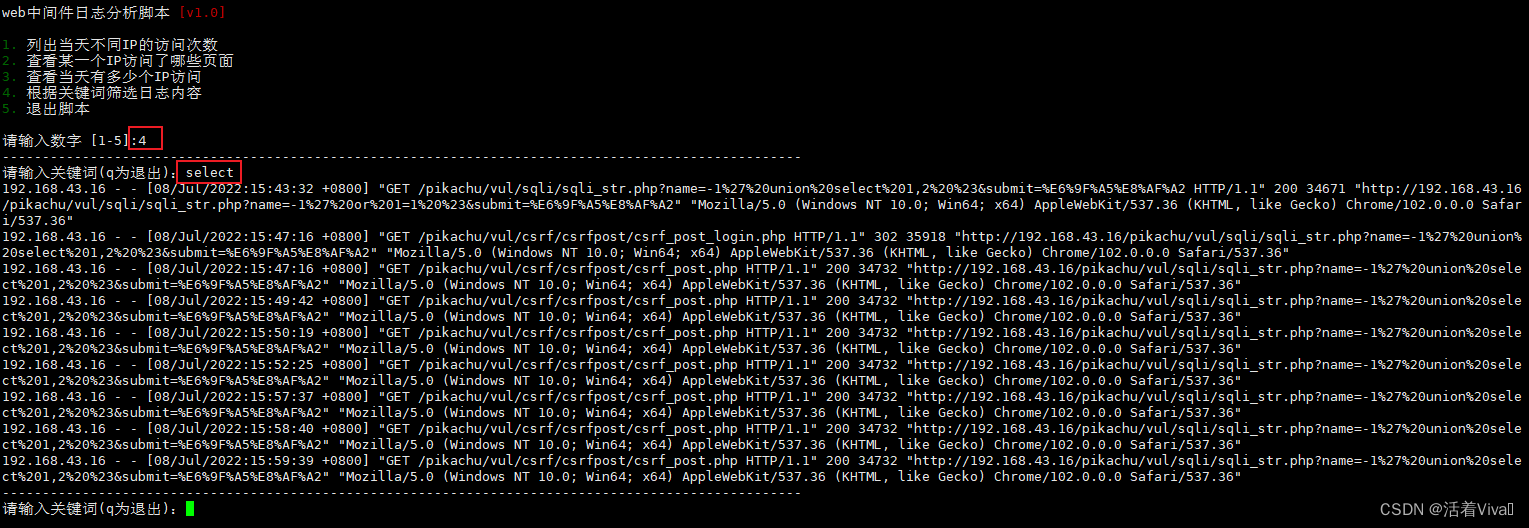
- 4. Filter out logs with keywords
- 3、 ... and 、 Code
- Four 、 Run script
Mainly used in peacetime web Security check of logs , It's better to look at the equipment directly
One 、 function
- List the different days IP Number of visits
- View a IP Which pages were visited
- See how many... Are there on that day IP visit
- Filter log content according to keywords
Two 、 design sketch
0. Just run the script, you need to enter the log file name or absolute path

Input error, need to re-enter 
1. Can view different IP Number of visits

2. Check out a IP Which pages were visited , You can also save the log to a file , Press y preservation ,IP Be sure to write options 1 There are IP



3. Check the total number of IP visit

4. Filter out logs with keywords
3、 ... and 、 Code
#!/bin/bash

#  The font color
Green_font_prefix="\033[32m"
Red_font_prefix="\033[31m"
Font_color_suffix="\033[0m"

#  Split line
line(){

for i in {
    1..100};do
  if [ $i -ne 100 ];then
    echo -ne "-"
  else
    echo -e "-"
  fi
  done
}

#  Option one
diffip(){

    line
    cut -d- -f 1 "$logfile"|sort| uniq -c | sort -rn
}

#  Option 2
oneip(){

    while true;do
    read -rp " Please enter the IP:" ip
    line
    if [ "$(grep ^$ip $logfile |wc -l)" -ne 0 ];then
        grep ^$ip $logfile| awk '{print $4."]",$1,$7,$9}'
        break
    else
        echo -e "${Red_font_prefix} We didn't find it IP! Please re-enter !!${Font_color_suffix}"
        line
        continue
    fi
    done
}

#  Save the file
savefile(){

    read -rp " Whether to save to file (y/n):" choose
    if [ $choose == "y" ] || [ $choose == "Y" ];then
        grep ^$ip $logfile| awk '{print $4."]",$1,$7,$9}' > "$ip.txt"
        echo -e " Saved to $ip.txt in "
    fi
}

#  Option 3
howmanyip(){

    line
    awk '{print $1}' $logfile|sort|uniq|wc -l
}

#  Option four
keyword(){

    while true;do
        line
        read -rp " Please enter keywords (q To quit ):" key
        if [ $key == "q" ];then
            break
        fi
        more "$logfile" | grep "$key"
    done
}

while true;do
    read -rp " Please enter the log to be analyzed :" logfile
    find "$logfile" &>/dev/null
    if [ $? -ne 0 ];then
        echo -e "${Red_font_prefix} No logs found , Please enter the file name or absolute path !!( The full name of the home directory should be written instead of ~)${Font_color_suffix}"
        line
    else
        break
    fi
done
# *****************************************
# **************  Lord   Noodles   plate ****************
# *****************************************
line
while true; do
echo -e "web Middleware log analysis script  ${Red_font_prefix}[v1.0]${Font_color_suffix} ${Green_font_prefix}1.${Font_color_suffix}  List the different days IP Number of visits  ${Green_font_prefix}2.${Font_color_suffix}  View a IP Which pages were visited  ${Green_font_prefix}3.${Font_color_suffix}  See how many... Are there on that day IP visit  ${Green_font_prefix}4.${Font_color_suffix}  Filter log content according to keywords  ${Green_font_prefix}5.${Font_color_suffix}  Exit script  "
read -r -p " Please enter a number  [1-5]:" num

if [ "$num" -eq "1" ];then
    diffip

elif [ "$num" -eq "2" ];then
    oneip
    savefile

elif [ "$num" -eq "3" ];then
    howmanyip

elif [ "$num" -eq "4" ];then
    keyword

elif [ "$num" -eq "5" ];then
    echo ""
    echo -e "${Green_font_prefix} ***************************************** ***********  Thank you for using , bye ************ ***************************************** ${Font_color_suffix}"
    exit 0

else
    echo -e "${Red_font_prefix} Please enter the correct number !!${Font_color_suffix}"
    line
    continue
fi
line
done
Four 、 Run script
Method 1
sh Script name
Method 2
bash Script name
Method 3
chmod 777  Script name
./ Script name    ( This should be in the same directory as the script )
Some requirements cannot be added to the code by themselves , Pretty simple
边栏推荐
- [Gorm] model relationship -hasone
- Complete backpack and 01 Backpack
- AlexNet(Pytorch实现)
- 放图仓库-Tsai
- Sliding window problem summary
- 爬虫中Request属性
- 94. Middle order traversal of binary tree
- 13_集成学习和随机森林(Ensemble Learning and Random Forests)
- Geek challenge 2019 (review the loopholes)
- Configure deeplobcut 1 with your head covered
猜你喜欢
![[Gorm] model relationship -hasone](/img/90/3069059ddd09dc538c10f76d659b08.png)






随机推荐
RESNET paper interpretation and code implementation (pytorch)
Several search terms
Complete review of parsing web pages
Fourier analysis (basic introduction)
Deep learning of parameter adjustment skills
[Gorm] model relationship -hasone
What is Tencent cloud lightweight application server? What are the differences between CVM and ECS?
What scenarios are Tencent cloud lightweight application servers suitable for?
deeplabcut使用1
Drawing warehouse-3 (functional image)
Error generating yolov5.wts file
About no module named'django.db.backends.mysql'
20220720 toss deeplobcut2
100. Same tree
Complex SQL_ 01
Xshell连接服务器时报“Could not load host key”错误
Codeforces B. Orac and Models (dp)
Share a regular expression
Iptables prevent nmap scanning and binlog
2022_ SummerBlog_ 008