当前位置:网站首页>atguigu----脚手架--02-使用脚手架(2)
atguigu----脚手架--02-使用脚手架(2)
2022-07-01 07:06:00 【张 邵】
ref属性
- 被用来给元素或子组件注册引用信息(id的替代者)
- 应用在html标签上获取的是真实DOM元素,应用在组件标签上是组件实例对象(vc)
- 使用方式:
- 打标识:
<h1 ref="xxx">.....</h1>或<School ref="xxx"></School> - 获取:
this.$refs.xxx
- 打标识:
<template>
	<div>
		<h1 v-text="msg" ref="title"></h1>
		<button ref="btn" @click="showDOM">点我输出上方的DOM元素</button>
		<School ref="sch"/>
	</div>
</template>

<script> //引入School组件 import School from './components/School' export default {
       name:'App', components:{
      School}, data() {
       return {
       msg:'欢迎学习Vue!' } }, methods: {
       showDOM(){
       console.log(this.$refs.title) //真实DOM元素 console.log(this.$refs.btn) //真实DOM元素 console.log(this.$refs.sch) //School组件的实例对象(vc) } }, } </script>
props配置项
功能:让组件接收外部传过来的数据
传递数据:
<Demo name="xxx"/>接收数据:
第一种方式(只接收):
props:['name']第二种方式(限制类型):
props:{name:String}第三种方式(限制类型、限制必要性、指定默认值):
props:{

 name:{

 type:String, //类型
 required:true, //必要性
 default:'老王' //默认值
 }
}
备注:props是只读的,Vue底层会监测你对props的修改,如果进行了修改,就会发出警告,若业务需求确实需要修改,那么请复制props的内容到data中一份,然后去修改data中的数据。
<template>
	<div>
		<h1>{
   {msg}}</h1>
		<h2>学生姓名:{
   {name}}</h2>
		<h2>学生性别:{
   {sex}}</h2>
		<h2>学生年龄:{
   {myAge+1}}</h2>
		<button @click="updateAge">尝试修改收到的年龄</button>
	</div>
</template>

<script> export default {
       name:'Student', data() {
       console.log(this) return {
       msg:'我是一个尚硅谷的学生', myAge:this.age } }, methods: {
       updateAge(){
       this.myAge++ } }, //简单声明接收 // props:['name','age','sex']  //接收的同时对数据进行类型限制 /* props:{ name:String, age:Number, sex:String } */ //接收的同时对数据:进行类型限制+默认值的指定+必要性的限制 props:{
       name:{
       type:String, //name的类型是字符串 required:true, //name是必要的 }, age:{
       type:Number, default:99 //默认值 }, sex:{
       type:String, required:true } } } </script>
mixin(混入)
功能:可以把多个组件共用的配置提取成一个混入对象
使用方式:
第一步定义混合:
{
    data(){....},
    methods:{....}
    ....
}
第二步使用混入:
全局混入:
Vue.mixin(xxx)
局部混入:mixins:['xxx']
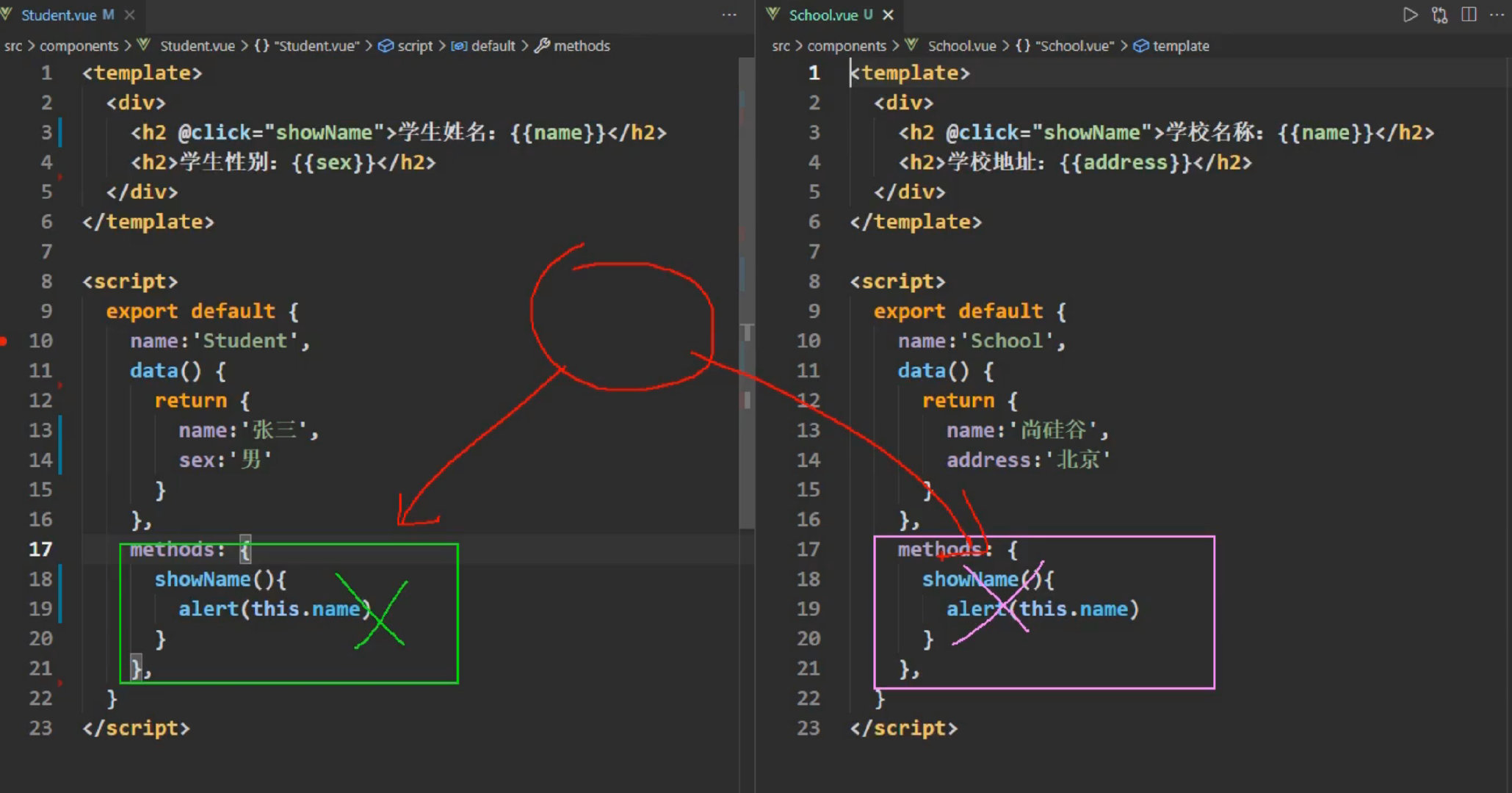
export const hunhe = {

	methods: {

		showName(){

			alert(this.name)
		}
	},
	mounted() {

		console.log('你好啊!')
	},
}
export const hunhe2 = {

	data() {

		return {

			x:100,
			y:200
		}
	},
}


//引入Vue
import Vue from 'vue'
//引入App
import App from './App.vue'
import {
    hunhe,hunhe2} from './mixin'
//关闭Vue的生产提示
Vue.config.productionTip = false

Vue.mixin(hunhe)
Vue.mixin(hunhe2)


//创建vm
new Vue({

	el:'#app',
	render: h => h(App)
})
<template>
	<div>
		<h2 @click="showName">学校名称:{
   {name}}</h2>
		<h2>学校地址:{
   {address}}</h2>
	</div>
</template>

<script> //引入一个hunhe // import {hunhe,hunhe2} from '../mixin' export default {
       name:'School', data() {
       return {
       name:'尚硅谷', address:'北京', x:666 } }, // mixins:[hunhe,hunhe2], } </script>


<template>
	<div>
		<h2 @click="showName">学生姓名:{
   {name}}</h2>
		<h2>学生性别:{
   {sex}}</h2>
	</div>
</template>

<script> // import {hunhe,hunhe2} from '../mixin' export default {
       name:'Student', data() {
       return {
       name:'张三', sex:'男' } }, // mixins:[hunhe,hunhe2] } </script>
插件
功能:用于增强Vue
本质:包含install方法的一个对象,install的第一个参数是Vue,第二个以后的参数是插件使用者传递的数据。
定义插件:
对象.install = function (Vue, options) {

    // 1. 添加全局过滤器
    Vue.filter(....)

    // 2. 添加全局指令
    Vue.directive(....)

    // 3. 配置全局混入(合)
    Vue.mixin(....)

    // 4. 添加实例方法
    Vue.prototype.$myMethod = function () {
      ...}
    Vue.prototype.$myProperty = xxxx
}
使用插件:
Vue.use()
export default {

	install(Vue,x,y,z){

		console.log(x,y,z)
		//全局过滤器
		Vue.filter('mySlice',function(value){

			return value.slice(0,4)
		})

		//定义全局指令
		Vue.directive('fbind',{

			//指令与元素成功绑定时(一上来)
			bind(element,binding){

				element.value = binding.value
			},
			//指令所在元素被插入页面时
			inserted(element,binding){

				element.focus()
			},
			//指令所在的模板被重新解析时
			update(element,binding){

				element.value = binding.value
			}
		})

		//定义混入
		Vue.mixin({

			data() {

				return {

					x:100,
					y:200
				}
			},
		})

		//给Vue原型上添加一个方法(vm和vc就都能用了)
		Vue.prototype.hello = ()=>{
    alert('你好啊')}
	}
}
main.js
//引入Vue
import Vue from 'vue'
//引入App
import App from './App.vue'
//引入插件
import plugins from './plugins'
//关闭Vue的生产提示
Vue.config.productionTip = false

//应用(使用)插件
Vue.use(plugins,1,2,3)
//创建vm
new Vue({

	el:'#app',
	render: h => h(App)
})
scoped样式
作用:让样式在局部生效,防止冲突。
写法:
<style scoped>
Less的使用
如果没有安装,就安装npm i [email protected] 安装指定版本
查看版本的npm view less-loader versions
边栏推荐
- Stored procedure learning notes
- 【图像处理】图像直方图均衡化系统含GUI界面
- ctfshow-web352,353(SSRF)
- Jena基于OWL的默认推理查询
- DC-4 target
- Servlet 和 JSP 中的分页
- [network planning] (I) hub, bridge, switch, router and other concepts
- Figure out the difference between event coordinates screenx, clientx, pagex and offsetx
- 灰度何以跌下神坛?
- Problem: officeexception: failed to start and connect (III)
猜你喜欢

C语言实现【扫雷游戏】完整版(实现源码)

运维管理系统,人性化操作体验

【电气介数】电气介数及考虑HVDC和FACTS元件的电气介数计算

Pourquoi tant de gens sont - ils devenus des gestionnaires de produits? Quelles sont les perspectives de développement des gestionnaires de produits?

运维管理有什么实用的技巧吗
ESP32 - ULP 协处理器在低功耗模式下读片内霍尔传感器HALL SENSOR

SQL learning notes nine connections 2

开源了!文心大模型ERNIE-Tiny轻量化技术,又准又快,效果全开

运维面临挑战?智能运维管理系统来帮您

盘点华为云GaussDB(for Redis)六大秒级能力
随机推荐
EasyNVS云管理平台功能重构:支持新增用户、修改信息等
Unity2021-Scene视图中物体无法直接选中的解决办法
Product learning (I) - structure diagram
Esp32 - ULP coprocessor reading Hall sensor in low power mode
[matlab] solve nonlinear programming
Summary of the concept and advantages of 5g massive MIMO
為什麼這麼多人轉行產品經理?產品經理發展前景如何?
发现了一个 MySQL 的巨坑:update 更新别再用影响行数做判断了!!!
用手机在指南针上开户靠谱吗?这样有没有什么安全隐患
Is fixed investment fund a high-risk product?
关于图灵测试和中文屋Chinese room的理解
[Electrical dielectric number] electrical dielectric number and calculation considering HVDC and facts components
LeetCode+ 71 - 75
Stored procedure learning notes
Open source! Wenxin large model Ernie tiny lightweight technology, accurate and fast, full effect
广发证券开户是安全可靠的么?怎么开广发证券账户
Esp32 monitors the battery voltage with ULP when the battery is powered
1286_FreeRTOS的任务优先级设置实现分析
Jena default inference query based on OWL
Rclone configuring Minio and basic operations