当前位置:网站首页>Esp32 monitors the battery voltage with ULP when the battery is powered
Esp32 monitors the battery voltage with ULP when the battery is powered
2022-07-01 06:37:00 【Morning breeze】
Chen Tuo 2022/06/01-2022/06/01
1. summary
stay 《ESP32 How is the deep sleep current lower than 10uA》
https://zhuanlan.zhihu.com/p/521640890
https://blog.csdn.net/chentuo2000/article/details/125033711?spm=1001.2014.3001.5502
and 《ESP32 - ULP The coprocessor reads the on-chip Hall sensor in low-power mode HALL SENSOR》
https://zhuanlan.zhihu.com/p/522082909
https://blog.csdn.net/chentuo2000/article/details/125048580?spm=1001.2014.3001.5502
In two articles we discussed ESP32 stay deep sleep Current in mode , In this article, we test based on official routines ESP32 When the battery is powered ULP Monitor battery voltage .
about ESP32 The current under various working modes can be referred to 《 understand ESP32 Sleep mode and its power consumption 》 One article .
https://zhuanlan.zhihu.com/p/521885688
https://blog.csdn.net/chentuo2000/article/details/125042156?spm=1001.2014.3001.5502
2. Official documents
- Official routine
《ULP Coprocessor Detect ESP32 Brownout》
https://gitee.com/chentuo2000/esp-iot-solution/tree/release/v1.1/examples/ulp_examples/ulp_detect_brownout
This example utilizes ULP Coprocessor ADC Measurement function , Polling in the background to detect VDD33 The voltage value of the pin , And deal with it when the voltage is unstable .
- Hardware connection
In this case , choice SAR ADC1 Of the 7 passageway (GPIO34), Through external jumpers , Connected to VDD33 Pin for voltage measurement , Test the use of the circuit board 《ESP32 How is the deep sleep current lower than 10uA》 The board introduced in the article .
For details, please refer to ESP32 Technical manual
https://www.espressif.com.cn/sites/default/files/documentation/esp32_technical_reference_manual_en.pdf
- How software works
Lord CPU After non sleep mode is activated , The following settings are required :
1) To configure SAR ADC1, And enable ULP Access to its functions
2) Initialize and enable RTC Watchdog timer
3) Load and start ULP Program
ULP After the program starts, it will always poll for detection VDD33 The voltage value of the pin :
1) If the voltage value is lower than the programmed value Brownout threshold , Turn off the digital kernel , RF circuits , And stop CPU
2) If the voltage value rises from low to set Brownout threshold ,ULP adopt RTC WDT Timeout resets the entire system
Be careful : because ULP Modules that do not have access to the digital part , Therefore, it cannot be read EFUSE Medium ADC Calibrate parameters to SAR ADC1 Calibrate the measurement results , So finally SAR ADC1 There will be some deviations in the measurement results of different module types .
ULP Coprocessors currently only support assembly development , The corresponding assembler is described in detail in the routine documentation .
- ESP-IoT-Solution brief introduction
The official routine is esp-iot-solution In the library .
https://docs.espressif.com/projects/espressif-esp-iot-solution/zh_CN/latest/gettingstarted.html
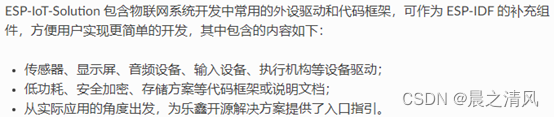
- ESP-IoT-Solution edition
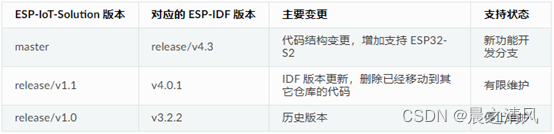
Different versions ESP-IoT-Solution The explanation is as follows :
- ESP-IoT-Solution Programming Guide
https://docs.espressif.com/projects/espressif-esp-iot-solution/zh_CN/latest/index.html
3. obtain ESP-IoT-Solution
- Get orders
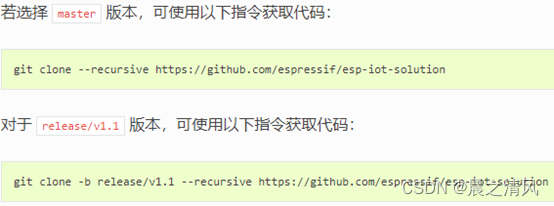
If from the official of Lexin github Library Download is difficult , You can start with gitee Clone a library on , And then from gitee Upload and download . Here is the download from my cloned Library , My library is private , You need to clone one yourself .
- Official routine
Be careful , The experimental routine is v1.1 In the version .
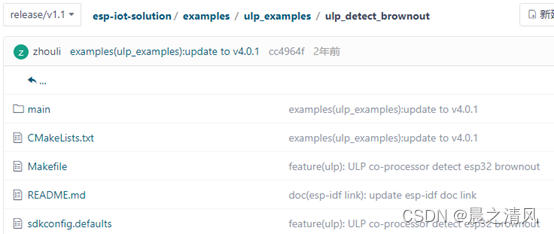
- download esp-iot-solution v1.1
cd ~/esp
git clone -b release/v1.1 --recursive https://gitee.com/chentuo2000/esp-iot-solution.git

from gitee When downloading clone library , The subject is going well , Having trouble downloading submodules , You need to manually download the following sub modules :
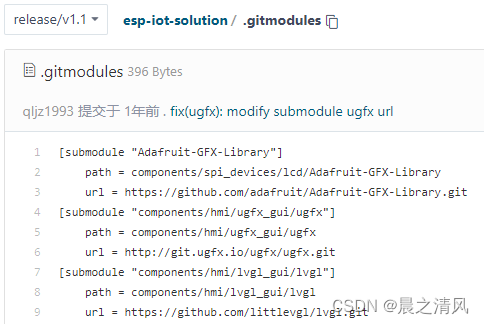
Download manually according to the source and the corresponding installation path .
If you still can't download , You can download this from the link below 3 Sub module :
download Adafruit-GFX-Library.tar.gz
https://download.csdn.net/download/chentuo2000/85481416
download ugfx.tar.gz
https://download.csdn.net/download/chentuo2000/85481491
download lvgl.tar.gz
https://download.csdn.net/download/chentuo2000/85481538
4. development environment
《 Use Lexin domestic Gitee Image building ESP32 development environment 》
https://zhuanlan.zhihu.com/p/348106034
https://blog.csdn.net/chentuo2000/article/details/113424934?spm=1001.2014.3001.5501
5. Build the project
- Copy official routine
Copy the official example project to ESP-IDF Beyond development tools :
cd ~/esp
cp -r ~/esp/esp-iot-solution/examples/ulp_examples/ulp_detect_brownout/ ~/esp/
- Project tree
cd ulp_detect_brownout

- Refresh esp-idf Environmental Science
get_idf
Be careful : Each time you open the terminal, enter sdk Execute this command once
- Set the target chip
idf.py set-target esp32
- Clear previous builds
- Configuration items
idf.py menuconfig
1) Set up Flash The memory size is 4MB

2) ULP It is enabled by default

preservation , sign out .
- Compile the project
idf.py build
- Burn project
see USB Serial port COM slogan :

burning :
idf.py -p /dev/ttyS3 -b 115200 flash
- Enable monitor
idf.py monitor -p /dev/ttyS3
(Ctrl+] You can exit the monitor program )
Lord CPU After starting , Print regularly ULP Read the VDD33 Pin voltage value (ADC Original value and converted voltage value ).ULP The coprocessor is set to timing 100ms Wake up detection VDD33 Pin voltage value , In the example Brownout Threshold set to 2.76v.
The following is the running log of the program :

4095 Is the measured value ,3.3 Is the converted voltage .
边栏推荐
- Promise
- [ManageEngine] how to realize network automatic operation and maintenance
- 三分钟带你快速了解网站开发的整个流程
- Is the account opening of Huafu securities safe and reliable? How to open Huafu securities account
- 关于变量是否线程安全的问题
- C语言课设学生信息管理系统(大作业)
- Chapter V input / output (i/o) management
- 3. Disabling copy construction
- Notes on probability theory
- 问题:OfficeException: failed to start and connect(三)
猜你喜欢
![[wechat applet] view container and basic content components](/img/25/181986ab4bf048854d1d1ca87de637.jpg)
[wechat applet] view container and basic content components

Grain Mall - environment (p1-p27)

C语言课设销售管理系统设计(大作业)
![[ManageEngine] how to realize network automatic operation and maintenance](/img/8a/75332d3180f92c6a6482d881032bbf.png)
[ManageEngine] how to realize network automatic operation and maintenance

C语言课设物业费管理系统(大作业)

mysql学习

C语言课设图书信息管理系统(大作业)

SQL statement
C language course set up property fee management system (big work)

下载外文期刊的方法
随机推荐
C语言课设学生考勤系统(大作业)
存储过程学习笔记
[wechat applet] view container and basic content components
[unity shader amplify shader editor (ASE) Chapter 9]
[ManageEngine Zhuohao] helps Huangshi Aikang hospital realize intelligent batch network equipment configuration management
PAT (Advanced Level) Practice 1057 Stack
了解ESP32睡眠模式及其功耗
C语言课设学生信息管理系统(大作业)
Is the account opening of Huafu securities safe and reliable? How to open Huafu securities account
Software engineering review
第五章 输入/输出(I/O)管理
json模块
软件工程领域的名词描述
C#如何打印輸出原版數組
C#如何打印输出原版数组
On whether variables are thread safe
What are the functions of LAN monitoring software
NOC 设计的一些坑
Methods of downloading Foreign Periodicals
DSBridge