当前位置:网站首页>Silicon Valley class lesson 7 - Tencent cloud on demand management module (2)
Silicon Valley class lesson 7 - Tencent cloud on demand management module (2)
2022-07-26 23:20:00 【Office template library material frog】
The eighth day of Silicon Valley class - VOD management module ( Two )
List of articles
- The eighth day of Silicon Valley class - VOD management module ( Two )
One 、 Release course - Create Syllabus

1、 Course Chapter interface
Realize the list of course chapters 、 add to 、 Modify and delete functions
1.1、 Writing chapters Controller
@RestController
@RequestMapping(value="/admin/vod/chapter")
@CrossOrigin
public class ChapterController {


    @Autowired
    private ChapterService chapterService;

    // Get the chapter summary list
    @ApiOperation(" Nested chapter data list ")
    @GetMapping("getNestedTreeList/{courseId}")
    public Result getNestedTreeList(
            @ApiParam(value = " Course ID", required = true)
            @PathVariable Long courseId){


        List<ChapterVo> chapterVoList = chapterService.getNestedTreeList(courseId);
        return Result.ok(chapterVoList);
    }

    //2  Add chapter
    @PostMapping("save")
    public Result save(@RequestBody Chapter chapter) {

        chapterService.save(chapter);
        return Result.ok(null);
    }

    //3  modify - according to id Inquire about
    @GetMapping("get/{id}")
    public Result get(@PathVariable Long id) {

        Chapter chapter = chapterService.getById(id);
        return Result.ok(chapter);
    }

    //4  modify - Final realization
    @PostMapping("update")
    public Result update(@RequestBody Chapter chapter) {

        chapterService.updateById(chapter);
        return Result.ok(null);
    }

    //5  Delete chapter
    @DeleteMapping("remove/{id}")
    public Result remove(@PathVariable Long id) {

        chapterService.removeById(id);
        return Result.ok(null);
    }
}
1.2、 Writing chapters Service
(1)ChapterService
public interface ChapterService extends IService<Chapter> {

    // Chapter summary list
    List<ChapterVo> getNestedTreeList(Long courseId);
}
(2)ChapterServiceImpl
@Service
public class ChapterServiceImpl extends ServiceImpl<ChapterMapper, Chapter> implements ChapterService {


    @Autowired
    private VideoService videoService;

    // Chapter summary list encapsulation
    @Override
    public List<ChapterVo> getNestedTreeList(Long courseId) {

        List<ChapterVo> chapterVoList = new ArrayList<>();

        // Get chapter information
        LambdaQueryWrapper<Chapter> queryWrapperChapter = new LambdaQueryWrapper<>();
        queryWrapperChapter.eq(Chapter::getCourseId, courseId);
        queryWrapperChapter.orderByAsc(Chapter::getSort, Chapter::getId);
        List<Chapter> chapterList = baseMapper.selectList(queryWrapperChapter);

        // Get class information
        LambdaQueryWrapper<Video> queryWrapperVideo = new LambdaQueryWrapper<>();
        queryWrapperVideo.eq(Video::getCourseId, courseId);
        queryWrapperVideo.orderByAsc(Video::getSort, Video::getId);
        List<Video> videoList = videoService.list(queryWrapperVideo);

        // Fill in the list data :Chapter list
        for (int i = 0; i < chapterList.size(); i++) {

            Chapter chapter = chapterList.get(i);

            // establish ChapterVo object
            ChapterVo chapterVo = new ChapterVo();
            BeanUtils.copyProperties(chapter, chapterVo);
            chapterVoList.add(chapterVo);

            // Fill in the list data :Video list
            List<VideoVo> videoVoList = new ArrayList<>();
            for (int j = 0; j < videoList.size(); j++) {

                Video video = videoList.get(j);
                if(chapter.getId().equals(video.getChapterId())){


                    VideoVo videoVo = new VideoVo();
                    BeanUtils.copyProperties(video, videoVo);
                    videoVoList.add(videoVo);
                }
            }
            chapterVo.setChildren(videoVoList);
        }
        return chapterVoList;
    }
}
2、 Course section interface
2.1、 To write VideoController
@Api(tags = " Course summary ( Class hour )")
@RestController
@RequestMapping(value="/admin/vod/video")
@CrossOrigin
public class VideoController {


    @Autowired
    private VideoService videoService;

    @ApiOperation(value = " obtain ")
    @GetMapping("get/{id}")
    public Result get(@PathVariable Long id) {

        Video video = videoService.getById(id);
        return Result.ok(video);
    }

    @ApiOperation(value = " newly added ")
    @PostMapping("save")
    public Result save(@RequestBody Video video) {

        videoService.save(video);
        return Result.ok(null);
    }

    @ApiOperation(value = " modify ")
    @PutMapping("update")
    public Result updateById(@RequestBody Video video) {

        videoService.updateById(video);
        return Result.ok(null);
    }

    @ApiOperation(value = " Delete ")
    @DeleteMapping("remove/{id}")
    public Result remove(@PathVariable Long id) {

        videoService.removeById(id);
        return Result.ok(null);
    }
}
3、 At the front of the syllabus
3.1、 Defining interfaces

(1)chapter.js
import request from '@/utils/request'

const api_name = '/admin/vod/chapter'

export default {


  getNestedTreeList(courseId) {

    return request({

      url: `${
      api_name}/getNestedTreeList/${
      courseId}`,
      method: 'get'
    })
  },

  removeById(id) {

    return request({

      url: `${
      api_name}/remove/${
      id}`,
      method: 'delete'
    })
  },

  save(chapter) {

    return request({

      url: `${
      api_name}/save`,
      method: 'post',
      data: chapter
    })
  },

  getById(id) {

    return request({

      url: `${
      api_name}/get/${
      id}`,
      method: 'get'
    })
  },

  updateById(chapter) {

    return request({

      url: `${
      api_name}/update`,
      method: 'put',
      data: chapter
    })
  }
}
(2) establish video.js
import request from '@/utils/request'

const api_name = '/admin/vod/video'

export default {


  save(video) {

    return request({

      url: `${
      api_name}/save`,
      method: 'post',
      data: video
    })
  },

  getById(id) {

    return request({

      url: `${
      api_name}/get/${
      id}`,
      method: 'get'
    })
  },

  updateById(video) {

    return request({

      url: `${
      api_name}/update`,
      method: 'put',
      data: video
    })
  },

  removeById(id) {

    return request({

      url: `${
      api_name}/remove/${
      id}`,
      method: 'delete'
    })
  }
}
3.2、 Write chapter pages
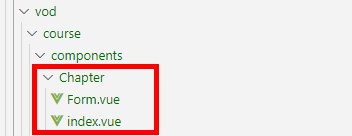
(1)Chapter -> index.vue
<template>
  <div class="app-container">

    <!--  Add chapter button  -->
    <div>
      <el-button type="primary" @click="addChapter()"> Add chapter </el-button>
    </div>

    <!--  Chapter list  -->
    <ul class="chapterList">
      <li
        v-for="chapter in chapterList"
        :key="chapter.id">
        <p>
          {
   { chapter.title }}
          <span class="acts">
            <el-button type="text" @click="addVideo(chapter.id)"> Add class hours </el-button>
            <el-button type="text" @click="editChapter(chapter.id)"> edit </el-button>
            <el-button type="text" @click="removeChapterById(chapter.id)"> Delete </el-button>
          </span>
        </p>
        <!--  video  -->
        <ul class="chapterList videoList">
          <li
            v-for="video in chapter.children"
            :key="video.id">
            <p>
              {
   { video.title }}
              <el-tag v-if="!video.videoSourceId" size="mini" type="danger">
                {
   { ' Video hasn't been uploaded yet ' }}
              </el-tag>
              <span class="acts">
                <el-tag v-if="video.isFree" size="mini" type="success">{
   { ' free ' }}</el-tag>
                <el-button type="text" @click="editVideo(chapter.id, video.id)"> edit </el-button>
                <el-button type="text" @click="removeVideoById(video.id)"> Delete </el-button>
              </span>
            </p>
          </li>
        </ul>
      </li>
    </ul>
    <!--  Chapter form dialog box  -->
    <chapter-form ref="chapterForm" />
    <!--  Class form dialog box  -->
    <video-form ref="videoForm" />
    <div style="text-align:center">
      <el-button type="primary" @click="prev()"> The previous step </el-button>
      <el-button type="primary" @click="next()"> next step </el-button>
    </div>
  </div>
</template>
<script>
import chapterApi from '@/api/vod/chapter'
import videoApi from '@/api/vod/video'

//  Import components
import ChapterForm from '@/views/vod/course/components/Chapter/Form'
import VideoForm from '@/views/vod/course/components/Video/Form'

export default {
  //  Certified components
  components: { ChapterForm, VideoForm },
  data() {
    return {
      chapterList: [] //  Nested list of chapters
    }
  },
  created() {
    this.fetchNodeList()
  },
  methods: {
    //  Get chapter and subsection data
    fetchNodeList() {
      chapterApi.getNestedTreeList(this.$parent.courseId).then(response => {
        this.chapterList = response.data
      })
    },
    // Delete chapter
    removeChapterById(chapterId) {
      this.$confirm(' This action will permanently delete the chapter , Whether or not to continue ?', ' Tips ', {
        confirmButtonText: ' determine ',
        cancelButtonText: ' Cancel ',
        type: 'warning'
      }).then(() => {
        return chapterApi.removeById(chapterId)
      }).then(response => {
        this.fetchNodeList()
        this.$message.success(response.message)
      }).catch((response) => {
        if (response === 'cancel') {
          this.$message.info(' Cancel deletion ')
        }
      })
    },
    //  Add chapter
    addChapter() {
      this.$refs.chapterForm.open()
    },
    //  Editing chapters
    editChapter(chapterId) {
      this.$refs.chapterForm.open(chapterId)
    },
    //  Add class hours
    addVideo(chapterId) {
      this.$refs.videoForm.open(chapterId)
    },
    //  Editing class hours
    editVideo(chapterId, videoId) {
      this.$refs.videoForm.open(chapterId, videoId)
    },
    //  Delete class hours
    removeVideoById(videoId) {
      this.$confirm(' This operation will permanently delete the class ,  Whether or not to continue ?', ' Tips ', {
        confirmButtonText: ' determine ',
        cancelButtonText: ' Cancel ',
        type: 'warning'
      }).then(() => {
        return videoApi.removeById(videoId)
      }).then(response => {
        this.fetchNodeList()
        this.$message.success(response.message)
      }).catch((response) => {
        if (response === 'cancel') {
          this.$message.info(' Cancel deletion ')
        }
      })
    },
    //  The previous step
    prev() {
      this.$parent.active = 0
    },
    //  next step
    next() {
      this.$parent.active = 2
    }
  }
}
</script>
<style scoped>
.chapterList{
    position: relative;
    list-style: none;
    margin: 0;
    padding: 0;
}
.chapterList li{
  position: relative;
}
.chapterList p{
  float: left;
  font-size: 20px;
  margin: 10px 0;
  padding: 10px;
  height: 70px;
  line-height: 50px;
  width: 100%;
  border: 1px solid #DDD;
}
.chapterList .acts {
    float: right;
    font-size: 14px;
}

.videoList{
  padding-left: 50px;
}
.videoList p{
  float: left;
  font-size: 14px;
  margin: 10px 0;
  padding: 10px;
  height: 50px;
  line-height: 30px;
  width: 100%;
  border: 1px dashed #DDD;
}
</style>
(2)Chapter -> Form.vue
<template>
  <!--  Add and modify chapter form  -->
  <el-dialog :visible="dialogVisible" title=" Add chapter " @close="close()">
    <el-form :model="chapter" label-width="120px">
      <el-form-item label=" Chapter title ">
        <el-input v-model="chapter.title"/>
      </el-form-item>
      <el-form-item label=" Chapter sorting ">
        <el-input-number v-model="chapter.sort" :min="0"/>
      </el-form-item>
    </el-form>
    <div slot="footer" class="dialog-footer">
      <el-button @click="close()"> take   eliminate </el-button>
      <el-button type="primary" @click="saveOrUpdate()"> indeed   set </el-button>
    </div>
  </el-dialog>
</template>

<script>
import chapterApi from '@/api/vod/chapter'
export default {

  data() {
    return {
      dialogVisible: false,
      chapter: {
        sort: 0
      }
    }
  },
  methods: {
    open(chapterId) {
      this.dialogVisible = true
      if (chapterId) {
        chapterApi.getById(chapterId).then(response => {
          this.chapter = response.data.item
        })
      }
    },

    close() {
      this.dialogVisible = false
      //  Reset form
      this.resetForm()
    },

    resetForm() {
      this.chapter = {
        sort: 0
      }
    },

    saveOrUpdate() {
      if (!this.chapter.id) {
        this.save()
      } else {
        this.update()
      }
    },

    save() {
      this.chapter.courseId = this.$parent.$parent.courseId
      chapterApi.save(this.chapter).then(response => {
        this.$message.success(response.message)
        //  Close the component
        this.close()
        //  Refresh List
        this.$parent.fetchNodeList()
      })
    },

    update() {
      chapterApi.updateById(this.chapter).then(response => {
        this.$message.success(response.message)
        //  Close the component
        this.close()
        //  Refresh List
        this.$parent.fetchNodeList()
      })
    }
  }
}
</script>
3.3、 Write sections ( Class hour ) page
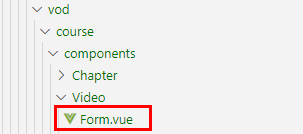
(1)Video -> Form.vue
<template>
  <!--  Add and modify session forms  -->
  <el-dialog :visible="dialogVisible" title=" Add class hours " @close="close()">
    <el-form :model="video" label-width="120px">
      <el-form-item label=" Class title ">
        <el-input v-model="video.title"/>
      </el-form-item>
      <el-form-item label=" Class ranking ">
        <el-input-number v-model="video.sort" :min="0" />
      </el-form-item>
      <el-form-item label=" Whether free ">
        <el-radio-group v-model="video.isFree">
          <el-radio :label="0"> free </el-radio>
          <el-radio :label="1"> Default </el-radio>
        </el-radio-group>
      </el-form-item>

      <!--  Upload video  -->
      <el-form-item label=" Upload video ">
        <el-upload
          ref="upload"
          :auto-upload="false"
          :on-success="handleUploadSuccess"
          :on-error="handleUploadError"
          :on-exceed="handleUploadExceed"
          :file-list="fileList"
          :limit="1"
          :before-remove="handleBeforeRemove"
          :on-remove="handleOnRemove"
          :action="BASE_API+'/admin/vod/upload'">
          <el-button slot="trigger" size="small" type="primary"> Choose video </el-button>
          <el-button
            :disabled="uploadBtnDisabled"
            style="margin-left: 10px;"
            size="small"
            type="success"
            @click="submitUpload()"> Upload </el-button>
        </el-upload>
      </el-form-item>
    </el-form>
    <div slot="footer" class="dialog-footer">
      <el-button @click="close()"> take   eliminate </el-button>
      <el-button type="primary" @click="saveOrUpdate()"> indeed   set </el-button>
    </div>
  </el-dialog>
</template>

<script>
import videoApi from '@/api/vod/video'
//import vodApi from '@/api/vod/vod'
export default {

  data() {
    return {
      BASE_API: 'http://localhost:8301',
      dialogVisible: false,
      video: {
        sort: 0,
        free: false
      },
      fileList: [], //  Upload file list
      uploadBtnDisabled: false
    }
  },

  methods: {
    open(chapterId, videoId) {
      this.dialogVisible = true
      this.video.chapterId = chapterId
      if (videoId) {
        videoApi.getById(videoId).then(response => {
          this.video = response.data
          //  The echo
          if (this.video.videoOriginalName) {
            this.fileList = [{ 'name': this.video.videoOriginalName }]
          }
        })
      }
    },

    close() {
      this.dialogVisible = false
      //  Reset form
      this.resetForm()
    },

    resetForm() {
      this.video = {
        sort: 0,
        free: false
      }

      this.fileList = [] //  Reset video upload list
    },

    saveOrUpdate() {
      if (!this.video.id) {
        this.save()
      } else {
        this.update()
      }
    },

    save() {
      this.video.courseId = this.$parent.$parent.courseId
      videoApi.save(this.video).then(response => {
        this.$message.success(response.message)
        //  Close the component
        this.close()
        //  Refresh List
        this.$parent.fetchNodeList()
      })
    },

    update() {
      videoApi.updateById(this.video).then(response => {
        this.$message.success(response.message)
        //  Close the component
        this.close()
        //  Refresh List
        this.$parent.fetchNodeList()
      })
    },

    //  Upload more than one video
    handleUploadExceed(files, fileList) {
      this.$message.warning(' Want to upload the video again , Please delete the uploaded video first ')
    },

    //  Upload
    submitUpload() {
      this.uploadBtnDisabled = true
      this.$refs.upload.submit() //  Submit upload request
    },

    //  Video upload successful callback
    handleUploadSuccess(response, file, fileList) {
      this.uploadBtnDisabled = false
      this.video.videoSourceId = response.data
      this.video.videoOriginalName = file.name
    },

    //  Failed callback
    handleUploadError() {
      this.uploadBtnDisabled = false
      this.$message.error(' Upload failed 2')
    },

    //  Confirm to delete the video file
    handleBeforeRemove(file, fileList) {
      return this.$confirm(` Confirm removal  ${file.name}?`)
    },

    //  Delete the video file
    handleOnRemove(file, fileList) {
      if (!this.video.videoSourceId) {
        return
      }
    }
  }
}
</script>
Two 、 Release course - The course is finally released
1、 The final release interface of the course
1.1、 To write CourseController
Add method
    @ApiOperation(" according to id Get course release information ")
    @GetMapping("getCoursePublishVo/{id}")
    public Result getCoursePublishVoById(
            @ApiParam(value = " Course ID", required = true)
            @PathVariable Long id){


        CoursePublishVo coursePublishVo = courseService.getCoursePublishVo(id);
        return Result.ok(coursePublishVo);
    }

    @ApiOperation(" according to id Release course ")
    @PutMapping("publishCourseById/{id}")
    public Result publishCourseById(
            @ApiParam(value = " Course ID", required = true)
            @PathVariable Long id){


        boolean result = courseService.publishCourseById(id);
        return Result.ok();
    }
1.2、 To write CourseService
// according to id Get course release information
CoursePublishVo getCoursePublishVo(Long id);

// according to id Release course
boolean publishCourseById(Long id);
1.3、 To write CourseServiceImpl
// according to id Get course release information
@Override
public CoursePublishVo getCoursePublishVo(Long id) {

	return courseMapper.selectCoursePublishVoById(id);
}

// according to id Release course
@Override
public boolean publishCourseById(Long id) {

	Course course = new Course();
	course.setId(id);
	course.setPublishTime(new Date());
	course.setStatus(1);
	return this.updateById(course);
}
1.4、 To write CourseMapper
public interface CourseMapper extends BaseMapper<Course> {

	// according to id Get course release information
    CoursePublishVo selectCoursePublishVoById(Long id);
}
1.5、 To write CourseMapper.xml
<?xml version="1.0" encoding="UTF-8"?>
<!DOCTYPE mapper PUBLIC "-//mybatis.org//DTD Mapper 3.0//EN" "http://mybatis.org/dtd/mybatis-3-mapper.dtd">
<mapper namespace="com.atguigu.ggkt.vod.mapper.CourseMapper">

    <select id="selectCoursePublishVoById" resultType="com.atguigu.ggkt.vo.vod.CoursePublishVo">
        SELECT
                c.id,
                c.title,
                c.cover,
                c.lesson_num AS lessonNum,
                c.price,
                t.name AS teacherName,
                s1.title AS subjectParentTitle,
                s2.title AS subjectTitle
        FROM course c
             LEFT OUTER JOIN teacher t ON c.teacher_id=t.id
             LEFT OUTER JOIN `subject` s1 ON c.subject_parent_id=s1.id
             LEFT OUTER JOIN `subject` s2 ON c.subject_id=s2.id
        WHERE c.id=#{id}
    </select>
</mapper>
1.6、 Add the configuration
(1)application.properties add to
mybatis-plus.mapper-locations=classpath:com/atguigu/ggkt/vod/mapper/xml/*.xml
(2)service modular pom.xml add to
<build>
    <plugins>
        <plugin>
            <groupId>org.springframework.boot</groupId>
            <artifactId>spring-boot-maven-plugin</artifactId>
        </plugin>
    </plugins>
    <resources>
        <resource>
            <directory>src/main/java</directory>
            <includes>
                <include>**/*.yml</include>
                <include>**/*.properties</include>
                <include>**/*.xml</include>
            </includes>
            <filtering>false</filtering>
        </resource>
        <resource>
            <directory>src/main/resources</directory>
            <includes> <include>**/*.yml</include>
                <include>**/*.properties</include>
                <include>**/*.xml</include>
            </includes>
            <filtering>false</filtering>
        </resource>
    </resources>
</build>
2、 The course is finally released to the front end
2.1、course.js Defining interfaces
// Get and publish course information
getCoursePublishById(id) {

   return request({

     url: `${
      api_name}/getCoursePublishVo/${
      id}`,
     method: 'get'
   })
},
// Release course
publishCourseById(id) {

   return request({

     url: `${
      api_name}/publishCourseById/${
      id}`,
     method: 'put'
   })
},
2.2、 To write Publish.vue
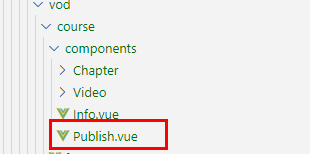
<template>
  <div class="app-container">
    <!-- Course preview -->
    <div class="ccInfo">
      <image :src="coursePublish.cover">
      <div class="main">
        <h2>{
   { coursePublish.title }}</h2>
        <p class="gray"><span> common {
   { coursePublish.lessonNum }} Class hour </span></p>
        <p><span> Classification :{
   { coursePublish.subjectParentTitle }} — {
   { coursePublish.subjectTitle }}</span></p>
        <p> Course instructor :{
   { coursePublish.teacherName }}</p>
        <h3 class="red">¥{
   { coursePublish.price }}</h3>
      </div>
    </div>
    <div style="text-align:center">
      <el-button type="primary" @click="prev()"> The previous step </el-button>
      <el-button :disabled="publishBtnDisabled" type="primary" @click="publish()"> Release course </el-button>
    </div>
  </div>
</template>

<script>
import courseApi from '@/api/vod/course'

export default {
  data() {
    return {
      publishBtnDisabled: false, //  Whether the button is disabled
      coursePublish: {}
    }
  },
  created() {
    if (this.$parent.courseId) {
      this.fetchCoursePublishById(this.$parent.courseId)
    }
  },
  methods: {
    //  Get course release information
    fetchCoursePublishById(id) {
      courseApi.getCoursePublishById(id).then(response => {
        this.coursePublish = response.data
      })
    },
    //  The previous step
    prev() {
      this.$parent.active = 1
    },
    //  next step
    publish() {
      this.publishBtnDisabled = true
      courseApi.publishCourseById(this.$parent.courseId).then(response => {
        this.$parent.active = 3
        this.$message.success(response.message)
        this.$router.push({ path: '/vodcourse/course/list' })
      })
    }
  }
}
</script>
<style scoped>
.ccInfo {
    background: #f5f5f5;
    padding: 20px;
    overflow: hidden;
    border: 1px dashed #DDD;
    margin-bottom: 40px;
    position: relative;
}
.ccInfo img {
    background: #d6d6d6;
    width: 500px;
    height: 278px;
    display: block;
    float: left;
    border: none;
}
.ccInfo .main {
    margin-left: 520px;
}
.ccInfo .main h2 {
    font-size: 28px;
    margin-bottom: 30px;
    line-height: 1;
    font-weight: normal;
}
.ccInfo .main p {
    margin-bottom: 10px;
    word-wrap: break-word;
    line-height: 24px;
    max-height: 48px;
    overflow: hidden;
}
.ccInfo .main p {
    margin-bottom: 10px;
    word-wrap: break-word;
    line-height: 24px;
    max-height: 48px;
    overflow: hidden;
}
.ccInfo .main h3 {
    left: 540px;
    bottom: 20px;
    line-height: 1;
    font-size: 28px;
    color: #d32f24;
    font-weight: normal;
    position: absolute;
}
</style>
3、 ... and 、 Function realization - Course deletion
1、 Course delete interface
(1) Writing courses Controller
@ApiOperation(value = " Delete course ")
@DeleteMapping("remove/{id}")
public Result remove(@PathVariable Long id) {

    courseService.removeCourseById(id);
    return Result.ok();
}
(2) Writing courses Service
    // Delete course
    @Override
    public void removeCourseById(Long id) {

        // According to the course id Delete section
        videoService.removeVideoByCourseId(id);
        // According to the course id Delete chapter
        chapterService.removeChapterByCourseId(id);
        // According to the course id Delete description
        descriptionService.removeById(id);
        // According to the course id Delete course
        baseMapper.deleteById(id);
    }
(3) To write VideoService
@Service
public class VideoServiceImpl extends ServiceImpl<VideoMapper, Video> implements VideoService {


    // According to the course id Delete section
    @Override
    public void removeVideoByCourseId(Long id) {

        QueryWrapper<Video> wrapper = new QueryWrapper<>();
        wrapper.eq("course_id",id);
        baseMapper.delete(wrapper);
    }
}
(4) To write ChapterService
   // According to the course id Delete chapter
    @Override
    public void removeChapterByCourseId(Long id) {

        QueryWrapper<Chapter> wrapper = new QueryWrapper<>();
        wrapper.eq("course_id",id);
        baseMapper.delete(wrapper);
    }
2、 Delete the front end of the course
2.1、course.js Defining interfaces
  removeById(id) {

    return request({

      url: `${
      api_name}/remove/${
      id}`,
      method: 'delete'
    })
  },
2.2、course -> list.vue Add method
methods: {

	......
	//  according to id Delete data
    removeById(id) {

      this.$confirm(' This action will permanently delete the course , And the next video and , Whether or not to continue ?', ' Tips ', {

        confirmButtonText: ' determine ',
        cancelButtonText: ' Cancel ',
        type: 'warning'
      }).then(() => {

        return courseApi.removeById(id)
      }).then(response => {

        this.fetchData()
        this.$message.success(response.message)
      }).catch((response) => {
     //  Failure
        if (response === 'cancel') {

          this.$message.info(' Cancel deletion ')
        }
      })
    }
}
",id);
baseMapper.delete(wrapper);
}
}
##### (4) To write ChapterService

```java
   // According to the course id Delete chapter
    @Override
    public void removeChapterByCourseId(Long id) {
        QueryWrapper<Chapter> wrapper = new QueryWrapper<>();
        wrapper.eq("course_id",id);
        baseMapper.delete(wrapper);
    }
2、 Delete the front end of the course
2.1、course.js Defining interfaces
  removeById(id) {

    return request({

      url: `${
      api_name}/remove/${
      id}`,
      method: 'delete'
    })
  },
2.2、course -> list.vue Add method
methods: {

	......
	//  according to id Delete data
    removeById(id) {

      this.$confirm(' This action will permanently delete the course , And the next video and , Whether or not to continue ?', ' Tips ', {

        confirmButtonText: ' determine ',
        cancelButtonText: ' Cancel ',
        type: 'warning'
      }).then(() => {

        return courseApi.removeById(id)
      }).then(response => {

        this.fetchData()
        this.$message.success(response.message)
      }).catch((response) => {
     //  Failure
        if (response === 'cancel') {

          this.$message.info(' Cancel deletion ')
        }
      })
    }
}
边栏推荐
- pgsql -&gt; flink cdc -&gt; flink -&gt; Mysql, if a PgSQL CDC
- Boss; Can flick CDC Oracle finish reading the full amount of data, just like directly fetching data from the database
- Day07 MySql知识点再总结与多表查询
- P5469 [noi2019] robot (Lagrange interpolation, interval DP)
- 面试:你印象最深的BUG,举个例子
- 电脑开机后内存占用过高(50%以上)
- Customer case | student education relies on observation cloud to create a new ecosystem of observable Smart Education
- Calendar documents implemented by several qwidgets
- [postgresql]postgresqlg使用enerate_series() 函数补全统计
- Arduino experiment I: two color lamp experiment
猜你喜欢

Eureka基本使用

Arduino experiment I: two color lamp experiment

Cheaper than seals, with a large space for shape explosion. Is there really no match for 200000 or so? Chang'an's new "King fried" is cost-effective

kalibr标定realsenseD435i --多相机标定

App information reconnaissance & night God simulator burp packet capture configuration

Programmer growth chapter 29: how to motivate employees?

科研太忙无法顾家?陈婷:人生不能只有一个支点

Hcia-r & s self use notes (19) VLAN configuration and experiment, routing between VLANs

Interview: your most impressive bug, for example

PostgreSQL 与 Navicat:数据库行业的中坚力量
随机推荐
Apifox -- a better API testing tool than postman
Is test development development development?
Hcia-r & s self use notes (19) VLAN configuration and experiment, routing between VLANs
PostgreSQL 与 Navicat:数据库行业的中坚力量
Day07 MySQL knowledge points re summary and multi table query
基于gRPC编写golang简单C2远控
Reinforcement learning weekly 55: lb-sgd, msp-drl & robust reinforcement learning against
Learn various details and thoughts of chatroom implementation in Muduo
黑马瑞吉外卖之新增员工
杰理下载器强制下载工具的使用介绍_AC695N696NAD14AD15全系列支持
A13 processor has become the biggest highlight of iphone11 series: its performance is twice that of Kirin 980!
KT6368A蓝牙芯片开发注意事项以及问题集锦--长期更新
Esmfold: a new breakthrough in protein structure prediction after alphafold2
[hcip] OSPF relationship establishment
8-其他编程语言--记录
An online accident, I suddenly realized the essence of asynchrony
gateway基本使用
Xu Li, CEO of Shangtang Technology: the company's valuation has exceeded $7billion, so we are not in a hurry to go public
为什么我还在CSDN写文章?一段陪伴学习的历程。
面试:你印象最深的BUG,举个例子