当前位置:网站首页>MATLAB and MySQL database connection and data exchange (based on ODBC)
MATLAB and MySQL database connection and data exchange (based on ODBC)
2022-06-26 21:37:00 【Baozheng dream sound】
One 、 To configure ODBC data source
1.1、 install Mysql-connect-ODBC drive , Click on mysql-connector-odbc-5.2.5-winx64.msi

1.2、 Click next NexT

1.3、 choice :I accept the terms in the license agreement

1.4、 choice Typical, next step Next


1.5、ODBC The driver is installed
Two 、 Click... In the control panel “ Management tools ”

2.1、 choice 64 position ODBC data source
Set up ODBC Data source , You can specify the user data source name (DSN) Or the system DSN. user DSN Is specific to the person who logs on to the computer . Only this person can see in the user DSN Data sources defined on the tab . System DSN It is not specific to the person who logs on to the computer . Anyone who logs on to the machine can see that SystemDSN Data sources defined on the tab . You set the user DSN Or the system DSN The capability of depends on the database and ODBC The driver . For more information , Please contact the database administrator or refer to ODBC Driver documentation .

2.2、 Click Add

2.3、 choice “MySQL ODBC 8.0 Unicode Driver”

2.4、 Fill in the database information ,Data Source Name Is the database name ;Description Is to describe , Not required ;
TCP/IP Server You can fill in localhost or 127.0.0.1;User Username , The default is root;Password Is password , For installation MySQL The password you filled in when ; And then click Test, Tips connect successful, The successful . And then click OK.
- stay Data source name In the box , Enter the appropriate name for the data source , Such as MySQL. Use this name to establish a connection to the database .
- stay describe In the box , Enter a description for this data source , Such as MySQL database.
- stay TCP/IP The server In the box , Enter the name of the database server . About the name of the database server , Please consult the database administrator .
- stay harbor Box . The default port number is 3306.
- stay user In the box , Enter your user name .
- stay password Box to enter your password .
- stay database In the box , Enter the name of the database .
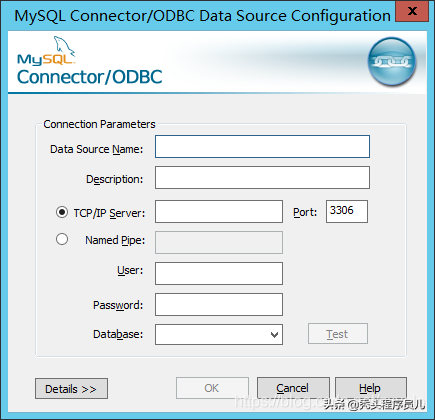
2.5、 Configuration complete .

3、 ... and 、 stay matlab Operation in
3.1、 open MATLAB, stay APP Choose from Database Explorer;
By clicking MATLAB On the toolbar Apps Tab opens the Database Explorer Application . then , stay “ Applications ” The right side of the section , single click “ Show more ” arrow , Open the application library . stay “ Database connectivity and reporting ” Next , single click “ Database Explorer ”. perhaps , Enter at the command line DatabaseExplorer. stay “ data source ” In the part , choice “ Configure data sources > To configure ODBC data source ”.

3.2、 Select the built database in the pop-up window , Enter the user name and password , Click on connect;

3.3、 The following figure shows the successful connection
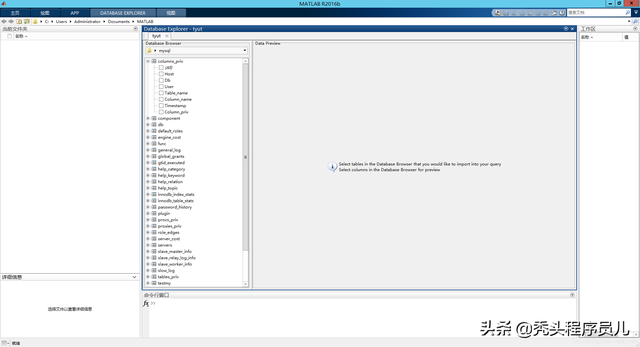
3.4、 Enter the code on the command line , Get data , Here's the picture ;
Connect to MySQL Use ODBC Drivers and command lines
Use ODBC The data source name connects to the database . for example , This code assumes that you are connecting to a named MySQL Have user name username And password pwd.
conn = database('MySQL','username','pwd');Closed database connection .
close(conn)

边栏推荐
- Is there any risk in opening a securities registration account? Is it safe?
- YuMinHong: New Oriental does not have a reversal of falling and turning over, destroying and rising again
- Student information management system based on SSH Framework
- [serial] shuotou O & M monitoring system 01 overview of monitoring system
- leetcode刷题:字符串01(反转字符串)
- QT两种方法实现定时器
- 在哪家证券公司开户最方便最安全可靠
- Leetcode: String 04 (reverse the words in the string)
- [Bayesian classification 3] semi naive Bayesian classifier
- curl: (35) LibreSSL SSL_connect: SSL_ERROR_SYSCALL in connection
猜你喜欢

Y48. Chapter III kubernetes from introduction to mastery -- pod status and probe (21)

Module 5 operation

Icml2022 | neurotoxin: a lasting back door to federal learning

Dynamic parameter association using postman
y48.第三章 Kubernetes从入门到精通 -- Pod的状态和探针(二一)

Matrix calculator design for beginners of linear algebra based on Qt development

记录一次Redis大Key的排查

windows系統下怎麼安裝mysql8.0數據庫?(圖文教程)

众多碎石3d材质贴图素材一键即可获取

卷积神经网络(CNN)详解及TensorFlow2代码实现
随机推荐
Cause analysis of 12 MySQL slow queries
How to enable Hana cloud service on SAP BTP platform
【题解】剑指 Offer 15. 二进制中1的个数(C语言)
Sword finger offer II 098 Number of paths / Sword finger offer II 099 Sum of minimum paths
[Bayesian classification 2] naive Bayesian classifier
Usage of MGrid in numpy
花店橱窗布置【动态规划】
Is it safe to open a stock account with the QR code given by the CICC securities manager? I want to open an account
leetcode刷题:字符串04(颠倒字符串中的单词)
360手机助手首家接入APP签名服务系统 助力隐私安全分发
Hands on deep learning pytorch version 3 - Data Preprocessing
网络爬虫2:抓取网易云音乐评论用户ID及主页地址
[solution] sword finger offer 15 Number of 1 in binary (C language)
Final part of web crawler: send directional messages to 100000 Netease cloud users
基于启发式搜索的一字棋
[Shandong University] information sharing for the first and second examinations of postgraduate entrance examination
传纸条【动态规划】
网络爬虫终篇:向10万级网易云用户发送定向消息
12个MySQL慢查询的原因分析
Treasure and niche cover PBR multi-channel mapping material website sharing