当前位置:网站首页>Simple introduction to matlab
Simple introduction to matlab
2022-06-29 12:57:00 【桜キャンドルル】
Catalog
2. Incremental method to construct vector
3. Use linspac Construct vectors
4. Use logspace Construct vectors
2. Use meshgrid Construct matrix
5. Describe arrays and matrices
6. Sort 、 reverse 、 Transposition 、 restore
7. Get the elements of the matrix
4. Use end Keyword to get the elements of the matrix
1. Create a random array with normal distribution
2. Generate an array whose elements are the same constant
3. Use cat Generate multidimensional arrays
2. Check the number of input parameters
One 、help and doc command
help and doc Commands can help us when we don't know unfamiliar functions , Query the description document of our function
help Function can help us directly display the command of the function we want to query in the command area
help logspace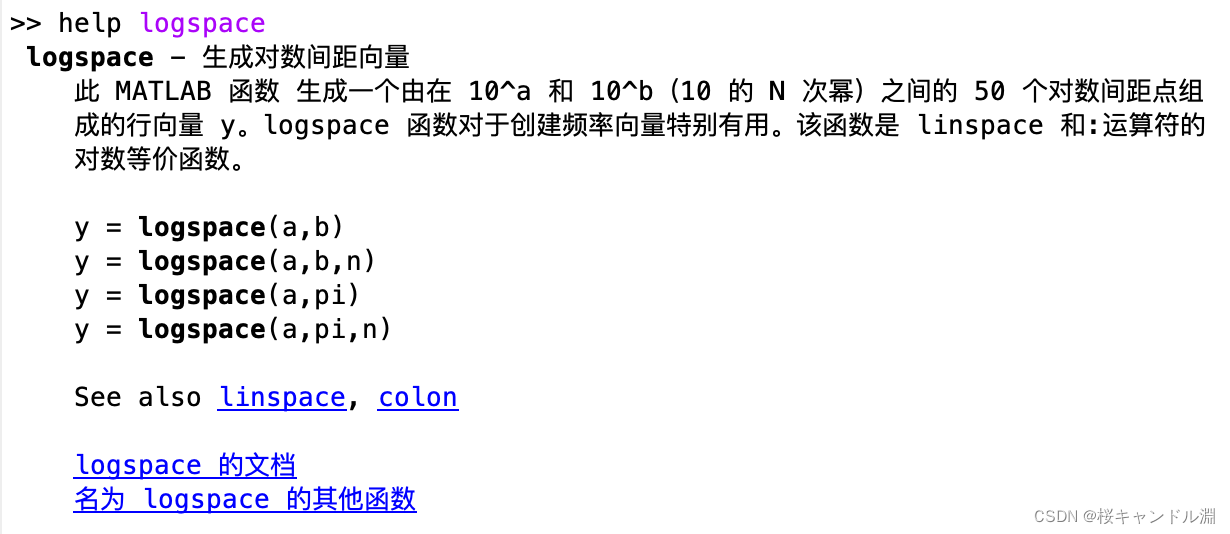
doc logspace doc The command can help us open the details of a function 
Two 、 Array
stay MATLAB All the data in is saved in the form of an array
1. constant
constant | Return value |
ans | Default variable name , Save recent results . If you do not specify an output variable for the expression ,MATLAB The results will be automatically saved to ans variable |
eps | Floating point relative precision . yes MATLAB Tolerance for calculation |
realmax | The maximum number of floating-point numbers that a computer can represent |
realmin | The smallest floating point number that a computer can represent |
pi | PI |
i, j | An imaginary unit |
inf | Unlimited value . similar n/0 The result of the expression of is inf, among n For the wrong 0 The set of real Numbers |
NaN | Indicates an illegal value , Non numerical . similar 0/0 and inf/inf The result of the expression of , And NaN The results of relevant arithmetic operations , as well as n/0,n When it is a complex number, the result is NaN |
computer | Computer type |
version | MATLAB Version string |
2. Variable
MATLAB The first variable must be a letter
MATLAB Case sensitive (a And A It's a different variable )
3. vector
1. Direct construction method
a=[1 2 3 4 5 6 7]
2. Incremental method to construct vector
The first data of the incremental method is the initial value , The second data is the step size , The third data is the end value .
a=1:2:10
b=10:-2:1
3. Use linspac Construct vectors
linspace The first parameter is zero Initial value , The second value is the end value , The third value is the number of elements in the generated vector, which is a vector constructed in an equal interval way
c=linspace(10,1,20)
4. Use logspace Construct vectors
The first parameter is zero 10^first, The second parameter is 10^last, The third parameter is the number of generated elements
x=logspace(0,1,10)
3、 ... and 、 matrix
1. Simple creation method
We use semicolons to separate when creating a matrix , But we must ensure that the number of elements in each row is the same .
a=[1,2,3;4,5,6;7,8,9]
2. Use meshgrid Construct matrix
this MATLAB function Based on vectors x and y The coordinates contained in the return 2D grid coordinates .X It's a matrix , Each line is x A copy of ;Y It's also a matrix , Each column is y A copy of . coordinate X and Y The grid represented has
length(y) Rows and length(x) Columns .[X,Y] = meshgrid(x,y)
[X,Y] = meshgrid(x)[X,Y,Z] = meshgrid(x,y,z)
[X,Y,Z] = meshgrid(x)

3. Construct a special matrix
Letter Count | work can |
ones | Create one where all elements are 1 Matrix |
zeros | Create one where all elements are 0 Matrix |
eye | Create diagonal elements as 1, The other elements are 0 Matrix |
diag | Create a diagonal matrix from a vector |
magic | Create a square matrix , One line 、 The sum of columns and diagonal elements is equal |
rand | Create a matrix or array , The elements are random numbers that obey uniform distribution |
randn | Create a matrix or array , The elements are random numbers that obey normal distribution |
randperm | Create a vector (1×n Matrix ) |
4. Aggregation matrix
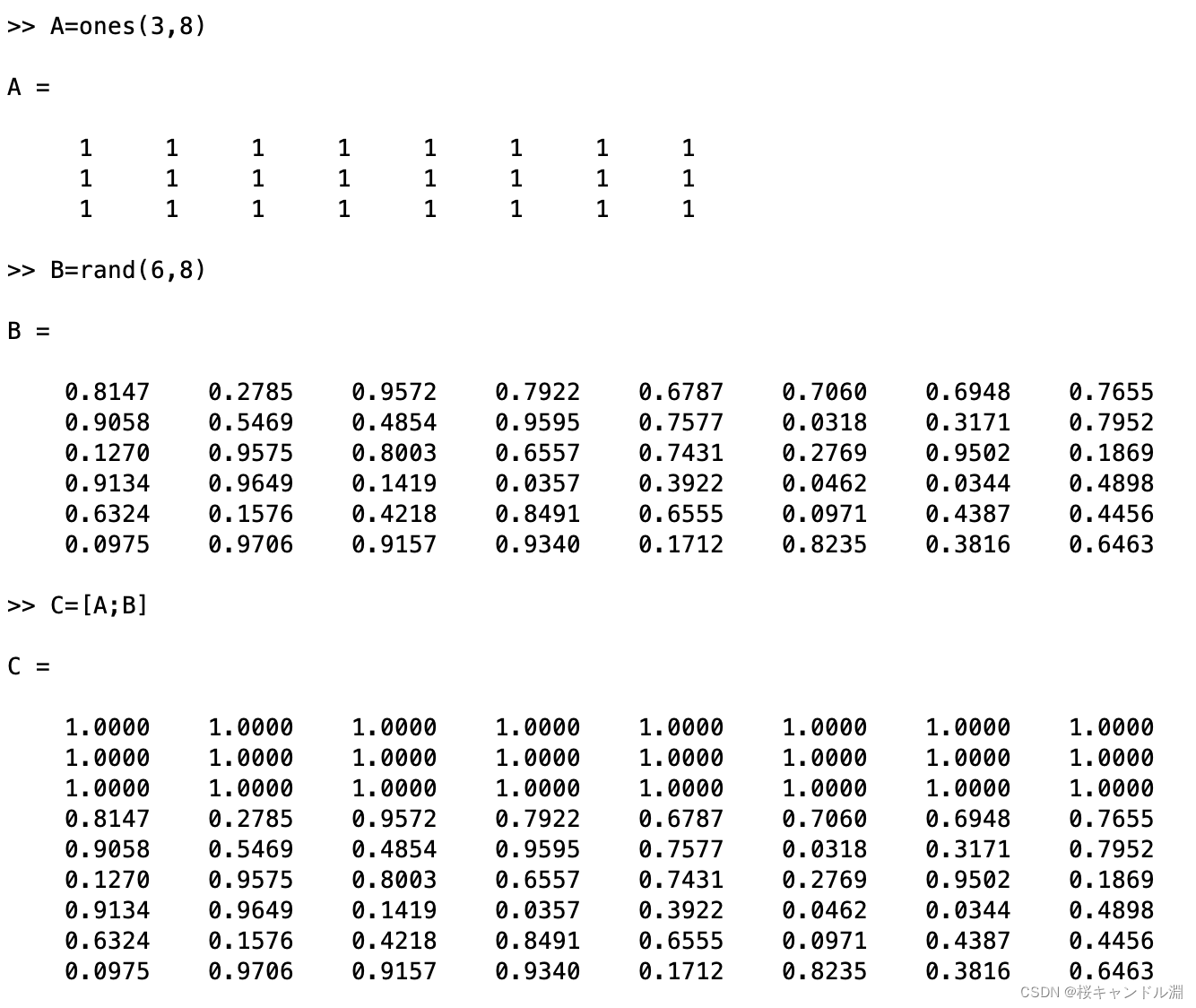
In the following code , We used C to A On B The top and bottom are spliced together .
When combining different matrices , When a high-precision matrix is combined with a low-precision matrix, the new matrix is of low precision .
5. Describe arrays and matrices
• size – size function
• The length of the maximum dimension - length function
• dimension – ndims function
• Element number – numel function

6. Sort 、 reverse 、 Transposition 、 restore
• Sort - sort/sortrows function
• Flip – flip/fliplr/flipud function
• Transposition – rot90/transpose function
• restore – reshape, squeeze function


7. Get the elements of the matrix
• Use numbered index
• Use linear index
• Use a colon
• Use end keyword
1. Numbering index

2. Linear index
because MATLAB When you save an array, you save it by column , So we need to calculate by column when we do linear indexing .
In the following code, we see that what we are looking for is C(15) The first thing we look for is the first column , There are... In the first column 9 Elements , So our sixth element in the second column is our C(15)

3. Use a colon
Use colon to get all the elements of a row or a column , Or the entire array itself .


4. Use end Keyword to get the elements of the matrix
there end It means our last element , Then we started from 1 Start taking value , To the end , In steps of 3, Get all our data
C(1:3:end)
8. Multidimensional arrays
1. Create a random array with normal distribution
In the following code , What we generate is a 5×3×2 Three dimensional array of

2. Generate an array whose elements are the same constant

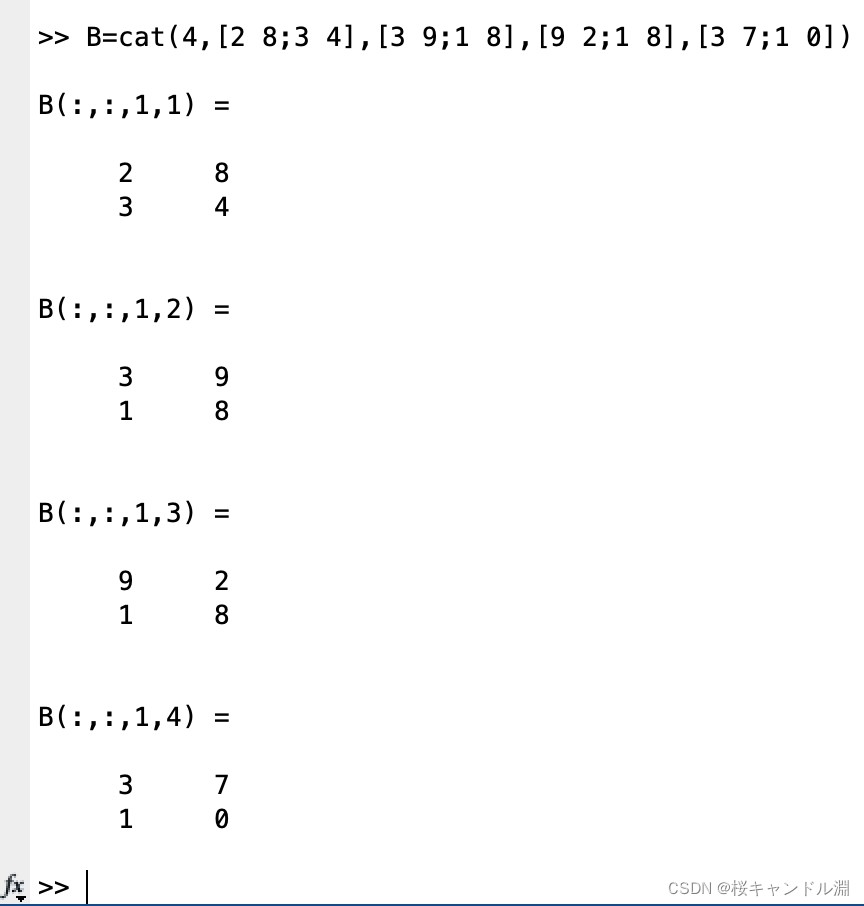
3. Use cat Generate multidimensional arrays
Four 、 data type
Data type of variable
double Type value type
Not double Type value type
character string
Date and time array
Sort array
surface
schedule
Structure array
Array of cells
Function handle

1. character string
• String creation
• String comparison
• String aggregation
• Search and replace strings
1. Create string
When creating a string , It is OK to use single quotation marks or double quotation marks .

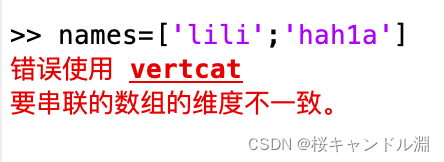
Of course, we can also create two-dimensional strings , But the number of elements in each line of string should be the same , And we can use the index of the two-dimensional array to manipulate our two-dimensional string .


2. Type conversion
Use mat2str Function to convert an array to a string

Use int2str Function to convert integer data to string data

2. Function handle
Function handles are used to hold MATLAB All information related to the operation of functions in
Here we define a function (. Point multiplication , That is, to process every element in our matrix .)
So the function represented by the following code is 
function f=myfun(x)
f=(3-2.*x).^2.*x;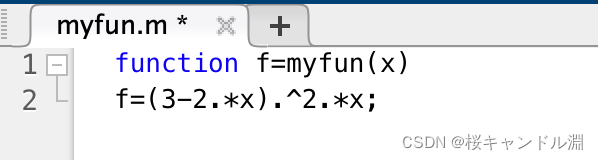
x=fminbnd(@myfun,0,1.5)In the code above , We have achieved the goal of 0 and 1.5 Pass it into our above method , Then the process of finding the minimum , Then we can get our x The value is 1.4999

5、 ... and 、M Document design
Variable
expression
Process control
function
M file
Program debugging and error handling
1. Variable
local variable : The scope of local variables is limited to this function
Global variables : For global variables global Keyword to declare , Its scope of action is the whole M file
2. expression
• The value represents
• Operator
• Handle string expressions
3. The value represents
MATLAB Using traditional numerical representation . For longer numbers , Use scientific counting , Use letters e Specified in 10 Is the power of the base . For imaginary numbers i or j As a suffix .

4. Operator
• Arithmetic operator
• Relational operator
• Logical operators
• Operator precedence
1. Arithmetic operator
Operator | say bright | Operator | say bright | |
+ | Add | .* | Dot by dot | |
- | reduce | ./ | Divide right by element | |
* | Matrix multiplication | .\ | Divide left by element | |
/ (a/b) | Right division of a matrix ,a ride b The inverse of | .^ | Exponentiation per element | |
\ (a\b) | Matrix left Division ,a Inverse multiplication of b | ' | Complex conjugate transpose | |
^ | The power of a matrix | () | Specify the calculation order |
2. Relational operator
Operator | Sketch Statement | Operator | Sketch Statement | |
< | Less than | >= | Greater than or equal to | |
<= | Less than or equal to | == | be equal to | |
> | Greater than | ~= | It's not equal to |
3. Logical operators
Operator | Letter Count | Sketch Statement | in example |
& | and | The values at the same position in both arrays are not 0 When to return to 1, Otherwise return to 0 | A & B=01001 or and(A,B) |
| | or | A value at the same position in two arrays has a non 0 When to return to 1, Otherwise return to 0 | A | B=11101 or or(A,B) |
~ | not | Invert the elements in the array , It's not 0 Value to 0,0 Turn into 1 | ~A=10010 or not(A) |
xor | There is only one non - element in the same position in two arrays 0 When to return to 1, Otherwise return to 0 | xor(A,B)=10100 | |
any(C) | If any of the elements in the vector is not 0, return 1; Otherwise return to 0 | any(C) ans= 0 1 1 | |
all(C) | If all the elements in the vector are not 0, return 1, Otherwise return to 0 | all(C) ans= 0 1 0 | |
&& | If the expressions at both ends of the symbol are true , return true(1); Otherwise return to 0 | a=8; a>5 && a<10 ans= 1 | |
|| | If one of the expressions at both ends of the symbol is true , return true(1); Otherwise return to 0 | a=11; a>5 || a<10 ans= 1 |
xor Function demonstration

4. Operator precedence
• parentheses ()
• Transposition (.')、 power (.^)、 Complex conjugate transpose (')、 The power of a matrix (^)
• One dollar plus (+)、 One dollar minus (-)、 Logical not (~)
• ride (.*)、 Divide right (./)、 be demoted (.\)、 Matrix multiplication (*)、 Right division of a matrix (/)、 Matrix left Division (\)
• Add (+)、 reduce (-)
• The colon operator (:)
• Less than (<)、 Less than or equal to (<=)、 Greater than (>)、 Greater than or equal to (>=)、 be equal to (==)、 It's not equal to (~=)
• By element AND(&)
• By element OR(|)
•&&
•||
5. Process control
• Under controlled conditions
• Cycle control
• Program termination control
1. Under controlled conditions
Here we define a process control function .

This is the result of our test

Of course, I can also pass Switch-case Statement to implement process control


2. Cycle control
for loop
while loop
for loop

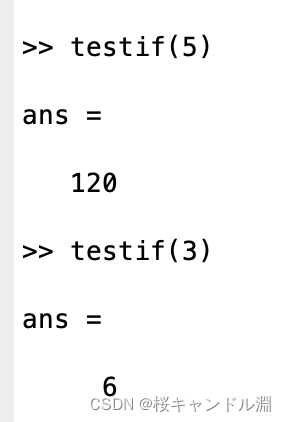
while loop
function f=testif(x)
sum=1;
while(x>=1)
    sum=sum*x;
    x=x-1;
f=sum;
end 
3. Program termination control
command | Where to use it | Sketch Statement |
break | for or while loop | When it appears , Exit loop , In nested loops , Enter the adjacent outer loop |
continue | for or while loop | Skip the remaining statements in this loop , Enter the next iteration of this loop |
return | Anywhere | When it appears , Exit the function immediately , Enter the calling function of the function |
6、 ... and . function
1. Anonymous functions
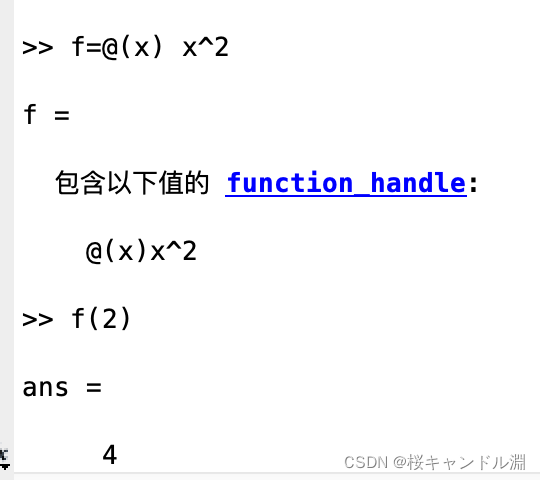
Anonymous functions can be implemented quickly when implementing some simple functions
[email protected](arglist) expr
2. Check the number of input parameters
Use nargin You can determine the number of input parameters of the function ,nargout Function can determine the number of output parameters
function c = w(a, b)
  if (nargin == 1)
      c = 1;
  elseif (nargin == 2)
      c = 2;
  end
3. Function handle
Handle function allows our function to use a simple variable
function c = w(x)
 c=sin(x);
end
In the following code , We will w Method is passed to our x
Then when we can pass feval function , The first parameter is passed into our method , The second parameter is passed into our specific argument .

Of course, we can also pass in a string of data for batch calculation

边栏推荐
- 趣谈网络协议(二)传输层
- 2022.6.28-----leetcode.324
- 测试--自动化测试:关于unittest框架
- Principle and process of MySQL master-slave replication
- 面试突击61:说一下MySQL事务隔离级别?
- How to fix ORA-01017:用户名/口令无效 登录拒绝
- C # clue binary tree through middle order traversal
- 墨菲安全入选中关村科学城24个重点项目签约
- 推荐模型复现(三):召回模型YoutubeDNN、DSSM
- Deep understanding of volatile keyword
猜你喜欢
![[intelligent QBD risk assessment tool] Shanghai daoning brings you leanqbd introduction, trial and tutorial](/img/00/9a6d17844b88f6921ad488f4975684.png)
[intelligent QBD risk assessment tool] Shanghai daoning brings you leanqbd introduction, trial and tutorial

测试--自动化测试:关于unittest框架
C#通过中序遍历对二叉树进行线索化

缓存一致性,删除缓存,写入缓存,缓存击穿,缓存穿透,缓存雪崩

QQ集体被盗号,猝不及防的大型社死名场面

Introduction to multi project development - business scenario Association basic introduction test payroll

推荐模型复现(一):熟悉Torch-RecHub框架与使用
LeetCode_双指针_中等_328.奇偶链表
Problem solving: modulenotfounderror: no module named 'pip‘

Kyligence Zen, an intelligent indicator driven management and decision-making platform, is newly launched and is in limited internal testing
随机推荐
C # implements the operations of sequence table definition, insertion, deletion and search
Earth observation satellite data
nvtmpp
如果我在深圳,到哪里开户比较好?另外想问,现在在线开户安全么?
如何計算win/tai/loss in paired t-test
Deep understanding of volatile keyword
C # realizes the first order traversal, middle order traversal and second order traversal of binary tree
【LeetCode】14、最长公共前缀
asp. Net project using aspnet_ compiler. Exe Publishing
C#实现顺序表定义、插入、删除、查找操作
推荐模型复现(三):召回模型YoutubeDNN、DSSM
Gbase8s database into external clause
Principle and process of MySQL master-slave replication
多项目开发入门-业务场景关联基础入门测试 工资表
[环境配置]PWC-Net
Interview shock 61: tell me about MySQL transaction isolation level?
How can colleges and universities build future oriented smart campus based on cloud native? Full stack cloud native architecture vs traditional IT architecture
Go learning - build a development environment vscode development environment golang
MySQL master-slave synchronous asynchronous replication semi synchronous replication full synchronous replication
倍福TwinCAT配置、调试第三方伺服详细讲解--以汇川IS620N为例子