当前位置:网站首页>Uni app form submit button send request
Uni app form submit button send request
2022-07-27 18:44:00 【North next week】
The current page is as follows
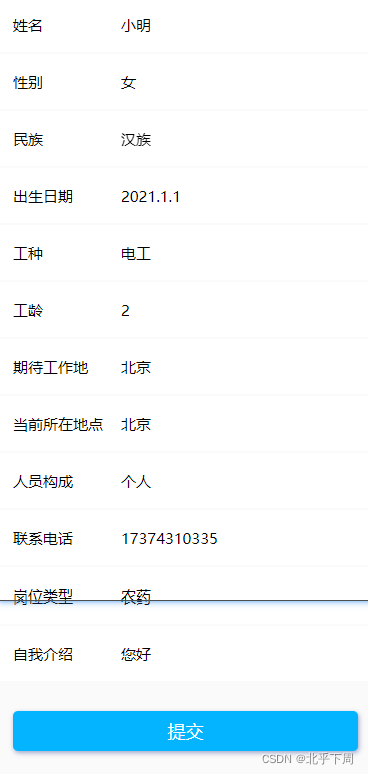
Code section
<html> Give oneortwo examples of input boxes
	<view class="content">
	        <view class="row b-b">
	            <text class="tit"> full name </text>
	            <input class="input" type="text" v-model="addressData.name" placeholder=" Please enter your name " placeholder-class="placeholder" />
	        </view>
	        <view class="row b-b">
	            <text class="tit"> Gender </text>
	            <input class="input" type="text" v-model="addressData.gender" placeholder=" Please enter your gender " placeholder-class="placeholder" />
	        </view>
            <button class="add-btn" @tap="sbmitFeedback"> Submit </button>
</view>
js Of data part
<script>
	export default {
		data() {
			return {
				addressData: {
				                    name: '',
				                    gender: '',
				                    nation: '',
				                    birth: '',
									wokind: '',
									wokage: '',
									city: '',
									here: '',
									person: '',
									phone: '',
									kindof: '',
									intro: '',
				                },

				footprintList: []
			}
		},
js part
methods: {
			// Submit
			sbmitFeedback: function(e) {
				let that = this;
				// if (that.feedType == 0) {
				// 	util.toast(' Please select the feedback type ');
				// 	return false;
				// }

				if (that.addressData.name == '') {
					util.toast(' Please enter the feedback ');
					return false;
				}

				// if (!util.isMobile(that.mobile)) {
				// 	util.toast(' Please enter the correct mobile phone number ');
				// 	return false;
				// }
				util.request('recruit/my/updateUser', {

					name: that.addressData.name,
					gender: that.addressData.gender,
					nation: that.addressData.nation,
					birth: that.addressData.birth,
					wokind: that.addressData.wokind,
					wokage: that.addressData.wokage,
					city: that.addressData.city,
					here: that.addressData.here,
					person: that.addressData.person,
					 phone: that.addressData.phone,
					 kindof: that.addressData.kindof,
					intro: that.addressData.intro,
				}, 'POST').then(function(res) {
					if (res.code === 0) {
						uni.showModal({
							content: ' We have received your feedback !',
							showCancel: false,
							success: function(res) {
								if (res.confirm) {
									uni.switchTab({
										url: '/pages/ucenter/index/index'
									})
								}
							}
						})
					} else {
						util.toast(res.data);
					}

				});
			},
		}
css part
page {
        padding-top: 16upx;
    }

    .row {
        display: flex;
        align-items: center;
        position: relative;
        padding: 0 30upx;
        height: 110upx;
        background: #fff;
  margin-bottom: 1px;
        .tit {
            flex-shrink: 0;
            width: 120upx;
            font-size: 30upx;

        }

        .input {
            flex: 1;
            font-size: 30upx;

        }

        .icon-shouhuodizhi {
            font-size: 36upx;

        }
    }

    .add-btn {
        display: flex;
        align-items: center;
        justify-content: center;
        width: 690upx;
        height: 80upx;
        margin: 60upx auto;
        background-color: rgb(28, 42, 134);
        color: #fff;

        border-radius: 10upx;
        box-shadow: 1px 2px 5px rgba(28, 42, 134, 0.4);
    }
</style>
Then I click save and report an error

Because I was in data The data declared in is different from the fields named in the background , Here you should change this field
notes : there userName and birthday I have checked the background document to modify , By way of example .

But because this involves data reproduction
So it is suggested that data The field name declared in is consistent with the background field
Here is the interface document in the background , There are field descriptions
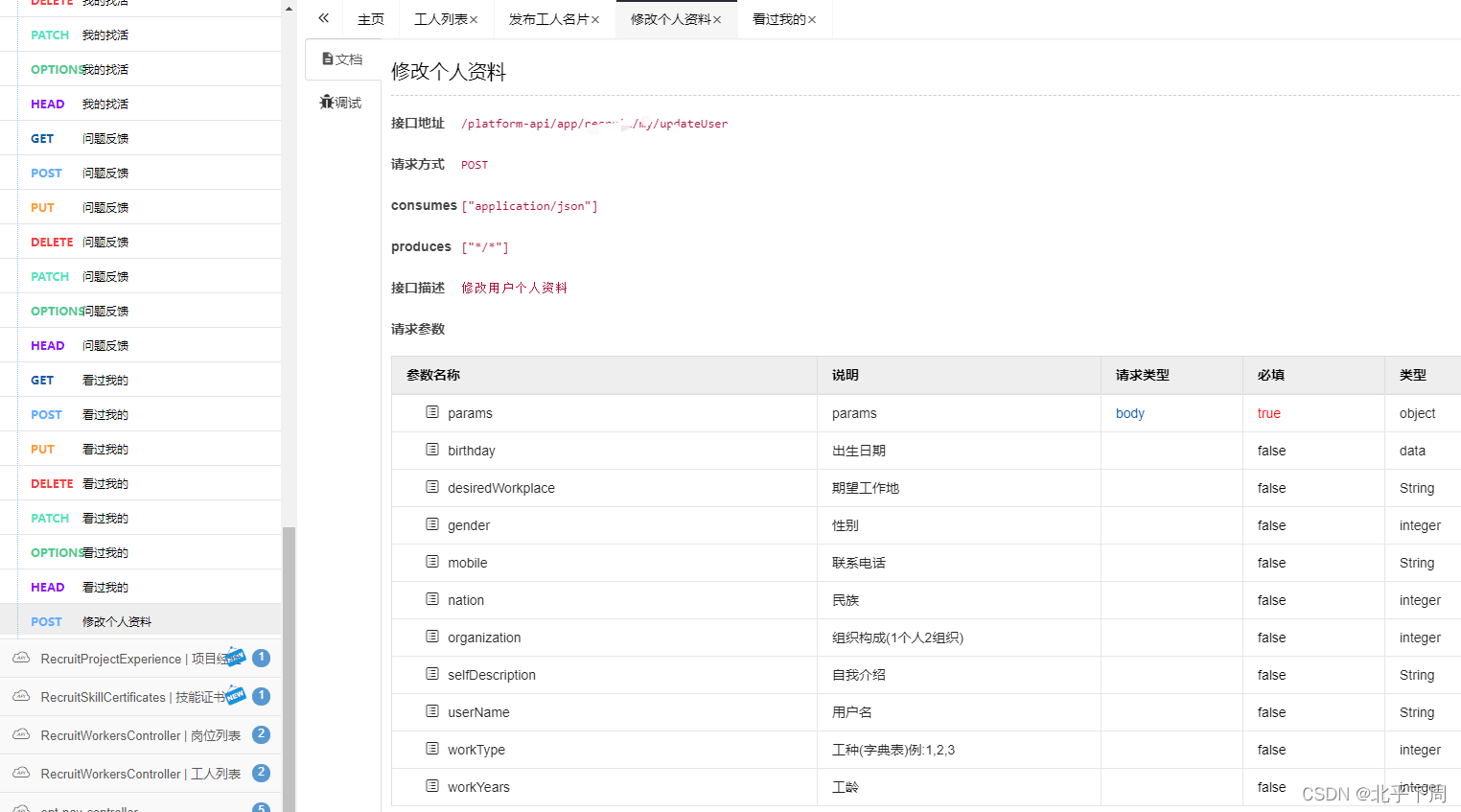
If you resubmit , Prompt unknown exception , At this time, learn to use postman
Reference resources postman Front end shallow use _ Beihu's blog next week -CSDN Blog
Then when you submit the form , You need to look at the field description of the background interface document There are plenty of them int type , You fill in string Will report a mistake
And then put all int The type is determined by string Types have been changed , But still submit exceptions

Because this is data type
This can be a selector , It can also be this input box , But you have to write xxx year -xx month xx The format of the day
The backstage will automatically change this string Type conversion
If it is an input box, it must be in this format

Then click save , Only then can we succeed

html
<template>
	<view class="content">
	        <view class="row b-b">
	            <text class="tit"> full name </text>
	            <input class="input" type="text" v-model="addressData.userName" placeholder=" Please enter your name " placeholder-class="placeholder" />
	        </view>
	        <view class="row b-b">
	            <text class="tit"> Gender </text>
	            <input class="input" type="text" v-model="addressData.gender" placeholder=" Please enter your gender " placeholder-class="placeholder" />
	        </view>
	        <view class="row b-b">
	            <text class="tit"> nation </text>
	            <input class="input" type="number" v-model="addressData.nation" placeholder=" Please enter your mobile number " placeholder-class="placeholder" />
	        </view>
	        <view class="row b-b">
	            <text class="tit"> Date of birth </text>
	            <input class="input" type="text" v-model="addressData.birthday" placeholder=" Please enter the dormitory number " placeholder-class="placeholder" />
	        </view>
			<view class="row b-b">
			    <text class="tit"> Type of work </text>
			    <input class="input" type="text" v-model="addressData.workType" placeholder=" Please enter the dormitory number " placeholder-class="placeholder" />
			</view>
			<view class="row b-b">
			    <text class="tit"> Working years </text>
			    <input class="input" type="text" v-model="addressData.workYears" placeholder=" Please enter the dormitory number " placeholder-class="placeholder" />
			</view>
			<view class="row b-b">
			    <text class="tit"> Expected place of work </text>
			    <input class="input" type="text" v-model="addressData.desiredWorkplace" placeholder=" Please enter the dormitory number " placeholder-class="placeholder" />
			</view>
		<!-- 	<view class="row b-b">
			    <text class="tit"> Current location </text>
			    <input class="input" type="text" v-model="addressData.here" placeholder=" Please enter the dormitory number " placeholder-class="placeholder" />
			</view> -->
			<view class="row b-b">
			    <text class="tit"> Organizational structure </text>
			    <input class="input" type="text" v-model="addressData.organization" placeholder=" Please enter the dormitory number " placeholder-class="placeholder" />
			</view>
			<view class="row b-b">
			    <text class="tit"> contact number </text>
			    <input class="input" type="text" v-model="addressData.mobile" placeholder=" Please enter the dormitory number " placeholder-class="placeholder" />
			</view>
			<view class="row b-b">
			    <text class="tit"> Job type </text>
			    <input class="input" type="text" v-model="addressData.jobCategoryId" placeholder=" Please enter the dormitory number " placeholder-class="placeholder" />
			</view>
			<view class="row b-b">
			    <text class="tit"> Self introduction. </text>
			    <input class="input" type="text" v-model="addressData.selfDescription" placeholder=" Please enter the dormitory number " placeholder-class="placeholder" />
			</view>

	        <button class="add-btn" @tap="sbmitFeedback"> Submit </button>
	    </view>
</template>
correct js
// Submit
			sbmitFeedback: function(e) {
				let that = this;
				// if (that.feedType == 0) {
				// 	util.toast(' Please select the feedback type ');
				// 	return false;
				// }

				if (that.addressData.name == '') {
					util.toast(' Please enter the feedback ');
					return false;
				}

				// if (!util.isMobile(that.mobile)) {
				// 	util.toast(' Please enter the correct mobile phone number ');
				// 	return false;
				// }
				util.request('recruit/my/updateUser', {

					userName: that.addressData.userName,
					gender: that.addressData.gender,
					nation: that.addressData.nation,
					birthday: that.addressData.birthday,
					workType: that.addressData.workType,
					workYears: that.addressData.workYears,
					desiredWorkplace: that.addressData.desiredWorkplace,
					here: that.addressData.here,
					organization: that.addressData.organization,
					 mobile: that.addressData.mobile,
					 jobCategoryId: that.addressData.jobCategoryId,
					selfDescription: that.addressData.selfDescription,
				}, 'POST').then(function(res) {
					if (res.code === 0) {
						uni.showModal({
							content: ' We have received your feedback !',
							showCancel: false,
							success: function(res) {
								if (res.confirm) {
									uni.switchTab({
										url: '/pages/ucenter/index/index'
									})
								}
							}
						})
					} else {
						util.toast(res.data);
					}

				});
			},
css unchanged
边栏推荐
猜你喜欢

Alibaba architects spent 280 hours sorting out 1015 pages of distributed full stack pamphlets to easily start the distributed system
![[mit 6.s081] LEC 10: multiprocessors and locking notes](/img/62/ca6362830321feaf450865132cdea9.png)
[mit 6.s081] LEC 10: multiprocessors and locking notes

LED学习护眼台灯触摸芯片-DLT8T10S-杰力科创

Visual Studio Code安装教程(超详细)

家用静音驱蚊灯芯片-DLTAP703SD-杰力科创
![[MIT 6.S081] Lab 6: Copy-on-Write Fork for xv6](/img/ca/e8c0827b13805c7c74cc41bf84c6ff.png)
[MIT 6.S081] Lab 6: Copy-on-Write Fork for xv6

mysql基础语句
阿里架构师耗时280个小时整理的1015页分布式全栈小册,轻松入手分布式系统

What should I do if MySQL master-slave replication data is inconsistent?

2021.7.12笔记 内外连接
随机推荐
[yuntu said] 249 mobile application security service - app's physical examination center, comprehensive testing, safe on the road!
MySQL学习 Day2 排序查询 / 聚合函数 /分组查询 /分页查询 /约束/多表之间的关系
uniapp H5跨域问题
Why don't you like it? It's easy to send mail in ci/cd
Quick access to website media resources
MySQL code database creation parking management system foreign key
Visual studio code installation tutorial (super detailed)
智能失眠治疗仪产品-DLT8P68SA-杰力科创
The second parameter of fragmenttransaction.replace reports an error
Knowledge map - Jieba, pyhanlp, smoothnlp tools to realize Chinese word segmentation (part of speech)
Mode= "widthfix" attribute in image tag
Wechat applet obtains openid, sessionkey, unionid
JPA connection database password field blob
20000 words + 30 pictures | what's the use of chatting about MySQL undo log, redo log and binlog?
2 万字 + 30 张图 | 细聊 MySQL undo log、redo log、binlog 有什么用?
Have you ever stumbled on MySQL's order by
修改input中placeholder样式
multi-table query
[MIT 6.S081] Lab 9: file system
Complete set of machine learning classification task effect evaluation indicators (including ROC and AUC)