当前位置:网站首页>Reinstallation of cadence16.3, failure and success
Reinstallation of cadence16.3, failure and success
2022-06-23 04:48:00 【Boundless also initial heart】
reinstall Cadence16.3, Failure and success
It was installed on the computer before Cadence16.3, It took a year or two , Somehow , It's not easy to use recently , Always License was not found, Let me use demo edition , Annoyed , It has been reinstalled many times , For days , I finally got it done this morning , Record .
This few days , I searched various methods on the Internet , Also tried various methods , It just didn't succeed , I went home last night , On your own computer ( No, I haven't Cadence) I tried it for a while , The method is the same , But it did .
During installation last night , It is installed according to the following steps :
Run Setup.exe, install the license manager. Cancle the dialogue blox “lincense location”.
Overwrite file cdslmd.exe in the installation folder of the license manager
(This step seems to be not necessary!) Create an environment variable with the value CDS_LIC_FILE [email protected]_host. “this_host” replaced with the name of your machine (My computer-> properties-> advanced-> enviromnent variables)
This step , I didn't do it directly , Then the computer will generate environment variables by itself !- Edit the first line in the file license163.lic - replace this_host to the real name of your computer
- Run LicenseServerConfiguration.exe in the folder: license manager ( \ LicenseManager)
- In the Select license, select the edited file license163.lic
- Click Next
- In the Port number edit check the value 5280
- In the editing window Host Name check your machine’s hostname (computer name)
- Click Next
- Click Next again
Click Finish
LicenseServerConfiguration.exe When finished , Show Unable to start…*…*, I thought the installation was unsuccessful , No matter the , Wait till you're done
In the license manager folder, the license file license.dat will be generated. Open it and check lines 2. It should look like:
DAEMON cdslmd C:\Cadence\LicenseManager\cdslmd.exe
If not (sometime it is broken into several lines), correct it.Run Programs/Cadense/License Manager/LmTools
On the register card “Start/stop/reread”, run “Reread license file”.
Exit LmTools
This step is crucial , We must do .
Then restart the computer .Install Cadence SPB / OrCAD 16.3 (Product installation)
Copy the files from the folder … \ Aspirin \ patch in the installation directory (where the folder SPB_16.3 is. Don’t enter this folder!)
Start RunMe!.Bat
Right click Properties , hold Runme!.bat Change it to Windows XP compatible , And then start -> function -> cmd ->cd:\C:\Cadence-> Runme!.bat, In this way, you can clearly see Runme!.bat The results of the implementation of , If it works, it will show 100 changed! done!- Wait
- Enjoy the Cadence SPB / OrCAD 16.3
I came to the office this morning , The computer in the office was installed yesterday Cadence, But it was not cracked successfully , I want to try again , Did the following two steps :
1.Start RunMe!.Bat
Right click Properties , hold Runme!.bat Change it to Windows XP compatible , And then start -> function -> cmd ->cd:\C:\Cadence-> Runme!.bat, In this way, you can clearly see Runme!.bat The results of the implementation of , If it works, it will show 100 changed! done!
2.Run Programs/Cadense/License Manager/LmTools
On the register card “Start/stop/reread”, run “Reread license file”.
Exit LmTools
And then it worked ,Cadence It can be used normally , No longer show anything License not found.
Finally, I took a look , Computer environment variables , as follows : 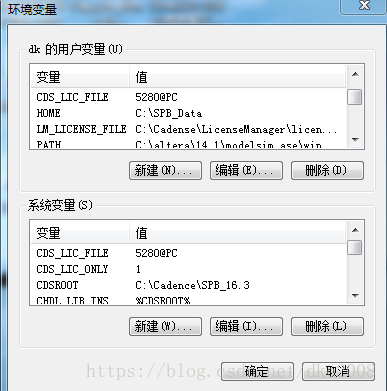
Last , During the installation , According to the Internet ,
I turned off the firewall ,
Even turned off the Internet connection ,
And a little bit more , want use Administrator Account to install !
边栏推荐
猜你喜欢


随机推荐
[acnoi2022] no way without guessing
Pta:6-30 time addition
Kail 渗透基本素养 基础命令
智能语音时代到来,谁在定义新时代AI?
Notes on writing questions in C language -- free falling ball
Bootstrap drive, top switching power supply and Optocoupler
win10查看my.ini路径
Pta:7-61 teacher student information management
TS进阶之infer
Current relay hdl-a/1-110vdc-1
thinkphp6 无关联ID的连表查询(2张表)主要是select的应用
VGG 中草药识别
磁阻 磁饱和
在PCB板边走高频高速信号线的注意事项–高频高速信号设计基本原则
MySQL导入大文件(可以是百万级,也可以是百级)
Chrome调试技巧
#17生成器的函数声明与调用
AD9使用技巧拾遗
win10下安装、运行MongoDB
Precautions for running high-frequency and high-speed signal lines near PCB board - basic principles for high-frequency and high-speed signal design