当前位置:网站首页>Applet cloud development joint table data query and application in cloud function
Applet cloud development joint table data query and application in cloud function
2022-06-25 09:28:00 【Maoningyi】
Click to watch the video ↓↓↓
Applet cloud development joint table data query and application in cloud functions | Multi-table query | Even the table lookup | Aggregate functions
List of articles
Hello everyone , I'm Ning Yi , Today, let's learn how to query the join table data of cloud development , And teach you how to apply cloud functions , Print the results of our query in the wechat developer tool
Let's set the scene first , Now there are two tables , Let's check the average scores of all the students in the class Mr. Xu took 
1、 League table query
Let's first look at how to query , The data connecting the two tables is class In the table id and student In the table class_id
So we should first find out what teacher Xu's class is id, yes 2, And then check student In the table class_id by 2 Of the students , Zhang Er and Li Er , Calculate the average score of the two students
Let's take a look at how to implement such a joint table query in cloud development
You should learn to read cloud development documents as much as possible , However, this document is actually very difficult for novices , If you have any functions that you want me to demonstrate, you can tell me in the bullet screen or comments , If there are many people who want to see , I will issue a separate issue to talk about .
Cloud development documentation , In the development guide – In the database , There is an introduction to join table query , We use lookup Function to realize joint table query
lookup({
  from: < The name of the collection to connect >,
  localField: < Enter the fields of the record to match equally >,
  foreignField: < The fields of the connected set to be matched equally >,
  as: < Output array field name >
})
(1)lookup Join two tables
Apply to the scenario we set above , It's like this , Need to call end Method to mark the end of the definition
lookup({

  from: 'student',      // Table to associate student
  localField: 'id',      //class Associated fields in the table
  foreignField: 'class_id',      //student Associated fields in the table
  as: 'stu'      // Defines the alias of the output array
})
.end()
This statement will find the following results , Will find out the information of the class and the information of all the students corresponding to the class
{
    "list":
  [{

    "id":1,
    "teacher":" Teacher wang ",
    "cname":" Class one ",
    "stu":[
      {

        "sname":" Ning Yi ",
        "class_id":1,
        "score":90
      }
    ]
  },
  {

    "id":2,
    "teacher":" Miss Xu ",
    "cname":" Class two ",
    "stu":[
      {

        "class_id":2,
        "sname":" Zhang Er ",
        "score":100
      },
      {

        "class_id":2,
        "sname":" Li Er ",
        "score":80
      }
    ]
  }]
}
But we only need the data of the students in Mr. Xu's class , So we need to add where Conditions , stay lookup You can't follow it directly where, Need to use match Instead of . Let's improve the above code
(2) Use match Query conditions
.lookup({

  from: 'student',
  localField: 'id',
  foreignField: 'class_id',
  as: 'stu'
})
.match({

  teacher:" Miss Xu "
})
.end()
Now we just return the student data of Mr. Xu's class , Student data is in stu In the corresponding array
{
    "list":
  [
    {
    "_id":"5e847ab25eb9428600a512352fa6c7c4",
      "id":2,
      "teacher":" Miss Xu ",
      "cname":" Class two ",
      // Student data
      "stu":[
        {
    "_id":"37e26adb5eb945a70084351e57f6d717",
          "class_id":2,
          "sname":" Zhang Er ",
          "score":100
        },
        {
    "_id":"5e847ab25eb945cf00a5884204297ed8",
          "class_id":2,
          "sname":" Li Er ",
          "score":80
        }
      ]
    }
  ]
}
Next, let's continue to optimize the code , Returns the student's average score directly
(3) Return the average student grade directly
If you want to be in a connected table ( In this course student) Do aggregate operations , Just use pipeline Method
however pipeline Cannot be associated with localField、foreignField share , So let's delete localField、foreignField And then pipeline Get student grades in (score) Average value
.lookup({

  from: 'student',
  pipeline: $.pipeline()
    .group({

      _id: null,
      score: $.avg('$score')
     })
    .done(),
  as: 'stu'
})
.match({

  teacher:" Miss Xu "
})
.end()
Now the printed data is like this
{
    "list":
  [
    {
    "_id":"5e847ab25eb9428600a512352fa6c7c4",
      "id":2,
      "teacher":" Miss Xu ",
      "cname":" Class two ",
      "stu":[
        {
    "_id":null,
          "score":90
        }
      ]
    }
  ]
}
But now the output data is a little complicated , If you just want to show teacher and score These two values , Let's do the following
(4) Display only teacher and score These two values
.lookup({

  from: 'student',
  pipeline: $.pipeline()
    .group({

      _id: null,
      score: $.avg('$score')
    })
    .done(),
  as: 'stu'
})
.match({

  teacher:" Miss Xu "
})
.replaceRoot({

  newRoot: $.mergeObjects([$.arrayElemAt(['$stu', 0]), '$$ROOT'])
})
.project({

  _id:0,
  teacher:1,
  score:1
})
.end()
Now the printed data is like this
{
    "list":
  [
    {
    "score":90,"teacher":" Miss Xu "}
  ]
}
replaceRoot({ newRoot: < expression > }) It's fixed writing , Output the existing field as a new node , We usually use it to turn a two-level array into a one-level array
mergeObjects Is the accumulator operator ,$.arrayElemAt(['$stu', 0]), '$$ROOT’] Will be stu First element in array , That is to say [{"_id":null,"score":90}] Merge to the following nodes of the array , That is to say, with teacher、cname These fields are the same level
project There will be _id Set later as 0, Set the element we want to display to 1, You can control the last output field
2、 Application in cloud function
Next, let's look at how to use cloud functions , Print the above query results in the wechat developer tool
(1) Add data to the cloud database
We open the cloud development console in the wechat developer tool , First create these two tables in the cloud database , Let's create class Table as an example 
After creating the form , Let's add records to the table , Add... According to the data in the table above , The data of class 2 is added below 
After all the data has been added , Go to the wechat developer tool cloud functions folder and create a folder named test The cloud function of
We created the cloud development project in advance , If you don't know how to create , You can see what I sent before 30 Minutes to create and launch the course of cloud development applet , It teaches you how to create
(2) Create a cloud function and initialize the database
After creation , The system will help us create a test Folder , We turn on test/index.js file , Delete some code created by default , And initialize the database , Like this
//  Cloud function entry file
const cloud = require('wx-server-sdk')
cloud.init()
// Initialize database
const db = cloud.database()
const _ = db.command
const $ = _.aggregate

//  Cloud function entry function
exports.main = async (event, context) => {

  // Let's continue to add code here
}
(3) Edit cloud function entry function
//  Cloud function entry function
exports.main = async (event, context) => {

  return await db.collection('class').aggregate()
  .lookup({

    from: 'student',
    pipeline: $.pipeline()
      .group({

      _id: null,
      score: $.avg('$score')
    })
    .done(),
  as: 'stu'
})
.match({

  teacher:" Miss Xu "
})
.replaceRoot({

  newRoot: $.mergeObjects([$.arrayElemAt(['$stu', 0]), '$$ROOT'])
})
.project({

  _id:0,
  teacher:1,
  score:1
})
.end()
}
Save the file after editing , And upload and deploy cloud functions
(4) Upload and deploy cloud functions
Right click the cloud function , Select upload and deploy : Cloud installation depends on ( Do not upload node_modules)
Open the cloud development console — Click cloud function – find test Cloud function click cloud test 
In the pop-up test box , Click the run test button directly 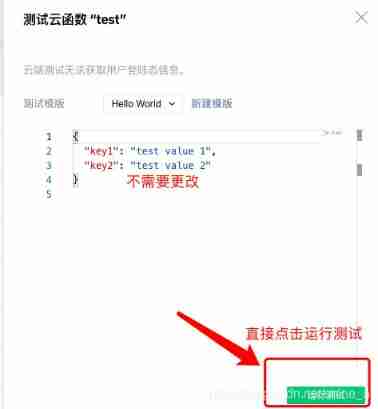
The returned results will be printed below , This indicates that the associated table query has been successful 
边栏推荐
- 某次比赛wp
- How safe is the new bond
- Are the top ten securities companies at great risk of opening accounts and safe and reliable?
- [design completion - opening report] zufeinfo 2018 software engineering major (including FAQ)
- Is it safe to open a stock account through the account opening QR code of the account manager? Or is it safe to open an account in a securities company?
- Is the client that gets the scanning code wechat or Alipay
- Voiceprint Technology (I): the past and present life of voiceprint Technology
- 35 websites ICER must know
- nodejs 使用Express框架demo
- [competition - Rural Revitalization] experience sharing of Zhejiang Rural Revitalization creative competition
猜你喜欢

云网络技术的好处以及类型
C#启动程序传递参数丢失双引号,如何解决?

The first techo day Tencent technology open day, 628 waiting for you!

关掉一个线程

JMeter interface test, associated interface implementation steps (token)

Cazy eight trigrams maze of Chang'an campaign

Use Navicat to compare data differences and structure differences of multi environment databases, and automatic DML and DDL scripts
![[untitled] * * database course design: complete the student information management system in three days**](/img/69/762819fa1b11085a7e36c95acbe880.png)
[untitled] * * database course design: complete the student information management system in three days**
Close a thread

浅谈Mysql底层索引原理
随机推荐
How to delete a blank page that cannot be deleted in word
通过客户经理的开户二维码开股票账户安全吗?
Voiceprint Technology (II): Fundamentals of audio signal processing
jmeter中csv参数化
Is it safe for Huatai Securities to open an account on it? Is it reliable?
《乔布斯传》英文原著重点词汇笔记(五)【 chapter three 】
The first techo day Tencent technology open day, 628 waiting for you!
证券开户风险大吗,安全靠谱吗?
五、项目实战---识别人和马
Le labyrinthe des huit diagrammes de la bataille de cazy Chang'an
Prepare for the 1000 Android interview questions and answers that golden nine silver ten must ask in 2022, and completely solve the interview problems
Online notes on Mathematics for postgraduate entrance examination (9): a series of courses on probability theory and mathematical statistics
二、训练fashion_mnist数据集
Atguigu---17-life cycle
Matplotlib plt grid()
Where is safe for FTSE A50 to open an account
云网络技术的好处以及类型
《乔布斯传》英文原著重点词汇笔记(一)【 Introduction 】
flutter 多语言的intl: ^0.17.0导不进去
How to download the school logo, school name and corporate logo on a transparent background without matting