当前位置:网站首页>Kingbasees SQL language reference manual of Jincang database (8. Function (2))
Kingbasees SQL language reference manual of Jincang database (8. Function (2))
2022-07-23 10:25:00 【Thousands of sails passed by the side of the sunken boat_】
8.21. ABBREV
usage :
abbrev({inet | cidr})function :
Abbreviation display format text
Example :
abbrev(inet '10.1.0.0/16')
abbrev(cidr '10.1.0.0/16')
8.22. ABS
usage :
abs (n)function :
ABS return n The absolute value of .
This function takes any numeric data type or any non numeric data type that can be implicitly converted to a numeric data type as a parameter . This function returns the same data type as the numeric data type of the parameter .
Example :
The following example returns -10 The absolute value of :
SELECT abs(-10);
8.23. ACOS
usage :
acos(n)function :
ACOS return n The arccosine of . Parameters n Must be in -1 To 1 Within the scope of , And the function returns a value in 0 To pi Values in range , In radians .
This function takes any numeric data type or any non numeric data type that can be implicitly converted to a numeric data type as a parameter . If the parameter is BINARY_FLOAT, Then the function returns BINARY_DOUBLE. otherwise , Function returns the same numeric data type as the parameter .
Example :
The following example returns 0.5 The arccosine of :
SELECT acos('0.5');
8.24. ACOSH
usage :
acosh(n)function :
ACOS return n The anti hyperbolic cosine of .
Example :
The following example returns 3 The anti hyperbolic cosine of :
SELECT acosh(float8 '3');
8.25. ADD_MONTHS
usage :
ADD_MONTHS(expr1 date / Time type , expr2 INT)function :
return expr1 add expr2 Date time value of months .
expr1 The data type is date / Time type (DATE、TIMESTAMP and TIMESTAMPTZ) Or it can be converted to date / Data type of time type . Enter the date / The time format string is automatically converted to TIMESTAMP.
expr2 The data type is INT type .
Input TIMESTAMP and TIMESTAMPTZ When to return to TIMESTAMP. Input DATE When to return to DATE.
Example :
 Patients with a :
select add_months(date'2012-1-20',-1) AS RESULT;


 Example 2 :
select add_months(timestamp'2012-1-31 10:00:00',-20)  AS RESULT;


 Example 3 :
select add_months('20120101',12)  AS RESULT;
8.26. AGE
usage :
age(timestamp, timestamp)age(timestamp)
function :
Subtract the parameter to generate a year 、 The month does not contain the formatted result of the day . Subtract... When there is only one parameter
current_date( Midnight ).Example :
SELECT age(timestamptz '2013-07-01 12:00:00', timestamptz '2011-03-01 12:00:00');
8.27. APPENDCHILDXML
usage :
appendchildxml(xml_instance xml,  xpath text , value_expr xml)
appendchildxml(xml_instance xml,  xpath text , value_expr xml,namespace _text)
function :
function
appendchildxmltake ``value_expr`` The value provided is used as ``xpath`` The child nodes of the node are appended to ``xml_instance`` in . If successful, the appended ``xml_instance`` data , Failure returns ERROR. Before using this function, you need to create kdb_utils_function Expand .Example :
SELECT appendchildxml('<test><value></value><value></value></test>', '/test/value', XMLPARSE(CONTENT '<name>newnode</name>'));
8.28. ARRAY_AGG
usage :
array_agg(expression)function :
When the parameter is of non array type ,
array_aggEnter the value ( Include null value ) Connect to an array , Return an array of parameter types . When the parameter is array type ,array_aggString the input array into a higher dimensional array , And return an array with the same parameter data type . The input array must have the same dimension , And cannot be empty or NULL.Example :
SELECT array_agg(array[i, nullif(i, 3), i+1]) from generate_series(1,4) g(i);
8.29. ARRAY_APPEND
usage :
array_append(anyarray, anyelement)function :
Directed array
anyarrayEnd append elementanyelementExample :
SELECT array_append( ARRAY[1,2], 3);
8.30. ARRAY_CAT
usage :
array_append(anyarray1, anyarray2)function :
Concatenate two arrays
Example :
SELECT array_cat( ARRAY[1,2], ARRAY[3,4]);
8.31. ARRAY_DIMS
usage :
array_dims(anyarray)function :
Returns the text representation of the array dimension
Example :
SELECT array_dims( ARRAY[[1,2,3], [4,5,6]]);
8.32. ARRAY_FILL
usage :
array_fill(anyelement, int[], int[])function :
Returns an array initialized with the specified value and dimension .
Example :
SELECT array_fill( 7, ARRAY[3], ARRAY[2]);
8.33. ARRAY_LENGTH
usage :
array_length(anyarray,int)function :
Returns the length of the specified dimension of the array .
Example :
SELECT array_length( array[1,2,3,4], 1);
8.34. ARRAY_LOWER
usage :
array_lower(anyarray, int)function :
Returns the lower bound of the specified dimension of the array
Example :
SELECT array_lower( array[1,2,3,4], 1);
8.35. ARRAY_NDIMS
usage :
array_ndims(anyarray)function :
Returns the number of array dimensions
Example :
SELECT array_ndims( ARRAY[[1,2,3], [4,5,6]]);
8.36. ARRAY_POSITION
usage :
array_position(anyarray, anyelement[, int])function :
Return to the array
anyelementFirst occurrence of subscript , If the third parameter of the function specifies , Then search from the subscript specified by the third parameter .Example :
SELECT array_position( ARRAY['sun', 'mon', 'tue', 'wed', 'thu', 'fri', 'sat'], 'mon');
8.37. ARRAY_POSITIONS
usage :
array_positions(anyarray, anyelement)function :
Returns an array of
anyarrayIt appears thatanyelementAn array of subscripts of .Example :
SELECT array_positions( ARRAY['A', 'A', 'B', 'A'], 'A');
8.38. ARRAY_PREPEND
usage :
array_prepend(anyelement, anyarray)function :
Insert an element into the head of the array
Example :
SELECT array_prepend( 1, ARRAY[2,3]);
8.39. ARRAY_REMOVE
usage :
array_remove(anyarray, anyelement)function :
From an array
anyarrayThe value removed from isanyelementThe elements ofExample :
SELECT array_remove( ARRAY[1,2,3,2], 2);
8.40. ARRAY_REPLACE
usage :
array_replace(anyarray, anyelement1, anyelement2)function :
Will array
anyarrayThe median is anyelement1 The element of is replaced by anyelement1.Example :
SELECT array_replace( ARRAY[1,2,5,4], 5, 3);
8.41. ARRAY_TO_JSON
usage :
array_to_json(anyarray [, pretty_bool])function :
Put the array
anyarrayAs json Array return , A multidimensional array will become an array json Array . Ifpretty_boolSet to true , Line breaks will be added between array dimensions .Example :
SELECT array_to_json('{
    {1,5},{99,100}}'::int[],true);
8.42. ARRAY_TO_STRING
usage :
array_lower(anyarray, int)function :
Connect the array elements with the specified delimiter and an optional empty string
Example :
SELECT array_to_string( ARRAY[1, 2, 3, NULL, 5],',', '*');
8.43. ARRAY_TO_TSVECTOR
usage :
array_to_tsvector(text[])function :
One of the text search functions , Convert the word bit array into tsvector.
Example :
SELECT array_to_tsvector('{fat,cat,rat}'::text[]);
8.44. ARRAY_UPPER
usage :
array_upper(anyarray, int)function :
Returns the upper bound of the specified dimension of the array
Example :
SELECT array_upper( ARRAY[1,8,3,7], 1);
8.45. ASIN
usage :
asin(n)function :
ASIN return n The inverse sine of . Parameters n Must be in -1 To 1 Within the scope of , The value returned by the function is -pi /2 To pi /2 Within the scope of , In radians .
This function takes any numeric data type or any non numeric data type that can be implicitly converted to a numeric data type as a parameter . If the parameter is BINARY_FLOAT, Then the function returns BINARY_DOUBLE. otherwise , Function returns the same numeric data type as the parameter .
Example :
The following example returns 0.5 The inverse sine of :
SELECT ASIN(0.5);
8.46. ASINH
usage :
asinh(n)function :
ASINH return n The anti hyperbolic sine of .
Example :
The following example returns 0.5 The inverse sine of :
SELECT asinh(2);
8.47. ATAN
usage :
atan(n)function :
ATAN return n It's all right . Parameters n It can be in an unbounded range , And back to - pi /2 To pi /2 Values in range , In radians .
This function takes any numeric data type or any non numeric data type that can be implicitly converted to a numeric data type as a parameter . If the parameter is BINARY_FLOAT, Then the function returns BINARY_DOUBLE. otherwise , Function returns the same numeric data type as the parameter .
Example : The following example returns 0.5 It's all right :
SELECT ATAN(0.5) ;
8.48. ATAN2
usage :
atan2(n1, n2)function :
ATAN2 return n1 and n2 It's all right . Parameters n1 It can be in an unbounded range , And back to -pi To pi Values in range , Depending on n1 and n2 The symbol of , In radians .
This function takes any numeric data type or any non numeric data type that can be implicitly converted to a numeric data type as a parameter . If any parameter is BINARY_FLOATor BINARY_DOUBLE, Then the function returns BINARY_DOUBLE. Otherwise, the function returns NUMBER.
Example :
The following example returns 1 and 2 It's all right :
SELECT atan2(1,2);
8.49. ATANH
usage :
atanh(n)function :
ATANh return n The inverse hyperbolic tangent of .
Example :
The following example returns 0.2 The inverse hyperbolic tangent of :
SELECT atanh(0.2);
8.50. AVG
usage :
avg(expression)function :
AVG return expr Average value .
This function takes any numeric data type or any non numeric data type that can be implicitly converted to a numeric data type as a parameter . This function returns the same data type as the numeric data type of the parameter .
Example :
The following example calculates students Average grades of all students in the table (score):
SELECT avg(score) from students;
边栏推荐
- [basics of C language] 14 file, declaration and format input and output
- [C language foundation] 15 bit operation
- QT error: error c2039 "value": not a member of "`global namespace"
- Compose原理解析系列之一Compose的设计原理
- Arcgis 计算两个栅格图层相关性
- 三数之和:(排序+双指针+剪枝)
- The technical points of the new project can be guided if necessary
- A brief tutorial for soft exam system architecture designer | requirements engineering
- 禅道的甘特图功能是什么
- Redis安装
猜你喜欢

redis的事务、锁机制、秒杀
![[c#] IEnumerable可枚举类型接口分析yield](/img/08/8c346ce257b4adc0bea80bf05b6f52.png)
[c#] IEnumerable可枚举类型接口分析yield
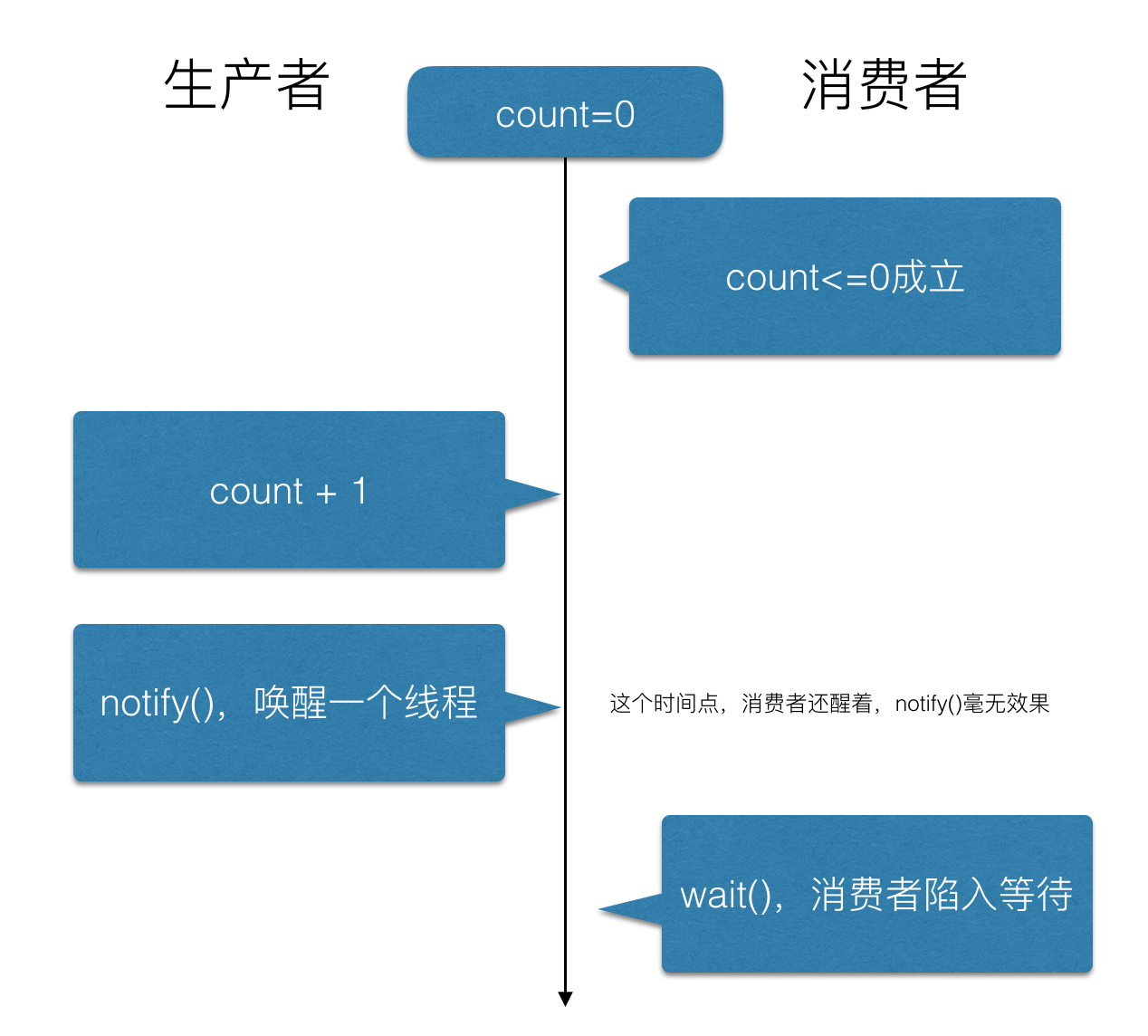
"Lost wake up problem" in multithreading | why do wait() and notify() need to be used with the synchronized keyword?

C language file operation

Read write barrier in memory barrier -- concurrency problem

如何在OneFlow中新增算子

什么是文件管理软件?你为什么需要它?

performance介绍

金仓数据库 KingbaseES SQL 语言参考手册 (8. 函数(九))

mysql三表查询问题
随机推荐
MD5加密解密网站测试,MD5加密还安全吗?
leetcode-99.恢复二叉搜索树
赛尔运维:高校IT运维服务新样本
mysql通过sql查询数据库所有表名称及列信息
[circular statement]
[azure event center] try new functions of azure event hub -- geo disaster recovery
金仓数据库 KingbaseES SQL 语言参考手册 (8. 函数(四))
世界正在被开源软件吞食
博世BOSCH EDI项目案例
The world is being devoured by open source software
Compose原理解析系列之一Compose的设计原理
使用IDEA的反编译插件 反编译jar包/class文件/修改jar包
[learning notes] agc022
Android development learning diary - content provider (cross application database modification)
Reverse theoretical knowledge 1
"Lost wake up problem" in multithreading | why do wait() and notify() need to be used with the synchronized keyword?
Self organization is the two-way rush of managers and members
MySQL queries all table names and column information of the database through SQL
[pytorch] the difference between cuda() and to (device)
时间序列-数据集:电力变压器数据集 (ETDataset)