当前位置:网站首页>C language file operation
C language file operation
2022-07-23 10:18:00 【A big cat 1201】
author : A big cat 1201
special column :《C Language learning 》
Maxim : You just try to , Leave the rest to time !

File operations
Introduction of documents
Ben meow wrote it before C The language code , Whether it's an array , Structure and other data , Are stored in memory space , They only exist in the process of program execution , And once the program is executed , Their memory space is recycled by the system , And these data are gone , So their life cycle is the execution time of the whole program , Some types of data , For example, local variables exist for a shorter time , So is there any way to make the data in the program always exist , It won't disappear with the end of the program ? Next, the file operation described by Ben meow can meet such requirements .
Type of file :
Generally speaking, documents can be divided into two categories , Program files and data files , No matter what kind of files are stored on disk , That is what we call hard disk .
Program files :
Include :
- Source program files , The suffix is .c
- Target file , stay windows In the environment, the suffix is .obj
- Executable program , stay windows In the environment, the suffix is .exe
Data files :
The content of the data file is the data that the program needs to read during execution , It can also be written data
Benmew's previous programs read data from the keyboard , The output is printed on the screen , When using file operation , Data is read from a file , The output is also written in the file .
Here, we only introduce the operation of data files .
file name :
Each file has a unique file ID , Only in this way can we find it accurately when using it , File ID is often called file name .
- File names include : File path + File name trunk + file extension
- for example :c:\code\test.c
- When written in code, it is
c:\\code\\test.cIn this way , Because you want to escape \, So write two \.
- The file suffix determines how the file is opened .
Opening and closing of files
The file pointer
Our program is actually an operation on memory , So how is the file on the hard disk operated by the program ?
There is an area in memory called File information area .
This file information area stores data of a structure type
struct _iobuf
{

	char *_ptr;
	int   _cnt;
	char *_base;
	int   _flag;
	int   _file;
	int   _charbuf;
	int   _bufsiz;
	char *_tmpfname;
};
typedef struct _iobuf FILE;
On different compilers , The member types in the structure may not work , But it's all the same , The effect is the same .
- This structure is the customized file type , By keyword typedef Rename it to FILE
- Every time you open a file , The system will automatically create such a structural variable in the file information area according to the situation of the file , And automatically fill in the member variables , We don't care what it fills
After creating this structural variable in the file information area , Assign its address to a FLIE* Pointer variable of type , This pointer is called The file pointer
FILE* pf;
Through the file pointer pf To maintain this structure variable , So as to achieve the purpose of operating the files stored on the hard disk .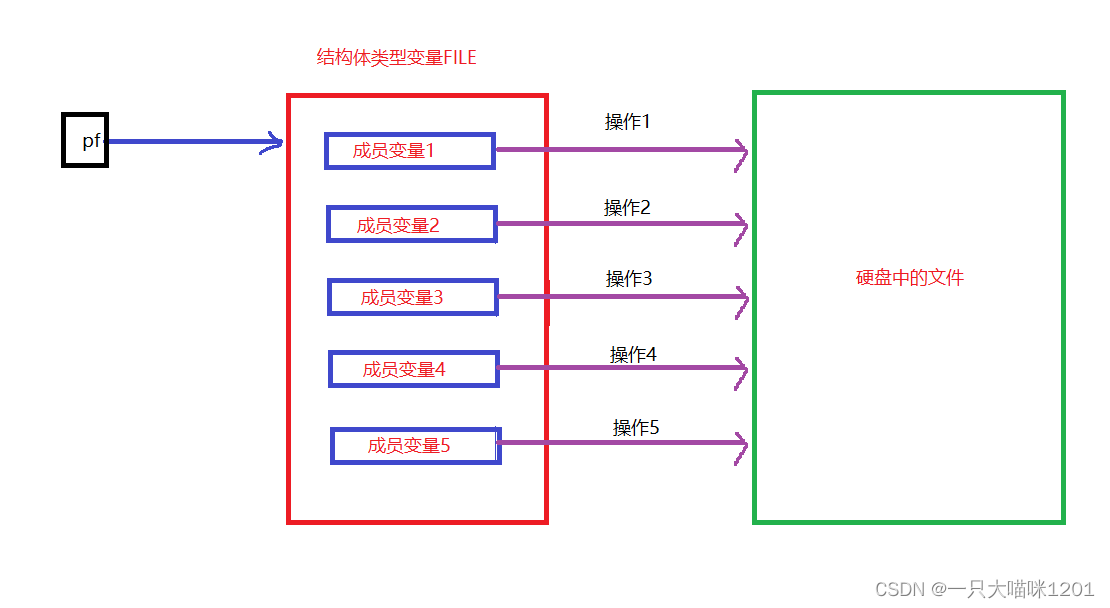
The general process is like that in the figure
- Through the file pointer pf To maintain structural variables in the file information area FILE, Perform corresponding operations on a series of member variables
- After the state and value of member variables in the structure change, corresponding operations will occur , And then realize the purpose of reading and writing data from files .
All this is done automatically by the system , We only need to know that we need a file pointer variable and the corresponding file operation function when operating on a file .
Different structure variables will be created when different files are opened 
But the process of manipulating each file is the same .
Open and close
Open file :
FILE * fopen ( const char * filename, const char * mode );
This is a function fopen Function declaration of , A reference header file is required stdio.h, The function is to open the files in the hard disk .
- Shape parameter :
- const char* filename: Used to receive the file name , The file name is received as a string , If the file is in the same directory as the current project, there is no need to write the file path , Write only the file name trunk + Suffixes are enough , Such as "test.txt", If you are not in the same directory, you need to write the clear file path .
- const char* mode: Decide how to open the file , Also received is a string , such as "r" Indicates that it has been opened in a read-only way .
- Return type :
- When it is opened successfully, a FILE File pointer to type , That is, the address of the structure variable on the file information area is returned , We also need a FILE Type file pointer to receive this address .
- When opening fails, a null pointer will be returned NULL.
There are many types of open files , The following table
| File open mode | meaning | If the specified file does not exist |
|---|---|---|
| “r”( read-only ) | In order to read ( Input ) data , Open an existing text file phone | error |
| “w”( Just write ) | To output data , Open a text file | Create a new file |
| “a”( Additional ) | Add data to the end of the text file | Create a new file |
| “rb”( read-only ) | For input ( Read ) data , Open a binary file | error |
| “wb”( Just write ) | To output data , Open a binary file | Create a new file |
| “ab”( Additional ) | Add data to the end of a binary file | error |
| “r+”( Reading and writing ) | For reading and writing , Open a text file | error |
| “w+”( Reading and writing ) | For reading and writing , Suggest a new file | Create a new file |
| “a+”( Reading and writing ) | Open a file , Read and write at the end of the file | Create a new file |
| “rb+”( Reading and writing ) | Open a binary file for reading and writing | error |
| “wb+”( Reading and writing ) | For reading and writing , Create a new binary file | Create a new file |
| “ab+”( Reading and writing ) | Open a binary file , Read and write at the end of the file | Create a new file |
#include <stdio.h>

int main()
{

	FILE* pf = fopen("test.txt", "w");// Open the file as a write
	// Determine whether the file is open
	if (pf == NULL)
	{

		perror("fopen");
		return 1;
	}
	// Use
	//....
	// Close file
	fclose(pf);
	pf = NULL;// Amnesia

	return 0;
}
This is written to open a name for test.txt The file of .
Be careful :
- When opening a file in writing
- If this file does not exist , A file with that name will be created
- If this file already exists , The contents of the file will be emptied when it is opened , When writing data, it is written from scratch .
- Be sure to judge the validity of the pointer returned after opening the file , Prevent right NULL Use null pointer
- Be sure to close the file after using it
Close file :
int fclose ( FILE * stream );
This is a function fclose Function declaration of , A reference header file is required stdio.h, The function is to close the opened file .
- Shape parameter : It's a FILE* File pointer variable of type , Used to receive the pointer returned after opening the file .
- Return type : It's a int type
- If it is successfully closed, it will return 0
- If closing fails, return EOF
The opening and closing of files exist in pairs , If there is opening, there must be closing
The reason is explained below .
The above is an example of opening in writing , Here is an example of reading
int main()
{

	FILE* pf = fopen("test.txt", "r");

	if (pf == NULL)
	{

		perror("fopen");
		return 1;
	}
	// Use
	fclose(pf);
	pf = NULL;

	return 0;
}
Because the above file has been created test.txt file , So we can open it smoothly here .
Be careful :
- When opening a file in read mode
- If this file exists , Open it directly
- If this file does not exist , False report , Returns a null pointer NULL
- Also, you must close the file at the end
Sequential reading and writing of files
We already know how to open a file above , Then how to read and write the file after it is opened ? This requires a series of read-write library functions
| function | Function name | Apply to |
|---|---|---|
| Character input function | fgetc | All input streams |
| Character output function | fputc | All output streams |
| Text line input function | fgets | All input streams |
| Text line output function | fputs | All output streams |
| Format input function | fscanf | All input streams |
| Format output function | fprintf | All output streams |
| Binary input | fread | file |
| Binary output | fwrite | file |
These library functions are used to read and write files , Let's show you one by one
- Character input function fgetc
int fgetc ( FILE * stream );
This is a function fgetc Statement of , A reference header file is required stdio.h, Used to read a character in a file .
- Shape parameter :FILE Pointer variable of type , Used to receive the pointer returned after opening the file
- Return type :
- Read successful , return int Type integer , because char Type characters also belong to the integer family , So the returned value is the read character
- Reading failed and returned EOF, And will report an error
- End of reading file contents , return EOF, No mistake.
First, we create a test.txt file , Put characters inside abcdef
Then read the characters in the file
int main()
{

	char ch = 0;
	FILE* pf = fopen("test.txt", "r");// Open file
	// Judge the validity of the pointer
	if (pf == NULL)
	{

		perror("fopen");
		return 1;
	}
	// Read
	while ((ch = fgetc(pf)) != EOF)
	{

		printf("%c\n", ch);
	}
	// close
	fclose(pf);
	pf = NULL;

	return 0;
}

Successfully read all the characters in the file .
If there is no test.txt What will happen to this file ?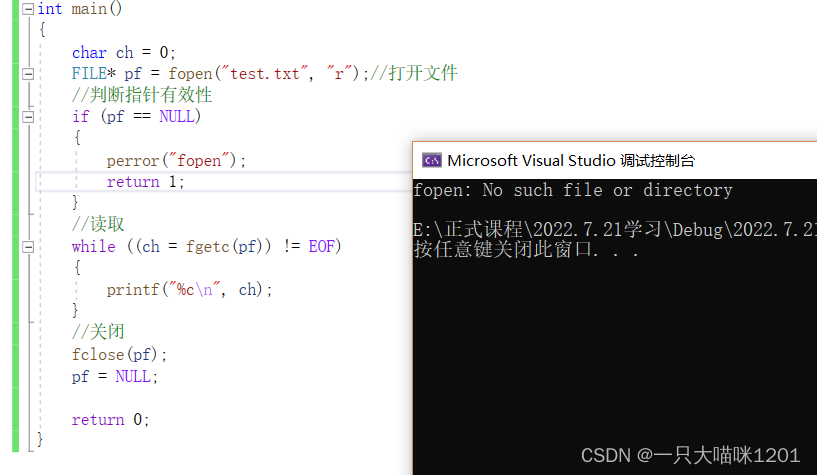
We will list test.txt After deleting the file , The code will report an error .
Be careful :
- When reading the contents of a file , Must read the way to open , If it is opened in writing, it cannot be read
- Character output function fputc
int fputc ( int character, FILE * stream );
This is a fputc Function declaration of , A reference header file is required stdio.h, Used to write a byte to the file .
- Shape parameter :
- int character: Used to receive characters to be written
- FILE* stream: Used to receive the pointer returned after opening the file
- Return type :int integer
- Output success , Returns the character written
- Output failed , return EOF, And an error
Next, we will use characters ’a’ To character ’z’ write in test.txt In file
int main()
{

	char ch = 0;
	FILE* pf = fopen("test.txt", "w");// Open file
	// Pointer validity judgment
	if (pf == NULL)
	{

		perror("fopen");
		return 1;
	}
	// Output
	for (ch = 'a'; ch <= 'z'; ch++)
	{

		fputc(ch, pf);
	}
	// close
	fclose(pf);
	pf == NULL;

	return 0;
}
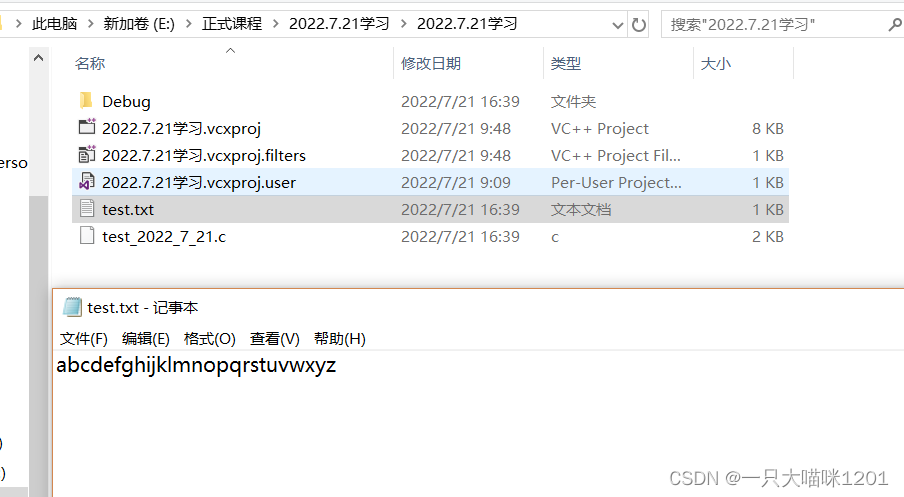
Under the project directory , We can see that the file name is test.txt The file of , The contents of the file are characters from a To z.
This is the original without this file , Newly created files , If you have this document , But we need to output other content ?
int main()
{

	char ch = 0;
	FILE* pf = fopen("test.txt", "w");// Open file
	// Pointer validity judgment
	if (pf == NULL)
	{

		perror("fopen");
		return 1;
	}
	// Output
	for (ch = 'A'; ch <= 'Z'; ch++)
	{

		fputc(ch, pf);
	}
	// close
	fclose(pf);
	pf == NULL;

	return 0;
}
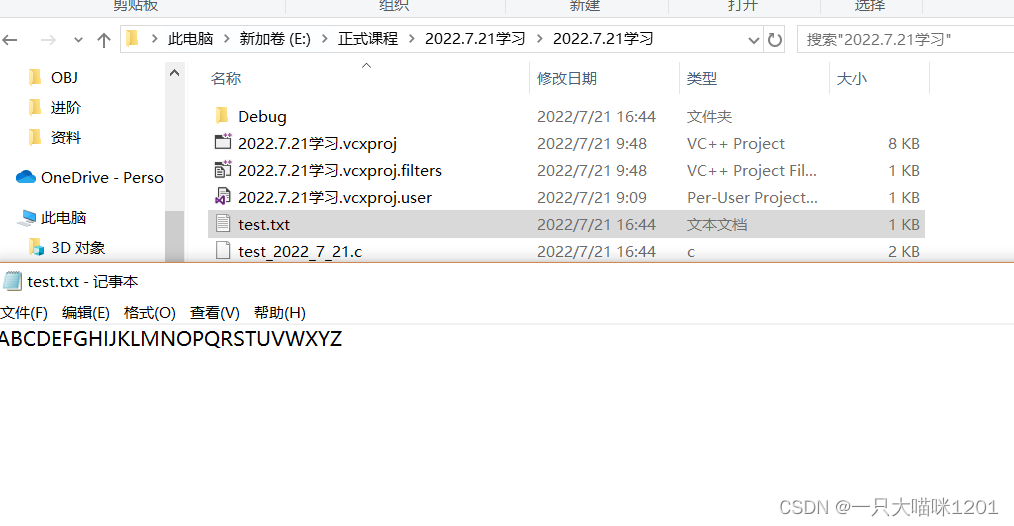
At this time, the original lowercase is overwritten by uppercase
- When you open it in a write only way , The contents of the original file will be cleared
- Text input function fgets
char * fgets ( char * str, int num, FILE * stream );
This is a fgets Function declaration of , A reference header file is required stdio.h, Used to read the string in the file .
- Shape parameter :
- char* str: Used to receive the first address of the read string storage space
- int num: Used to receive the number of characters in the string , Including byte receiving flag ’\0’
- FILE* stream: Used to receive the pointer returned after opening the file
- Return type :char* Pointer variable of type
- Read successful , Return the first address of the memory space where the string is stored
- Read ahead of time encountered the end of file flag EOF, Return null pointer NULL, And tell eof, No mistake , It belongs to the normal end
- An error occurred during reading , Return null pointer NULL, And tell ferror, And an error
Again , We create files in the project directory test.txt, The string 
There are also many characters
int main()
{

	char arr[20];
	FILE* pf = fopen("test.txt", "r");
	// Pointer validity judgment
	if (pf == NULL)
	{

		perror("fopen");
		return 1;
	}
	// Read string
	fgets(arr, 12, pf);
	// Print string
	printf("%s\n", arr);
	//printf("%s\n",fgets(arr,12,pf));
	// close
	fclose(pf);
	pf == NULL;

	return 0;
}

Although there are also characters in the file , But the reading is in the form of string .
It is not written in the document ‘\0’, When the string is put into the storage space, it is automatically filled ’\0’
- Text output function fputs
int fputs ( const char * str, FILE * stream );
This is a fputs Function declaration of , A reference header file is required stdio.h, Used to write strings to files .
- Shape parameter :
- const char* str: Used to receive the first address of the character to be written in the memory space
- FILE* stream: Used to receive the pointer returned after opening the file
- Return type :int type
- Output success , Returns a nonnegative integer
- Output failed , return EOF, And an error
We will string “I LOVE SHANGHAI" Output to test.txt In file .
int main()
{

	char arr[] = "I LOVE SHANGHAI";
	FILE* pf = fopen("test.txt", "w");
	if (pf == NULL)
	{

		perror("fopen");
		return 1;
	}
	fputs(arr, pf);
	fclose(pf);
	pf = NULL;
	return 0;
}

You can see , In the file is the string we output , There is also no end of character mark ’\0’
- Format input function fscanf
int fscanf ( FILE * stream, const char * format, ... );
This is a fscanf Function declaration of , A reference header file is required stdio.h, Used to read data in a certain format from a file .
contrast scanf Function definition of
int scanf ( const char * format, ... );
You can see , The difference lies in
- fscanf There are two formal parameters in , The first parameter is used to receive the pointer returned after the file is opened , The second formal parameter is scanf The formal parameters of are exactly the same
therefore fscanf Usage and scanf The usage is the same , The difference is that fscanf Need one more parameter of pointer variable .
We are test.txt Put three different types of data in the file

int main()
{

	char ch = 0;
	int a = 0;
	float b = 0.0f;
	FILE* pf = fopen("test.txt", "r");
	if (pf == NULL)
	{

		perror("fopen");
		return 1;
	}
	fscanf(pf, "%c %d %f", &ch, &a, &b);// Format read data
	printf("%c\n", ch);
	printf("%d\n", a);
	printf("%f\n", b);
	fclose(pf);
	pf == NULL;

	return 0;
}

Successfully read the corresponding number according to our format .
Be careful :
- The format of numbers in the file should be put according to the format read in the program , If the format cannot correspond , The number taken out will be wrong
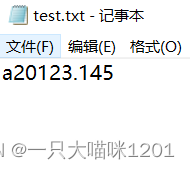
If you remove the spaces between different types 
The result of printing will become like this , The result is not what we want .
- Format output function fprintf
int fprintf ( FILE * stream, const char * format, ... );
This is a fprintf Function declaration of , A reference header file is required stdio.h, Used to output formatted data to files .
contrast printf Function definition of
int printf ( const char * format, ... );
Again fprintf Just one more pf The file pointer , Others and printf In the same way .
We sent the document test.txt Medium output ‘a’ 1999 96.00 Format data for
int main()
{

	char ch = 'a';
	int a = 1999;
	float b = 96.00f;

	FILE* pf = fopen("test.txt", "w");
	if (pf == NULL)
	{

		perror("fopen");
		return 1;
	}
	fprintf(pf, "%c %d %.2f\n", ch, a, b);
	fclose(pf);
	pf == NULL;

	return 0;
}

Meet our requirements .
- Binary output function fwrite
size_t fwrite ( const void * ptr, size_t size, size_t count, FILE * stream );
This is a fwrite Function declaration of , A reference header file is required stdio.h, It is used to write data to the file in binary form .
- Shape parameter :
1.const void* ptr: The address of the memory space used to receive the output data
- size_t size: The size used to receive the read data type
- size_t count: Used to receive the number of data to be read
- FILE* stream: Used to receive the address returned after opening the file
- Return type :size_t type , That is to say unsigned int type , Indicates the number of data output
- Output success , The returned value is equal to the number of output in the formal parameter
- Output failed , return 0, And an error
We create a structure type of data , Output in binary form to test.txt In file
struct S
{

	char c1;
	int i;
	char c2;
};

int main()
{

	struct S s = {
     'a',1998,'b' };
	struct S* ps = &s;
	FILE* pf = fopen("test.txt", "wb");
	if (pf == NULL)
	{

		perror("fopen");
		return 1;
	}
	fwrite(ps, sizeof(struct S), 1, pf);
	fclose(pf);
	pf = NULL;

	return 0;
}

We found that , I can't understand the contents of the document at all , This is actually expressed in the form of binary number text .
Be careful :
- Here, the file is opened in ”wb“
How to verify that this content is correct ? Next, we will read it in binary mode and see the result
- Binary input function fread
size_t fread ( void * ptr, size_t size, size_t count, FILE * stream );
This is a fread Function declaration of , A reference header file is required stdio.h, Used to read data from binary files .
- Shape parameter :
- void* ptr: It is used to receive the spatial address used to put the read data
- size_t size: The type size used to receive read data
- size_t count: Used to receive the number of data to be read
- FILE* stream: Used to receive the address returned after opening the file
- Return type :size_t type
- Read successful , The returned value is equal to the number of formal parameters to be read
- Read failed , The returned value and the number of formal parameters to be read are not equal
Let's read the binary file created by the above program test.txt
struct S
{

	char c1;
	int i;
	char c2;
};

int main()
{

	struct S s = {
     0 };
	struct S* ps = &s;
	FILE* pf = fopen("test.txt", "rb");
	if (pf == NULL)
	{

		perror("fopen");
		return 1;
	}
	fread(ps, sizeof(struct S), 1, pf);
	printf("%c\n", ps->c1);
	printf("%d\n", ps->i);
	printf("%c\n", ps->c2);

	fclose(pf);
	pf = NULL;

	return 0;
}

You can see , The result is the same as what we wrote in the previous program .
Although we can't read binary files , But it can be read by the system through the program .
Be careful :
- The opening method here uses ”rb“
The above is the function used to operate the file .
Random reading and writing of documents
The file reading and writing functions mentioned above by benmew are to read and write data in order , So can you read only one data in the file without reading others ? Next, benmew introduces several functions that can read data at any position .
- Function to locate the offset of the file pointer fseek
int fseek ( FILE * stream, long int offset, int origin );
This is a function fseek Statement of , A reference header file is required stdio.h, The function is to locate the position where the data is to be read .
- Shape parameter :
- FILE* stream: Used to receive the pointer returned after opening the file
- long int offset: It is used to receive the offset of the data to be read from the reference position
- int oring: Used to receive the reference position
- Return type :int type
- Successful operation , return 0
- operation failed , Returns a nonnegative number , And an error
- When opened in binary operation mode , There are three reference positions for this function :
- SEEK_SET: Indicates the starting position of the file
- SEEK_CUR: Indicates the current location of the file
- SEEK_END: Indicates the end position of the file
When we use this function , The formal parameters are here 3 Just choose one of them .
- When opened in the operation mode of text file , There are two reference positions for this function :
- Numbers 0
- function ftell The offset returned
int main()
{

	FILE* pf = fopen("test.txt", "wb");
	if (pf == NULL)
	{

		perror("open");
		return 1;
	}
	fputs("0123456789", pf);
	fseek(pf, 5, SEEK_SET);
	fputs("abc", pf);
	fclose(pf);
	pf = NULL;

	return 0;
}


Originally, what we put in the document is 0 To 9 String
- We set the offset to 5, The starting position is the beginning of the file , At this time, when operating on the data of the file, the offset is 5 The data of , That's the character 5 Started
- take abc After writing to the file , Directly overwrites the characters in the original file 567
- Function that returns the offset of the file pointer from the starting position ftell
long int ftell ( FILE * stream );
This is a ftell Function declaration of , A reference header file is required stdio.h, The function is to return the offset of the data operated at this time relative to the starting position of the file .
- Shape parameter : Used to receive the address returned after opening the file
Return type : The offset of the data of the operation relative to the starting position of the file
int main()
{

	FILE* pf = fopen("test.txt", "rb");
	if (pf == NULL)
	{

		perror("fopen");
		return 1;
	}
	fseek(pf, 3, SEEK_SET);// The offset is set to 3
	int ret = ftell(pf);// Look at the offset

	fclose(pf);
	pf = NULL;

	printf("%d\n", ret);

	return 0;
}

The returned offset is the offset we set earlier .
- A function that returns the starting position of the file pointer rewind
void rewind ( FILE * stream );
This is a rewind Function declaration of , A reference header file is required stdio.h, The function is to make the file pointer return to the starting position .
Parameter types are not mentioned anymore .
int main()
{

	FILE* pf = fopen("test.txt", "rb");
	if (pf == NULL)
	{

		perror("fopen");
		return 1;
	}
	fseek(pf, 3, SEEK_SET);// The offset is set to 3
	int ret = ftell(pf);// Look at the offset
	printf(" Before returning :%d\n", ret);

	rewind(pf);
	ret = ftell(pf);// Look at the offset
	printf(" After returning :%d\n", ret);

	fclose(pf);
	pf = NULL;

	return 0;
}

We originally set 3 And the offset of that becomes 0, It indicates that the file pointer has returned to the starting position of the file .
The above is the function related to the access location of the file pointer , By matching these functions , We can access one or several data in the text at will .
Text files and binaries
Data files are divided into text files and binary files
- Data files : Data is stored in memory in binary form , If you do not add any conversion output in the external memory , Such files are called data files
- text file : Convert the binary data in memory , With ASCII Output to external memory in the form of code value , Such a file is called a text file
Generally speaking , Text files are understandable , Binary files are beyond our comprehension .
Binary files can make files occupy less disk space
Look at code
#include <stdio.h>

int main()
{

	int a = 10000;
	FILE* pf = fopen("test.txt", "w");// Open the file as written
	if (pf == NULL)
	{

		perror("fopen");
		return 1;
	}
	fprintf(pf, "%d\n", a);
	fclose(pf);
	pf = NULL;

	return 0;
}

This is a text file in the form of numbers 10000 Output to the hard disk , The size is five bytes .
int main()
{

	int a = 10000;
	FILE* pf = fopen("test.txt", "wb");// Open the file as written
	if (pf == NULL)
	{

		perror("fopen");
		return 1;
	}
	fwrite(&a,sizeof(a),1,pf);
	fclose(pf);
	pf = NULL;

	return 0;
}
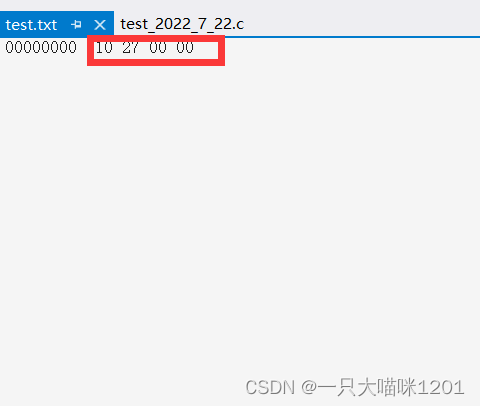
This is to output data to the hard disk in binary form , It's a binary file , Size is 4 Bytes .
Be careful : The pile in front 0 Is a file format , It does not represent data
We can see directly , Numbers 10000 Put in the text file is 5 Bytes , Put in binary file is 4 Byte size , It is obviously one byte smaller .

The green box in the above figure is the text file we opened in binary form , The blue box is the binary file opened in binary form .
- Numbers 10000 When stored as a text file , Is to put the character ’1’ and 4 Characters ‘0’ Store in hard disk , Each character has a corresponding ASCII Code value , This is what you see when you open it in binary form 5 A character ASCII value , altogether 5 Byte size
- Numbers 10000 When stored in binary file , It is to store the binary in the memory in the hard disk without conversion , Numbers 10000 yes int type , Size is 4 Bytes , So what you see when you open it in binary form is 10000 The binary form of is stored in memory according to the small end storage , Size is 4 Bytes
Through the above analysis , We found that , Binary files can really save space .
Determination of the end of file reading
When introducing the sequential read function, benmew analyzed the return value of each function one by one , Now let's summarize
Two functions are needed to judge the end of file reading :
- feof
int feof ( FILE * stream );
This is a function feof Statement of , A reference header file is required stdio.h, The function is to judge whether the reading ends normally .
- Shape parameter : File pointer type
- Return type :int type
- Normal end returns a non negative number
- An error occurred and returned 0
- ferror
int ferror ( FILE * stream );
This is a ferror Function declaration of , A reference header file is required stdio.h, The function is to judge whether the end of file reading is caused by an error .
- Shape parameter : The file pointer
- Return type :int type
- If an error occurs, end , Returns a non negative number
- If it's a normal end , return 0
We read only , Data files are divided into text files and binary files , Their file end judgment is also different .
- End of text file reading , Determine whether the return value is EOF perhaps NULL
Such as :
fgetc return EOF
fgets return NULL- Binary file reading finished , Judge whether the return value is less than the number to be read
Such as :
Judge fread Whether the return value of is less than the number to be read
Text file example :
int main()
{

	char c = 0;
	FILE* pf = fopen("test.txt", "r");

	if (pf == NULL)
	{

		perror("fopen");
		return 1;
	}

	while ((c = fgetc(pf)) != EOF)
	{

		printf("%c ", c);
	}
	printf("\n");
	// Determine the reason for the end of reading
	if (feof)
		printf(" End of normal reading \n");
	else if (ferror)
		printf(" Reading ended when an error was encountered \n");

	fclose(pf);
	pf = NULL;

	return 0;
}

At this time, I encounter EOF Finished reading , So it is the end of normal reading .
Example of reading binary files :
int main()
{

	// Create binaries
	double arr[10] = {
     0.0,1.0,2.,3.0,4.0,5.0,6.0,7.0,8.0,9.0 };

	double arr1[10] = {
     0 };
	FILE* pf = fopen("test.txt", "wb");

	if (pf == NULL)
	{

		perror("fopen");
		return 1;
	}

	fwrite(arr, sizeof(double), 10, pf);

	fclose(pf);
	pf = NULL;

	// Read binary
	pf = fopen("test.txt", "rb");
	if (pf == NULL)
	{

		perror("fopen");
		return 1;
	}
	int sum = fread(arr1, sizeof(double), 10, pf);

	if (sum < 10)
		printf(" Error reading \n");
	else if (sum == 10)
		printf(" End of normal reading \n");

	fclose(pf);
	pf = NULL;

	return 0;
}

Because the number read at this time is equal to the number to be read , So the normal reading ends .
File buffer
flow
In the table above that describes the read-write function of sequential files , Did you find fread Functions and fwrite Function only applies to binary files , Other functions are used for all streams , So what does flow mean here ?
- Flow is a design concept , Because when we write programs, we don't need to care about the underlying logic of data input or output , We just output this data to the stream , Or input from the stream , As for how to realize the data in the stream and the keyboard , We don't need to care about the interaction between screens and other devices
- But streams also have types , For example, our output and input to files belong to file streams , And keyboard streaming, etc , They are like small rivers , They are collectively referred to as flows .
Look at an example
int main()
{

	int a = 10;
	fprintf(stdout, "%d\n", a);
	printf("%d\n", a);

	return 0;
}

Use fprintf It can also be achieved and printf Same effect
- printf Is the standard output function , And our monitor is the standard equipment , Then the output data belongs to the standard output stream
- fprintf in , Change the first formal parameter to stdout when , It means that the data output at this time also belongs to the standard output stream , If it's a pointer variable pf When , Then the data at this time is the file output stream
- alike , You can change the first formal parameter to a pointer to a different stream . So we say fprintf Applicable to all streams . The same is true for other input-output functions .
- and fwrite and fread Only for binary files , It is not suitable for all streams .
File buffer
We already know that we can export and import files , So what is the process like ? It is to output a number from memory and put it directly into the file on the hard disk ?

In fact, the data in the program and the data in the hard disk interact through a buffer , Whether it's a keyboard or a monitor , Or documents .
- ANSIC The standard is “ Buffer file system ” Processing of data files , The so-called buffer file system means that the system automatically opens up a block in memory for each file being used in the program “ File buffer ”.
- Data output from memory to disk is first sent to a buffer in memory , After the buffer is filled, it is sent to the disk together .
- If you read data from disk to computer , Then read the data from the disk file and input it into the memory buffer ( Fill the buffer ), And then send the data from the buffer to the program data area one by one ( Program variables, etc ). The size of the buffer depends on C The compiler system decides .
Through an example to prove the existence of this buffer :
#include <stdio.h>
#include <windows.h>
int main()
{

	FILE* pf = fopen("test.txt", "w");
	if (pf == NULL)
	{

		perror("fopen");
		return 1;
	}
	fputs("abcdef", pf);// Put the code in the output buffer first

	printf(" sleep 10 second - The data has been written , open test.txt file , Found no content in the file \n");
	Sleep(10000);
	printf(" Refresh buffer \n");
	fflush(pf);// When the buffer is flushed , Write the data in the output buffer to a file ( disk )

	printf(" Sleep again 10 second - here , Open again test.txt file , There's something in the file \n");
	Sleep(10000);
	fclose(pf); // notes :fclose When closing a file , It also flushes the buffer
	pf = NULL;

	return 0;
}

- After outputting the string to a file 10 Seconds ,test.txt There is nothing in the document , It indicates that the data is still in the input buffer at this time , Buffer not full , All not transferred to hard disk .

- And after fflush(pf) After refreshing the buffer 10 Seconds , There is content in the document , That is, we use it in front fputs The output string , It indicates that the contents in the buffer are output to the file , That is, it is transferred to the hard disk .
fclose The buffer will also be refreshed after execution
Through the above example, I believe you feel the existence of file buffer , alike , Keyboard entry , As well as screen output, there are buffers , It is necessary to wait until the buffer is full before sending data .
The purpose of this design is to improve the efficiency of the system , If the data is transmitted one by one , Then the system doesn't have to do anything else , Because of the buffer , In the process of filling the buffer , The system can carry out other tasks , All greatly improve the efficiency of the system .
summary
There are no hard to understand knowledge points in file operation , It's just that there are many functions , As long as we can skillfully use these functions , Then our file operation will be more handy . I hope this article will help you .
边栏推荐
猜你喜欢





随机推荐
图文并茂演示小程序movable-view的可移动范围
数据库设计
专题训练-链表
What level is GF futures? Is the account opening safe and reliable?
JS div scroll to the bottom
【Azure 事件中心】Azure Event Hub 新功能尝试 -- 异地灾难恢复 (Geo-Disaster Recovery)
【C语言基础】16 可变数组(数组长度可扩展)
Kill a process on Linux
Scala object
华泰证券网上开户安全吗是真的吗
ssm框架外卖订餐系统
[C language foundation] 16 variable array (array length can be extended)
GNN third party Library: pyg (pytorch geometric) [the library based on pytorch can help users quickly build and train their own graph neural network model] [deepwalk, line, GCN, gat, etc.]
广发期货是什么级别?开户安全可靠吗?
How does the browser import and export | delete bookmarks? Here are the steps
[C language foundation] 15 bit operation
Arcgis 计算两个栅格图层相关性
【PyTorch】cuda()与to(device)的区别
内存屏障中的读写屏障——并发问题
【C语言基础】15 位运算