当前位置:网站首页>Infinite penetration test
Infinite penetration test
2022-06-28 08:21:00 【Xinyouyou】
Four Use Kali Perform an infinite penetration test
Set up a wireless experimental environment
Create an interface that runs in monitoring mode
Grab wireless packets
Four Use Kali Perform an infinite penetration test
4.1 Set up a wireless experimental environment
Configure wireless network card
#iwconfig Commands for configuring the wireless network interface
#[iwconfig]:config a wireless network interfaceiwconfig# View the wireless network configuration
#[ifconfig]:config a network interfaceifconfig wlan0 up#wlan0 yes Kali Wireless interface created for wireless network card , Execute this command to activate the interfaceifconfig wlan0# see wlan0 Current state of the interface , The purpose of this check is to ensure that Kali linux Your wireless interface has been properly activated

wlan0 yes Kali Wireless interface created for wireless network card .
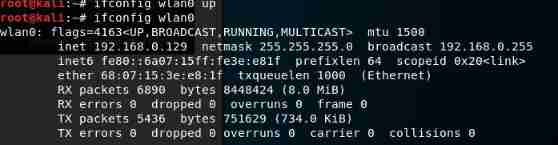
explain :Kali Linux Default by oneself Alfa and Edimax All drivers required by the network card .
Once the system is booted, the network card can be identified . Assign it a network interface wlan0.
Connect the wireless network card to AP( Access AP For one router)
#[iwlist]:Get more detailed wireless information from a wireless interface
#iwlist: Wireless network scan commandiwlist wlan0 scanning# View the wireless network detected by the current wireless network card , In command output ESSID The field contains the name of the wireless networkiwconfig wlan0 essid "xxx"# Set the wireless network name to xxxiwconfig wlan0# Check infinite interface status , If the connection is successful, it will be in Access Point You can see... In the field AP Of MAC Addressroute -n# View the default router in the command output ip Address , The IP The address is usually AP Of the management interface IP Address .ifconfig wlan0 192.168.0.2 netmask 255.255.255.0 up# For this host waln0 The interface is configured with a AP On the same subnet IPifconfig wlan0# Check out the wireless network wlan0 Configuration status ofping 192.168.0.1#ping AP, If the network link is correct, you can ping througharp -a# verification AP Of MAC Address
# Be careful : Some new AP Maybe not Internet Control message protocol (icmp)echo request The packet makes any response , Therefore, it is impossible to ping Through its management address .
# The purpose of this is to improve security , Ensure that the equipment is minimized during unpacking configuration .
# For something like this AP You need to start the browser to access its web Management interface , To verify whether the wireless connection is normal .

In command output ESSID The field contains the name of the wireless network .
Be careful : Because it can be multiple AP Same configuration ESSID, Therefore, it is necessary to output... Through the above command Address Field to determine whether it is correct AP Of MAC Address matching . stay AP(TP-LINK Broadband Router ) On the back of or based on web Of GUI You can see it in the configuration interface MAC Address .


Be careful : stay windows OS in IP The address management command is ipconfig, And in the Kali In Chinese, it means ip
The following is a ip Common forms of commands :
ip addressip addrifconfig


4.2 Create an interface that runs in monitoring mode
WLAN Data frame structure : https://wenku.baidu.com/view/07d927bacfc789eb162dc86f.html
Packet capturing tools in wireless networks :Wireshark,Airodump-NG,Tcpdump,Tshark.
The main use of Wireshark Grab the bag .
The first step in catching a bag is to let Interface of the device that performs packet capturing function stay Monitoring mode Run under .
So , You need to create an interface for the wireless network card of your laptop , So that it can receive all wireless data frames propagating in the air , Whether the actual destination of the frame is the interface or not .
about Wired network for , Where this interface is located Monitoring mode Be commonly called Hybrid mode (promiscuous mode).
Create an interface that runs in monitoring mode
iwconfig
perform iwconfig command , View the configuration of the wireless network , Confirm that the system has been able to detect the wireless network card , The network card driver can be loaded correctly .
If it is installed in a virtual machine Kali There is no wireless network card , A wireless network card adapter is required , One piece USB WiFi network card .
Alfa Networks The company's Alfa AWUS036NH The wireless network card is better , because Kali Linux This network card is supported by default , Drive free installation , Plug it in and use it .
ifconfig wlan0 up
Activate the wireless network card .wlan0 yes Kali The name of the wireless interface created for the wireless network card , This is the name of the wireless network card .
ifconfig wlan0
Verify whether the wireless network card is activated . If... Appears in the command UP word , It means that the wireless network card has been activated .
airmon-ng
To make the wireless network card operate in monitoring mode , Need to use Kali Self contained airmon-ng Tools .
perform airmon-ng command , To verify whether the system has detected an available network card .
airmon-ng start wlan0
Create with wlan0 Monitoring mode interface corresponding to the equipment .
The new interface in monitoring mode will be named wlan0mon.
You can execute... Again without any parametersairmon-ngCommand to verify that the monitor mode interface has been created .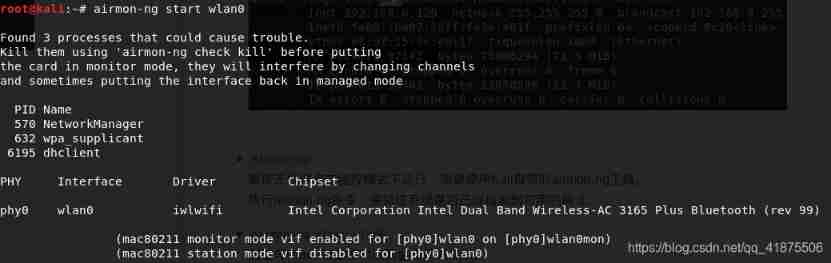
ifconfig wlan0mon
Observe whether the output is named wlan0mon The new interface .
So far, a monitoring mode interface has been created , be known as wlan0mon, The interface is based on the wireless network card .
The interface is used to capture wireless packets traveling through the air .
You can also create multiple interfaces in monitoring mode : You can create multiple interfaces in monitoring mode with the same physical network card , Using the same airmon-ng Tool implementation .
4.3 Grab wireless packets
wireshark &|wireshark
start-up wireshark Program .
Click on 【 Capture 】stay Interface Select from the menu bar wlan0mon— Click... In the upper left corner of the window 【 Start capturing packets ( Shark horn icon )】
Choose to use wlan0mon Interface grab .
When wireshark When starting to grab bags , In the wireshark The main window of packet capturing sees the packet capturing data .
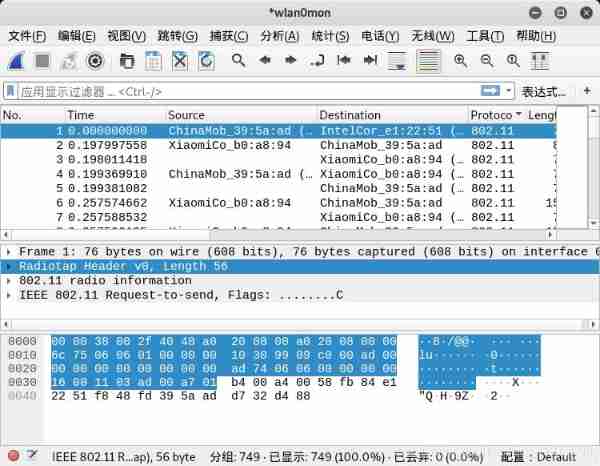
wireshark The main window for capturing packets shows the data packets captured by the wireless network card across the air .
To view the contents of any packet , Now select the packet in the packet list at the top of the window , You can view it in the packet content area in the middle of the window .
The content area in the middle of the window , Click the small triangle on the left to display additional information under the content area .
边栏推荐
- The Falling Leaves
- 广州:金融新活水 文企新机遇
- FatMouse and Cheese
- 【力扣10天SQL入门】Day5+6 合并表
- WasmEdge 0.10.0 发布!全新的插件扩展机制、Socket API 增强、LLVM 14 支持
- Anniversary party
- Installing mysql5.7 under Windows
- The RAC cannot connect to the database normally after modifying the scan IP. The ora-12514 problem is handled
- nlp序列完全可以模拟人脑智能
- 设置cmd的编码为utf-8
猜你喜欢

B_QuRT_User_Guide(28)

Installing mysql5.7 under Windows

VMware Workstation related issues

图像翻译:UVCGAN: UNET VISION TRANSFORMER CYCLE-CONSISTENT GAN FOR UNPAIRED IMAGE-TO-IMAGE TRANSLATION

MySQL tablespace parsing

Two tips for block level elements

Reverse mapping of anonymous pages

The maximum number of Rac open file descriptors, and the processing of hard check failure

js取整的小技巧

nlp序列完全可以模拟人脑智能
随机推荐
设置cmd的编码为utf-8
【学习笔记】差分约束
关于如何在placeholder中使用字体图标
Unity - use of API related to Pico development input system ---c
Introduction to kubernetes (I)
PC端隐藏滚动条
App automated testing appium tutorial 2 - ADB command
B_ QuRT_ User_ Guide(30)
你了解TCP协议吗(一)?
Prometheus monitoring (I)
[learning notes] shortest path + spanning tree
Priority of JS operator
Chenglian premium products donated love materials for flood fighting and disaster relief to Yingde
The maximum number of Rac open file descriptors, and the processing of hard check failure
VMware Workstation related issues
Leetcode swing series
Activity隐式跳转
Trigonometric transformation formula
开户券商怎么选择?网上开户是否安全么?
Set<String>