当前位置:网站首页>Network Security Learning (XIII) data link layer
Network Security Learning (XIII) data link layer
2022-07-25 22:51:00 【Shake light·】
Data link layer (2 layer Date link layer)
1. Belongs to the second floor
2. The transmission unit : frame
3. Frame structure : Pictured
Frame head :6+6+2=14 byte
MTU value :1500 byte
Frame tail :4 byte
Frame header content : The goal is mac, Source mac, type
Role of type : Identify the upper layer protocol
0x0800: The upper level is IP agreement
0x0806: The upper level is ARP agreement
The frame format :
802.3( Wired network card )
802.3u Achieve 100m Fast Ethernet
802.3z Optical fiber realizes gigabit network
802.3ab The twisted pair realizes Gigabit Ethernet
802.3ae Achieve 10 trillion
802.3ba Achieve 100000 trillion
802.11( wireless network adapter )
802.11a The highest speed 54Mbps(5g)
802.11b The highest speed 11Mbs (2.4g)
802.11g The highest speed 54Mbs(2.4g)
802.11n The highest speed 600Mbs
mac Address 12 position 16 Base number = 16*4=48 Bit binary = 48 byte /8 = 6 byte
MTU The value is only 1500
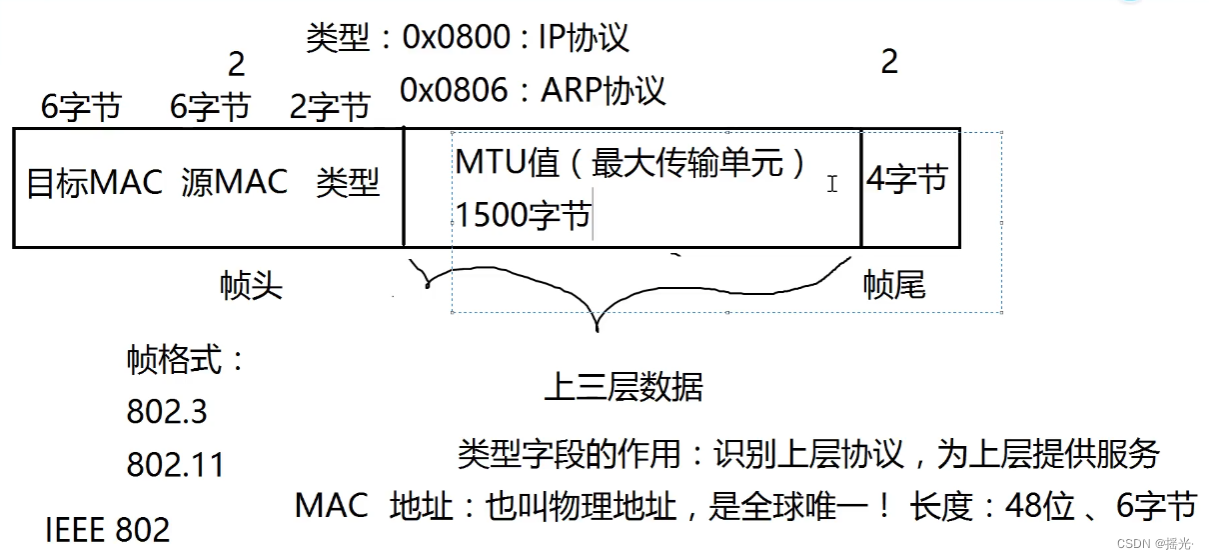
4. Equipment working at the data link layer : Switch / network card
5. How switches work :
After receiving a data frame :
First, learn the source in the frame MAC Address to form MAC Address table
Then check the target in the frame MAC Address , And match MAC Address table
If there is a match in the table , Unicast forwarding
If there is no match in the table , In addition to the receiving port, broadcast forwarding
MAC The aging time of the address table is... By default 300 second ( Modifiable )


Port status :up/down
down Three possibilities :
1) artificial down fall
2) Rate mismatch
3) Duplex mode mismatch ( Duplex duplex)
Duplex mode : Simplex , Half duplex , full duplex
Basic working mode and commands of the switch
Configure the network device for the first time , Need to use console Line
stay PC Need to use “ hyper terminal ” Or other third-party software
1) User mode
switch>
You can view the basic and simple information of the switch , And the configuration cannot be modified
2) Privilege mode :
Input switch>enable
switch#
You can view all configurations , And the configuration cannot be modified , But you can test , preservation , Initialization and other operations
3) Global configuration mode
Input switch#configure terminal
switch(config)#
Configuration cannot be viewed by default ! You can modify the configuration , And the global effect !
4-1) Interface configuration mode
Input switch(config)# interface f0/1
switch(config-if)#
Input switch(config)#line console 0 Get into console mouth / Line / Console mode
Configuration cannot be viewed by default ! You can modify the configuration , And effective for this port !
4-2)console mouth / Line / Console mode
Input switch(config)#line console 0
Configuration cannot be viewed by default ! You can modify the configuration , And right console Entry into force !
command
exit Exit level 1
end Go straight back to privileged mode
configure teriminal
hostname name Configure host name ( Interface configuration mode )
line console 0
password password
login Set user password ( Console mode )
configure teriminal
enable password Set a privileged password ( Interface configuration mode )
enable secret password Encrypt privileged password ( If plaintext password has been configured , Clear text password will be invalid )
Support command abbreviations
? View command
History commands
tab Completion order
Shortcut key
ctrl+u Delete a line
ctrl+a Jump to the beginning of the line
ctrl+e Jump to the end of the line
Do not save after configuring the switch , After restart, the configuration is gone
Because there is a file in memory
running-config
The first time I turn on the computer , The system will automatically create a new clean... In memory running-config
Save configuration
Under privilege mode :
copy running-config startup-config
or
write
Switch restart :
en
reload
Switch startup action :
First go to the hard disk to find startup-config Whether there is
If it doesn't exist , Create a new... In memory run
If there is , Then it is copied into memory and named running-config
The interface rate of the switch
int f0/0
speed rate
see running-config To configure
en
show running-config
sh run Abbreviation
Configure duplex mode
int f0/1
duplex half Half duplex
full full duplex
auto The adaptive
see stratup-config To configure
en
show stratup-config
see MAC Address table
en
show mac-address-table
View the brief information of the interface
en
show ip interface brife
show ip int b Abbreviation
Close the interface manually
int f0/x
shutdown Turn on
no shutdown close
Commands in privileged mode can be enforced in other modes
do xxx
But no code completion
Delete the configuration
1) Delete it wherever you configure it
2) Add before configuration no
3) The original command has parameters , Delete unnecessary parameters
no shutdown
Empty / erase / Initialize configuration
en
erase startup-config
Configure for layer 3 ports IP Address :
int f0/0
ip address 10.1.1.254 255.255.255.0
Abbreviation ip add 10.1.1.254 255.255.255.0
no shutdown
exit
Remote control router
Input :
Router(config)#line vty 0 ? Enter the virtual terminal
? Take 0-15, Represents the number of people with the most remote control
You need to set the password after entering ( The setting method is the same as user password )
Router(config-line)#password xxxxxx
Router(config-line)#login
You can also set no password
Router(config-line)#login local Use local Do Authentication
To configure local( Local database )
Router(config)#username xx password xxx
And it can only be accessed when the privileged password is set
Default on 23 The port number can be passed through telnet visit
Get into Virtual terminal after , You can also change the port number , Use ssh Connect
transport input ?
all Turn on 22 23 port
none Close all ports
ssh open 22 port
telnet open 23 port
But before setting, you need to turn on the encryption algorithm
Router(config)# crypto key generate rsa Generate the key
Then you will be asked to enter the length of the key pair
But to execute the above command, you need to configure the domain name and router name ( This domain name has nothing to do with the company's domain name )
Router(config)#ip domain-name domain name
Use ssh Connect
ssh -l Router name ip Address Only in switches
In reality, orders are often
ssh user name @ip Address
What is Authentication ?
Login requires an account and password
Two states of the interface
The physical layer Data link layer
1) up up Manually open and plug in the Internet cable Successful negotiation
2) down down No network cable
3) up up Negotiation failed
4) administratively down down Manually close the interface
2 The layer interface is enabled by default
3 The layer interface is manually closed by default
Configure management for the switch IP
conf t
int vlan 1 vlan For virtual network card
ip add xxx xxx
no shutdown
Configure the default gateway for the switch
Used for remote management across network segments !
conf t
ip default-gateway 10.1.1.254
Turn off command parsing search
conf t
no ip domain-lookup
边栏推荐
- 3 lexical analysis
- Can generic types be used in array
- Summary of traversal methods of six sets list, set, map, queue, deque and stack
- 依法严厉打击违规自媒体运营者:净化自媒体行业迫在眉睫
- Oracle query statement summary
- What is the difference between bio, NiO and AIO?
- [training day15] good name [hash]
- Compiler introduction
- 软件测试 pytest pytest的命名规则 用例的前后置 conftest.py 定制allure报告 @pytest.mark.parametrize()装饰器作数据驱动
- Opencv compile and call GPU version
猜你喜欢
编译器引论

HCIE终到手,路才开始

【集训DAY15】简单计算【树状数组】【数学】

Kibana~后台启动Kibana之后无法找到进程号

Dom and events
![[training Day12] tree! Tree! Tree! [greed] [minimum spanning tree]](/img/46/1c7f6abc74e11c4c2e09655aade223.png)
[training Day12] tree! Tree! Tree! [greed] [minimum spanning tree]

1000 okaleido tiger launched binance NFT, triggering a rush to buy

【自然语言处理】【向量表示】AugSBERT:改善用于成对句子评分任务的Bi-Encoders的数据增强方法

单元测试,写起来到底有多痛?

【集训DAY11】Nescafe【贪心】
随机推荐
[training day15] boring [tree DP]
Deep recursion, deep search DFS, backtracking, paper cutting learning.
Hcie is finally in hand, and the road begins
Examples and points for attention about the use of getchar and scanf
[training Day12] tree! Tree! Tree! [greed] [minimum spanning tree]
Interpretation of English terms
Extended configuration of static routing in the second experiment
贴片微型滚珠振动开关的结构原理
CMU AI PhD 第一年总结
ECMA 262 12 Lexical Grammer
Simple setting method of search box
[natural language processing] [vector representation] augsbert: improve the data enhancement method of Bi encoders for paired sentence scoring tasks
PE format: analyze and implement IATHOOK
2020-09-17
access-list vs ip access-list
ECMA 262 12 Lexical Grammer
Multi data source switching
Anaconda~Upload did not complete.
The new media operation strategy (taking xiaohongshu as an example) helps you quickly master the creative method of popular models
XSS collect common code