当前位置:网站首页>【TypeScript】TypeScript常用类型(下篇)
【TypeScript】TypeScript常用类型(下篇)
2022-07-26 12:40:00 【海底烧烤店ai】
前言
在上篇中讲到了TypeScript中的基元类型,数组,any,函数,对象,在这一篇中将继续深入TypeScript的常用类型,包括联合类型,类型别名,接口,类型断言等,在学习之前建议先了解一下上篇的内容,安装并配置好tsc 编译器。
1、联合类型
- 定义联合类型
联合类型是由两个或多个其他类型组成的类型,表示可能是这些类型中的任何一种的值。我们将这些类型中的每一种称为联合类型的成员。
多个类型之间使用|分割:
function getId(id: string | number) {

    console.log("id=", id);
}
getId(1);
getId("1");
这个例子中getId接收的参数id可为string类型也可为number类型,当类型不匹配时依旧会抛出错误:

- 使用联合类型
在使用联合类型时需要注意的是:不能盲目将联合类型的数据当成单独类型的数据进行操作,不然TypeScript将抛出错误提醒你:

这里直接对联合类型id进行字符串上的toUpperCase操作,TypeScript会自动检测id联合类型的成员是否都具有toUpperCase属性,这里检测到联合类型的成员number类型并不具有toUpperCase属性,所以会抛出错误提示用户。
正确的做法是:
function getId(id: string | number) {

    if (typeof id === "string") {

        // 在此分支中,TS自动检测id的类型为“string”
        console.log(id.toUpperCase());
    } else {

        // 此处,TS自动检测id的类型为“number”
        console.log(id.toString());
    }
}
先使用判断语句确定id具体的类型,再对其进行操作(这称为类型缩小,博主后期会出另外的博文对其详细介绍),TypeScript会非常智能的检测判断分支的语句中id的类型。
2、类型别名
前面我们声明类型都是直接在类型注释中编写类型来使用它们,这很方便,但是想要多次使用同一个类型,并用一个名称来引用它是很常见的。
这就可以使用类型别名type来声明类型:
type Id = number | string;
// 在类型注释中直接使用类型别名
function getId(id: Id) {

    console.log("id=", id);
}
getId(1);
getId("1");
在定义类型别名以及后面讲到的接口时,都建议将首字母进行大写,如上面例子中的Id
- 类型别名也可以声明复杂的类型:
type Point = {

    x: number;
    y: number;
};

function printCoord(pt: Point) {

    console.log("坐标x的值是: " + pt.x);
    console.log("坐标y的值是: " + pt.y);
}
printCoord({
     x: 100, y: 100 });
- 扩展类型
类型别名可以使用交叉点&来扩展类型:
type User = {

    name: string;
};
type Admin = User & {

    isAdmin: boolean;
};

const admin: Admin = {

    name: "Ailjx",
    isAdmin: true,
};
这里Admin在User基础上扩展了isAdmin类型,当使用Admin并赋予的类型不匹配时将抛出错误:


注意这里报的错,在下面的接口与类型别名的区别中会详细分析这个报错。
梳理一下,之所以称其为类型别名,就是因为它只是用一个名称来指向一种类型,当用户需要使用该种类型时可直接使用该名称,方便复用,也方便将类型与业务代码抽离开来。
3、接口
一个接口声明interface 是另一种方式来命名对象类型:
interface Point {

    x: number;
    y: number;
}
// 与前面的示例完全相同
function printCoord(pt: Point) {

    console.log("坐标x的值是: " + pt.x);
    console.log("坐标y的值是: " + pt.y);
}
printCoord({
     x: 100, y: 100 });
- 类型别名和接口之间的差异
类型别名和接口非常相似,在很多情况下你可以自由选择它们。几乎所有的功能都在interface 中可用type ,关键区别在于扩展新类型的方式不同:
前面提到类型别名是通过交叉点&来扩展类型,而接口的扩展是使用extends 继承(这与class类的继承相似):
interface User {

    name: string;
}
interface Admin extends User {

    isAdmin: boolean;
}

const admin: Admin = {

    name: "Ailjx",
    isAdmin: true,
};
继承后的Admin接口包含父类User中的所有类型,当使用Admin并赋予的类型不匹配时将抛出错误:

这里对比类型注意中抛出的错误会发现这么一个细节:
当我们不给使用Admin类型的常量admin添加name属性时,使用类型别名扩展的会提示:但类型 "User" 中需要该属性,而使用接口扩展的会提示:但类型 "Admin" 中需要该属性
从这里我们能看出类型别名的扩展是将父类
User与扩展的类型{ isAdmin: boolean;}一并交给Admin引用,当使用Admin时实际是同时使用了User和{ isAdmin: boolean;}两种类型。
而接口的扩展是直接继承父类
User,在父类基础上添加了{ isAdmin: boolean;}并生成一个新类型Admin,使用Admin时仅仅是使用了Admin,与User无关了
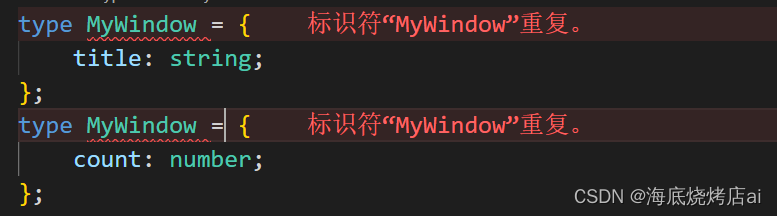
interface也可以向现有的接口添加新字段:
interface MyWindow {

    title: string;
}
interface MyWindow {

    count: number;
}
const w: MyWindow = {

    title: "hello ts",
    count: 100,
};
同名的interface会被TypeScript合并到一起,这是类型别名所做不到的:
- 在
TypeScript 4.2版之前,类型别名可能出现在错误消息中,有时会代替等效的匿名类型(这可能是可取的,也可能是不可取的)。接口将始终在错误消息中命名。 - 类型别名可能不参与声明合并,但接口可以。
- 接口只能用于声明对象的形状,不能重命名基元。
- 接口名称将始终以其原始形式出现在错误消息中,但仅当它们按名称使用时。
4、类型断言
有时,你会获得有关 TypeScript 不知道的值类型的信息。
例如,如果你正在使用document.getElementById ,TypeScript 只知道这将返回某种类型的HTMLElement ,但你可能知道你的页面将始终具有HTMLCanvasElement 给定 ID 的值 。
在这种情况下,你可以使用类型断言as来指定更具体的类型:
const myCanvas = document.getElementById("main_canvas") as HTMLCanvasElement;
与类型注释一样,类型断言由编译器删除,不会影响代码的运行时行为。
还可以使用尖括号语法(除非代码在.tsx 文件中),它是等效的:
const myCanvas = <HTMLCanvasElement>document.getElementById("main_canvas");
提醒:因为类型断言在编译时被移除,所以没有与类型断言相关联的运行时检查。
null如果类型断言错误,则不会出现异常。
TypeScript 只允许类型断言转换为更具体或不太具体的类型版本。此规则可防止“不可能”的强制,例如:

类型断言应该用于:在TypeScript 没有推断出确切的类型,而你又非常坚定其确切的类型是什么的情况
5、文字类型
除了一般类型string 和number ,我们可以在类型位置引用特定的字符串和数字,来限定变量只能为特定的值:
let MyName: "Ailjx";

就其本身而言,文字类型并不是很有价值,拥有一个只能有一个值的变量并没有多大用处!
但是通过将文字组合成联合,你可以表达一个更有用的概念——例如,只接受一组特定已知值的函数:
function printText(s: string, alignment: "left" | "right" | "center") {

// ...
}
printText("Hello, world", "left");
printText("G'day, mate", "centre");
alignment只能被赋予left、right或center,这在组件库中非常常见!
数字文字类型的工作方式相同:
function compare(a: number, b: number): -1 | 0 | 1 {

	return a === b ? 0 : a > b ? 1 : -1;
}
当然,你可以将这些与非文字类型结合使用:
interface Options {

	width: number;
}
function configure(x: Options | "auto") {

// ...
}
configure({
     width: 100 });
configure("auto");
configure("automatic"); // 报错

还有一种文字类型:布尔文字。只有两种布尔文字类型,它们是类型true 和false 。类型boolean 本身实际上只是联合类型true | false 的别名。
- 文字推理
看这样一段代码:
function handleRequest(url: string, method: "GET" | "POST" | "GUESS") {

    // ...
}
const req = {

    url: "https://blog.csdn.net/m0_51969330?type=blog",
    method: "GET",
};
handleRequest(req.url, req.method);
感觉没毛病是吧,但其实TypeScript会抛出错误:
在上面的例子req.method 中推断是string ,不是"GET" 。因为代码可以在创建req 和调用之间进行评估,TypeScript 认为这段代码有错误。
有两种方法可以解决这个问题。
1. 可以通过在任一位置添加类型断言来更改推理
方案一:
const req = {

    url: "https://blog.csdn.net/m0_51969330?type=blog",
    method: "GET" as "GET",
};
>
表示:“我确定
req.method始终拥有文字类型"GET"”
方案二:
handleRequest(req.url, req.method as "GET");
表示:“我知道
req.method具有"GET"值”。
2. 可以使用as const 将类型转换为类型文字
将整个对象转换成类型文字:
const req = {

    url: "https://blog.csdn.net/m0_51969330?type=blog",
    method: "GET",
} as const;
只将method转换成类型文字:
const req = {

    url: "https://blog.csdn.net/m0_51969330?type=blog",
    method: "GET" as const,
};
该as const 后缀就像const 定义,确保所有属性分配的文本类型,而不是一个更一般的string 或number 。
6、null和undefined
JavaScript 有两个原始值用于表示不存在或未初始化的值: null 和undefined
TypeScript 有两个对应的同名类型。这些类型的行为取决于您是否设置tsconfig.json/strictNullChecks 选择。
strictNullChecks表示在进行类型检查时,是否考虑“null”和“undefined”
strictNullChecks=false时,下述代码不会报错:
function doSomething(x: string | null) {

    console.log("Hello, " + x.toUpperCase());
}
strictNullChecks=true时(strict= true时所有的严格类型检查选项都默认为true),上述代码会报错:

避免报错正确的做法:
function doSomething(x: string | null) {

	if (x === null) {

		// 做一些事
	} else {

		console.log("Hello, " + x.toUpperCase());
	}
}
- 非空断言运算符(
!后缀)
! 在任何表达式之后写入实际上是一种类型断言,即确定该值不是null or undefined :
function liveDangerously(x?: number | null) {

    // console.log(x.toFixed()); // 报错:对象可能为 "null" 或“未定义”。
    console.log(x!.toFixed()); // 正确
}
就像其他类型断言一样,这不会更改代码的运行时行为,因此仅当你知道该值不能是null 或undefined 时! 的使用才是重要的。
7、枚举
枚举是 TypeScript 添加到 JavaScript 的一项功能,它允许描述一个值,该值可能是一组可能的命名常量之一。
与大多数 TypeScript 功能不同,这不是JavaScript 的类型级别的添加,而是添加到语言和运行时的内容。因此,你确定你确实需要枚举在做些事情,否则请不要使用。可以在Enum 参考页 中阅读有关枚举的更多信息。
TS枚举:
enum Direction {

Up = 1,
Down,
Left,
Right,
}
console.log(Direction.Up) // 1
编译后的JS代码:
"use strict";
var Direction;
(function (Direction) {

    Direction[Direction["Up"] = 1] = "Up";
    Direction[Direction["Down"] = 2] = "Down";
    Direction[Direction["Left"] = 3] = "Left";
    Direction[Direction["Right"] = 4] = "Right";
})(Direction || (Direction = {
    }));
console.log(Direction.Up); // 1
8、不太常见的原语
- bigint
从 ES2020 开始,JavaScript 中有一个用于非常大的整数的原语BigInt :
// 通过bigint函数创建bigint
const oneHundred: bigint = BigInt(100);
// 通过文本语法创建BigInt
const anotherHundred: bigint = 100n;
主意:使用BigInt和bigint时需要将tsconfig.json中的target设置成es2020以上(包含es2020)的版本
你可以在TypeScript 3.2 发行说明 中了解有关 BigInt 的更多信息。
- symbol
JavaScript 中有一个原语Symbol() ,用于通过函数创建全局唯一引用:
const firstName = Symbol("name");
const secondName = Symbol("name");
if (firstName === secondName) {

	// 这里的代码不可能执行
}

边栏推荐
- STM32 drives hc05 Bluetooth serial port communication module
- 手机上买股票,在哪里开户比较安全?
- LCD笔记(4)分析内核自带的LCD驱动程序
- 火山引擎云上增长方案全景:30+方案齐出,兵发优势领域
- Hit the blackboard and draw the key points: a detailed explanation of seven common "distributed transactions"
- LCD笔记(5)LCD驱动程序框架_使用设备树
- Azure Synapse Analytics 性能优化指南(2)——使用具体化视图优化性能(上)
- Redis realizes single sign on -- system framework construction (I)
- Backtracking - question 51 Queen n -- a classic backtracking problem that must be overcome
- 自定义浏览器默认右击菜单栏
猜你喜欢

1-6月中国ADAS供应商占比9% 又一家零部件巨头全面布局智驾新赛道

Industry case | how does the index help the sustainable development of Inclusive Finance in the banking industry
华为超融合FusionCube解决方案笔记

Backtracking - question 51 Queen n -- a classic backtracking problem that must be overcome

Food safety | these common foods are poisonous! Check your dining table quickly

V00 - do whatever you want when you are old

被罚“带薪休假”一个月后,谷歌解雇了“爱”上 AI 的他

Emerging security providers to learn about in 2022

Ue5 official case Lyra full feature explanation 7. resource management

The programmed navigation route jumps to the current route (the parameters remain unchanged), and if it is executed multiple times, it will throw a navigationduplicated warning error?
随机推荐
【2243】module_ param.m
历史上的今天:IBM 获得了第一项专利;Verizon 收购雅虎;亚马逊发布 Fire Phone...
The "2022 Huawei developer competition eastern China division opening ceremony" was successfully held in Fuzhou
Access database cannot connect
2022 employment season! Adobe helps creative industry workers break through the shackles of skills and return to the source of ability
数据库组成存储过程和函数
LCD笔记(7)LCD驱动程序框架_配置时钟
Data query function
Redis realizes single sign on -- system framework construction (I)
Overseas app push (Part 2): Channel Integration Guide for overseas manufacturers
回溯——第51题. N皇后——必须攻克的经典回溯难题
LCD笔记(6)LCD驱动程序框架_配置引脚
Backtracking - 46. Full arrangement
可移动表空间
Notes....
论文阅读-MLPD:Multi-Label Pedestrian Detector in Multispectral Domain(海康威视研究院实习项目)
Understand test.py in gaitset
[map] universal map usage & two ways of fuzzy query
最好的工程师,就是这样被你“逼”走的!
Visual stdio(VS)中的(int argc、char** argv)命令行参数