当前位置:网站首页>LCD笔记(4)分析内核自带的LCD驱动程序
LCD笔记(4)分析内核自带的LCD驱动程序
2022-07-26 12:21:00 【翠果打烂她的嘴】
1. 驱动程序框架
Linux驱动程序 = 驱动程序框架 + 硬件编程。 在前面已经基于QEMU编写了LCD驱动程序,对LCD驱动程序的框架已经分析清楚。 核心就是:
分配fb_info
设置fb_info
注册fb_info
硬件相关的设置
1.1 入口函数注册platform_driver
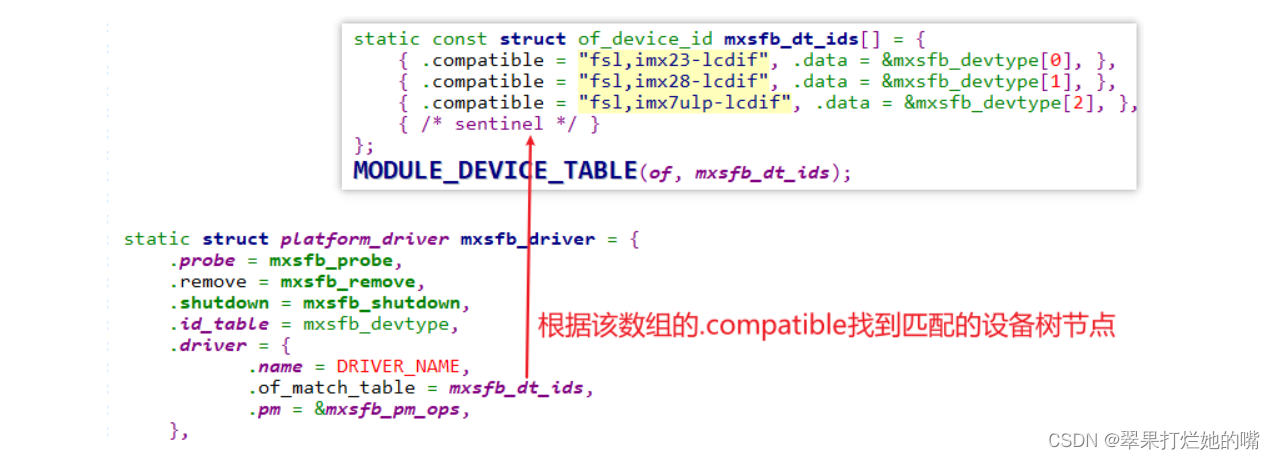
1.2 设备树有对应节点

2. 编写硬件相关的代码
我们只需要针对IMX6ULL的编写硬件相关的代码,涉及3部分:
GPIO设置
LCD引脚
背光引脚
时钟设置
确定LCD控制器的时钟
根据LCD的DCLK计算相关时钟
LCD控制器本身的设置
比如设置Framebuffer的地址
设置Framebuffer中数据格式、LCD数据格式
设置时序
2.1 GPIO设置
有两种方法:
直接读写相关寄存器
使用设备树,在设备树中设置pinctrl
本课程专注于LCD,所以使用pinctrl简化程序

2.2 时钟设置
IMX6ULL的LCD控制器涉及2个时钟:

代码里直接使用时钟子系统的代码。
在设备树里指定频率:
文件:arch/arm/boot/dts/100ask_imx6ull-14x14.dts
代码:clock-frequency

从设备树获得dot clock,存入display_timing
文件:drivers\video\of_display_timing.c
代码:
ret |= parse_timing_property(np, "clock-frequency", &dt->pixelclock);
使用display_timing来设置videomode
文件:drivers\video\videomode.c
代码:
void videomode_from_timing(const struct display_timing *dt,
			  struct videomode *vm)
{
	vm->pixelclock = dt->pixelclock.typ;
	vm->hactive = dt->hactive.typ;
	vm->hfront_porch = dt->hfront_porch.typ;
	vm->hback_porch = dt->hback_porch.typ;
	vm->hsync_len = dt->hsync_len.typ;

	vm->vactive = dt->vactive.typ;
	vm->vfront_porch = dt->vfront_porch.typ;
	vm->vback_porch = dt->vback_porch.typ;
	vm->vsync_len = dt->vsync_len.typ;

	vm->flags = dt->flags;
}
根据videomode的值,使用时钟子系统的函数设置时钟:
文件:drivers\video\fbdev\mxc\ldb.c

2.3 LCD控制器的配置
以设置分辨率为例。
在设备树里指定分辨率:
文件:arch/arm/boot/dts/100ask_imx6ull-14x14.dts
代码:clock-frequency
      display-timings {
            native-mode = <&timing0>;

             timing0: timing0_1024x768 {
				hactive = <1024>;
	            vactive = <600>;
从设备树获得分辨率,存入display_timing
文件:drivers\video\of_display_timing.c
代码:
	ret |= parse_timing_property(np, "hactive", &dt->hactive);
	ret |= parse_timing_property(np, "vactive", &dt->vactive);
使用display_timing来设置videomode
文件:drivers\video\videomode.c
代码:
void videomode_from_timing(const struct display_timing *dt,
			  struct videomode *vm)
{
	vm->hactive = dt->hactive.typ;

    vm->vactive = dt->vactive.typ;
根据videomode的值,设置fb_videomode
文件:drivers\video\fbdev\core\fbmon.c
代码:
int fb_videomode_from_videomode(const struct videomode *vm,
				struct fb_videomode *fbmode)
{
	unsigned int htotal, vtotal;

	fbmode->xres = vm->hactive;

    fbmode->yres = vm->vactive;
根据fb_videomode的值,设置fb_info中的var:
文件:drivers\video\fbdev\core\modedb.c
代码:
void fb_videomode_to_var(struct fb_var_screeninfo *var,
			 const struct fb_videomode *mode)
{
	var->xres = mode->xres;
	var->yres = mode->yres;
根据var的分辨率,设置寄存器
文件:drivers\video\fbdev\mxsfb.c
代码:
	writel(TRANSFER_COUNT_SET_VCOUNT(fb_info->var.yres) |
			TRANSFER_COUNT_SET_HCOUNT(fb_info->var.xres),
host->base + host->devdata->transfer_count);边栏推荐
- The map function counts the number of occurrences of characters
- Detailed explanation of Legendre transformation and conjugate function
- 可移动表空间
- Pytorch深度学习快速入门教程 -- 土堆教程笔记(一)
- QT入门引导 及其 案例讲解
- 2、 Container_
- Data query of MySQL (aggregate function)
- Pytest interface automated testing framework | using multiple fixtures
- Uniapp H5, APP references external online JS
- Introduction to FPGA (II) - one out of two selector
猜你喜欢

Use and optimization of MySQL composite index (multi column index)

详解勒让德变换与共轭函数

Codepoint 58880 not found in font, aborting. Flutter build APK reports an error

UE5 官方案例Lyra 全特性详解 7.资源管理

3D point cloud course (VIII) -- feature point matching

美容院管理系统统一管理制度?

HTAP comes at a price

Redis master-slave replication principle

动静态库的实现(打包动静态库供他人使用)

基于STM32的SIM900A发送中文和英文短信
随机推荐
Shell变量和引用
微软关闭了两种攻击途径:Office 宏、RDP 暴力破解
干货|语义网、Web3.0、Web3、元宇宙这些概念还傻傻分不清楚?(中)
美容院管理系统统一管理制度?
Backtracking - 491. Incremental subsequence
Industry case | how does the index help the sustainable development of Inclusive Finance in the banking industry
面试京东T5,被按在地上摩擦,鬼知道我经历了什么?
尤雨溪向初学者推荐Vite 【为什么使用Vite】
Transformer dominates the world? Depth wise conv has something to say
连锁店收银系统如何帮助鞋店管理好分店?
el-form 每行显示两列,底部按钮居中
论文阅读-MLPD:Multi-Label Pedestrian Detector in Multispectral Domain(海康威视研究院实习项目)
Y9000p2022 reinstallation win10 problem
JVM内存溢出和内存泄漏的区别
Redis为什么这么快?Redis的线程模型与Redis多线程
Introduction to FPGA (III) - 38 decoder
Optical distance sensing chip 4530a combining ambient light, proximity sensing and infrared ranging
How do children's playgrounds operate?
【微信小程序】一文读懂,数据请求
Introduction to FPGA (II) - one out of two selector