当前位置:网站首页>CentOS installs docker and MySQL and redis environments
CentOS installs docker and MySQL and redis environments
2022-07-26 17:47:00 【Tengqingshan yyds】
docker Installation and configuration
Official documents :Install Docker Engine on CentOS | Docker Documentation
First su root Switch to root user , You don't have to add sudo 了 .
Uninstall the previously installed version ( If it has not been installed before, you can skip it )
yum remove docker \
                 docker-client \
                 docker-client-latest \
                 docker-common \
                 docker-latest \
                 docker-latest-logrotate \
                 docker-logrotate \
                 docker-engine
Set up repository
 yum install -y yum-utils

 yum-config-manager \
    --add-repo \
    https://download.docker.com/linux/centos/docker-ce.repo
install docker
yum install docker-ce docker-ce-cli containerd.io docker-compose-pluginGive Way docker Boot from boot
systemctl enable dockerstart-up docker
systemctl start dockerConfigure alicloud image
mkdir -p /etc/docker

tee /etc/docker/daemon.json <<-'EOF'
{
	"registry-mirrors": ["https://82m9ar63.mirror.aliyuncs.com"]
}
EOF

systemctl daemon-reload

systemctl restart docker
The address can be changed into your own , Log in to alicloud Console after , Get into Container image service Then choose Image accelerator You can see that .
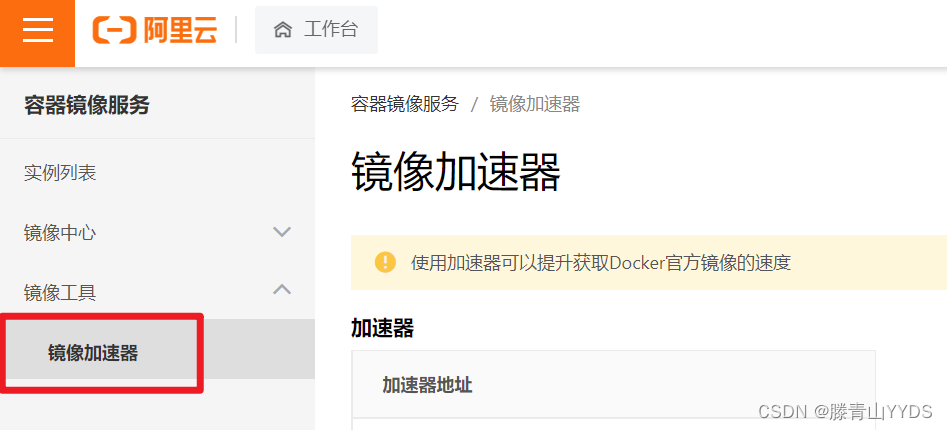
Come here docker The installation and configuration of are completed .
mysql Installation and configuration
Download the image file
docker pull mysql:5.7Create an instance and start
docker run -p 3306:3306 --name mysql \
-v /mydata/mysql/log:/var/log/mysql \
-v /mydata/mysql/data:/var/lib/mysql \
-v /mydata/mysql/conf:/etc/mysql \
-e MYSQL_ROOT_PASSWORD=root \
-d mysql:5.7
Parameter description
-p 3306:3306: The container of 3306 Port mapping to host's 3306 port
-v /mydata/mysql/conf:/etc/mysql: Mount the configuration folder to the host
-v /mydata/mysql/log:/var/log/mysql: Mount the log folder to the host
-v /mydata/mysql/data:/var/lib/mysql/: Mount the configuration folder to the host
-e MYSQL_ROOT_PASSWORD=root: initialization root User's passwordThe function of mount is : It can be directly used in the current host environment mysql Change the file in the container , If you don't mount it , You have to go through
docker exec -i -t mysql /bin/bashEnter the container and modify the file .To configure mysql
It is mainly to modify the character code to utf-8.
vi /mydata/mysql/conf/my.cnfThe content is :
[client]
default-character-set=utf8

[mysql]
default-character-set=utf8

[mysqld]
init_connect='SET collation_connection = utf8_unicode_ci'
init_connect='SET NAMES utf8'
character-set-server=utf8
collation-server=utf8_unicode_ci
skip-character-set-client-handshake
skip-name-resolve
among skip-name-resolve Used to skip domain name resolution .
redis Installation and configuration
Download the image file
docker pull redisestablish redis The configuration file
mkdir -p /mydata/redis/conf
touch /mydata/redis/conf/redis.conf
Create an instance and start
docker run -p 6379:6379 --name redis -v /mydata/redis/data:/data \
-v /mydata/redis/conf/redis.conf:/etc/redis/redis.conf \
-d redis redis-server /etc/redis/redis.conf
-p 6379:6379 Port mapping ,: The front represents the host part ,: After that is the container part .
–name redis Specify the container name , It's convenient to check and operate .
-v Mount Directory , The rules are the same as port mapping .
-d redis Indicates background start redis
redis-server /etc/redis/redis.conf Start with configuration file redis, Load the... In the container conf file , Finally, we found the directory of the mount /usr/local/redis/redis.confTo configure redis Persistence
By default ,redis Will save data to memory , Once it is restarted, it will disappear , So here we start by modifying the configuration we just created AOF Persistence .
vi /mydata/redis/conf/redis.confThe content is :
appendonly yesUse redis Mirrored execution redis-cli Command connection
docker exec -it redis redis-cli
边栏推荐
猜你喜欢

ACL实验演示(Huawei路由器设备配置)

就这一次!详细聊聊分布式系统的那些技术方案
(25)Blender源码分析之顶层菜单Blender菜单

AI遮天传 DL-回归与分类

重磅!《2022中国开源发展蓝皮书》正式发布
Performance tuning bugs emerge in endlessly? These three documents can easily handle JVM tuning

点击劫持攻击

注意 公安部发出旅游客运交通安全预警
【OpenCV 例程 300篇】240. OpenCV 中的 Shi-Tomas 角点检测

Overview of the agenda of the keynote speech of apachecon Asia, an international celebrity vs a local open source star
随机推荐
Is it really safe and reliable to exempt five in case of opening an account in a stock company
2.1.2 synchronization always fails
(24) the top menu of blender source code analysis shows code analysis
JS closure simulates private variable interview questions and immediately executes function Iife
Ascend目标检测与识别-定制自己的AI应用
国际大咖 VS 本土开源新星 | ApacheCon Asia 主题演讲议程全览
二层管理型交换机如何设置IP
What is a test case? How to design?
OpenWrt之feeds.conf.default详解
Asemi rectifier bridge kbpc3510, kbpc3510 package, kbpc3510 application
Tensor operation in pytoch
2.1.2 同步始终失败
CCS TM4C123新建工程
SQL中去去重的三种方式
After vs code is formatted, the function name will be automatically followed by a space
浅析接口测试
【云原生】 iVX 低代码开发 引入腾讯地图并在线预览
【欧米读书会】谈谈元宇宙中的创作者经济:无限次元
Good afternoon, everyone. Please ask a question: how to start a job submitted in SQL from the savepoint? Problem Description: using SQL in Cl
Shrimp Shope get commodity details according to ID API return value description