当前位置:网站首页>Wechat applet realizes music player (5)
Wechat applet realizes music player (5)
2022-07-26 03:52:00 【richest_ qi】
List of articles
Antecedents feed
pubsubjs Realize page communication
npm install --save pubsub-js, Install third party libraries pubsub-js.import PubSub from "pubsub-js", Introducing third-party libraries pubsub.- Subscribe to news :
id = PubSub.subscribe( Message name ,callback), And callback The first parameter of the default is the message name , Then there are the parameters passed in by the developer . - Release the news :
PubSub.publish( Message name , Developer parameters ). - Unsubscribe :
PubSub.unsubscribe(id).
moment.js Realize time formatting
This example will use a third-party library moment.js To format the time .
- Installation dependency .
npm install --save moment. - Wechat developer tools , Tools > structure npm.
- Introduce and use... In the page moment.
import moment from "moment";moment( Time ).format( Format );
BackgroundAudioManager
BackgroundAudioManager, It is the only background audio manager in the world . The applet cuts into the background , If the audio is playing , You can continue playing . But the background state cannot be called API Manipulate the playback state of audio .
From wechat client 6.7.2 Version start , If you need the applet to cut the background and continue to play the audio , Need to be in the global configuration file app.json Middle configuration requiredBackgroundModes attribute , Such as :"requiredBackgroundModes": ["audio"].
BackgroundAudioManager example , Can pass wx.getBackgroundAudioManager() obtain .BackgroundAudioManager The instance has the following properties and methods :
title, Audio title , Required .src, Audio data source , The default is an empty string , Not required . however , Only setsrcwhen , The audio will play automatically .duration, The length of the current audio ,number type , Unit is s, That is, seconds .currentTime, The current audio playback position ,number type , Unit is s, That is, seconds .play(), Play music .pause(), Music suspended .onPlay(function callback), Listen for background audio playback events .onPause(function callback), Listen for background audio pause events .onStop(function callback), Listen for background audio stop event .onEnded(function callback), Monitor the end event of natural playback of background audio .onTimeUpdate(function callback), Listen for background audio playback progress update events .
Applet project
The main files involved in the code are :
- app.json
- app.wxss
- app.js
- pages/index/index.json
- pages/index/index.wxml
- pages/index/index.wxss
- pages/index/index.js
- pages/music/music.json
- pages/music/music.wxml
- pages/music/music.wxss
- pages/music/music.js
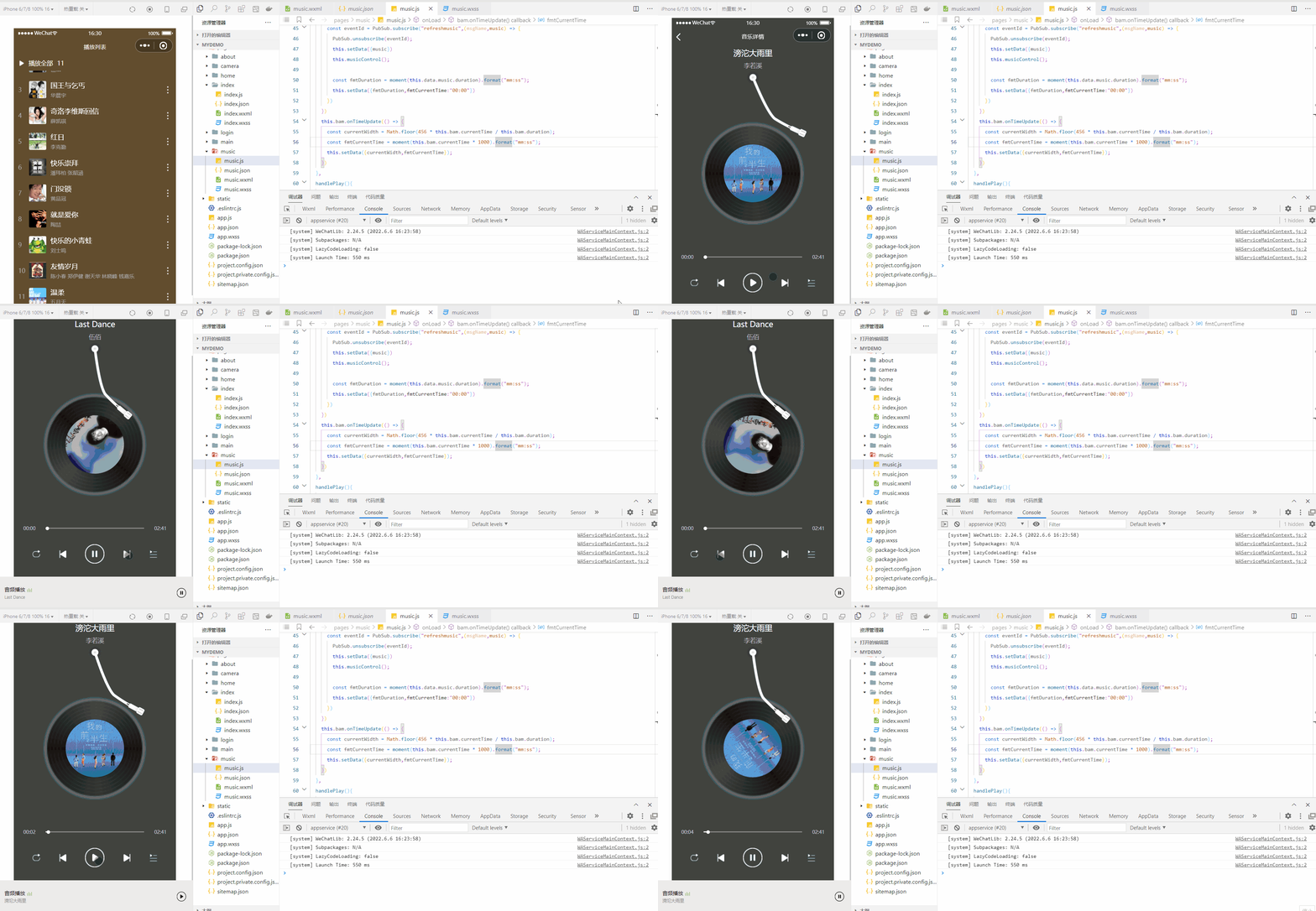
app.json
{

  "pages": [
    "pages/index/index",
    "pages/music/music"
  ],
  "window": {

    "navigationBarBackgroundColor": "#624d2e",
    "navigationBarTitleText": " home page ",
    "navigationBarTextStyle": "white"
  },
  "requiredBackgroundModes": [
    "audio"
  ],
  "style": "v2",
  "sitemapLocation": "sitemap.json"
}
app.wxss
page{

  height: 100%;
}
app.js
App({

  globalData:{

    isPlayGlobal:false,   // Is there a song currently playing
    musicIdGlobal:''     // Which song is currently playing
  }
})
pages/index/index.json
{

  "usingComponents": {
    },
  "navigationBarTitleText": " Playlist "
}
pages/index/index.wxml
<view class="index-container">
  <view class="header">
    <image src="/static/images/icon-play-square.png"></image>
    <text> Play all </text>
    <text>{
   {musicList.length}}</text>
  </view>
  <scroll-view class="music-list" enable-flex scroll-y >
    <view class="music-item" wx:for="{
     {musicList}}" wx:key="id" bindtap="handleTap" data-musicindex="{
     {index}}" data-musicitem="{
     {item}}">
      <view class="music-index">{
   {index+1}}</view>
      <image class="music-image" src="{
     {item.picUrl}}"></image>
      <view class="music-info">
        <view class="musci-name">{
   {item.name}}</view>
        <view class="music-author">{
   {item.author}}</view>
      </view>
      <image class="btn-more" src="/static/images/icon-more.png"></image>
    </view>
  </scroll-view>
</view>
pages/index/index.wxss
.index-container{

  padding: 20rpx;
  background:#624d2e
}
.header{

  display: flex;
  align-items: center;
}
.header image{

  width: 28rpx;
  height: 28rpx;
  margin-right: 20rpx;
}
.header text{

  color: #fff;
  height: 28rpx;
  line-height: 28rpx;
  margin-right: 20rpx;
  font-size: 28rpx;
}
.music-list{

  margin-top: 20rpx;
  color: #fff;
  height: calc(100vh - 88rpx);
}
.music-item{

  display: flex;
  align-items: center;
  height: 100rpx;
  margin: 20rpx 0;
  position: relative;
}
.music-item .music-index{

  width: 50rpx;
  font-size: 28rpx;
  color: #aaa;
}
.music-item .music-image{

  width: 80rpx;
  height: 80rpx;
  border-radius: 6rpx;
  margin-right: 20rpx;
}
.music-item .music-info{

  display: flex;
  flex-direction: column;
}
.music-item .music-info .music-author{

  font-size: 24rpx;
  color: #aaa;
  margin-top: 10rpx;
}
.music-item .btn-more{

  width: 36rpx;
  height: 36rpx;
  position: absolute;
  right: 0;
}
pages/index/index.js
import PubSub from "pubsub-js";
const host = "http://localhost:3000";

Page({

  data:{

    musicList:[], // Song list
    musicindex:0  // After entering a song , Record the index of the song in the list
  },
  onLoad(){

    this.getDataFromServer();

    // receive messages , Receive from page pages/music/music The news of , according to “ On a ”or“ The following piece ”, Determine which song should be displayed currently
    PubSub.subscribe("switchsong",(msgName,type) => {

      // console.log(msgName,type);
      let {
    musicindex,musicList} = this.data;
      if(type === "prev"){

        if(musicindex===0) {

          musicindex = musicList.length-1;
        }else{

          musicindex--;
        }
      }else if(type === "next"){

        if(musicindex === musicList.length-1){

          musicindex = 0;
        }else{

          musicindex++;
        }
      }
      this.setData({
    musicindex});
      const music = musicList[musicindex];
      // Send a message , Tell page pages/music/music, Tell it the details of the song after switching .
      PubSub.publish("refreshmusic",music);
    })
  },
  getDataFromServer(){

    const result = [
      {
    id:"001",name:" In torrential rain ","author":" Li Ruoxi ","picUrl":host+"/images/ In torrential rain .jpg","url":host+"/audios/ In torrential rain .mp3",duration:161000},
      {
    id:"002",name:"Last Dance","author":" Five hundred ","picUrl":host+"/images/Last Dance.jpg","url":host+"/audios/Last Dance.mp3",duration:271000},
      {
    id:"003",name:" The king and the beggar ","author":" Hua Chenyu ","picUrl":host+"/images/ The king and the beggar .jpg","url":host+"/audios/ The king and the beggar .mp3",duration:178000},
      {
    id:"004",name:" Chilo Levis reply ","author":" Xue Kaiqi ","picUrl":host+"/images/ Chilo Levis reply .jpg","url":host+"/audios/ Chilo Levis reply .mp3",duration:243000},
      {
    id:"005",name:" Red sun ","author":" Li Keqin ","picUrl":host+"/images/ Red sun .jpg","url":host+"/audios/ Red sun .mp3",duration:291000},
      {
    id:"006",name:" Happy worship ","author":" Wilber Pan   Zhang Shaohan ","picUrl":host+"/images/ Happy worship .jpg","url":host+"/audios/ Happy worship .mp3",duration:329000},
      {
    id:"007",name:" The door is unlocked ","author":" Huangpinguan ","picUrl":host+"/images/ The door is unlocked .jpg","url":host+"/audios/ The door is unlocked .mp3",duration:233000},
      {
    id:"008",name:" Just love you ","author":" David Tao ","picUrl":host+"/images/ Just love you .jpg","url":host+"/audios/ Just love you .mp3",duration:340000},
      {
    id:"009",name:" Happy little frog ","author":" Liu Shiming ","picUrl":host+"/images/ Happy little frog .jpg","url":host+"/audios/ Happy little frog .mp3",duration:130000},
      {
    id:"0010",name:" Years of friendship ","author":" Jordan Chan   Zheng Yijian   Thank God   Lin Xiaofeng   Qian Jiale ","picUrl":host+"/images/ Years of friendship .jpg","url":host+"/audios/ Years of friendship .mp3",duration:209000},
      {
    id:"0011",name:" gentle ","author":" May day ","picUrl":host+"/images/ gentle .jpg","url":host+"/audios/ gentle .mp3",duration:269000}
    ];
    this.setData({
    musicList:result});
  },
  handleTap(event){

    const {
    musicitem,musicindex} = event.currentTarget.dataset;
    this.setData({
    musicindex})
    wx.navigateTo({

      url: '/pages/music/music?musicitem='+JSON.stringify(musicitem),
    })
  }
})
pages/music/music.json
{

  "usingComponents": {
    },
  "navigationBarBackgroundColor": "#2f434e",
  "navigationBarTitleText": " Music details "
}
pages/music/music.wxml
<view class="music-container">
  <view class="music-name">{
   {music.name}}</view>
  <view class="music-author">{
   {music.author}}</view>
  <image class="arm {
     {isPlay&&'arm-reset'}}" src="/static/images/arm.png"></image>
  <view class="disc-container {
     {isPlay&&'disc-animate'}}">
    <image class="disc" src="/static/images/disc.png"></image>
    <image class="music-image" src="{
     {music.picUrl}}"></image>
  </view>

  <view class="progress-container">
    <text class="current-time">{
   {fmtCurrentTime}}</text>
    <view class="bar-box">
      <view class="current-progress" style="width:{
        {
        currentWidth}}rpx">
        <view class="progress-circle"></view>
      </view>
    </view>
    <text class="duration">{
   {fmtDuration}}</text>
  </view>

  <view class="player">
    <view class="btns">
      <image class="loop-btn" src="/static/images/loop.png"></image>
      <image class="prev-btn" src="/static/images/prev.png" id="prev" bindtap="handleSwitch"></image>
      <image class="play-btn" src="{
     {isPlay?'/static/images/stop.png':'/static/images/play.png'}}" bindtap="handlePlay"></image>
      <image class="next-btn" src="/static/images/next.png" id="next" bindtap="handleSwitch"></image>
      <image class="list-btn" src="/static/images/list.png"></image>
    </view>
  </view>
</view>
pages/music/music.wxss
.music-container{

  height: 100%;
  display: flex;
  flex-direction: column;
  align-items: center;
  background: #2f434e;
  position: relative;
}
.music-container .music-name{

  margin: 10rpx 0;
  color: #fff;
  font-size: 36rpx;
}
.music-container .music-author{

  color: #bbb;
  font-size: 28rpx;
  margin: 6rpx 0;
}
.music-container .arm{

  width:204rpx;
  height: 358rpx;
  position: relative;
  left: 72rpx;
  z-index: 99;
  transform: rotate(-15deg);
  transform-origin: 30rpx 30rpx;
  transition: transform .7s linear;
}
.disc-container{

  position: relative;
  top: -128rpx;
  width: 490rpx;
  height: 490rpx;
}
.disc-container .disc{

  width: 100%;
  height: 100%;
}
.disc-container .music-image{

  width: 270rpx;
  height: 270rpx;
  border-radius: 100%;
  position: absolute;
  left: 0;right: 0;top: 0;bottom: 0;
  margin: auto;
}
.music-container .arm-reset{

  transform: rotate(0deg);
}
.disc-animate{

  animation: rotate 2.5s 1s linear infinite;
}
@keyframes rotate{

  from{

    transform: rotate(0deg);
  }
  to{

    transform: rotate(360deg);
  }
}
.player{

  width: 100%;
  position: absolute;
  bottom: 60rpx;
}
.btns{

  display: flex;
  align-items: center;
  justify-content: space-evenly;
}
.btns image{

  width: 36rpx;
  height: 36rpx;
}
.btns .play-btn,.btns .stop-btn{

  width: 90rpx;
  height: 90rpx;
}
.progress-container {

  width: 100%;
  display: flex;
  justify-content: space-around;
  align-items: center;
}
.progress-container .bar-box{

  width: 456rpx;
  height: 4rpx;
  line-height: 4rpx;
  background: #888;
}
.bar-box .current-progress{

  position: relative;
  height: 4rpx;
  line-height: 4rpx;
  background: #fff;
}
.progress-circle{

  width: 16rpx;
  height: 16rpx;
  border-radius: 50%;
  background: #fff;
  position: absolute;
  right: -16rpx;
  top: -6rpx;
}
.progress-container text{

  color: #ccc;
  font-size: 22rpx;
  margin: 0 40rpx;
}
pages/music/music.js
import PubSub from "pubsub-js";
import moment from 'moment';
const appInstance = getApp();

Page({

  data:{

    isPlay:false,
    music:{
    },
    fmtDuration:"00:00",
    fmtCurrentTime:"00:00",
    currentWidth:0
  },
  onLoad(options){

    const music = JSON.parse(options.musicitem);
    let fmtDuration = moment(music.duration).format("mm:ss");
    this.setData({
    music,fmtDuration})

    const {
    isPlayGlobal,musicIdGlobal} = appInstance.globalData;
    const {
    id} = this.data.music;
    if(isPlayGlobal && musicIdGlobal === id) {

      this.setData({
    isPlay:true});
    }

    this.bam = wx.getBackgroundAudioManager();
    this.bam.onPlay(() => {

      this.setData({
    isPlay:true})
      appInstance.globalData.isPlayGlobal = true;
      appInstance.globalData.musicIdGlobal = this.data.music.id;
    })
    this.bam.onPause(() => {

      this.setData({
    isPlay:false})
      appInstance.globalData.isPlayGlobal = false;
    })
    this.bam.onStop(() => {

      this.setData({
    isPlay:false})
      appInstance.globalData.isPlayGlobal = false;
    })
    this.bam.onEnded(() => {

      // this.setData({isPlay:false});
      // appInstance.globalData.isPlayGlobal = false;

      //  The music naturally ends , Then switch to the next song
      PubSub.publish("switchsong","next");
      // receive messages , Receive from pages/index/index The news of , Show the song details after switching
      const eventId = PubSub.subscribe("refreshmusic",(msgName,music) => {

        PubSub.unsubscribe(eventId);
        this.setData({
    music})
        this.musicControl();

        const fmtDuration = moment(this.data.music.duration).format("mm:ss");
        this.setData({
    fmtDuration,fmtCurrentTime:"00:00"})
      })
    })
    this.bam.onTimeUpdate(() => {

      const currentWidth = Math.floor(456 * this.bam.currentTime / this.bam.duration);
      const fmtCurrentTime = moment(this.bam.currentTime * 1000).format("mm:ss");
      this.setData({
    currentWidth,fmtCurrentTime});
    })
  },
  handlePlay(){

    const isPlay = !this.data.isPlay;
    this.setData({
    isPlay});
    this.musicControl();
  },
  musicControl(){

    const {
    isPlay} = this.data;
    if(isPlay){

      this.bam.src = this.data.music.url;
      this.bam.title = this.data.music.name;
    }else{

      this.bam.pause();
    }
  },
  handleSwitch(event){

    const type = event.target.id;
    // Send a message , tell pages/index/index: Cut one or the next .prev Represents cutting a song ,next Represents cutting off a song .
    PubSub.publish("switchsong",type);

    // receive messages , Receive from pages/index/index The news of , Show the song details after switching
    const eventId = PubSub.subscribe("refreshmusic",(msgName,music) => {

      PubSub.unsubscribe(eventId);
      this.setData({
    music})
      this.musicControl();
    })
  }
})
Related links
moment.js Chinese document
pubsubjs
Wechat applet realizes music player (4)( Use pubsubjs Realize inter page communication )
边栏推荐
- Visio:甘特图如何合并单元格?解决方案:覆盖单元格
- [cloud native kubernetes] how to use configmap under kubernetes cluster
- Hurry in!!! Write a number guessing game with dozens of lines of code based on the basic knowledge of C language
- php中可以使用取绝对值函数 abs() 将负数转成正数
- Asemi rectifier bridge gbu1510 parameters, gbu1510 specifications, gbu1510 package
- 某大厂开发和测试干了一架,还用鼠标线勒脖子...
- Graduation season & harvest season, leave your beautiful moments
- 第十八章:2位a~b进制中均位奇观探索,指定整数的 3x+1 转化过程,指定区间验证角谷猜想,探求4份黑洞数,验证3位黑洞数
- 【程序员必备】七夕表白攻略:”月遇从云,花遇和风,晚上的夜空很美“。(附源码合集)
- day03_ 1_ Idea tutorial
猜你喜欢
![[mathematical modeling - Summary of planning model] | matlab solution](/img/b0/a4d33d7d7b605b7cc6149b59b55fb8.png)
[mathematical modeling - Summary of planning model] | matlab solution

Find My技术|物联网资产跟踪市场规模达66亿美元,Find My助力市场发展

《opencv学习笔记》-- 霍夫变换

booking.com缤客上海面经
申请SSL证书,并给域名配置SSL证书,并部署服务器;SSL证书的下载和安装

Moco V2: further upgrade of Moco series

在 Istio 服务网格内连接外部 MySQL 数据库

One stop monitoring of the software and hardware infrastructure of the whole university, and Suzhou University replaces PostgreSQL with time series database

深度学习之DAT

Opencv learning notes - edge detection and Canny operator, Sobel operator, lapiacian operator, ScHARR filter
随机推荐
php eval() 函数可以将一个字符串当做 php 代码来运行
Summary of senior report development experience: understand this and do not make bad reports
Chinese database oceanbase was selected into the Forrester translational data platform report
【云原生之kubernetes】kubernetes集群下ConfigMap使用方法
Connect external MySQL databases in istio Service Grid
JS base64编码和解码
测试工作不受重视?学长:你应该换位思考
【单片机仿真项目】外部中断0和1控制两位数码管进行计数
Hurry in!!! Write a number guessing game with dozens of lines of code based on the basic knowledge of C language
Six years of automated testing from scratch, I don't regret turning development to testing
[mathematical modeling - Summary of planning model] | matlab solution
FPS game reverse - box Perspective (matrix)
用GaussDB(for Redis)存画像,推荐业务轻松降本60%
Tf.constant usage
1311_硬件设计_ICT概念、应用以及优缺点学习小结
想要做好软件测试,可以先了解AST、SCA和渗透测试
Portable power fast charging scheme 30W automatic pressure rise and fall PD fast charging
oracle 11g “密码延迟验证”特性
资深报表开发经验总结:明白这一点,没有做不好的报表
Uncaught TypeError: $(...).onmouseenter is not a function js错误,解决办法: