当前位置:网站首页>Win11安装redis 数据库以及redis desktop manager的下载
Win11安装redis 数据库以及redis desktop manager的下载
2022-07-01 00:39:00 【·惊鸿】
安装
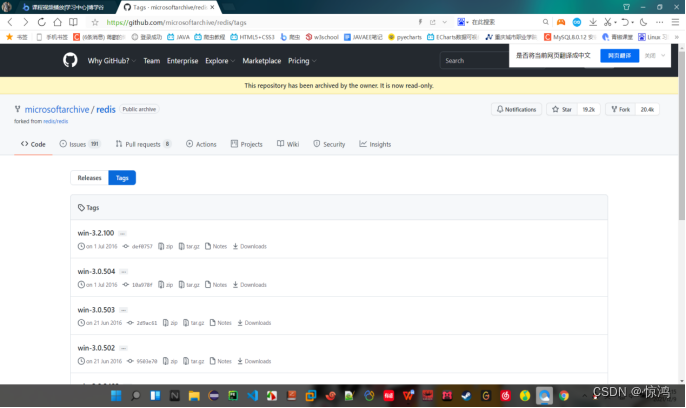
下载网址:https://github.com/microsoftarchive/redis/tags
1、首先进入网址,如图:
2、点击Releases,切换显示界面
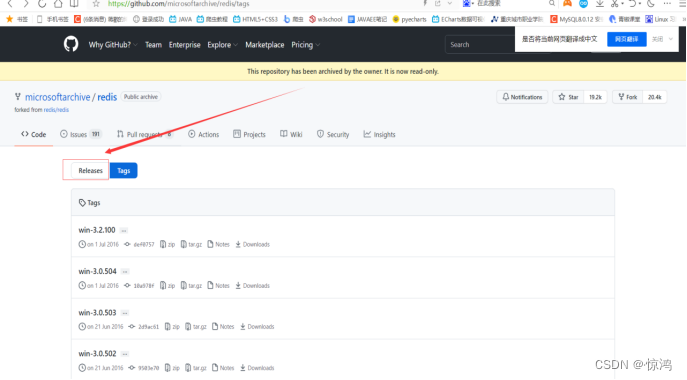
3、下载最新版本(zip格式,随便放在哪 对路径没得要求)

4、下载完成后解压,如图:

调试
5、启动服务器端
5.1 复制我们解压文件路径(我这就是D:Scrapy-redis数据库)
5.2 WIN加R打开一个命令窗口,将当前目录切换到 我们自己解压的路径下(下面以我的目录为例)
5.3 在命令窗口输入:redis-server redis.windows.conf
出现一下画面 即算服务器端启动成功!
切记 不要关闭!不要关闭!当前命令窗口 才能保持服务器连接!
并且 记住这个端口号!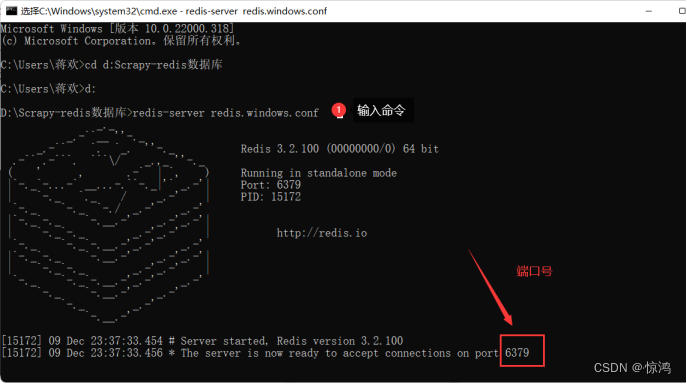
6、启动客服端
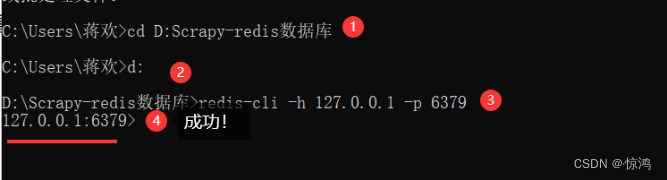
6.1 重新打开一个 命令窗口(原来的和这个都别关)
同样,将当前目录切换到我们解压的路径
输入:redis-cli -h 127.0.0.1 -p 6379(自己的端口号)
7、配置环境变量
7.1在Path里面把我们的解压目录添加进去,如图:
这样设置之后 以后输入命令就不用 每次切换目录!
8.重启服务器和客户端
8.1 重启服务器
control+c 关闭 服务器端口
再次打开命令窗口输入:redis-server,如图:
8.2 重启客服端
control+c 关闭 客服端器端口
再次打开命令窗口输入:redis-cli,如图:
9、测试
9.1在客服端输入:set 出现如图:
不用管 也删不掉 我们只需要输入命令 这一串相当于注释 当然 set要留着!
输入set name ‘huanhuan’
set 数据名 ‘数据值’如图:
9.2 继续输入 get name name就是我们取得数据名
如图:
修改文件
10、修改redis.conf配置文件(可以使用其他ip地址实现远程连接)
10.1 找到我们解压的路径,找到
redis.windows.conf 文件,选择记事本打开,并如下两步图修改:
bind 0.0.0.0 表示不在限制IP!
关闭受保护模式 
10.2 连接服务器
打开一个新的命令窗口
输入:redis-server 刚才我们修改的配置文件的路径

测试远程连接
10.3 测试客户端的远程连接
打开一个命令窗口,输入 ipconfig 查看自己的ip地址(原来的127.0.0.1是本地 我们的ip地址也可以视为远程连接所以用我们的ip进行测试 远程连接)
如果是用的移动的冰川客服端网卡页面应该会有冰川这个说明就相当于我这里是Netkeepr你们可能就是冰川一样
如果用的是热点 那一般就是第一个
反正不可能是我们的两块虚拟机网卡
然后在输入 :redis-cli -h 自己的ip地址 -p 服务器端口号,如图:
Redis Desktop Manager桌面工具
11、下载Redis Desktop Manager桌面工具
11.1点击我文件夹的安装包 next 我同意 选择安装路径 再next 最后 finish 非常简 单!!!
11.2进入界面 进行如图测试!
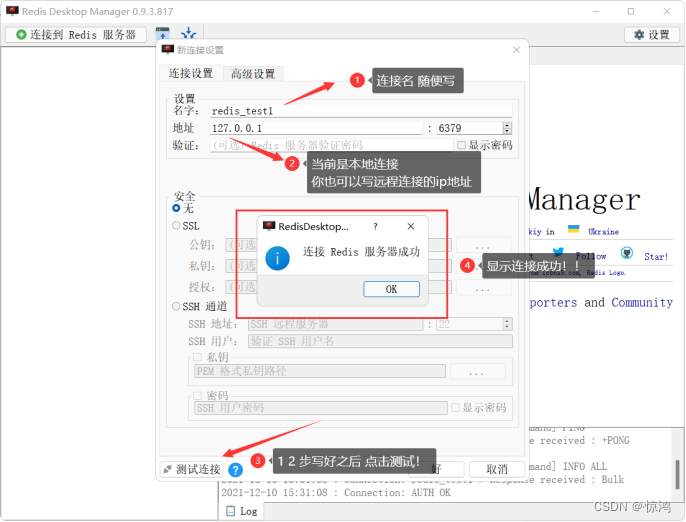
连接成功后 点击右下角的 好
并进入到下图:


这个只是我们的可视化管理工具而已 还是要保持服务器和客服端的连接!
最后
启动服务器端:
1、redis-server(如果不需要远程连接的时候)
2、redis-server 我们10步修改的配置文件名
启动客服端:
1、redis-cli (默认本地 127.0.0.1)
2、redis-cli -h ip地址 -p 端口号 (远程连接)
退出两个端:control+c (按两次)
新建数据:set 数据名 ‘数据值’
显示值:get 数据名
如果中途遇见其他错误
请上百度或者CSDN搜索
我已经被榨干!爱莫能助!
百度:https://www.baidu.com/
CSDN:https://www.csdn.net/
边栏推荐
猜你喜欢

Koa koa-combine-routers 分路由管理

P4学习——p4runtime

Sword finger offer 19 Regular Expression Matching

Service

From January 11, 2007 to January 11, 2022, I have been in SAP Chengdu Research Institute for 15 years

闭锁继电器YDB-100、100V

剑指 Offer 18. 删除链表的节点

Q弹松软的大号吐司,带来更舒服的睡眠

fluttertoast

魔王冷饭||#101 魔王解惑数量多与质量;员工管理;高考志愿填报;游戏架构设计
随机推荐
冲击继电器ZC-23/DC220V
2021电赛F题openmv和K210调用openmv api巡线,完全开源。
How to do the performance pressure test of "Health Code"
History of deep learning
Join table query select generation
Experiment 8 T-SQL, stored procedure
Pytorch auto derivation
06.论Redis持久化的几种方式
The real topic of the 11th provincial competition of Bluebridge cup 2020 - crop hybridization
Interface documentation system - Yapi
Share your own terminal DIY display banner
Web compatibility testing of software testing
ArrayList分析1-循环、扩容、版本
Koa koa-combine-routers 分路由管理
What is product thinking
解决IDEA:Class ‘XXX‘ not found in module ‘XXX‘
初识 Flutter 的绘图组件 — CustomPaint
孔乙己第一问之服务通信知多少?
女朋友说:你要搞懂了MySQL三大日志,我就让你嘿嘿嘿!
Sword finger offer 18 Delete the node of the linked list