当前位置:网站首页>Mt4/mql4 getting started to mastering EA tutorial lesson 3 - common functions of MQL language (III) - common functions of K-line value taking
Mt4/mql4 getting started to mastering EA tutorial lesson 3 - common functions of MQL language (III) - common functions of K-line value taking
2022-06-22 08:01:00 【EA development - green shirt code customer】
double iOpen();
double  iOpen(
   string           symbol,     //  Trade variety
   int              timeframe,  //  cycle
   int              shift       // K Line post
   );
iOpen() The function has three arguments ,symbol、timeframe、shift
The function returns a root of a specified period of a specific transaction type K Line post Opening price
double iClose();
double  iClose(
   string           symbol,          //  Trade variety
   int              timeframe,       //  cycle
   int              shift            // K Line post
   );
iClose() The function has three arguments ,symbol、timeframe、shift
The function returns a root of a specified period of a specific transaction type K Line post Closing price
double iLow();
double  iLow(
   string           symbol,          // symbol
   int              timeframe,       // timeframe
   int              shift            // shift
   );
iLow() The function has three arguments ,symbol、timeframe、shift
The function returns a root of a specified period of a specific transaction type K Line post The lowest price
double iHigh();
double  iHigh(
   string           symbol,          // symbol
   int              timeframe,       // timeframe
   int              shift            // shift
   );
iHigh() The function has three arguments ,symbol、timeframe、shift
The function returns a root of a specified period of a specific transaction type K Line post Highest price
datetime iTime();
datetime  iTime(
   string           symbol,          // symbol
   int              timeframe,       // timeframe
   int              shift            // shift
   );
iTime() The function has three arguments ,symbol、timeframe、shift
The function returns a root of a specified period of a specific transaction type K Line post Time
long iVolume();
long  iVolume(
   string           symbol,          // symbol
   int              timeframe,       // timeframe
   int              shift            // shift
   );
iVolume() The function has three arguments ,symbol、timeframe、shift
The function returns a root of a specified period of a specific transaction type K Line post volume
The script instance
//+------------------------------------------------------------------+
//| Script program start function |
//+------------------------------------------------------------------+
void OnStart()
  {

   double open=iOpen("USDCHF",PERIOD_H1,0);    // return K The opening price of the string column
   double close=iClose("USDCHF",PERIOD_H1,0);   // return K The closing price of the string column
   double low=iLow("USDCHF",PERIOD_H1,0);     // return K The lowest price of the line post
   double high=iHigh("USDCHF",PERIOD_H1,0);    // return K The highest price of the line post
   datetime time=iTime("USDCHF",PERIOD_H1,0);    // return K Time of line post
   long volume=iVolume("USDCHF",PERIOD_H1,0);  // return K Trading volume of the line column

   Print("Current bar for USDCHF H1 open: ",open);
   Print("Current bar for USDCHF H1 close: ",close);
   Print("Current bar for USDCHF H1 low: ",low);
   Print("Current bar for USDCHF H1 high: ",high);
   Print("Current bar for USDCHF H1 time: ",time);
   Print("Current bar for USDCHF H1 volume: ",volume);

  }
The code function is Log print out USDCHF The current of the one hour period K The opening price of the string column 、 Closing price 、 The lowest price 、 Highest price 、 Time 、 volume .
Parameter details
(“USDCHF”,PERIOD_H1,0)
“USDCHF”, Trade variety
PERIOD_H1, The time period is one hour
0 , At present K Line post
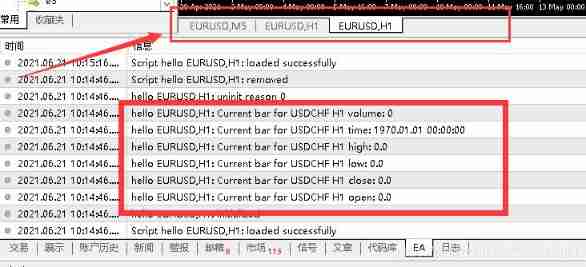
The results show that all the data are 0, That is to say, no data is read , The reason is that there is no open... In the chart window USDCHF Chart , So no data can be read .
Now open it casually USDCHF A chart of a cycle , Open one USDCHF5 Minute cycle chart .

You can see in the log that USDCHF A set of data
Then verify the correctness of the data , Switch back to the USDCHF One hour chart , Click on the data window to view 
You can see Low、Close、Volume The data in the log is Not the same .
Why? ???
Because I read the current K Line column data except Open Other data are still Fluctuating .
Of course , Procedures need to be rigorous , No mistake is allowed .
Now change the parameters , Read the previous one K Line column data
//+------------------------------------------------------------------+
//| Script program start function |
//+------------------------------------------------------------------+
void OnStart()
  {

   double open=iOpen("USDCHF",PERIOD_H1,1);    // return K The opening price of the string column
   double close=iClose("USDCHF",PERIOD_H1,1);   // return K The closing price of the string column
   double low=iLow("USDCHF",PERIOD_H1,1);     // return K The lowest price of the line post
   double high=iHigh("USDCHF",PERIOD_H1,1);    // return K The highest price of the line post
   datetime time=iTime("USDCHF",PERIOD_H1,1);    // return K Time of line post
   long volume=iVolume("USDCHF",PERIOD_H1,1);  // return K Trading volume of the line column

   Print("Current bar for USDCHF H1 open: ",open);
   Print("Current bar for USDCHF H1 close: ",close);
   Print("Current bar for USDCHF H1 low: ",low);
   Print("Current bar for USDCHF H1 high: ",high);
   Print("Current bar for USDCHF H1 time: ",time);
   Print("Current bar for USDCHF H1 volume: ",volume);
  }
Just put the parameters 0 Change to 1.
0 On behalf of the current K Line post , In turn forward K The parameters of the line column are 1、2、3·······
Continue to execute the script

Printed out a set of data
Data window to verify
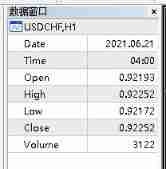
All data are correct , The explanation is correct .
A good workman does his work well , You must sharpen your tools first , The most important thing in trading is to follow the rules , Strictly carry out . Official account , Study MQL Beginner to master EA course , Learn more EA Programming , Write your own EA, Forge your own magic weapon .

边栏推荐
- Xlua environment configuration
- Wx applet vant UI call interface to realize two-level cascade
- Baidu Post Bar crawler crawls to the middle of the building
- Applet /vant UI to upload files
- Orientdb batch execute SQL
- Applet vant UI implementation calls interface data and displays it
- 关于菲涅尔现象
- Template code overview
- 数据可视化优秀案例
- Node red sends wechat official account message (template message)
猜你喜欢

Expérience électrique en mode - - expérience 2 circuit d'amplification de source commune JFET

Canvastotempfilepath of wechat

Characteristics of industrial Internet
关于菲涅尔现象

Maptalks: basic operation and wms/wmts map service loading

代码覆盖率测试对编程小白的意义及其使用方法

QT combox的使用示例

Xlua environment configuration

【Oracle 数据库】奶妈式教程 day13 日期函数
模电实验——实验二 JFET共源极放大电路

随机推荐
SQL server changes the primary key index to a non clustered index
Scrollrect for tableview
《守望先锋》阵亡镜头、全场最佳和亮眼表现是如何设计
AudioQueue
什么是分布式事务
Difference between ID instancetype nsobject *
Some problems caused by null data in MySQL
Website sharing of program ape -- continuous update
Docker install mysql, hello world
Note pad replaces all contents after a character in all lines
Orientdb batch execute SQL
KVO summary
ES6 set data type de duplication of array, intersection, union and difference
Template code overview
先锋期货安全么?期货开户都是哪些流程?期货手续费怎么降低?
Leetcode 172 Zero after factorial (2022.06.21)
Use js to download the current image
SVN 提交子文件夹问题
模电实验——实验二 JFET共源极放大电路
LNMP environment setup