当前位置:网站首页>【界面】pyqt5和Swin Transformer对人脸进行识别
【界面】pyqt5和Swin Transformer对人脸进行识别
2022-06-26 22:46:00 【努力的袁】
基于python,使用pyqt5模块和swin transformer检测算法对人脸进行识别
工具
语言:
python
主要库:
pyqt5
检测模型:
swin transformer
核心代码
import time, cv2
from PyQt5 import QtCore, QtGui, QtWidgets
from PyQt5.QtCore import *
from PyQt5.QtGui import *
from PyQt5.QtWidgets import QFileDialog, QMainWindow
from PyQt5.QtCore import QTimer, QDateTime
from PyQt5.Qt import QThread, pyqtSignal, QMutex
import qimage2ndarray
from queue import Queue
from Project import Ui_Form
from infer import *

video_steam = Queue()

class Thread1(QThread):        # 线程1
    # 使用自定义信号,一定要记得信号是类变量,必须在类中定义,不能在实例方法中定义,
    thread1_signal2 = pyqtSignal(object)   #定义信号,定义参数为object类型

    def __init__(self):
        super(Thread1, self).__init__()
        self.t = 0
        self.Image_thread1 = None
        self.mutex = QMutex()            # 创建线程锁
        self._isPause = False

    def run(self):
        while True:
            self.mutex.lock()            # 加锁
            time.sleep(0.001)            # 休眠
            _, frame = cap.read()
            frame = cv2.cvtColor(frame, cv2.COLOR_BGR2RGB)
            self.Image_thread1 = frame
            self.thread1_signal2.emit(self.Image_thread1)    # 传信号
            self.mutex.unlock()          # 解锁


class Thread2(QThread):         # 线程2
    thread1_signal3 = pyqtSignal(object)

    def __init__(self):
        super(Thread2, self).__init__()
        self.t = 0
        self.Image_thread1 = None
        self.mutex = QMutex()
        self._isPause = False
        self.video_flag = 0

    def run(self):
        while True:
            self.mutex.lock()
            time.sleep(0.001)
            # time.sleep(1 / self.a) 在这里改帧率
            _, frame = cap.read()
            config_file = 'mask_rcnn_swin_tiny_patch4_window7_mstrain_480-800_adamw_1x_coco.py'
            checkpoint_file = 'epoch_100.pth'
            classes = ['The color of silica gel is abnormal', 'The color of silica gel is normal', 'The door is open',
                       'The door is close', 'breakage', 'dirt', 'rust', 'foreign object', 'oil leakage', 'animal',
                       'hat', 'person']
            model = init_detector(config_file, checkpoint_file, device='cuda:0')
            frame, result_label = InferResult(frame, config_file, checkpoint_file, classes, model)

            frame = cv2.cvtColor(frame, cv2.COLOR_BGR2RGB)
            if self.video_flag == 0:
                video_steam.put(frame)
            self.Image_thread1 = frame
            self.thread1_signal3.emit(self.Image_thread1)
            self.mutex.unlock()


class PyQtMainEntry(QMainWindow, Ui_Form):
    def __init__(self):
        super().__init__()
        self.setupUi(self)
        self.mark = 0
        self.btnReadImage.clicked.connect(self.btnReadImage_Clicked)
        self.btnShowCamera.clicked.connect(self.btnOpenCamera_Clicked)
        self.btnStartLabel.clicked.connect(self.startRecognize)
        self.btnSaveResult.clicked.connect(self.resultsave)
        self.time()


    def btnReadImage_Clicked(self):
        self.mark = 0
        filename,  _ = QFileDialog.getOpenFileName(self, '打开')
        if filename:
            self.captured = cv2.imread(str(filename))
            self.captured = cv2.cvtColor(self.captured, cv2.COLOR_BGR2RGB)
            rows, cols, channels = self.captured.shape
            bytesPerLine = channels * cols
            QImg = QImage(self.captured.data, cols, rows, bytesPerLine, QImage.Format_RGB888)
            self.Videolabel.setPixmap(QPixmap.fromImage(QImg).scaled(
            self.Videolabel.size(), Qt.KeepAspectRatio, Qt.SmoothTransformation))
            self.Videolabel.setScaledContents(True)

    def btnOpenCamera_Clicked(self):
        self.mark = 1
        self.process_thread = Thread2()
        self.process_thread.thread1_signal3.connect(self.thread2_work2)
        self.preview_thread = Thread1()
        self.preview_thread.thread1_signal2.connect(self.thread1_work2)
        self.preview_thread.start()

    def thread1_work2(self, img):
        self.Image = img
        qimg = qimage2ndarray.array2qimage(img)
        self.Videolabel.setPixmap(QPixmap(qimg))
        self.Videolabel.show()
        self.Videolabel.setScaledContents(True)

    def thread2_work2(self, img):
        self.Image = img
        qimg = qimage2ndarray.array2qimage(img)
        self.DetectImagelabel.setPixmap(QPixmap(qimg))
        self.DetectImagelabel.show()
        self.DetectImagelabel.setScaledContents(True)
        self.Videolabel_2.setPixmap(QPixmap(qimg))
        self.Videolabel_2.show()
        self.Videolabel_2.setScaledContents(True)

    def startRecognize(self):
        if self.mark == 0:
            img = self.captured
            config_file = 'mask_rcnn_swin_tiny_patch4_window7_mstrain_480-800_adamw_1x_coco.py'
            checkpoint_file = 'epoch_100.pth'
            classes = ['The color of silica gel is abnormal', 'The color of silica gel is normal', 'The door is open',
                       'The door is close', 'breakage', 'dirt', 'rust', 'foreign object', 'oil leakage', 'animal',
                       'hat', 'person']
            model = init_detector(config_file, checkpoint_file, device='cuda:0')
            draw_1, result_label = InferResult(img, config_file, checkpoint_file, classes, model)

            self.result = draw_1
            draw_2 = qimage2ndarray.array2qimage(draw_1)
            self.DetectImagelabel.setPixmap(QPixmap(draw_2))
            self.DetectImagelabel.setScaledContents(True)
            self.DetectImagelabel.show()
        else:
            self.process_thread.start()


    # 显示时间
    def showCurrentTime(self, timeLabel):
        time = QDateTime.currentDateTime()
        self.timeDisplay = time.toString('yyyy-MM-dd hh:mm:ss dddd')
        timeLabel.setText(self.timeDisplay)

    def time(self):
        self.timer = QTimer()
        self.timer.timeout.connect(lambda: self.showCurrentTime(self.label_2))
        self.timer.start()

    def resultsave(self):
        path_filename = QFileDialog.getExistingDirectory(self, '结果保存')
        if path_filename:
            self.saveImage = cv2.cvtColor(self.result, cv2.COLOR_RGB2BGR)
            cv2.imwrite(path_filename + '/' + self.timeDisplay[:10]
                       + '_' + str(10) + '.png', self.saveImage)
        # 显示路径
        self.PathLineEdit.setText(path_filename)


if __name__ == "__main__":
    import sys
    app = QtWidgets.QApplication(sys.argv)
    cap = cv2.VideoCapture(0)
    window = PyQtMainEntry()
    window.show()
    sys.exit(app.exec_())
运行结果
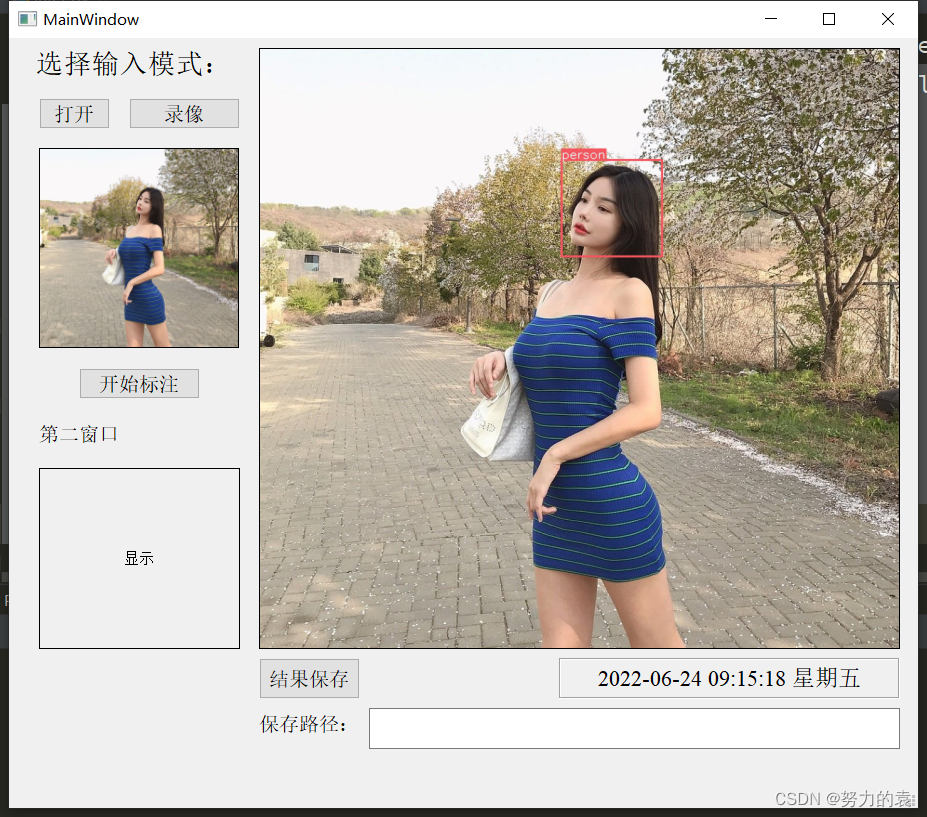
源代码
边栏推荐
- 美术向的Unity动画知识
- Raspberry pie preliminary use
- Leetcode (452) - detonate the balloon with the minimum number of arrows
- 用C#通过sql语句操作Sqlserver数据库教程
- Share three methods of automatic summation in Excel
- Unity 设置Material、Shader的方法
- Selenium电脑上怎么下载-Selenium下载和安装图文教程[超详细]
- leetcode:710. Random numbers in the blacklist [mapping thinking]
- Data governance does everything
- How to write test cases and a brief introduction to go unit test tool testify
猜你喜欢
![Selenium电脑上怎么下载-Selenium下载和安装图文教程[超详细]](/img/ec/1c324dcf38d07742a139aac2bab02e.png)
Selenium电脑上怎么下载-Selenium下载和安装图文教程[超详细]
![[fundamentals of image processing] GUI image curve adjustment system based on MATLAB [including Matlab source code 1923]](/img/e8/6342f2dc6e7f06a847852ce4b40719.jpg)
[fundamentals of image processing] GUI image curve adjustment system based on MATLAB [including Matlab source code 1923]

Yolov6: the fast and accurate target detection framework is open source

Some ways out for older programmers

论文解读(LG2AR)《Learning Graph Augmentations to Learn Graph Representations》
YOLOv6:又快又准的目標檢測框架開源啦

360 mobile assistant is the first to access the app signature service system to help distribute privacy and security
VB. Net class library (Advanced - 2 overload)

CVPR 2022 - Interpretation of selected papers of meituan technical team

开放世界机甲游戏-Phantom Galaxies
随机推荐
[bug feedback] the problem of message sending time of webim online chat system
Open world mecha games phantom Galaxy
数据治理啥都干
大龄程序员的一些出路
Implementation of collaborative filtering evolution version neuralcf and tensorflow2
Centos7 compiling and installing redis
How to write test cases and a brief introduction to go unit test tool testify
【BUG反馈】WebIM在线聊天系统发消息时间问题
Do an online GIF synthesis service at no cost
Unity3D插件 AnyPortrait 2D骨骼動畫制作
Leetcode (122) - the best time to buy and sell stocks II
Using C to operate SQLSERVER database through SQL statement tutorial
Is it safe for CICC fortune to open an account? I want to open an account to speculate in stocks.
Is it safe to buy stocks and open accounts through the account QR code of the CICC securities manager? Want to open an account for stock trading
【老卫搞机】090期:键盘?主机?全功能键盘主机!
Data governance does everything
Partage de trois méthodes de sommation automatique dans un tableau Excel
打新债注册开户有没有什么风险?安全吗?
【混合编程jni 】第七篇之JNI 的命令行们
Brief analysis of the self inspection contents of the blue team in the attack and defense drill