当前位置:网站首页>RT thread learning notes (VII) -- open the elmfat file system based on SPI flash (middle)
RT thread learning notes (VII) -- open the elmfat file system based on SPI flash (middle)
2022-07-26 10:43:00 【aping_ cs_ dn】
Software environment :Win7,Keil MDK 4.72a, IAR EWARM 7.2, GCC 4.2,Python 2.7 ,SCons 2.3.2
Hardware environment :Armfly STM32F103ZE-EK v3.0 Development board
Reference article :RT-Thread Programming Guide
[RTthread] The new version RTT Medium SPI Drive frame
Github managed Realtouch In the branch examples Directory spi flash Routine for
【1】RT-Thread 1.2.x Component initialization code analysis in
It was introduced in the last article spi flash Add relevant driver files and modify relevant codes , Although compilation can pass, it does not mean debugging can pass . Because for rt-thread-1.2.x The version adopts the function of component initialization , The concrete is components.c Implemented in , Look at the following code :
/**
* RT-Thread Components Initialization
*/
void rt_components_init(void)
{
#ifndef _MSC_VER
#if RT_DEBUG_INIT
int result;
const struct rt_init_desc *desc;
rt_kprintf("do components intialization.\n");
for (desc = &__rt_init_desc_rti_board_end; desc < &__rt_init_desc_rti_end; desc ++)
{
rt_kprintf("initialize %s", desc->fn_name);
result = desc->fn();
rt_kprintf(":%d done\n", result);
}
#else
const init_fn_t *fn_ptr;
for (fn_ptr = &__rt_init_rti_board_end; fn_ptr < &__rt_init_rti_end; fn_ptr ++)
{
(*fn_ptr)();
}
#endif
The code above in blue and bold is the entry of component initialization , Is a function pointer .init_fn_t In the definition of rtdef.h in , As shown below :
/* initialization export */
#ifdef RT_USING_COMPONENTS_INIT
typedef int (*init_fn_t)(void);
... ...
... ...
#define INIT_EXPORT(fn, level) \
const init_fn_t __rt_init_##fn SECTION(".rti_fn."level) = fn
... ...
... ...
... ...
#endif
among typdef int (*init_fn_t)(void) It means Definition init_fn_t Is the type of pointer to the function , This function returns int Type values . thus , We are right. (*init_fn_t)() The meaning of is clear .
INIT_EXPOT(fn,level) The expression of const init_fn_t __rt_init_##fn SECTION(".rti_fn."level) = fn, among ## Conjunctions ,SECTION For the definition of :
#define SECTION(x) __attribute__((section(x)))
RealView Compiler tools Compiler reference guide The following explanation is given in :
__attribute__((section("name")))
Usually ,ARM The compiler places the objects it generates in sections , Such as data and bss. however , You may need to use other data sections , Or you want the variable to appear in a special section , for example , Easy to map to special hardware .section Property specifies that variables must be placed in a specific data section . If you use section attribute , Then put the read-only variable in RO In the data section , And put the read-write variables in RW In the data section , Unless you use zero_init attribute . under these circumstances , Variables are placed in ZI In the festival .
Here we are , The meaning is already very clear , The compiler can base on section("name") Medium name Appoint , You can put the data it generates into specific data sections , Here is a quote from a netizen electrlife View of the :
In a similar way ,Linux It also provides some references , Put the address of a function ( Notice the function address , Not the function itself ) Output to a separate section in , At the same time, they are arranged in a certain order , for example :
.rti_fn.0
.rti_fn.1
.rti_fn.2
...
.rti_fn.7
Such a few section( There are several different section The order of arrangement is also given ). At the same time .rti_fn.0 and .rti_fn.7 Reserved for system use , Define two piles respectively and place them at these two points . You can also follow RT-Thread Define simplified macros in the form of :
typedef int (*init_fn_t)(void);
#define INIT_EXPORT(fn, level) \
const init_fn_t __rt_init_##fn SECTION(".rti_fn."level) = fn
#define INIT_BOARD_EXPORT(fn) INIT_EXPORT(fn, "1")
#define INIT_CPU_EXPORT(fn) INIT_EXPORT(fn, "2")
#define INIT_DEVICE_EXPORT(fn) INIT_EXPORT(fn, "3")
#define INIT_COMPONENT_EXPORT(fn) INIT_EXPORT(fn, "4")
#define INIT_FS_EXPORT(fn) INIT_EXPORT(fn, "5")
#define INIT_APP_EXPORT(fn) INIT_EXPORT(fn, "6")
INIT_EXPORT Macros are used to output a function into the initialization sequence , Correspondingly, some simpler macros can be defined .
Such two piles can be defined as :
static int rti_start(void)
{
return 0;
}
INIT_EXPORT(rti_start, "0");
static int rti_end(void)
{
return 0;
}
INIT_EXPORT(rti_end,"7");
According to the position of these two piles , A simplified rt_components_init() Function can become :
void rt_components_init(void)
{
const init_fn_t* fn_ptr;
for (fn_ptr = &__rt_init_rti_start; fn_ptr < &__rt_init_rti_end; )
{
(*fn_ptr)();
fn_ptr ++;
}
}
in fact ,aozima Engineering tests have been done and verified :
After compiling the project , from map Find the relevant part of the file :
InitFuncSym$$Base 0x00000e18 Number 0init_1.o(InitFuncSym)
__rt_init_init_1 0x00000e18 Data 4init_1.o(InitFuncSym)
__rt_init_init_2 0x00000e1c Data 4init_2.o(InitFuncSym)
__rt_init_init_3 0x00000e20 Data 4init_3.o(InitFuncSym)
__rt_init_init_4 0x00000e24 Data 4init_4.o(InitFuncSym)
__rt_init_init_5 0x00000e28 Data 4init_5.o(InitFuncSym)
__rt_init_init_6 0x00000e2c Data 4init_6.o(InitFuncSym)
InitFuncSym$$Limit 0x00000e30 Number 0init_6.o(InitFuncSym)
Although the data is stored in different files , But from here, we can see that the space is allocated continuously
The stake set by the landlord
static int rti_start(void)
{
return 0;
}
INIT_EXPORT(rti_start, "0");
static int rti_end(void)
{
return 0;
}
INIT_EXPORT(rti_end,"7");
May by InitFuncSym$$Base and InitFuncSym$$Limit Instead of
Last , The initialization process can be written as
extern int InitFuncSym$$Base;
extern int InitFuncSym$$Limit;
init_fn_t* fn;
for (fn = (init_fn_t *)&InitFuncSym$$Base; fn < (init_fn_t *)&InitFuncSym$$Limit; fn ++ ) {
(*fn)();
}
alike ,ffxz There are also the following tests :
Reference resources RTT Under the IAR engineering , stay ICF Add a line to the file
keep { section InitFuncSym };
This line concerns whether the following information is generated .
stay Debug/List Under the map This is described in
.text ro code0x00000658 0x16xprout.o
InitFuncSym 0x00000670 0x14<Block>
InitFuncSym const 0x00000670 0x4init_1.o
InitFuncSym const 0x00000674 0x4init_2.o
InitFuncSym const 0x00000678 0x4init_4.o
InitFuncSym const 0x0000067c 0x4init_5.o
InitFuncSym const 0x00000680 0x4init_6.o
.rodata const 0x00000684 0x10init_1.o
......
InitFuncSym$$Base 0x00000670 DataGb- Linker created -
InitFuncSym$$Limit 0x00000684 DataGb- Linker created -
All in all , By defining
#define INIT_EXPORT(fn, level) \
const init_fn_t __rt_init_##fn SECTION(".rti_fn."level) = fn
Components of all parts of the system can pass INIT_EXPORT(fn,level) Put it in a specific code segment , in short , When we want to initialize a component , After defining this initialization function , According to the comments defined by the macro above , Next put one under it INIT_XXX_EXPORT(fn) That's all right. . It is equivalent to an invisible call assigned to a specific code segment , And it should be clear that this segment is the entry address of the initialization function of different components , for example :
int my_init_fun(void)
{
... ...
}
INIT_XXX_EXPORT(my_init_fun)
Based on the above analysis , We need to modify the engineering documents accordingly :
【2】 Modification of engineering documents
(1) open sdcard.c file , Locate the 3241 Near the line , Revised as follows :
int rt_hw_sdcard_init(void)
{
/* SDIO POWER */
... ...
__return:
rt_kprintf("sdcard init failed\n");
GPIO_SetBits(GPIOC,GPIO_Pin_6); /* SD card power down */
return 0;
}
//INIT_DEVICE_EXPORT(rt_hw_sdcard_init);
... ...
Save after modification , Because there is not yet sd Card functions , Comment out first , Do not let the system call this initialization function .
(2) open rt_spi_flash_device.c file , Locate the 94 Near the line , Revised as follows :
... ...
}
INIT_DEVICE_EXPORT(rt_hw_spi_init);
#endif /* RT_USING_SPI */
void rt_spi_flash_device_init(void)
{
#if defined(RT_USING_DFS) && defined(RT_USING_DFS_ELMFAT)
w25qxx_init("flash0", "spi11");
#endif /* RT_USING_DFS && RT_USING_DFS_ELMFAT */
... ...
By means of rt_hw_spi_init() Add macro statements below “INIT_DEVICE_EXPORT(rt_hw_spi_init);” Let the system implicitly call it . Of course, there is no need to rt_spi_device_init() Function called it .
(3) open application.c, Locate the 99 Near the line , Confirm that it has been modified to the following code :
void rt_init_thread_entry(void* parameter)
{
#ifdef RT_USING_COMPONENTS_INIT
/* initialization RT-Thread Components */
rt_components_init();
#endif
rt_spi_flash_device_init();
#ifdef RT_USING_FINSH
finsh_set_device(RT_CONSOLE_DEVICE_NAME);
#endif /* RT_USING_FINSH */
Then navigate to the beginning of the file 45 Near the line , Add an external declaration , as follows :
#include "led.h"
extern void rt_spi_flash_device_init(void);
ALIGN(RT_ALIGN_SIZE)
static rt_uint8_t led_stack[ 512 ];
static struct rt_thread led_thread;
static void led_thread_entry(void* parameter)
{
unsigned int count=0;
rt_hw_led_init();
... ...
Save after modification .
【3】 confirm Flash Whether the chip model identification code of the bottom driver corresponds to the hardware on the development board
On the development board SPI Flash Chip model SST25VF016B, Open the data book , Locate to the first 19 page , You can see the definition shown in the following figure :
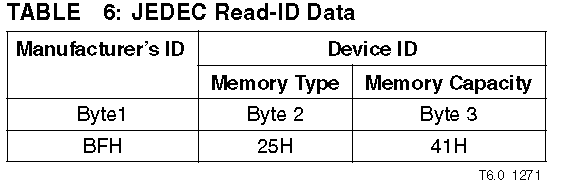
Manufacturer ID Number 0xBF, device ID yes 0x4125, open spi_flash_w25qxx.c, Locate the 37 Near the line , Revised as follows :
/* JEDEC Manufacturer¡¯s ID */
#define MF_ID (0xBF) /*(0xEF)*/
/* JEDEC Device ID: Memory type and Capacity */
#define MTC_W25Q16_BV_CL_CV (0x4015) /* W25Q16BV W25Q16CL W25Q16CV */
#define MTC_W25Q16_DW (0x6015) /* W25Q16DW */
#define MTC_W25Q32_BV (0x4016) /* W25Q32BV */
#define MTC_W25Q32_DW (0x6016) /* W25Q32DW */
#define MTC_W25Q64_BV_CV (0x4017) /* W25Q64BV W25Q64CV */
#define MTC_W25Q64_DW (0x4017) /* W25Q64DW */
#define MTC_W25Q128_BV (0x4018) /* W25Q128BV */
#define MTC_W25Q256_FV (TBD) /* W25Q256FV */
#define MTC_SST25VF016B (0x4125) /* SST25V016B */
And then locate 378 Near the line , Revised as follows :
... ...
else if(memory_type_capacity == MTC_W25Q16_DW)
{
FLASH_TRACE("W25Q16DW detection\r\n");
spi_flash_device.geometry.sector_count = 512;
}
else if(memory_type_capacity == MTC_SST25VF016B)
{
FLASH_TRACE("W25Q16DW detection\r\n");
spi_flash_device.geometry.sector_count = 512;
}
else
{
FLASH_TRACE("Memory Capacity error!\r\n");
return -RT_ENOSYS;
}
... ...
Save after modification .
(4) Use Notepad++ open driver In the catalog Sconscript, Locate the 23 Near the line , Add the front to driver The directory rt_spi_device.c,rt_stm32f10x_spi.c,spi_flash_w25qxx.c Add to Depend() in , Revised as follows :
# add DFS drvers.
if GetDepend('RT_USING_DFS'):
src += ['rt_spi_flash_device.c','rt_stm32f10x_spi.c','spi_flash_w25qxx.c']
# add RTC drvers.
if GetDepend('RT_USING_RTC'):
src += ['rtc.c']
When this script is executed , Add driver file to compile , Save after modification .
【4】 Compile testing
The following information is found after compilation :
drivers\rt_spi_device.c(86): warning: #144-D: a value of type "void (*)(void)" cannot be used to initialize an entity of type "const init_fn_t"
Alarm appears : as a result of rt_hw_spi_init(void) The function has problems , This function should be defined as int Type, not void type , Change it now , open rt_spi_device.c Locate the 21 Near the line , Revised as follows :
#ifdef RT_USING_SPI
static int rt_hw_spi_init(void)
{
/* register spi bus */
{
... ...
return 0;
}
INIT_DEVICE_EXPORT(rt_hw_spi_init);
#endif /* RT_USING_SPI */
Save after modification , recompile ,OK, Compile and pass , There is no warning .
Download to the development board and run , give the result as follows :

Memory Capacity error , Failed to mount .
Enter trace debugging mode , open spi_flash_w25qxx.c, Locate the 378 That's ok , In the presence of “Memory Capacity error!” Place this breakpoint , Then click Run , Stop at the breakpoint , obtain memory_type_capacity The tracking value of is shown in the figure below :

Obviously, it is in the figure below MTC_SST25VF016B The value of is defined incorrectly , Locate the

Position up to 48 Near the line , It turned out to be the problem of chip model definition
... ...
#define MTC_W25Q128_BV (0x4018) /* W25Q128BV */
#define MTC_W25Q256_FV (TBD) /* W25Q256FV */
#define MTC_SST25VF016B (0x4125) /* SST25V016B */
... ...
Now it is changed to and tracked to memory_type_capacity Same value :
... ...
#define MTC_SST25VF016B (0x2541) /* SST25V016B */
... ...
Then exit debugging mode , Save changes , recompile , download , After operation , The terminal information is as follows :

边栏推荐
- 抽象工厂及其改进示例
- PLC与伺服电机连接
- [notes on machine learning] [building a cyclic neural network and its application] deeplearning ai course5 1st week programming(keras)
- 点击el-dropdown-item/@click.native
- Uninstall Meizu app store
- [machine learning notes] [style transfer] deeplearning ai course4 4th week programming(tensorflow2)
- 关于硕博士开题报告编写的思考
- Error[pe147]: declaration is incompatible with 'error problem
- Flutter TextField设置高度并且自动换行,圆角边框去除下划线
- router.push(),router.repalce(),router.go()使用
猜你喜欢
![[leetcode每日一题2021/8/31]1109. 航班预订统计【中等】差分数组](/img/9d/5ce5d4144a9edc3891147290e360d8.png)
[leetcode每日一题2021/8/31]1109. 航班预订统计【中等】差分数组
![[leetcode每日一题2021/5/8]1723. 完成所有工作的最短时间](/img/e7/a48bb5b8a86cbc4cd5b37bb16661a8.png)
[leetcode每日一题2021/5/8]1723. 完成所有工作的最短时间

Problems encountered in QRcode QR code (C language)
[leetcode daily question 2021/5/8]1723. The shortest time to complete all work

反射机制简述
![[leetcode每日一题2021/2/13]448. 找到所有数组中消失的数字](/img/9b/624416fa6a408bf64ca5438273176b.png)
[leetcode每日一题2021/2/13]448. 找到所有数组中消失的数字
![Error[pe147]: declaration is incompatible with 'error problem](/img/4f/57145d78f4dc1fe84d2f271dd9d82f.png)
Error[pe147]: declaration is incompatible with 'error problem
![[leetcode每日一题2021/4/29]403. 青蛙过河](/img/fb/612777c77df5a611506e72f4f4c3c8.png)
[leetcode每日一题2021/4/29]403. 青蛙过河

Sql Server 数据库之数据类型

Oracle cannot start tnslistener service cannot start
随机推荐
鹏哥C语言第六节课
Write to esp8266 burning brush firmware
Koin
.net operation redis sorted set ordered set
10 let operator= return a reference to *this
Problems encountered in QRcode QR code (C language)
winpcap 抓包函数pcap_loop(),停止问题
Common classes (understand)
C语言鹏哥20210812C语言函数
剑指Offer(二十):包含min函数的栈
.net operation redis hash object
【机器学习小记】【搭建循环神经网络及其应用】deeplearning.ai course5 1st week programming(keras)
第7期:内卷和躺平,你怎么选
[leetcode每日一题2021/2/13]448. 找到所有数组中消失的数字
Flutter编译报错 version of NDK matched the requested version 21.0.6113669. Versions available locally: 2
Zongzi battle - guess who can win
Dry goods likeshop takeout order system is open source, 100% open source, no encryption
一文详解Nodejs中fs文件模块与path路径模块
SAP ABAP 守护进程的实现方式
Application of.Net open source framework in industrial production