当前位置:网站首页>How to choose Visibility, Display, and Opacity when interacting or animating
How to choose Visibility, Display, and Opacity when interacting or animating
2022-08-01 21:07:00 【Nan Feiyan】
Create fade in/淡出效果
例如,Create fade in/淡出效果
在 Web 前端开发中,我们可以使用display, opacity,visibility和其他 CSS properties to show and hide elements.
How do these properties differ?What if we want to animate when showing and hiding?本文将为您介绍.
Let's take a look at their differences first:
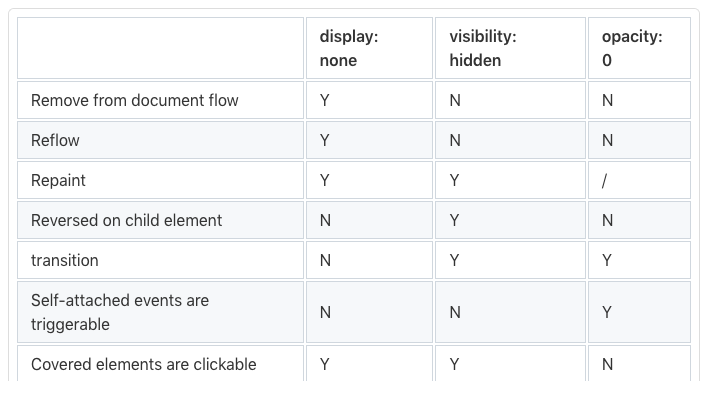
可以看出,There are still some differences between them,We need to choose the attribute according to the specific situation.
For example, the mouseover fades in and out,我们就不能用display.Because it's not transition-animable CSS 属性.换句话说,It cannot be changed within a given time.
visibility 和 opactiy Two are transition animations that can be set
<style>
  div {
    border: 1px solid #000;
    color: red;
    font-size: 36px;
    width: 150px;
    height: 150px;
  }
  div > span {
    opacity: 0;
    transition: opacity 1s linear;
  }
  div:hover > span {
    visibility: visible;
    opacity: 1;
  }
</style>
<div>
  <span>content</span>
</div>

看起来很棒.But if we give useopacityHidden elements are bound to click events, 当opacity: 0can still be clicked, Then I want to have a transition effect at this time, Also thought he couldn't be clicked when he was hidden, only when displayed,才能被点击
<style>
  #upper {
    position: absolute;
    width: 150px;
    height: 150px;
    opacity: 1;
    visibility: visible;
    background-color: beige;
    transition-property: opacity, visibility;
    transition-duration: 0.6s;
  }
  #lower {
    background-color: aquamarine;
    width: 200px;
    height: 200px;
  }
</style>
<div id="upper"></div>
<div id="lower"></div>
<script>
  const [upper, lower] = ["upper", "lower"].map((i) =>
    document.getElementById(i)
  );

  upper.addEventListener("click", () => {
    upper.style.opacity = 0;
    // Toggle comments here to see the difference
    upper.style.visibility = "hidden";
  });

  const randomColor = () => `#${(~~(Math.random() * (1 << 24))).toString(16)}`;
  lower.addEventListener("click", () => {
    lower.style.backgroundColor = randomColor();
  });
</script>
In this way, we have a transition effect when hiding, At the same time, after hiding, there is no click event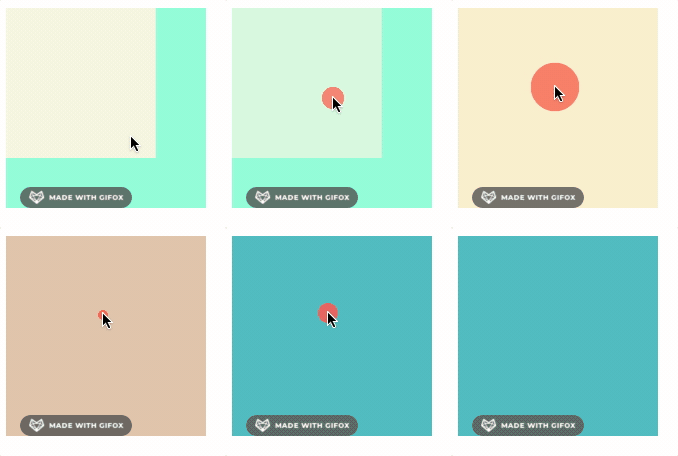
边栏推荐
- JSD - 2204 - Knife4j framework - processing - Day07 response results
- 字符串
- Graph adjacency matrix storage
- C陷阱与缺陷 第7章 可移植性缺陷 7.6 内存位置0
- Kubernetes 如何实现组件高可用
- Taobao's API to get the list of shipping addresses
- C陷阱与缺陷 第8章 建议与答案 8.1 建议
- SkiaSharp 之 WPF 自绘 五环弹动球(案例版)
- Pytorch框架学校记录11——搭建小实战完整细节
- How to encapsulate the cookie/localStorage sessionStorage hook?
猜你喜欢
StringTable详解 串池 性能调优 字符串拼接
PyQt5 + MySQL5.8 【学生信息管理系统】【增删改查】

测试的意义并不是能找到全部的缺陷

网红驼背矫正产品真的管用吗?如何预防驼背?医生说要这样做
property语法

Transplant MQTT source code to STM32F407 development board

网络安全与基础设施安全局(CISA):两国将在网络安全方面扩大合作

Questions I don't know in database kernel interview(1)

有点奇怪!访问目的网址,主机能容器却不行

STAHL触摸屏维修一体机显示屏ET-316-TX-TFT常见故障
随机推荐
封装一个管理 url 状态的 hook
Kubernetes 如何实现组件高可用
仿牛客论坛项目
微信小程序云开发|个人博客小程序
如何用Chrome编辑以及调试代码
tiup mirror clone
对C语言结构体内存对齐的理解
JSD-2204-Knife4j框架-处理响应结果-Day07
基于FPGA的任意字节数(单字节、多字节)的串口(UART)发送(含源码工程)
Go 语言中常见的坑
sizeof的详细解说和与strlen的区别
MySQL语法基础
JS Improvement: Handwritten Publish Subscriber Model (Xiaobai)
空间数据库开源路,超图+openGauss风起禹贡
C专家编程 第1章 C:穿越时空的迷雾 1.4 K&R C
idea实用快捷键合集——持续更新
Go Atomic
(七)《数电》——CMOS与TTL门电路
98.嵌入式控制器EC实战 EC开发板开发完成
分类接口,淘宝分类详情 API