当前位置:网站首页>Huawei equipment configures local virtual private network mutual access
Huawei equipment configures local virtual private network mutual access
2022-06-11 04:51:00 【Tony_ long7483】
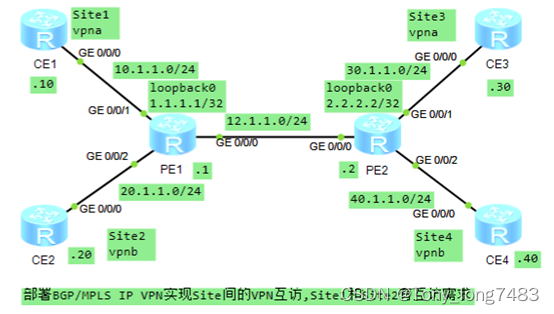
- To configure IP Address
[PE1-GigabitEthernet0/0/0]ip add 12.1.1.1 24
[PE1-GigabitEthernet0/0/1]ip add 10.1.1.1 24
[PE1-GigabitEthernet0/0/2]ip add 20.1.1.1 24
[CE1-GigabitEthernet0/0/0]ip add 10.1.1.10 24
[PE1-LoopBack0]ip add 1.1.1.1 32
[CE2-GigabitEthernet0/0/0]ip add 20.1.1.20 24
[PE2-GigabitEthernet0/0/0]ip add 12.1.1.2 24
[PE2-GigabitEthernet0/0/1]ip add 30.1.1.2 24
[PE2-GigabitEthernet0/0/2]ip add 40.1.1.2 24
[PE2-LoopBack0]ip add 2.2.2.2 32
[CE3-GigabitEthernet0/0/0]ip add 30.1.1.30 24
[CE4-GigabitEthernet0/0/0]ip add 40.1.1.40 24 - stay PE The device is configured with VPN example , take CE Access PE
[PE1]ip vpn-instance vpna
[PE1-vpn-instance-vpna]ipv4-family
[PE1-vpn-instance-vpna-af-ipv4]route-distinguisher 100:1
[PE1-vpn-instance-vpna-af-ipv4]vpn-target 111:1 export-extcommunity
[PE1-vpn-instance-vpna-af-ipv4]vpn-target 111:1 222:2 import-extcommunity
[PE1]ip vpn-instance vpnb
[PE1-vpn-instance-vpnb]route-distinguisher 100:2
[PE1-vpn-instance-vpnb-af-ipv4]vpn-target 222:2 export-extcommunity
[PE1-vpn-instance-vpnb-af-ipv4]vpn-target 111:1 222:2 import-extcommunity
[PE1-GigabitEthernet0/0/1]ip binding vpn-instance vpna
[PE1-GigabitEthernet0/0/1]ip add 10.1.1.1 24
[PE1-GigabitEthernet0/0/2]ip binding vpn-instance vpnb
[PE1-GigabitEthernet0/0/2]ip add 20.1.1.1 24
[PE2]ip vpn-instance vpna
[PE2-vpn-instance-vpna]ipv4-family
[PE2-vpn-instance-vpna]route-distinguisher 100:1
[PE2-vpn-instance-vpna-af-ipv4]vpn-target 111:1 both
[PE2]ip vpn-instance vpnb
[PE2-vpn-instance-vpnb]ipv4-family
[PE2-vpn-instance-vpnb-af-ipv4]route-distinguisher 100:2
[PE2-vpn-instance-vpnb-af-ipv4]vpn-target 222:2 both
[PE2-GigabitEthernet0/0/1]ip binding vpn-instance vpna
[PE2-GigabitEthernet0/0/1]ip add 30.1.1.2 24
[PE2-GigabitEthernet0/0/2]ip binding vpn-instance vpnb
[PE2-GigabitEthernet0/0/2]ip add 40.1.1.2 24
- To configure BGP, To local CE The direct connection route of is introduced VPN Routing table
[PE1]bgp 100
[PE1-bgp]ipv4-family vpn-instance vpna
[PE1-bgp-vpna]import-route direct
[PE1-bgp]ipv4-family vpn-instance vpnb
[PE1-bgp-vpnb]import-route direct
[PE2]bgp 100
[PE2-bgp]ipv4-family vpn-instance vpna
[PE2-bgp-vpna]import-route direct
[PE2-bgp]ipv4-family vpn-instance vpnb
[PE2-bgp-vpnb]import-route direct - To configure CE Static routing on
[CE1]ip route-static 0.0.0.0 0.0.0.0 10.1.1.1
[CE2]ip route-static 0.0.0.0 0.0.0.0 20.1.1.1
[CE3]ip route-static 0.0.0.0 0.0.0.0 30.1.1.2
[CE4]ip route-static 0.0.0.0 0.0.0.0 40.1.1.2 - To configure PE Between OSPF
[PE1]ospf 1
[PE1-ospf-1]area 0
[PE1-ospf-1-area-0.0.0.0]network 12.1.1.0 0.0.0.255
[PE1-ospf-1-area-0.0.0.0]network 10.1.1.0 0.0.0.255
[PE1-ospf-1-area-0.0.0.0]network 20.1.1.0 0.0.0.255
[PE1-ospf-1-area-0.0.0.0]network 1.1.1.1 0.0.0.0
[PE2]ospf 1
[PE2-ospf-1]area 0
[PE2-ospf-1-area-0.0.0.0]network 30.1.1.0 0.0.0.255
[PE2-ospf-1-area-0.0.0.0]network 40.1.1.0 0.0.0.255
[PE2-ospf-1-area-0.0.0.0]network 12.1.1.0 0.0.0.255
[PE2-ospf-1-area-0.0.0.0]network 2.2.2.2 0.0.0.0 - To configure PE Of MPLS Basic abilities and MPLS LDP, establish LDP LSP
[PE1]mpls lsr-id 1.1.1.1
[PE1]mpls
[PE1]mpls ldp
[PE1-GigabitEthernet0/0/0]mpls
[PE1-GigabitEthernet0/0/0]mpls ldp
[PE2]mpls lsr-id 2.2.2.2
[PE2]mpls
[PE2]mpls ldp
[PE2-GigabitEthernet0/0/0]mpls
[PE2-GigabitEthernet0/0/0]mpls ldp - stay PE Establish between MP-IBGP Peer relationship
[PE1]bgp 100
[PE1-bgp]peer 2.2.2.2 as-number 100
[PE1-bgp]peer 2.2.2.2 connect-interface LoopBack 0
[PE1-bgp]ipv4-family vpnv4
[PE1-bgp-af-vpnv4]peer 2.2.2.2 enable
[PE2]bgp 100
[PE2-bgp]peer 1.1.1.1 as-number 100
[PE2-bgp]peer 1.1.1.1 connect-interface LoopBack 0
[PE2-bgp]ipv4-family vpnv4
[PE2-bgp-af-vpnv4]peer 1.1.1.1 enable - Check the configuration


边栏推荐
- PostgreSQL数据库复制——后台一等公民进程WalReceiver 收发逻辑
- Parametric contractual learning: comparative learning in long tail problems
- 华为设备配置本地虚拟专用网互访
- Yolact paper reading and analysis
- C language test question 3 (program multiple choice question - including detailed explanation of knowledge points)
- 2020-12-24
- Let me tell you how to choose a 10 Gigabit network card
- [Transformer]CoAtNet:Marrying Convolution and Attention for All Data Sizes
- Minor problems encountered in installing the deep learning environment -- the jupyter service is busy
- USB to 232 to TTL overview
猜你喜欢

New product pre-sale: 25g optical network card based on Intel 800 series is coming

Pychart displays pictures with imshow

Commissioning experience and reliability design of brushless motor

CoDeSys get system time

Win10+manjaro dual system installation

新库上线 | CnOpenData不可移动文物数据

华为设备配置BGP/MPLS IP 虚拟专用网

QT method for generating QR code pictures

Meedu knowledge payment solution v4.5.4 source code

Top 100 video information of station B
随机推荐
Leetcode question brushing series - mode 2 (datastructure linked list) - 83:remove duplicates from sorted list
lower_bound,upper_bound,二分
无刷电机调试经验与可靠性设计
C语言试题三(程序选择题进阶_含知识点详解)
董明珠称“格力手机做得不比苹果差”哪里来的底气?
[Transformer]CoAtNet:Marrying Convolution and Attention for All Data Sizes
华为设备配置BGP/MPLS IP 虚拟专用网命令
Unzip Imagenet after downloading
Leetcode question brushing series - mode 2 (datastructure linked list) - 160:intersection of two linked list
go单元测试实例;文件读写;序列化
Anaconda installation and use process
2020-12-24
Leetcode question brushing series - mode 2 (datastructure linked list) - 206:reverse linked list
【Markdown语法高级】 让你的博客更精彩(三:常用图标模板)
华为设备配置跨域虚拟专用网
Pytoch machine learning GPU usage (conversion from CPU to GPU)
[Transformer]MViTv1:Multiscale Vision Transformers
碳路先行,华为数字能源为广西绿色发展注入新动能
Temporary website English Writing
lower_bound,upper_bound,二分