当前位置:网站首页>Implementation of code scanning login
Implementation of code scanning login
2022-06-28 08:42:00 【ZhiXiongWu】
Preface
In this article, we will introduce the method based on SpringBoot + Vue + Android Code scanning login demo General idea of , Implement some references What's the principle of QR code scanning login .
Project brief introduction
Back end :SpringBoot,Redis.
front end :Vue,Vue Router、VueX、Axios、vue-qr、ElemntUI.
Android :ZXing、XUI、YHttp
Realize the idea
Overall code scanning login and OAuth2.0 The validation logic of is similar , As shown below :

The user's choice of code scanning login can be regarded as A: The front end sends an authorization request , wait for app Sweep code .
The user to use app Scanning code can be regarded as B: Scan code for authorization , Returns a temporary Token For secondary certification .
The user is in app Making a confirmation login can be seen as C: Confirm login , Authorized user at Web End login .
The backend will return a formal message after the user confirms the login Token It can be regarded as a step D.
The follow-up front-end is based on the formal Token Access the background interface , Officially in Web It can be regarded as E and F.
Reasons for secondary certification
The reason why the user needs to confirm login again after scanning the code , Instead of just logging in , For the sake of user safety , Avoid the user scanning the QR code that others need to log in , Log in directly without confirmation , Cause others to access our information without our knowledge .
Implementation steps
One 、 The user accesses the web side , Select scan code to login
When the user selects scanning code to log in , A QR code generation request will be sent to the backend , Backend generation UUID, And save to Redis( Fixed effective time ), The status is set to UNUSED( not used ) state , If Redis Cache expiration , Then for EXPIRE( Be overdue ) state , The front end generates a QR code according to the content returned by the back end , And set a timer , Every once in a while, according to the contents of the QR code UUID, Send a request back , Get the status of the QR code , Update the content displayed in the interface .
Generate QR code backend interface :
/** *  Generate QR code content  * * @return  result  */
@GetMapping("/generate")
public BaseResult generate() {

    String code = IdUtil.simpleUUID();
    redisCache.setCacheObject(code, CodeUtils.getUnusedCodeInfo(),
                              DEFAULT_QR_EXPIRE_SECONDS, TimeUnit.SECONDS);
    return BaseResult.success(GENERATE_SUCCESS, code);
}
The front end gets the content , Generate qr code :
getToken() {

    this.codeStatus = 'EMPTY'
    this.tip = ' Getting login code , One moment please '
    //  Valid time  60  second
    this.effectiveSeconds = 60
    clearInterval(this.timer)
    request({

        method: 'get',
        url: '/code/generate'
    }).then((response) => {

        //  The request is successful ,  Set QR code content ,  And update the relevant information
        this.code = `${
      HOST}/code/scan?code=${
      response.data}`
        this.codeStatus = 'UNUSED'
        this.tip = ' Please use your mobile phone to scan the code to log in '
        this.timer = setInterval(this.getTokenInfo, 2000)
    }).catch(() => {

        this.getToken()
    })
}
Back end interface that returns QR code status information :
/** *  Get QR code status information  * * @param code  QR code  * @return  result  */
@GetMapping("/info")
public BaseResult info(String code) {

    CodeVO codeVO = redisCache.getCacheObject(code);
    if (codeVO == null) {

        return BaseResult.success(INVALID_CODE, StringUtils.EMPTY);
    }
    return BaseResult.success(GET_SUCCESS, codeVO);
}
The front end polls for QR code status :
getTokenInfo() {

    this.effectiveSeconds--
    //  QR code expired
    if (this.effectiveSeconds <= 0) {

        this.codeStatus = 'EXPIRE'
        this.tip = ' QR code has expired , Please refresh '
        return
    }
    //  Polling and querying QR code status
    request({

        method: 'get',
        url: '/code/info',
        params: {

            code: this.code.substr(this.code.indexOf('=') + 1)
        }
    }).then(response => {

        const codeVO = response.data
        //  QR code expired
        if (!codeVO || !codeVO.codeStatus) {

            this.codeStatus = 'EXPIRE'
            this.tip = ' QR code has expired , Please refresh '
            return
        }
        //  The QR code status is login
        if (codeVO.codeStatus === 'CONFIRMING') {

            this.username = codeVO.username
            this.avatar = codeVO.avatar
            this.codeStatus = 'CONFIRMING'
            this.tip = ' Scan code successfully , Please confirm on your mobile phone '
            return
        }
        //  The QR code status is confirm login
        if (codeVO.codeStatus === 'CONFIRMED') {

            clearInterval(this.timer)
            const token = codeVO.token
            store.commit('setToken', token)
            this.$router.push('/home')
            Message.success(' Login successful ')
            return
        }
    })
}
Two 、 Use your mobile phone to scan the code , QR code status changes
When the user uses the mobile phone to scan the code ( Logged in and is correct app, Otherwise, scanning the code will jump to the customized promotional page ), The status of the QR code will be updated to CONFIRMING( To be confirmed ) state , And in Redis The newly added user name and avatar information in the cache are saved for the front end to use and display , In addition, the login information of the user will be returned ( The login address 、 browser 、 operating system ) to app Exhibition , At the same time, a temporary Token to app( Fixed effective time ).
Background processing during code scanning :
/** *  Handle unused QR codes  * * @param code  QR code  * @param token token * @return  result  */
private BaseResult handleUnusedQr(String code, String token) {

    //  check  app  End access passing  token
    boolean isLegal = JwtUtils.verify(token);
    if (!isLegal) {

        return BaseResult.error(AUTHENTICATION_FAILED);
    }
    //  Save user name 、 Avatar information ,  For front end display
    String username = JwtUtils.getUsername(token);
    CodeVO codeVO = CodeUtils.getConfirmingCodeInfo(username, DEFAULT_AVATAR_URL);
    redisCache.setCacheObject(code, codeVO, DEFAULT_QR_EXPIRE_SECONDS, TimeUnit.SECONDS);
    //  Return to the login address 、 browser 、 Operating system and a temporary  token  to  app
    String address = HttpUtils.getRealAddressByIp();
    String browser = HttpUtils.getBrowserName();
    String os = HttpUtils.getOsName();
    String tmpToken = JwtUtils.sign(username);
    //  Will be temporary  token  As key ,  The user name is stored in  redis  in
    redisCache.setCacheObject(tmpToken, username, DEFAULT_TEMP_TOKEN_EXPIRE_MINUTES, TimeUnit.MINUTES);
    LoginInfoVO loginInfoVO = new LoginInfoVO(address, browser, os, tmpToken);
    return BaseResult.success(SCAN_SUCCESS, loginInfoVO);
}
3、 ... and 、 Confirm login by mobile phone
When the user app Click confirm to log in , The generated temporary Token Send a request to update the status , The status of the QR code will be updated to CONFIRMED( Login confirmed ) state , At the same time, the back end will generate a formal Token Save in Redis in , The front end gets this when polling for update status Token, Then use this Token Log in .
The back-end process confirms the login code :
/** 1.  Process QR code of unconfirmed status  2. 3. @param code  QR code  4. @param token token 5. @return  result  */
private BaseResult handleConfirmingQr(String code, String token) {

    //  Use temporary  token  Get username ,  And from  redis  Delete temporary  token
    String username = redisCache.getCacheObject(token);
    if (StringUtils.isBlank(username)) {

        return BaseResult.error(AUTHENTICATION_FAILED);
    }
    redisCache.deleteObject(token);
    //  Generate a formal according to the user name  token And keep it in  redis  For front-end use
    String formalToken = JwtUtils.sign(username);
    CodeVO codeVO = CodeUtils.getConfirmedCodeInfo(username, DEFAULT_AVATAR_URL, formalToken);
    redisCache.setCacheObject(code, codeVO, DEFAULT_QR_EXPIRE_SECONDS, TimeUnit.SECONDS);
    return BaseResult.success(CONFIRM_SUCCESS);
}
Effect demonstration
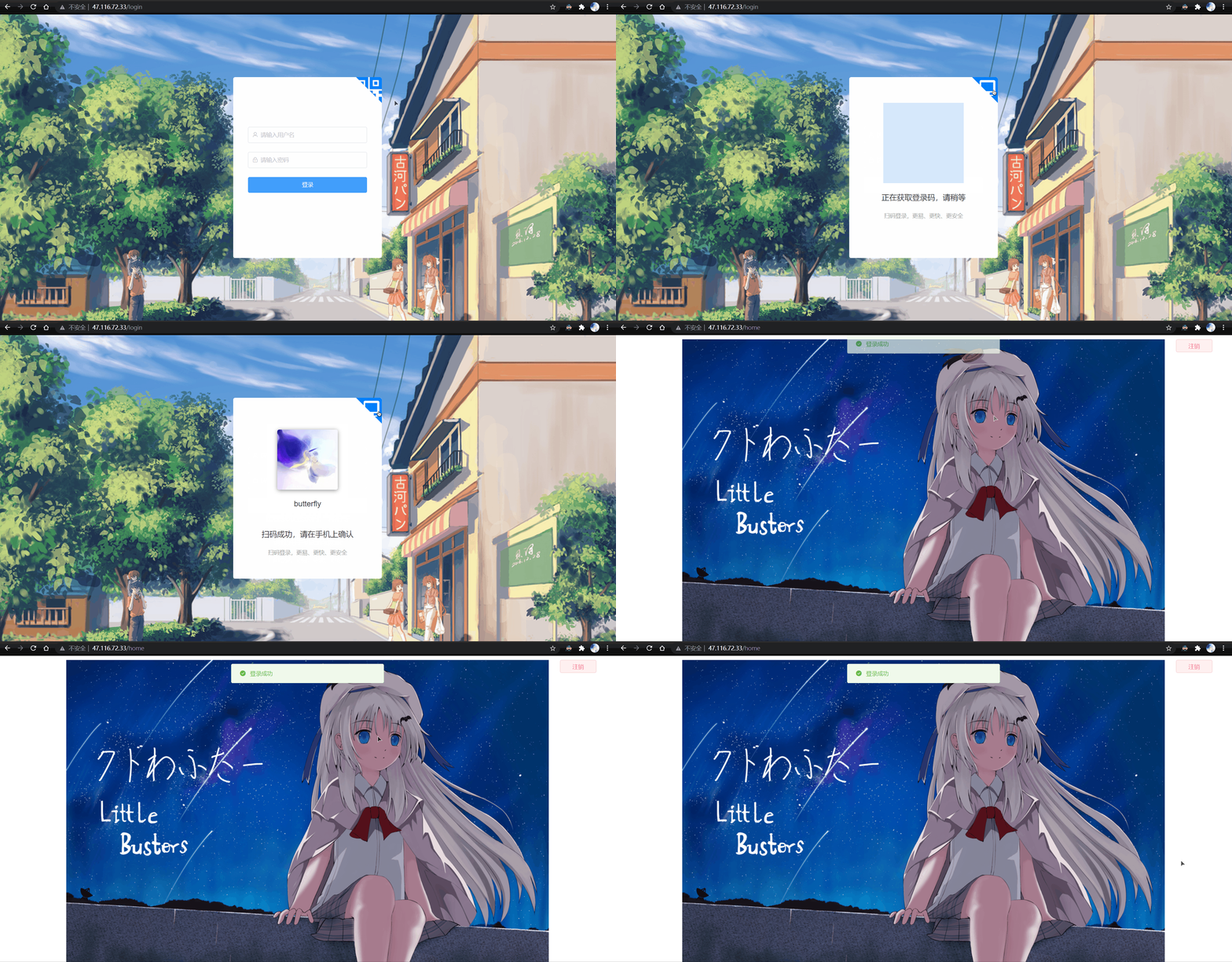
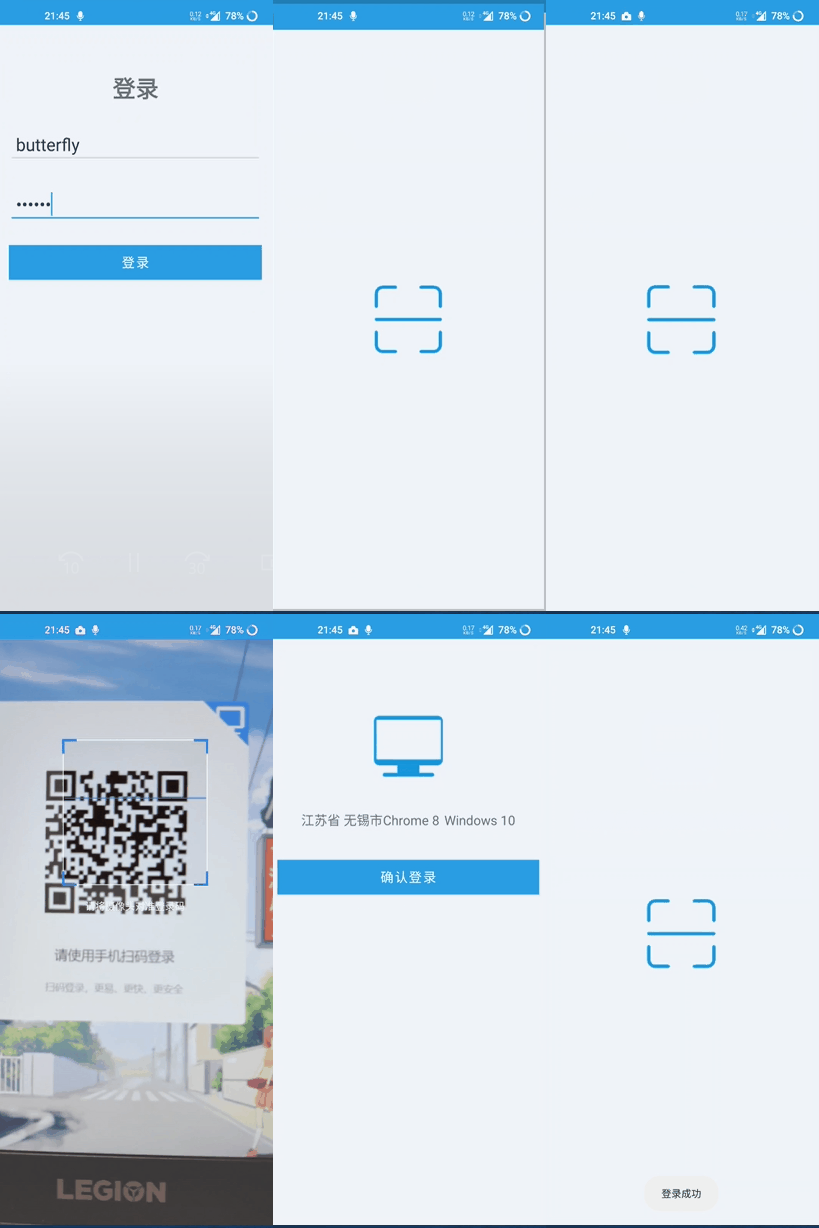
ps: Notes , Bosses do not spray , If there are defects, please point out ,3Q!
边栏推荐
猜你喜欢
![[untitled]](/img/bb/213f213c695795daecb81a4cf2adcd.jpg)
[untitled]

Build the first neural network with pytoch and optimize it
利尔达低代码数据大屏,铲平数据应用开发门槛

Mysql8.0 forgot the root password
Kubernetes notes and the latest k3s installation introduction
What is the bandwidth of the Tiktok server that can be used by hundreds of millions of people at the same time?

VMware Workstation related issues
Application of energy management system in iron and steel enterprises
887. egg drop

AWS builds a virtual infrastructure including servers and networks (2)
随机推荐
The Falling Leaves
PMP从报考到拿证基本操作,了解PMP必看篇
[.Net6] GRP server and client development cases, as well as the access efficiency duel between the minimum API service, GRP service and traditional webapi service
Common faults and solutions of Substation
Fire safety hazards
High rise building fire prevention
[reprint] STM32 GPIO type
DELL R730服务器开机报错:[XXX] usb 1-1-port4: disabled by hub (EMI?), re-enabling...
Comment supprimer le crosstalk SiC MOSFET?
Understanding of CUDA, cudnn and tensorrt
【云原生 | Kubernetes篇】深入了解Pod(六)
【力扣10天SQL入门】Day5+6 合并表
Solution: selenium common. exceptions. WebDriverException: Message: ‘chromedriver‘ execu
Large current and frequency range that can be measured by Rogowski coil
ffmpeg推流报错Failed to update header with correct duration.
duilib 入门基础十二 样式类
FFMpeg (一) av_register_all()
Ffmpeg (I) AV_ register_ all()
Hidden scroll bar on PC
找合适的PMP机构只需2步搞定,一查二问