当前位置:网站首页>Iptables firewall (II)
Iptables firewall (II)
2022-07-27 01:33:00 【JXin-xxx】
iptables A firewall ( Two )
SNAT Strategy and Application
SNAT Application environment :
LAN hosts share a single public network IP Address access Internet ( private IP Can't be in Internet Normal routing in )

SNAT principle :
Source address translation , Modify the source of the packet according to the specified conditions IP Address , It's usually called yuanyingxie

SNAT Conversion prerequisites :
1. LAN hosts have been set correctly IP Address 、 Subnet mask 、 Default gateway address
2.Linux Gateway on IP Routing and forwarding
Turn on SNAT command
linxu I think the system itself has no forwarding function Only routing sends data
Temporarily open
echo 1 >/proc/sys/net/ipv4/ip_forward
 or
sysctl -w net.ipv4.ip forward=1
Permanent open
vim /etc/ sysctl. conf
net. ipv4.ip_ forward = 1				# Write this line to the configuration file
sysctl -P				# Read the modified configuration
SNAT transformation 1: Fixed public network IP Address :
# To configure SNAT Strategy , Realization snat function , Will all 192.168.100.0 This segment of ip Source ip Change it to 10.0.0.1
iptables -t nat -A POSTROUTING -s 192.168.100.0/24 -o ens33 -j SNAT --to 10.0.0.1
                                     Can be replaced by a separate IP    Departure   The network card              Extranet IP
 or
iptables -t nat -A POSTROUTING -s 192.168.100.0/24 -o ens33 -j SNAT --to-source 10.0.0.1-10.0.0.10
                                      Intranet IP          Departure   The network card                      Extranet IP Or address pool
SNAT transformation 2: Non fixed public network IP Address ( Shared dynamics IP Address ):
iptables -t nat -A POSTROUTING -s 192.168.100.0/24 -o ens33 -j MASQUERADE
SNAT Case study
The experimental requirements
To configure SNAT( Source address translation ) It can realize that the external client machine can access the internal network area web service
Service environment description
Intranet client : Used to access Internet servers .IP:192.168.100.110
Internet server : Provide httpd service IP:10.0.0.20 Turn on httpd、 Services turn off firewalls and selinux
Gateway server : Use a virtual machine to turn on the core forwarding function to simulate , Used to implement SNAT function
VMware In the virtual network editor Vmnet1 Mode segment :192.168.100.0,Vmnet3 Mode segment :10.0.0.0

Install httpd as well as iptables Service and start

Open the virtual network editor , see VMnet1 and VMnet3 The network segment . Set up ens33 The network segment of is 192.168.100.0,ens37 The network segment of is 10.0.0.0

Add a network card and configure

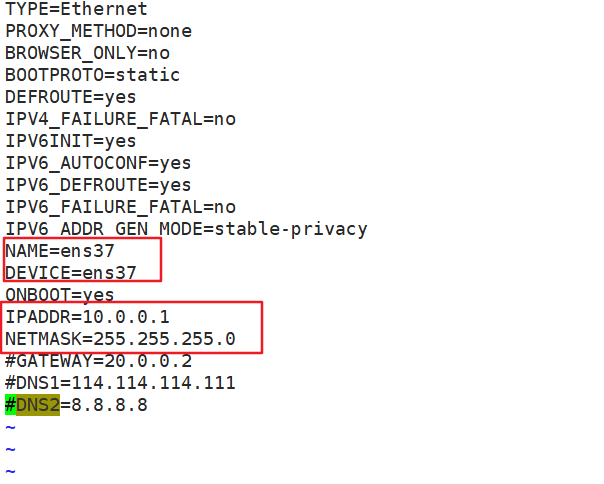

Permanent open IP Routing and forwarding , Turn on SNAT

SNAT transformation , Fixed public network IP Address

Set up the host 2 network card


modify windows The network configuration

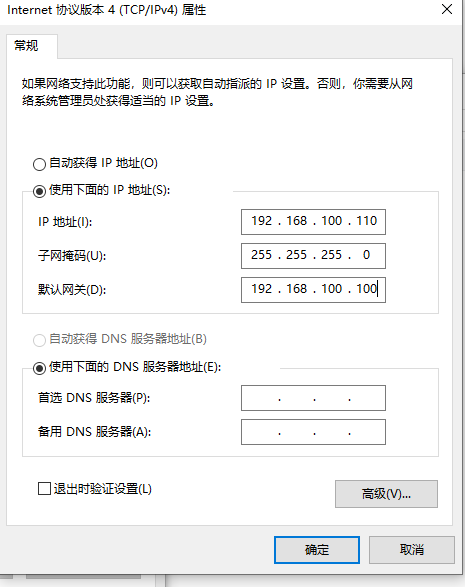
The verification results

DNAT Principle and Application
DNAT summary
DNAT Application environment
stay Internet Publish servers located in the LAN
DNAT principle
Modify the destination address of the packet
DNAT Conversion prerequisites
1. LAN servers can access Internet
2. The gateway's Internet address is correct DNS Parsing records
3.Linux Gateway on IP Routing and forwarding
Turn on DNAT command
vim /etc/sysctl.conf
net.ipv4.ip_forward = 1
sysctl -p
DNAT transformation
 Take from ens33 Come in and visit web The destination address of the service packet is converted to  192.168.80.11

iptables -t nat -A PREROUTING -i ens37 -d 10.0.0.1 -p tcp --dport 80 -j DNAT --to 192.168.100.118
 perhaps
iptables -t nat -A PREROUTING -i ens37 -d 10.0.0.1 -p tcp --dport 80 -j DNAT --to-destination 192.168.100.118

iptables -t nat -A PREROUTING -i ens37 -p tcp --dport 80 -j DNAT --to 192.168.100.13-192.168.100.20
Modify the target port
# Publish the information inside the LAN OpenSSH The server , The external network host needs to use 250 Port to connect
iptables -t nat -A PREROUTING -i ens33 -d 12.0.0.1 -p tcp --dport 250 -j DNAT --to 192.168.80.11:22

# Use... In an extranet environment SSH test
ssh -p 250 [email protected]
yum -y install net-tools  If there is no  ifconfig  The command can be used in advance  yum  Installation
ifconfig ens33

 Be careful : Use DNAT when , At the same time, there is cooperation SNAT Use , In order to realize the correct return of the response packet
DNAT Case study

modify win10 To configure


Modify host 2 And restart


Set up DNAT transformation

The verification results

Backup and restore of firewall
export ( Backup ) Rules for all tables
# export ( Backup ) Rules for all tables
[[email protected] ~]# iptables-save > /opt/iptables.txt
[[email protected] ~]# cat /opt/iptables.txt
Import ( Restore ) The rules
iptables-restore < /opt/iptables.txt Restore the backed up files

 take iptables The rule file is saved in  /etc/sysconfig/iptables  in ,iptables The rules will be automatically restored when the service starts

iptables-save > /etc/sysconfig/iptables

systemctl stop iptables stop it iptables The service will clear the rules of all tables

systemctl start iptables start-up iptables The service will automatically restore /etc/sysconfig/iptables  The rules in the
There is /etc/sysconfig/iptables in ,iptables The rules will be automatically restored when the service starts
iptables-save > /etc/sysconfig/iptables
systemctl stop iptables stop it iptables The service will clear the rules of all tables
systemctl start iptables start-up iptables The service will automatically restore /etc/sysconfig/iptables The rules in the
边栏推荐
猜你喜欢




随机推荐
Esp8266 --- JSON data exchange format
MQTT----下(注意事项)
MySQL关闭连接事务自动提交的问题
Unity[1] 学习目录
ESP8266 STA_TCP_Server
基本的DOS命令
7. Formula F1 champion
十四、sed
c语言实现动态顺序表的增删查改
Esp8266----- SNTP get network time
Introduction to Internet of things platform
Mqtt---- bottom (precautions)
软件测试面试题之xpath
Unity CharacterController
Esp8266 access to cloud platform ----- DNS domain name connection server
十六、awk
Come on: encourage college graduates to return home to start businesses and employment, and help rural revitalization
Play guest cloud brush machine 5.9
六、if语句
Longest common substring