当前位置:网站首页>单元测试界的高富帅,Pytest框架,手把手教学,以后测试报告就这么做~
单元测试界的高富帅,Pytest框架,手把手教学,以后测试报告就这么做~
2022-06-27 19:36:00 【软件测试呀】
一、生成 HTML 报告
pytest 生成 HTML 的插件有很多,比如 pytest-html,pytest-testreport 等等,下面就给大家介绍如何使用 pytest-testreport 这个插件来生成 HTML 测试报告。
1.1、安装插件
pip install pytest-testreport
注意点:如果安装了 pytest-html 这个插件请先卸载,不然有可能会有冲突
1.2、插件的使用介绍
在使用 pytest 运行测试时,如果要使用 pytest-testreport 生成测试报告, 运行测试时加上参数 --report 指定报告文件名,即可实现。
其他运行参数:
–title :指定报告标题
–tester :指定报告中的测试者
–desc :指定报告中的项目描述
–template :指定报告模板样式(1 or 2)
命令行执行:
pytest --report=musen.html --title=测试报告 --tester=木森 --desc=项目描述 --template=2
代码中使用 pytest.main 执行
import pytest
生成的报告样式如下
样式一
样式二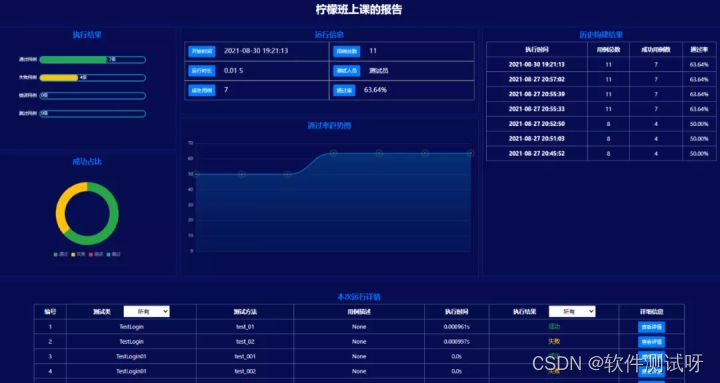
关于 HTML 格式的报告生成就给大家介绍到这里,接下来和大家讲讲怎么集成 allure 报告
二、集成 Allure 报告
如果要在 pytest 中集成 allure 报告,首先得下载 allure,并配置好环境
2.1、allure 环境配置
一、下载 allure:
地址:https://github.com/allure-framework/allure2/releases
下载之后并解压
二、环境变量配置
将 allure 解压之后的 allure 路径的 bin 目录路径放到环境变量当中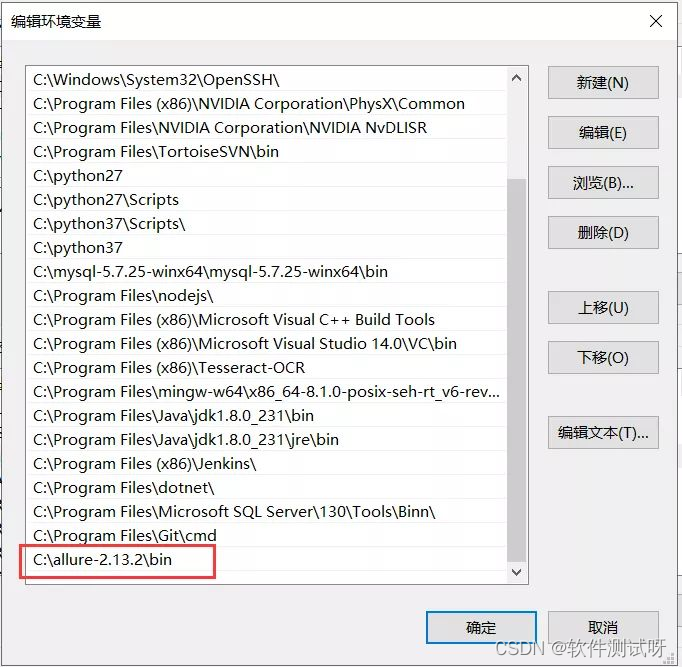
三、安装 allure 的 pytest 插件
pip install allure-pytest
2.2、生成 allure 报告
安装配置好 allure 环境之后,在使用 pytest 执行用例时,就可以通过 allure 插件的参数来指定生成 allure 来报告了。
运行参数:
--alluredir :指定 allure 报告保存的路径
命令行运行
pytest --alluredir=reports
代码中使用 pytest.main 执行
import pytest
2.3、启动 allure 服务
在命令终端输入如下命令,启动 allure 服务
# 命令:allure serve 生成的报告路径
执行上述命令,allure 服务启动之后会自动在打开浏览器,显示 allure 的服务页面
2.4、allure 内置常用的方法
添加错误截图
allure.attach
def error_save_screenshot(driver,file_path, desc):
添加报告中的用例名称
allure.title
import allure
参数化的用例中动态设置用例名称
allure.dynamic.title
# 用例数据
添加报告中的功能描述
allure.story
@allure.story('登录功能')
添加报告中套件名称
allure.suite
@allure.suite('登录测试套件')
房子要一层一层盖,知识要一点一点学。大家在学习过程中要好基础,多上手实操,话不多说,这里狠狠上一次干货!我熬夜整理好的各阶段(功能、接口、自动化、性能、测开)技能学习资料+实操讲解,非常适合私下里学习,比找资料自学高效多了,分享给你们。
领取关 w/x/g/z/h:软件测试小dao
敲字不易,如果此文章对你有帮助的话,点个赞收个藏来个关注,给作者一个鼓励。也方便你下次能够快速查找。
边栏推荐
- GBase 8a数据库用户密码安全相关参数汇总
- Summary of gbase 8A database user password security related parameters
- ∫(0→1) ln(1+x) / (x ² + 1) dx
- 软件测试自动化测试之——接口测试从入门到精通,每天学习一点点
- 01-Golang-环境搭建
- Bit. Store: long bear market, stable stacking products may become the main theme
- 语言弱点列表--CWE,一个值得学习的网站
- C语言程序设计详细版 (学习笔记1) 看完不懂,我也没办法。
- [LeetCode]186. Flip word II in string
- 鲜为人知的mysql导入数据
猜你喜欢

Go从入门到实战——仅执行一次(笔记)

图解基于AQS队列实现的CountDownLatch和CyclicBarrier

Go从入门到实战——CSP并发机制(笔记)

01-Golang-环境搭建
Go from introduction to practice -- coordination mechanism (note)
![[leetcode] dynamic programming solution split integer i[silver fox]](/img/18/8dc8159037ec1262444db8899cde0c.png)
[leetcode] dynamic programming solution split integer i[silver fox]
![[LeetCode]动态规划解分割数组II[Arctic Fox]](/img/a1/4644206db3e14c81f9f64e4da046bf.png)
[LeetCode]动态规划解分割数组II[Arctic Fox]

STM32CubeIDE1.9.0\STM32CubeMX 6.5 F429IGT6加LAN8720A,配置ETH+LWIP

PCIE知识点-008:PCIE switch的结构

Bit. Store: long bear market, stable stacking products may become the main theme
随机推荐
Process control task
Method of reading file contents by Excel
uniapp拦截请求
Null pointer exception
软件缺陷管理——测试人员必会
流程控制任务
猜拳游戏专题训练
Go from entry to practice - dependency management (notes)
开源技术交流丨一站式全自动化运维管家ChengYing入门介绍
Matlab finds the position of a row or column in the matrix
excel读取文件内容方法
[LeetCode]572. A subtree of another tree
STM32F107+LAN8720A使用STM32cubeMX配置网络连接+tcp主从机+UDP app
Go from starting to Real - Interface (note)
GBase 8a OLAP分析函数cume_dist的使用样例
JVM memory structure when creating objects
[LeetCode]513. 找树左下角的值
微服务之远程调用
Go from introduction to actual combat - panic and recover (notes)
Go從入門到實戰——接口(筆記)