当前位置:网站首页>Detailed explanation of Ag search tool parameters
Detailed explanation of Ag search tool parameters
2022-07-25 21:17:00 【Tao Ge is still fly】
ag Detailed explanation of search tool parameters
Ag Is similar to ack, grep Tools for , It is used to search for the corresponding keywords in the file .
Officials have listed several reasons for choosing it :
- It is better than ack faster ( and grep Not on an order of magnitude )
- It will ignore .gitignore and .hgignore The matching file in
- If there are files you want to ignore , You need to add them to
.ignoreIn file - It has shorter command names :-)
install
ubuntu Direct installation :
sudo apt install silversearcher-ag
Basic use
ag The basic use of is very direct : Follow the command with what you want to search character string that will do , It will search all text files in the current directory , And return the result .
ag Module
Output :
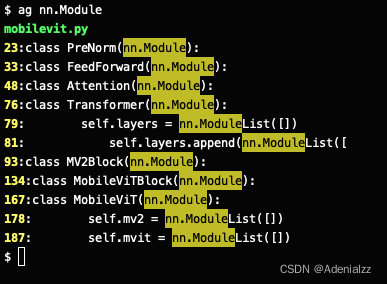
You can see , The output will be clearly highlighted , and , It's really , Very fast .
.ignore The file name specified in the file will be skipped , No search . Just write in the file name you want to ignore :
# .ignore
model.py
trainer.py
Detailed format and command options
Here are some ag Common parameter options and their meanings :
| Options | function |
|---|---|
-s / -i / -S | Case sensitive / Insensitivity / Intelligent case determination ( Default ), That is, case sensitivity is turned on when there is uppercase , Otherwise it's not sensitive |
-c | count, Output several matching strings in each file |
-A / -B / -C [NUM] | after / before / context, Show matching to string [ after / front / Before and after ] NUM That's ok , Default 2 That's ok |
-a | Search all files , Include .ignore Ignored files , Don't include hidden files |
-D | Output ridiculous amounts of debugging info. Not useful unless you´re actually debugging. ( This sentence is the original manual , laugh ) |
-f | Track soft links , The default is not to track |
-g [PATTERN] | Output match PATTERN The name of the file |
-G [PATTERN] | Only search for file name matches PATTERN File contents of |
-l / -L | Only output can / The contents cannot match the file name of the successful file , Do not output line content |
-m [NUM] | Only before output NUM The content of the second successful match , Skip the rest , The default is 0, That is, all outputs |
-r / -n | yes / No, enter the directory for recursive search , Recursive search will be performed by default |
-o | Only the part of the line that matches successfully |
-p [PATH] | Provide the specified .ignore Path to file , Default to current directory |
-Q | Will not PATTERN Parse according to regular expressions |
-u | Search all files , Including binary files , But I still ignore .ignore Wait for the documents |
-U | Ignore VCS ignore file ( Include .gitignore, .hgignore), But I will still consider .ignore, The content of the first two will be searched , however .ignore The content in will still be ignored |
-w | Match only the whole word |
-V | Output version information |
-v | Match all lines that do not contain the specified string |
z | Search the contents of the compressed file |
Other options :
| Options | function |
|---|---|
--ackmate | By AckMate Output results in parsed format |
--hidden | Search for hidden files , But it will not search for ignored files , I.e -a contrary |
--depth [NUM] | Search directory depth ,-1 For unlimited , The default is 25 |
--ignore PATTERN | Ignore name matching to PATTERN Contents of files or directories , I.e -G contrary |
--[no]break | Whether there are blank lines between different files of search results , Default blank line |
--[no]color | Whether there is color highlight , The default is |
--column | Output column number |
This is basically all , There are also some parameters that are not very commonly used , All option parameters can man ag Check it out. .
边栏推荐
- CV image flipping, emgucv image rotation "recommended collection"
- 有哪些优化mysql索引的方式请举例(sqlserver索引优化)
- ES6 --- four powerful operators (?,? =,?.,?:)
- ZigBee IOT development platform (Industrial IOT)
- Too many passwords, don't know how to record? Why don't you write a password box applet yourself
- "Shallow in and shallow out" MySQL and InnoDB [it is recommended to collect and share]
- An interview question combining defer and function in golang
- When MySQL resets the root password and modifies the password, an error occurs. The password field does not exist
- Focus on data | Haitai Fangyuan directly hits the construction idea of data security governance in the securities industry
- Leetcode-79: word search
猜你喜欢

Advanced technology management - how can the team be broken?
Cesium polygon gradient texture (canvas)

Leetcode-155: minimum stack

Leetcode-6125: equal row and column pairs
Leetcode skimming -- guess the size of numbers II 375 medium

476-82(322、64、2、46、62、114)

ONEFLOW V0.8.0 officially released

Add startup software items when the win system starts up

Character function and string function (2)
LeetCode刷题——猜数字大小II#375#Medium
随机推荐
Leetcode-6125: equal row and column pairs
腾讯云数据库的可信可控之路
yuv422转rgb(422sp转420p)
Character function and string function (2)
zigbee物联网开发平台(工业物联网)
When MySQL resets the root password and modifies the password, an error occurs. The password field does not exist
seven point two three
The role of the resize function is "suggestions collection"
DDD go practice
Golang language quickly get started to comprehensive practical notes (go language, beego framework, high concurrency chat room, crawler)
SSH private key realizes login to remote target server
Per capita Swiss number series, Swiss number 4 generation JS reverse analysis
On Web Performance Optimization (1)
Success factors of software R & D effectiveness measurement
The onnx model is exported as a TRT model
[MSA] a brief description of the moveit Configuration Assistant chain in planning groups
"Shallow in and shallow out" MySQL and InnoDB [it is recommended to collect and share]
An interview question combining defer and function in golang
YUV422 to RGB (422sp to 420p)
图片怎么存储到数据库里「建议收藏」