当前位置:网站首页>[Bi design teaching] STM32 and FreeRTOS realize low power consumption
[Bi design teaching] STM32 and FreeRTOS realize low power consumption
2022-07-28 12:55:00 【Mdc_ stdio】
Record
In the development process , Encounter such a product , It's based on Cortex-M7 Kernel STM32F769 chip , At the same time FreeRTOS Real-time operating system .
Because the product uses battery power , Therefore, there is a demand for low power consumption .
Next , The senior student will briefly describe STM32 And FreeRTOS Their low power consumption characteristics , And how to realize the low power consumption of the product when used together .
One 、STM32F769 Three low power consumption modes of the chip
STM32F769 Support three low power consumption modes , They are :SLEEP、STOP and STANDBY, Its power saving capacity is enhanced in turn .
SLEEP
stay SLEEP In mode , Only Cortex-M7 The kernel stopped working , The peripherals are still running .
When entering SLEEP After the model , All interrupts wake up MCU, So as to exit SLEEP Pattern .
STOP
stay STOP In mode , The kernel stops working , And all the clocks ( Such as HCLK, PCLK1, PCLK2 etc. ) And stop working , That is, all peripherals stop working , Here's one thing to pay special attention to , here SYSTICK Will also be stopped . Of course , In our products RTC It's still running , Because its clock source is external 32.768K Crystal oscillator .
When entering STOP After the model , Only external interrupts (EXTI) To wake up MCU( because RTC The interrupt is hung on the external interrupt line , therefore RTC Interruptions can also wake up MCU).
STANDBY
stay STANDBY In mode , kernel 、 All the clocks 、 And backup 1.2V The power supply stops working .
from STANDBY Wake up in mode , The system is equivalent to performing a reset operation , The program will start over .
in summary , Obviously , stay STM32 Of the three low-power modes provided , We can only use one of them SLEEP and STOP These two kinds of ,STANDBY Do not apply .
About STM32769 More detailed introduction to low power consumption , Please check out Reference Manual Of 4.3 section – Low-power modes.
Two 、FreeRTOS Low power implementation [2]
When starting the task scheduler ,FreeRTOS Will create a IDLE Mission , Its task priority is the lowest , If and only if all other tasks are blocked ,IDLE The task will get CPU Right to use .
therefore , It's easy to think of in IDLE To achieve entry and exit in the task STM32F769 Low power consumption mode , That is, cutting into IDLE After the task , Give Way STM32 Also enter low power mode , And I'm about to switch out IDLE Before the mission , To wake up STM32.
in addition , Newer versions of FreeRTOS in , Added Tickless mode, For a more detailed introduction, please refer to the references [2].
3、 ... and 、 The low-power realization of the whole product
So in IDLE In the mission , How to determine the current STM32 It should be entering SLEEP still STOP How about the model ?
in consideration of SLEEP and STOP The difference between the two , namely SLEEP Any interrupt can wake up STM32, And in the STOP Next , Can only be awakened by an external interrupt , therefore , Our product adopts the following mechanism :
For a certain period of time in the future , If the programmer knows that a non external interrupt will occur during this period , At this time , You can't let STM32 Get into STOP Pattern . because , Once in STOP,STM32 You can only respond to external interrupts , Not for non external interrupts ( Such as serial port 、I2C Wait for the peripheral to interrupt ) A response .
For example, it would be easier to understand . Suppose such a scenario —— Read by interrupt I2C data . After the programmer configures I2C After reading data interrupt , The system is waiting I2C The state of interruption . Then if there is I2C interrupt , It means that the data has been read , The programmer can then process the data .
Take the one above , The configured I2C After reading data interrupt , If at this time IDLE The task is carried out , that , In this case, you can't let STM32 Get into STOP Pattern , And can only enter SLEEP Pattern . Once it happens I2C interrupt , be STM32 It will start from SLEEP To be awakened . And if before STM32 Into the STOP Pattern , So this I2C The interruption will be omitted .
therefore , In this product , We provide two interfaces ,disable_enter_stop_mode and enable_enter_stop_mode, Used separately to inform , Cannot enter... At present STOP Mode and current can enter STOP The model .
Sort it out , We can get the following flow chart :
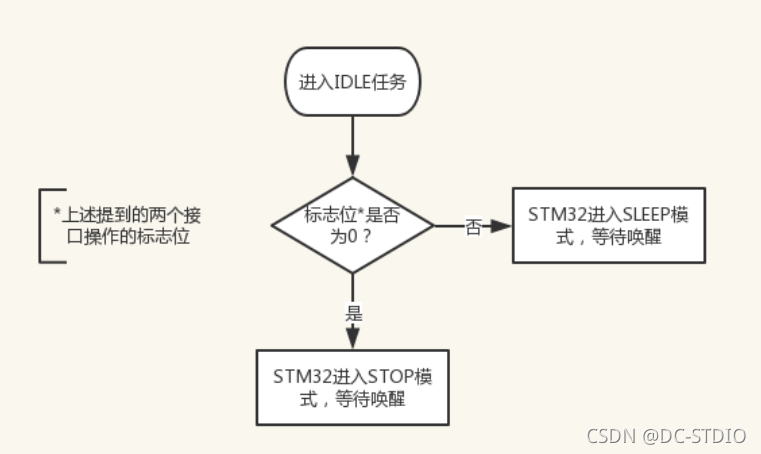
If you can enter STOP Pattern , Before really entering STOP Before , There is one more thing to do —— To configure RTC Wake up timer , Let it wake up at some point STM32. It can be found in STOP How long do you sleep in mode , from FreeRTOS Medium prvGetExpectedIdleTime Interface calculation results .
RTC After the wake-up timer is configured , You can call HAL_PWR_EnterSTOPMode Give Way STM32 Get into STOP The model . If there is no interruption at this time, it is in PENDING state , be STM32 Will enter immediately STOP Pattern , If there is an interrupt at this time, it is in PENDING state , be STM32 Will not enter the STOP Pattern , The code continues to execute .
stay STM32 be in STOP Mode period , If any external interrupt is generated (EXTI interrupt ), be STM32 Will be awakened immediately , No matter RTC Whether the wake-up timer has timed out . If there has been no external interruption during , that STM32 Will always be in STOP Pattern , until RTC Wake up timer timed out , So that STM32 Wake up the .
in addition , Because in STOP Next , by FreeRTOS Provides a heartbeat clock SYSTICK Also stopped working , therefore , After being awakened , Also need to be in STOP Tell me about the passing time FreeRTOS.
All in all , The basic idea of reducing the power consumption of the whole product , Is to make FreeRTOS Only as much time as possible in IDLE Mission , Give Way STM32 Spend as much time as possible in STOP Pattern , Finally, the purpose of reducing power consumption as much as possible .
Last
边栏推荐
- Rolling update strategy of deployment.
- 20220728-Object类常用方法
- leetcode:704二分查找
- BA autoboot plug-in of uniapp application boot
- How to view win11 system and reserved space?
- Pits encountered in MSP430 development (to be continued)
- 快速读入
- Force buckle 315 calculates the number of elements smaller than the current element on the right
- Holes in [apue] files
- 连通块&&食物链——(并查集小结)
猜你喜欢

Design a thread pool

HC-05蓝牙模块调试从模式和主模式经历

How to add PDF virtual printer in win11
How to view win11 system and reserved space?

VS1003 debugging routine

苏黎世联邦理工学院 | 具有可变形注意Transformer 的基于参考的图像超分辨率(ECCV2022))

03 pyechars rectangular coordinate system chart (example code + effect drawing)

Redis implements distributed locks

Sliding Window

Unity installs the device simulator
随机推荐
GMT installation and use
Application and download of dart 3D radiative transfer model
机器学习基础-支持向量机 SVM-17
非标自动化设备企业如何借助ERP系统,做好产品质量管理?
JSP自定义标签之自定义分页标签02
牛客网二叉树题解
VS code更新后不在原来位置
C# 泛型是什么、泛型缓存、泛型约束
C for循环内定义int i变量出现的重定义问题
输入字符串,内有数字和非字符数组,例如A123x456将其中连续的数字作为一个整数,依次存放到一个数组中,如123放到a[0],456放到a[1],并输出a这些数
Rolling update strategy of deployment.
Uniapp 应用开机自启插件 Ba-Autoboot
Solution to the binary tree problem of niuke.com
AVL tree (balanced search tree)
HC-05蓝牙模块调试从模式和主模式经历
Pits encountered in MSP430 development (to be continued)
机器学习基础-贝叶斯分析-14
How to open the power saving mode of win11 system computer
Initialization examples of several modes of mma8452q
How to add PDF virtual printer in win11