当前位置:网站首页>Getting started with Prometheus (III)
Getting started with Prometheus (III)
2022-07-23 14:56:00 【lionwerson】
Prometheus Get started with ( 3、 ... and )
Prometheus Alarm introduction :
Prometheus adopt PromQL The expression defines the trigger alarm condition , After the trigger condition is met web The page displays the alarm , relation Alertmanager And then you can go through Alertmanager Push warning messages to different platforms .
Prometheus Alarm architecture diagram :

Prometheus Alarm setting :
Prometheus The alarm rules of pass PromQL Expression definition triggers warning condition , The alarm notification will be triggered when the conditions are met ,
1. edit prometheus.yml file , Set up rules File path :
rule_files:
  # - "first_rules.yml"
  # - "second_rules.yml"
  - /usr/local/prometheus/*.yml   # Set up prmetheus All under rules file , By default, every minute is calculated according to these rules , Can pass **evaluation_interval** To override the default calculation cycle
2. edit rules File setting alarm rules :
groups:                             # Multiple rules can be set under the rule group
- name: hostStatsAlert               # Rule group name
  rules:
  - alert: hostCpuUsageAlert  # Warning name
    expr: (sum(increase(node_cpu_seconds_total[1m]))by(instance)) > 59 # The alarm PromQL expression , If the conditions are met, the alarm will be triggered
    for: 1m                   # Evaluate the waiting time , Optional parameters . It is used to indicate that the alarm will be sent only after the trigger condition lasts for a period of time . The status of the newly generated alarm during the waiting period is pending
    labels:                   # Custom tag , Allows the user to specify a set of additional labels to be attached to the alarm
      severity: page
    annotations:              # Additional information
      summary: "Instance {
    { $labels.instance }} CPU usgae high"  # Summarize warning report information
      description: "{
    { $labels.instance }} CPU usage above 85% (current value: {
    { $value }})" # Describe the warning information in detail

 adopt $labels.<labelname> Variable can access the value of the specified tag in the current alarm instance .$value You can get the current PromQL The sample value calculated by the expression

3. restart promtheus server

4. Pull up manually cpu utilization :
[email protected]:~# cat /dev/zero>/dev/null
restart Prometheus server Then you can see the set alarm rules and the current alarm status :

Because the waiting time is set to one minute , So the warning status changes from PENDING To FIRING state :

Deploy AlertManager And Promtheus Association :
Alertmanager Configuration of :
| To configure | effect |
|---|---|
| Global configuration (global) | Used to define some global public parameters , Like the overall situation SMTP To configure ,Slack Configuration, etc |
| Templates (templates) | Used to define the template for alarm notification , Such as HTML Templates , Mail template, etc |
| Alert routing (route) | Match according to label , Determine how the current alarm should be handled |
| recipient (receivers) | Receiver is an abstract concept , It can be an email or wechat ,Slack perhaps Webhook etc. , The receiver usually cooperates with the alarm routing |
| Inhibition rules (inhibit_rules) | Reasonable setting of suppression rules can reduce the generation of garbage alarm |
1. download AlertManger:

[email protected]:~# wget https://github.com/prometheus/alertmanager/releases/download/v0.24.0/alertmanager-0.24.0.linux-amd64.tar.gz

2. decompression AlertManger Executable files :
[email protected]:~# tar -xzvf alertmanager-0.24.0.linux-amd64.tar.gz -C /usr/local/

3. Create link file :
[email protected]:~# ln -sv /usr/local/alertmanager-0.24.0.linux-amd64/alertmanager /usr/local/bin/alertmanager
'/usr/local/bin/alertmanager' -> '/usr/local/alertmanager-0.24.0.linux-amd64/alertmanager'

4. edit AlertManager.yml file :
route:                             # route
  group_by: ['severity']           # Divided groups
  group_wait: 30s
  group_interval: 5m
  repeat_interval: 1h
  receiver: 'web.hook'
receivers:
  - name: 'web.hook'
    webhook_configs:
      - url: 'http://127.0.0.1:5001/'
inhibit_rules:
  - source_match:
      severity: 'critical'
    target_match:
      severity: 'warning'
    equal: ['severity', 'dev', 'instance']     # When label by severity when , Only one alarm message occurs

5. start-up AlertManager
[email protected]:~# nohup alertmanager --config-file='/usr/local/alertmanager-0.24.0.linux-amd64/alertmanager.yml' &
visit http://IP:9093 You can go to web The interface sees the contents of the alarm :

linkage Prometheus and AlertManager:
1. edit Prometheus.yml In the document alerting part
alerting:
  alertmanagers:
    - static_configs:
        - targets: ["192.168.0.50:9093"]
          # - alertmanager:9093
2. restart Prometheus
After that, the alarm information will change from Prometheus Forwarding to AlertManager, Re pass Alertmanager The configuration in is pushed to different platforms ( Including email , Mobile ,webhook Methods such as )
utilize webhook Send alarm messages :
route:                             # route
  group_by: ['severity']
  group_wait: 30s
  group_interval: 5m
  repeat_interval: 1h
  receiver: 'web.hook'           # Receiver
receivers:
  - name: 'web.hook'
    webhook_configs:             # The receiver is webhook The way
      - url: 'http://127.0.0.1:5001/'  # Push address
inhibit_rules:
  - source_match:
      severity: 'critical'
    target_match:
      severity: 'warning'
    equal: ['severity', 'dev', 'instance']
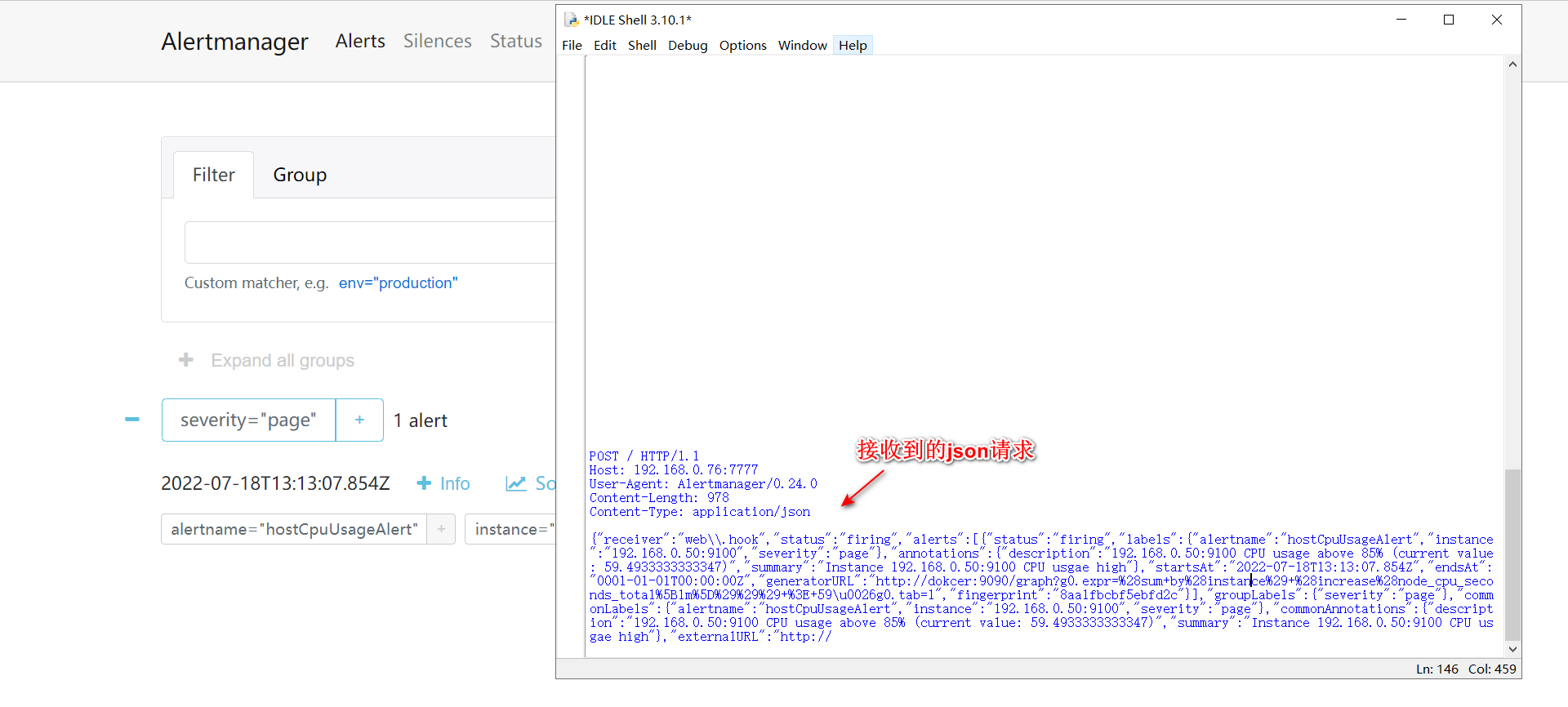
When the alarm message is triggered, it will pass POST The way to url The address to send json request :
json Format :
{

  "version": "4",
  "groupKey": <string>,              // key identifying the group of alerts (e.g. to deduplicate)
  "truncatedAlerts": <int>,          // how many alerts have been truncated due to "max_alerts"
  "status": "<resolved|firing>",
  "receiver": <string>,
  "groupLabels": <object>,
  "commonLabels": <object>,
  "commonAnnotations": <object>,
  "externalURL": <string>,           // backlink to the Alertmanager.
  "alerts": [
    {

      "status": "<resolved|firing>",
      "labels": <object>,
      "annotations": <object>,
      "startsAt": "<rfc3339>",
      "endsAt": "<rfc3339>",
      "generatorURL": <string>,      // identifies the entity that caused the alert
      "fingerprint": <string>        // fingerprint to identify the alert
    },
    ...
  ]
}
verification webhook effect :
utilize python Write a simple web server,url Fill in the address , You can receive alertmanager Sent post request :
web_server:
import socket

def server_start(port):
    server = socket.socket()

    server.setsockopt(socket.SOL_SOCKET,socket.SO_REUSEADDR,True)

    server.bind(("192.168.0.76",port))

    server.listen(128)

    while True:
        client, ip_port = server.accept()

        print(f" client {
      ip_port[0]} Successful connection ")

        request_data = client.recv(1024).decode()

        print(request_data)  # Print the received information

        if len(request_data) == 0:

            client.close()
        else:
            request_path = request_data.split(" ")[1]

            if request_path == "/":
                request_path = "index.html"
            else:
                request_path = request_path.replace("/","")
                print(request_path)

            try:
                with open(request_path, 'rb') as file:
                    file_content = file.read()

            except Exception as e:
                response_line = "HTTP/1.1 404 NOT FOUND\r\n"
                response_head = "Server: Python Server2.0\r\n"

                with open("../miniweb/error.html", "rb") as e:
                    error_data = e.read()

                    response_data = (response_line + response_head + "\r\n").encode() + error_data

                    client.send(response_data)

            else:
                response_line = "HTTP/1.1 200 Ok\r\n"
                response_head = "Server: Python Server2.0\r\n"

                response_data = (response_line + response_head + "\r\n").encode() + file_content

                client.send(response_data)

            finally:
                client.close()

if __name__ == '__main__':
    server_start(7777)
Received warning message :
边栏推荐
- The self-developed data products have been iterated for more than a year. Why not buy third-party commercial data platform products?
- 生成订单号
- Transferred from Yuxi information disclosure: products such as mRNA covid-19 vaccine and Jiuzhou horse tetanus immunoglobulin are expected to be on the market within this year.
- Prometheus入门使用(三)
- cmake笔记
- C language introduction practice (11): enter a group of positive integers and sum the numbers in reverse order
- [转]基于POI的功能区划分()
- CSDN writing method (II)
- CSDN写文方法(二)
- C# 线程锁和单多线程简单使用
猜你喜欢

General of MySQL_ Log log

21 - vertical traversal of binary tree

MySQL unique index has no duplicate value, and the error is repeated

Palindrome related topics

Kettle實現共享數據庫連接及插入更新組件實例

如何实现多个传感器与西门子PLC之间485无线通讯?

【小程序自动化Minium】三、元素定位- WXSS 选择器的使用

【测试平台开发】23. 接口断言功能-保存接口断言和编辑回显

直播课堂系统03补充-model类及实体

Yunna - how to strengthen fixed asset management? How to strengthen the management of fixed assets?
随机推荐
Opencv calculation outsourcing rectangle
Common JS modular specification from a code question
MySQL unique index has no duplicate value, and the error is repeated
[test platform development] 20. Complete the function of sending interface request on the edit page
【 langage c】 devinez jeux numériques + applet d'arrêt
NVIDIA vid2vid论文复现
mysql函数汇总之数学函数
Official wechat product! Applet automation framework minium sharing Preview
微信官方出品!小程序自动化框架 minium 分享预告
[转]基于POI的功能区划分()
真人踩过的坑,告诉你避免自动化测试常犯的10个错误
Some libraries that can perform 2D or 3D triangulation
LZ77 file compression
Detailed tutorial of typora drawing bed configuration
(heavy chain dissection) Magic Tree
Argocd user management, RBAC control, script login, APP synchronization
【测试平台开发】二十、完成编辑页发送接口请求功能
PKI体系快速介绍
R language practical application case: drawing part (III) - drawing of multiple combination patterns
【软件测试】盘一盘工作中遇到的 MQ 异常测试