当前位置:网站首页>C winfrom chart chart control bar chart and line chart
C winfrom chart chart control bar chart and line chart
2022-06-29 16:29:00 【Xiongsiyu】
Catalog
3、 ... and 、 Broken line diagram
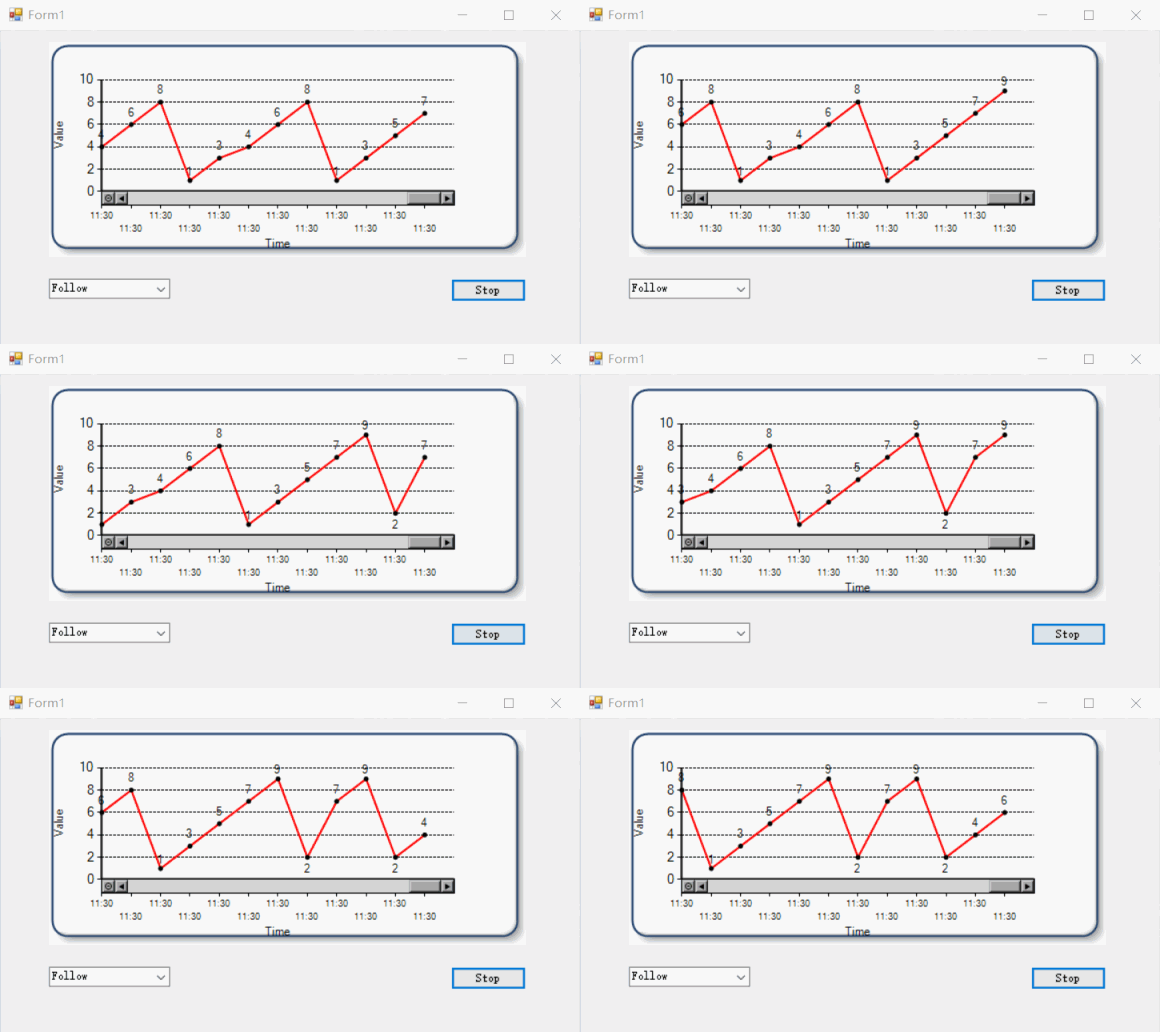
effect


One 、 Reference resources
c# Chart Set the style - wenglabs - Blog Garden
Powerful Winform Chart Chart control instructions - Let's have a look
Two 、 Histogram
1. New projects
Create a new one .NET Framework Type of Winfrom project , Find... In the data Chart Control , Drag into the interface

as follows :

When dragging a control , There is a chart style by default , The actual operation is actually a blank

2. Change the chart style
stay Series here , Click the back of the set to three points

The corresponding name can be modified here , Add a button on the left here , You can add a set of histograms , If it's a line chart , Two wires .
 Here you can change the style of the chart , For example, histogram , Broken line diagram

3. Data binding
There is no data in the chart at this time , You can add data by binding , as follows
private List<int> XList = new List<int>();
private List<int> YList = new List<int>();
private Random randoms = new Random();

private void Form1_Load(object sender, EventArgs e)
{
    for (int i = 0; i < 6; i++)
    {
        XList.Add(i);
        YList.Add(randoms.Next(10, 100));
    }
    chart1.Series["Series1"].Points.DataBindXY(XList, YList);
}
After operation, it is as follows

There are two problems in the figure above ,
1. The bar graph does not show specific data , It is impossible to see how much the actual data is ,
2. The background grid is not removed , The style is ugly ,
You can solve these two problems with code
private List<int> XList = new List<int>();
private List<int> YList = new List<int>();
private Random randoms = new Random();
//private int index = -1;

private void Form1_Load(object sender, EventArgs e)
{
    chart1.ChartAreas[0].AxisX.MajorGrid.LineDashStyle = ChartDashStyle.NotSet; // Set the grid type to dashed line
    chart1.ChartAreas[0].AxisY.MajorGrid.LineDashStyle = ChartDashStyle.Dash; // Set the grid type to dashed line
    chart1.Series[0].IsValueShownAsLabel = true;// Set the display number

    for (int i = 0; i < 6; i++)
    {
        XList.Add(i);
        YList.Add(randoms.Next(10, 100));
    }
    // It is written in the same way as above  chart1.ChartAreas[0]  similar
    chart1.Series["Series1"].Points.DataBindXY(XList, YList);
}
effect
At this point, the effect we want is almost the same
3、 ... and 、 Broken line diagram
1. Chart settings
Create a new one .NET Framework Type of Winfrom project , The operation is the same as above , take ChartType This is set to Line, And in Form1 Add a button to the interface


After running , The chart is still blank

2. Data binding
Add code
using System;
using System.Collections.Generic;
using System.Windows.Forms;
using System.Windows.Forms.DataVisualization.Charting;

namespace  Broken line diagram
{
    public partial class Form1 : Form
    {
        public Form1()
        {
            InitializeComponent();
        }

        private List<int> XList = new List<int>();
        private List<int> YList = new List<int>();
        private Random randoms = new Random();
        private int index = -1;

        private void Form1_Load(object sender, EventArgs e)
        {
            chart1.ChartAreas[0].AxisX.MajorGrid.LineDashStyle = ChartDashStyle.NotSet; // Set the grid type to dashed line
            chart1.ChartAreas[0].AxisY.MajorGrid.LineDashStyle = ChartDashStyle.Dash; // Set the grid type to dashed line
            chart1.Series[0].IsValueShownAsLabel = true;// Set the display number
        }

        private void button1_Click(object sender, EventArgs e)
        {
            index++;
            XList.Add(index);
            YList.Add(randoms.Next(10, 100));
            //chart1.Series[0].Points.AddXY(index, randoms.Next(10, 100));
            chart1.Series[0].Points.DataBindXY(XList, YList);
        }
    }
}
After operation , Click the add button , The effect is as follows
Here you will find a problem , In the figure to 93 This point , It has reached the top , The words are half blocked , Here you can use code to set , such as , Traverse the whole Y The value of the shaft , Then calculate the maximum and minimum values , And give chart1 Of Maximum,Minimum assignment , You can center the line chart
chart1.ChartAreas[0].AxisY.Maximum = 200;If you want the following effect , You can also refer to my post , although DLL Dissimilarity , The writing method is basically the same , In the following source code, there is also this case to the effect , You can support me if you need me , thank you .
Source download : Click to download
end
If this post is useful to you , welcome Focus on + give the thumbs-up + Leaving a message. , thank you
end
边栏推荐
- Sophon KG升级3.1:打破数据间壁垒,解放企业生产力
- isEmpty 和 isBlank 的用法区别,居然一半的人答不上来?
- MATLAB输出格式控制 %d,%f,%c,%s的用法
- telnet+ftp 对设备进行 操控 和 升级
- The third sprint of Wei long La Tiao: the growth rate of performance declined, and Liu Weiping and Liu Fuping cashed out in advance
- Interviewer: tell me about the MySQL transaction isolation level?
- Which version of JVM is the fastest?
- 代码大全读后感
- Top the list for 10 consecutive years? What is the "most common" programming language for programmers?
- 实践 | 脚本错误量极致优化-让脚本错误一目了然
猜你喜欢

同样是做测试,为什么别人年薪30W+?

Top the list for 10 consecutive years? What is the "most common" programming language for programmers?

Cerebral Cortex:从任务态和静息态脑功能连接预测儿童数学技能

MySQL基础——多表查询

Self taught programming can understand the code, but what if you can't write it yourself

暑期数据可视化分析展示效果

MySQL foundation - transaction

小程序在产业互联网有「大」作为

能够1年涨薪2次的软件测试工程师,他到底强在哪里?

数学知识:求组合数 II—求组合数
随机推荐
如何配置 logback?30分钟让你彻底学会代码熬夜敲
Which version of JVM is the fastest?
The difference between Magento and WordPress
Tool chain empowers hundreds of companies, horizon opens the "Matthew effect" of mass production of intelligent driving
【Proteus仿真】数码管递加/递减带闪烁消隐显示
Sophon CE社区版上线,免费Get轻量易用、高效智能的数据分析工具
Key wizard play monster learning - multi window and multi thread background judgment of character, pet blood volume and pet happiness
Mysql database foundation: DDL data definition language
MySQL error: expression 1 of order by claim is not in group by claim and contains nonaggregated column
Top the list for 10 consecutive years? What is the "most common" programming language for programmers?
水球图-利用动态波纹展示百分比
按键精灵打怪学习-多窗口多线程后台判断人物、宠物血量和宠物快乐度
【Try to Hack】XML
C# Winfrom Chart图表控件 柱状图、折线图
leetcode:139. Word splitting [DFS + memory]
[proteus simulation] nixie tube +4x4 keyboard matrix key simple calculator
【Proteus仿真】数码管+4x4键盘矩阵按键简易计算器
[proteus simulation] progressive increase / decrease of nixie tube with flashing blanking display
工具链赋能百家,地平线开启智能驾驶量产的“马太效应”
暑期数据可视化分析展示效果