当前位置:网站首页>Interpretation of cesium3dtilesets using customshader and examples of Omni effects
Interpretation of cesium3dtilesets using customshader and examples of Omni effects
2022-07-28 02:41:00 【liuqing0.0】
Preface : The principle of light band is Rotating bouncing pyramid This article has already explained , But there are still many beautiful people and girls who may be confused , stay 3Dtilesets How to use in ? Why I can't understand the few code examples I see on the Internet ? It's because I didn't understand it thoroughly . Take this opportunity to , Provide a small example , Apply it from beginning to end .
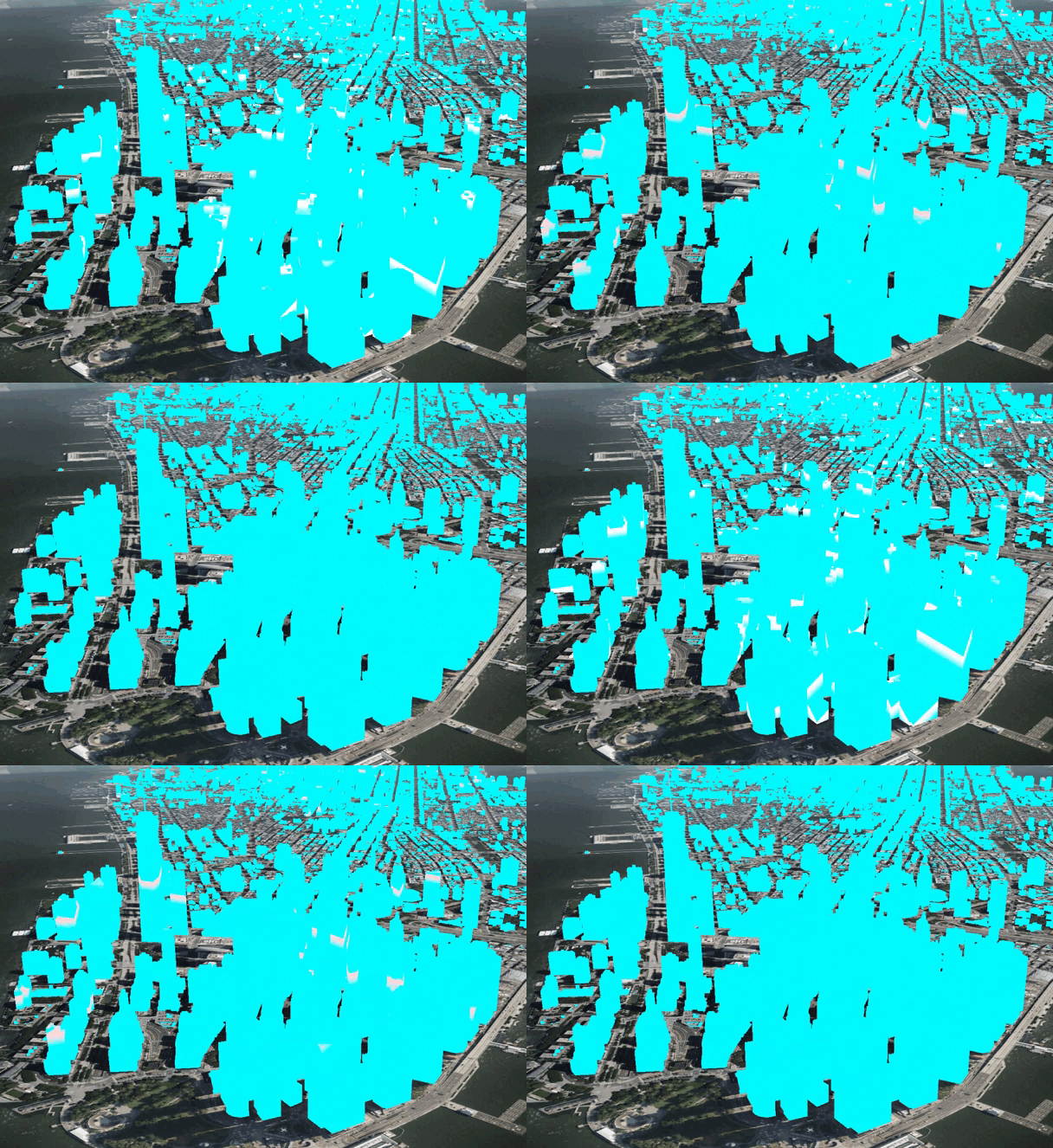
effect
load Cesium3Dtilesets
// viewer  Instance generation
const viewer = initViewer()
const tileset = new Cesium.Cesium3DTileset({

	url: Cesium.IonResource.fromAssetId(75343) //  Or some of your saved tests tileset  Of url
})
viewer.scene.primitives.add(tileset)
The above code creates a tileset, But generally speaking , We will be in readyPromise Operate inside , Mainly because This loading process is asynchronous , Before that, we read tileset The variables that are loaded and processed under are unreadable . therefore
tileset.readyPromise.then((tileset) => {

	// do sth
})
customShader
customShader yes Cesium stay 1.87 edition To launch the A function class , The main purpose is in previous versions , We want to load out 3dtiles Write custom shader When Often, you can only modify the source code . Now we can directly call this class to pass customShader in , Modify vertex shaders and film source shaders , And of course uniforms The value of the . So before we start , There are several precautions , And some pre content that needs to be understood .
Before we start , You can download it first cesium Source code , The directory structure is shown in the following figure , Contrast should prove 
First of all, from the example given on the official website What parameters are there , And what parameters are used for .
const customShader = new CustomShader({

  uniforms: {

    u_colorIndex: {

      type: Cesium.UniformType.FLOAT,
      value: 1.0
    },
    u_normalMap: {

      type: Cesium.UniformType.SAMPLER_2D,
      value: new Cesium.TextureUniform({

        url: "http://example.com/normal.png"
      })
    }
  },
  varyings: {

    v_selectedColor: Cesium.VaryingType.VEC3
  },
  vertexShaderText: ` void vertexMain(VertexInput vsInput, inout czm_modelVertexOutput vsOutput) { v_selectedColor = mix(vsInput.attributes.color_0, vsInput.attributes.color_1, u_colorIndex); vsOutput.positionMC += 0.1 * vsInput.attributes.normal; } `,
  fragmentShaderText: ` void fragmentMain(FragmentInput fsInput, inout czm_modelMaterial material) { material.normal = texture2D(u_normalMap, fsInput.attributes.texCoord_0); material.diffuse = v_selectedColor; } `
});
So you can see that , We can deal with it , Only pass value uniforms,varyings namely Transfer variables from vertex shader to slice shader .
Specially : vertexMain as well as fragmentMain Parameters of Variable And related treatment
Say one by one , Then down
customShader uniforms
- uniforms Need to be in customShader Can be defined in the constructor of customShader.setUniform Go make changes , This is also mentioned in the source code and documentation .


- uniformType namely Types of support
-
customShader varyings
- varyingType Types of support

customShader vertexShaderText
You have to type a little more for this , The author puts forward the following questions to explore .
1、 Why only in vertexMain Inside Write shader code ?
2、cesium Encapsulated variables vertexInput as well as vsOutput What's in it ?
3、 How to be like native webgl Then output position information in vertex shader ?
In fact, understanding these three questions is enough . The following explains respectively .

First observe the notes , First vertexInput Follow This is initialized inputStuct (input The structure of the body ) It's based on JS Dynamically generated , We don't really care about the implementation , One thing is certain ,Cesium Inside It must be There is a rendering pipeline that splices shader code according to various states , ad locum ,customShader Rendering pipeline of As shown in the figure above , Readers can study by themselves if they are interested , I won't go into more details here .
So you can see that vertexMain This Variable Is executed as a function . Omit most of the content , We can roughly understand it as the following process
// ...
void main(){

	// deal variable
	vertexMain(vsInput,vsOutput);
}
This explains the first content .Cesium When processing Is to put We filled in vertexShadertext String inside Parsing is performed as a function . therefore , We must state that vertexMain This function And you can only write code in this function .
This is actually the answer fragmentMain Why can only write code in it . It means the same , So I won't mention it again .
Then answer the second question ,cesium Encapsulated variables vertexInput as well as vsOutput What's in it ? Even through the shader code above, you can get a glimpse , But obviously , It stores a series of structures ( This article is just for accuracy , Actually JS Programmer's understanding , You can compare it to an object : There are properties , Valuable )
- vertexInput

Of course , You can also see in the above figure ,vertexInput Next Yes 3 individual Structure ( object ), This article only explores attributes, Because it's more common , And often .
The above table also shows fragmentInput Properties in . Don't remember , You can check it at any time .
//  for example   In the vertex shader   Read  positionMC Variable
void vertexMain(VertexInput vsInput, inout czm_modelVertexOutput vsOutput) {

	vsInput.attributes.positionMC //  This can be read normally
	vsInput.attributes.positionWC //  It cannot be read normally  ,  Because in vsInput in   This value   Not calculated .
}
Then answer the third question , How to output location information ?
Cesium The output is packaged as follows 
In fact, structurally speaking , With primordial webgl Not much difference . The same is pointSize And one. position .
The concept is roughly the same , The difference is just this Output Inside the structure positionMC Write location information , Then from cesium Go in and deal with it 、 Calculation ( What world coordinates , According to the normal vector coordinates of the eyes, ah, and so on .)
That's the point. There must be some questions here , namely positionMC Follow We usually understand gl_Position The vertex coordinates Whether it means the same ?
Focus on simple translation ,customShader This may be modified positionMC namely (position Model Coordinates Translate into model coordinates ), This result will be used for calculation gl_Position , That is, the vertex position , So the two are not the same concept ! Notice here . in other words , What you actually modified positionMC It is not equal to We are in the original webgl Upper Vertex position information , This is a pit !
Question answering : The model position of the output vertex . modify Such as
vsOutput.attributes.positionMC = ?
customShader fragmentShaderText
Still ask questions here
1、czm_modelMaterial What are the attributes ? What do they mean ?
There should have been two problems , namely fragmentInput What is it , What are the attributes , Well, it has been explained before , Structure It's almost exactly the same , Don't say it again .
Solving the above problem is simple , In fact, just find its declaration file , The comments of the code have been written clearly , Let me briefly explain the coloring we usually care about 
Before that webgl In the slice shader of We paint It's through Output gl_FragColor = vec4(?); Accomplished .
stay customShader in , We want to follow gl_FragColor Same function , Just declare diffuse Follow alpha that will do , Of course This is not set emissive Of Under color . Something about reflected light In fact, I didn't go deep to learn , There is no explanation here .
OK , Front content It means that , If you have enough webgl The basis of , I believe in the above content , You can fully understand how you write in customShader Code in , Here is a small example Feel it concretely .
The following code should be able to run directly . by the way , Remember to defaultAccessToken add .
Floodlight ( Or light band ) effect
	  const viewer = new Cesium.Viewer("earthContainer", {

      });
      const scene = viewer.scene;
      scene.globe.depthTestAgainstTerrain = true;
      // Set the initial camera view to look at Manhattan
      const initialPosition = Cesium.Cartesian3.fromDegrees(
        -74.01881302800248,
        40.69114333714821,
        753
      );
      const initialOrientation = new Cesium.HeadingPitchRoll.fromDegrees(
        21.27879878293835,
        -21.34390550872461,
        0.0716951918898415
      );
      scene.camera.setView({

        destination: initialPosition,
        orientation: initialOrientation,
        endTransform: Cesium.Matrix4.IDENTITY,
      });
      Cesium.ExperimentalFeatures.enableModelExperimental = true;

      // // Load the NYC buildings tileset.
      const tileset = new Cesium.Cesium3DTileset({

        url: Cesium.IonResource.fromAssetId(75343),
        customShader: new Cesium.CustomShader({

          lightingModel: Cesium.LightingModel.UNLIT,
          uniforms: {

            maxHeight: {

              type: Cesium.UniformType.FLOAT,
              value: 0.0,
            },
            minHeight: {

              type: Cesium.UniformType.FLOAT,
              value: 0.0,
            },
          },
          fragmentShaderText: ` void fragmentMain(FragmentInput fsInput, inout czm_modelMaterial material) { float curz = fsInput.attributes.positionMC.z; float d = (curz - minHeight) / (maxHeight - minHeight); float r = 0.01; r = fract(r * czm_frameNumber); float c = smoothstep(r, r+0.03, d) - smoothstep(r + 0.035,r + 0.04, d); vec3 linearColor = mix(vec3(1.0,1.0,1.0) ,vec3(255.0,48.0,48.0)/255.0,r); vec3 renderColor = mix(vec3(0.0,0.96,1.0) ,linearColor,c); material.diffuse = renderColor; }`,
        }),
        backFaceCulling:  false,
      });
      // 547.75 -11.89
      // let [maxHeight,minHeight] = [tileset._properties.Height.maximum,tileset._properties.Height.minimum]

      tileset.readyPromise.then((tileset) => {

        console.log(tileset);
        let [maxheight, minheight] = [
          tileset.properties.Height.maximum,
          tileset.properties.Height.minimum,
        ];
        tileset.customShader.setUniform("maxHeight", maxheight);
        tileset.customShader.setUniform("minHeight", minheight);
        console.log(`Maximum building height: ${
      maxheight}`);
        console.log(`Minimum building height: ${
      minheight}`);
      });
      console.log(tileset);
      scene.primitives.add(tileset);
The light band is cesium3dtilesets Interpretation of the effect principle train of thought
Refer to my previous Interpretation of light band principle This article , In essence , Watch my shader code
float d = (curz - minHeight) / (maxHeight - minHeight);
This article Interpretation of light band principle The implementation behind the article is rather sloppy , Just for Space clipping coordinates An increase in Control the whole The movement of light bands , At this time , You can compare it a little , It's really just Cut the end point of coordinates from space 1 Change into Its highest point . That may be a little vague , Upper figure .
Previous implementations 
Now the realization 
So I say essentially , This is the same as the previous one . In fact, I don't want to elaborate more . But helplessness may not be easy to understand at first , I hope you can see this picture suddenly . signify , From direct to the whole webgl The light band of space , It becomes a light band scanning only within the box of the model .
End chat
Today is another fishing day , In the future, this article will benefit many beautiful people , I really want to hurry home for national day , The heart is tired , I want to lie flat , But no money , I have to continue to be a yard animal , I don't know whether the beautiful people and girls in this article are introduced by rich women ? Age 20 - 28 Between , I don't want to code , Don't want to work hard !
边栏推荐
- QT implementation disable shortcut key
- How do you use the jar package sent by others (how to use the jar package sent by others)
- Wechat campus bathroom reservation applet graduation design finished product (1) development outline
- Explore flex basis
- TypeScript(零) —— 简介、环境搭建、第一个实例
- MySQL blocking monitoring script
- Share an esp32 relay
- Soft test - database (2) relational model
- [hcip] BGP Foundation
- Use of Day6 functions and modules
猜你喜欢

Hardware standard

POC模拟攻击利器 —— Nuclei入门(一)

When iPhone copies photos to the computer, the device connection often fails and the transmission is interrupted. Here's the way

Design of edit memory path of edit box in Gui

JVM tuning -xms -xmx -xmn -xss

Deep Residual Learning for Image Recognition浅读与实现

MySQL是如何利用索引的(荣耀典藏版)
Cesium3Dtilesets 使用customShader的解读以及泛光效果示例

分层图解决的一些最短路问题

Leetcode hot topic Hot 100 - > 3. longest substring without repeated characters
随机推荐
【HCIP】路由策略、策略路由
Flask1.1.4 werkzeug1.0.1 source code analysis: Blueprint
Common SQL statement query
Is the interface that can be seen everywhere in the program really useful? Is it really right?
MySQL blocking monitoring script
MySQL是如何利用索引的(荣耀典藏版)
MySQL is shown in the figure. The existing tables a and B need to be associated with a and B tables through projectcode to find idcardnum with different addresses.
并发编程的三大核心问题(荣耀典藏版)
2022.7.8 supplement of empty Luna
Use try-with-resources or close this
[tutorial of using idea] shortcut key of idea
MySQL's way to solve deadlock - lock analysis of common SQL statements
2022.7.8 eth price analysis
【HCIP】BGP 基础
[TA frost wolf \u may - hundred people plan] Figure 3.7 TP (d) r architecture of mobile terminal
Smart contract security -- selfdestroy attack
[solution] solve the problem of SSH connection being inactive for a long time and being stuck and disconnected
第二季度邮件安全报告:邮件攻击暴增4倍,利用知名品牌获取信任
【信号去噪】基于卡尔曼滤波实现信号去噪附matlab代码
The virtual host website cannot access the self-test method