当前位置:网站首页>linux centos7环境下修改oracle19c监听IP并重启
linux centos7环境下修改oracle19c监听IP并重启
2022-07-22 18:05:00 【冬天里的懒猫】
1.问题描述
在linux服务器centos7上新安装的oracle 19c,结果发现客户端怎么都连不上。检查了下,发现原来是监听的端口采用默认配置为了LOCALHOST:
[[email protected] bin]$ netstat -an |grep 1521
tcp        0      0 127.0.0.1:1521          0.0.0.0:*               LISTEN
tcp        0      0 127.0.0.1:56449         127.0.0.1:1521          ESTABLISHED
tcp        0      0 127.0.0.1:1521          127.0.0.1:56449         ESTABLISHED
unix  2      [ ACC ]     STREAM     LISTENING     108564   /var/tmp/.oracle/sEXTPROC1521
[[email protected] bin]$
可以看到监听端口的ip为127.0.0.1。是本地回环路由。其他服务器无法访问这个地址。
现在对这个问题进行修改:
2.修改listener.ora 文件
首先要修改listener.ora 文件。
该文件位于:
/opt/oracle/product/19c/dbhome_1/network/admin/listener.ora
vim这个文件:
# listener.ora Network Configuration File: /opt/oracle/product/19c/dbhome_1/network/admin/listener.ora
# Generated by Oracle configuration tools.

LISTENER =
  (DESCRIPTION_LIST =
    (DESCRIPTION =
      (ADDRESS = (PROTOCOL = TCP)(HOST = 192.168.161.120)(PORT = 1521))
      (ADDRESS = (PROTOCOL = IPC)(KEY = EXTPROC1521))
    )
  )
将上述文件的LOCALHOST修改为IP地址。
3.修改tnsnames.ora
同理,tnsnames.ora文件也需要修改:
# tnsnames.ora Network Configuration File: /opt/oracle/product/19c/dbhome_1/network/admin/tnsnames.ora
# Generated by Oracle configuration tools.

ORCLCDB =
  (DESCRIPTION =
    (ADDRESS = (PROTOCOL = TCP)(HOST = 192.168.161.120)(PORT = 1521))
    (CONNECT_DATA =
      (SERVER = DEDICATED)
      (SERVICE_NAME = ORCLCDB)
    )
  )

LISTENER_ORCLCDB =
  (ADDRESS = (PROTOCOL = TCP)(HOST = 192.168.161.120)(PORT = 1521))
3.重启oracle
切换到oracle用户:
[[email protected] admin]# sudo su - oracle
Last login: Thu Jul 21 16:50:06 CST 2022 on pts/0
查看监听状态:
[[email protected] ~]$ lsnrctl status

LSNRCTL for Linux: Version 19.0.0.0.0 - Production on 21-JUL-2022 17:19:59

Copyright (c) 1991, 2019, Oracle.  All rights reserved.

Connecting to (DESCRIPTION=(ADDRESS=(PROTOCOL=TCP)(HOST=192.168.161.120)(PORT=1521)))
TNS-12541: TNS:no listener
 TNS-12560: TNS:protocol adapter error
  TNS-00511: No listener
   Linux Error: 111: Connection refused
Connecting to (DESCRIPTION=(ADDRESS=(PROTOCOL=IPC)(KEY=EXTPROC1521)))
STATUS of the LISTENER
------------------------
Alias                     LISTENER
Version                   TNSLSNR for Linux: Version 19.0.0.0.0 - Production
Start Date                21-JUL-2022 16:21:09
Uptime                    0 days 0 hr. 58 min. 50 sec
Trace Level               off
Security                  ON: Local OS Authentication
SNMP                      OFF
Listener Parameter File   /opt/oracle/product/19c/dbhome_1/network/admin/listener.ora
Listener Log File         /opt/oracle/diag/tnslsnr/mv161p120/listener/alert/log.xml
Listening Endpoints Summary...
  (DESCRIPTION=(ADDRESS=(PROTOCOL=tcp)(HOST=127.0.0.1)(PORT=1521)))
  (DESCRIPTION=(ADDRESS=(PROTOCOL=ipc)(KEY=EXTPROC1521)))
  (DESCRIPTION=(ADDRESS=(PROTOCOL=tcps)(HOST=mv161p120)(PORT=5500))(Security=(my_wallet_directory=/opt/oracle/admin/ORCLCDB/xdb_wallet))(Presentation=HTTP)(Session=RAW))
Services Summary...
Service "ORCLCDB" has 1 instance(s).
  Instance "ORCLCDB", status READY, has 1 handler(s) for this service...
Service "ORCLCDBXDB" has 1 instance(s).
  Instance "ORCLCDB", status READY, has 1 handler(s) for this service...
Service "e44dc6e87c454000e05378a1a8c0f895" has 1 instance(s).
  Instance "ORCLCDB", status READY, has 1 handler(s) for this service...
Service "orclpdb1" has 1 instance(s).
  Instance "ORCLCDB", status READY, has 1 handler(s) for this service...
The command completed successfully
[[email protected] ~]$ lsnrctl stop

LSNRCTL for Linux: Version 19.0.0.0.0 - Production on 21-JUL-2022 17:20:25

Copyright (c) 1991, 2019, Oracle.  All rights reserved.

Connecting to (DESCRIPTION=(ADDRESS=(PROTOCOL=TCP)(HOST=192.168.161.120)(PORT=1521)))
TNS-12541: TNS:no listener
 TNS-12560: TNS:protocol adapter error
  TNS-00511: No listener
   Linux Error: 111: Connection refused
Connecting to (DESCRIPTION=(ADDRESS=(PROTOCOL=IPC)(KEY=EXTPROC1521)))
The command completed successfully
之后用sqlplus连接:
[[email protected] ~]$ sqlplus /nolog
SQL*Plus: Release 19.0.0.0.0 - Production on Thu Jul 21 17:20:32 2022
Version 19.3.0.0.0

Copyright (c) 1982, 2019, Oracle.  All rights reserved.

SQL> conn /as sysdba
Connected.
执行shutdown:
SQL> shutdown immediate
Database closed.
Database dismounted.
ORACLE instance shut down.
SQL> exit
Disconnected from Oracle Database 19c Enterprise Edition Release 19.0.0.0.0 - Production
Version 19.3.0.0.0
启动监听:
[[email protected] ~]$ lsnrctl start

LSNRCTL for Linux: Version 19.0.0.0.0 - Production on 21-JUL-2022 17:21:39

Copyright (c) 1991, 2019, Oracle.  All rights reserved.

Starting /opt/oracle/product/19c/dbhome_1/bin/tnslsnr: please wait...

TNSLSNR for Linux: Version 19.0.0.0.0 - Production
System parameter file is /opt/oracle/product/19c/dbhome_1/network/admin/listener.ora
Log messages written to /opt/oracle/diag/tnslsnr/mv161p120/listener/alert/log.xml
Listening on: (DESCRIPTION=(ADDRESS=(PROTOCOL=tcp)(HOST=192.168.161.120)(PORT=1521)))
Listening on: (DESCRIPTION=(ADDRESS=(PROTOCOL=ipc)(KEY=EXTPROC1521)))

Connecting to (DESCRIPTION=(ADDRESS=(PROTOCOL=TCP)(HOST=192.168.161.120)(PORT=1521)))
STATUS of the LISTENER
------------------------
Alias                     LISTENER
Version                   TNSLSNR for Linux: Version 19.0.0.0.0 - Production
Start Date                21-JUL-2022 17:21:39
Uptime                    0 days 0 hr. 0 min. 0 sec
Trace Level               off
Security                  ON: Local OS Authentication
SNMP                      OFF
Listener Parameter File   /opt/oracle/product/19c/dbhome_1/network/admin/listener.ora
Listener Log File         /opt/oracle/diag/tnslsnr/mv161p120/listener/alert/log.xml
Listening Endpoints Summary...
  (DESCRIPTION=(ADDRESS=(PROTOCOL=tcp)(HOST=192.168.161.120)(PORT=1521)))
  (DESCRIPTION=(ADDRESS=(PROTOCOL=ipc)(KEY=EXTPROC1521)))
The listener supports no services
The command completed successfully
[[email protected] ~]$ lsnrctl status

LSNRCTL for Linux: Version 19.0.0.0.0 - Production on 21-JUL-2022 17:21:46

Copyright (c) 1991, 2019, Oracle.  All rights reserved.

Connecting to (DESCRIPTION=(ADDRESS=(PROTOCOL=TCP)(HOST=192.168.161.120)(PORT=1521)))
STATUS of the LISTENER
------------------------
Alias                     LISTENER
Version                   TNSLSNR for Linux: Version 19.0.0.0.0 - Production
Start Date                21-JUL-2022 17:21:39
Uptime                    0 days 0 hr. 0 min. 7 sec
Trace Level               off
Security                  ON: Local OS Authentication
SNMP                      OFF
Listener Parameter File   /opt/oracle/product/19c/dbhome_1/network/admin/listener.ora
Listener Log File         /opt/oracle/diag/tnslsnr/mv161p120/listener/alert/log.xml
Listening Endpoints Summary...
  (DESCRIPTION=(ADDRESS=(PROTOCOL=tcp)(HOST=192.168.161.120)(PORT=1521)))
  (DESCRIPTION=(ADDRESS=(PROTOCOL=ipc)(KEY=EXTPROC1521)))
The listener supports no services
The command completed successfully
sqlplus连接并启动:
[[email protected] ~]$ sqlplus /nolog

SQL*Plus: Release 19.0.0.0.0 - Production on Thu Jul 21 17:21:53 2022
Version 19.3.0.0.0

Copyright (c) 1982, 2019, Oracle.  All rights reserved.

SQL> conn /as sysdba
Connected to an idle instance.
SQL> startup
ORACLE instance started.

Total System Global Area 2466250400 bytes
Fixed Size		    9137824 bytes
Variable Size		  570425344 bytes
Database Buffers	 1879048192 bytes
Redo Buffers		    7639040 bytes
Database mounted.
Database opened.
4.测试
netstat验证:
[[email protected] admin]# netstat -an |grep 1521
tcp        0      0 192.168.161.120:1521    0.0.0.0:*               LISTEN
unix  2      [ ACC ]     STREAM     LISTENING     126161   /var/tmp/.oracle/sEXTPROC1521
[[email protected] admin]#
客户端配置: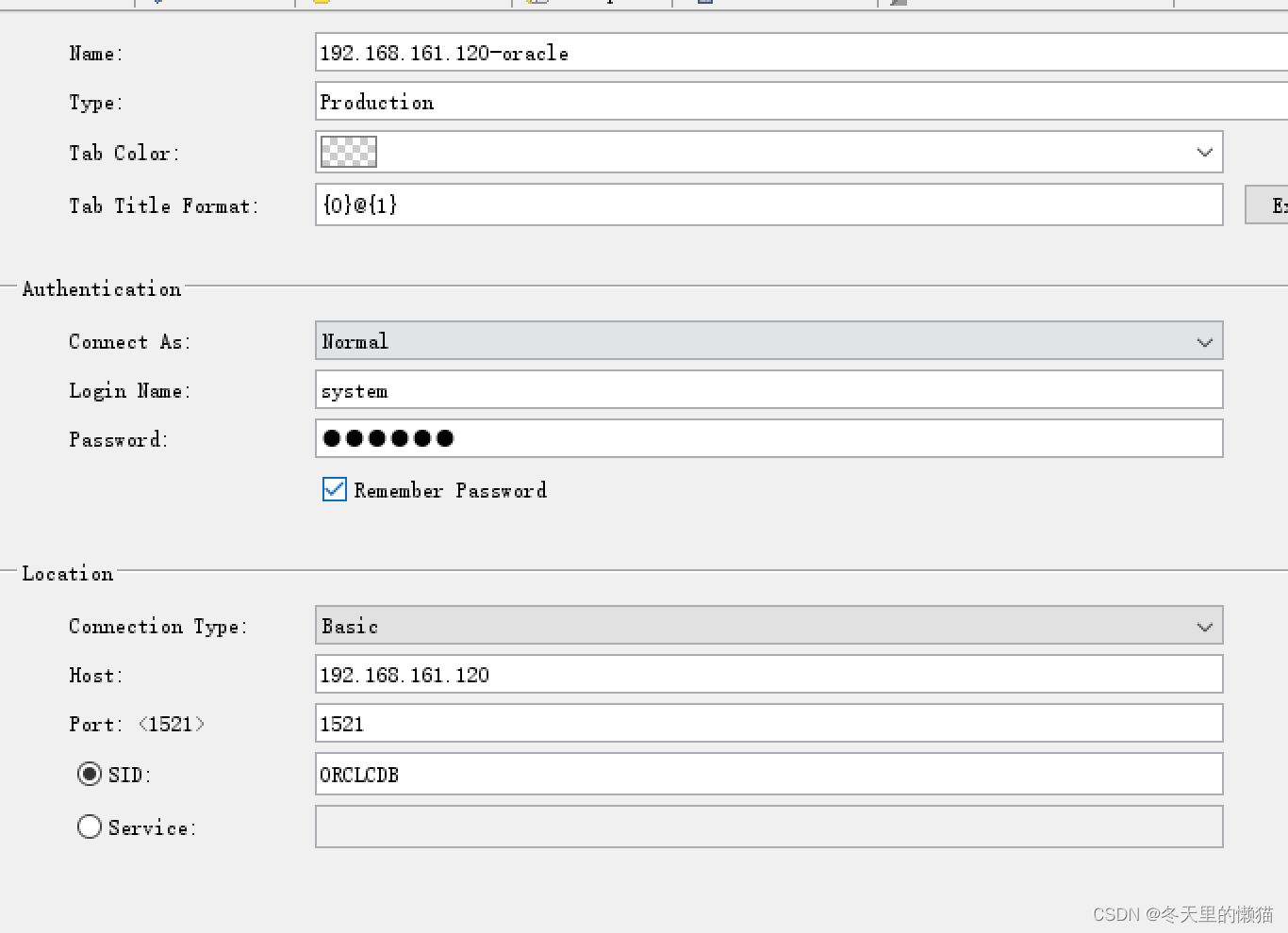
之后客户端连接测试:
边栏推荐
猜你喜欢

文件预览(通过URL访问本地资源)

*资源类*超实用学术必备的论文学习网站和英文论文编写(免费)

Optimisation de précision * stratégie d'optimisation 1: Réseau + optimiseur Sam

On GaN Network - II

GIC介绍 (三)——GIC400 Register

Jetpack -- transformations of livedata extension

从几何角度重新看线性分类器

*论文篇*lightweightnetwork轻量级网络论文速览,持续更新中。。。

图像特征-harris-角点检测

SVM To Face Recognize
随机推荐
51nod 1677 treecnt(树形 dp,逆元,贡献)
Espressif 玩转 WebSocket
*编程理解*从0搭建网络MobileNetV2并进行训练和测试
智能机器人与智能系统(大连理工大学庄严教授)——2.移动机器人感知
浅谈GAN网络-二
GIC 基础知识介绍 (一)
jupyter import包失败
[classical neural network] RESNET implementation
ICM20948九轴传感器角速度读取与实际单位转化的换算关系
P5905 [template] Johnson full source shortest circuit
*编码理解*cv2中应该了解的那些基本函数(加代码练习)
[deep learning] loss function (mean absolute error, mean square error, smoothing loss, cross entropy, cross entropy with weight, dice loss, focalloss)
jetson agx orin换源
Jetpack -- livedata source code analysis
*论文篇*Context Based Emotion Recognition Using EMOTIC Dataset论文翻译
ba_shell学习总结
Deep learning series -- alxenet realizes MNIST handwritten numeral recognition
*论文篇*EmotiCon: Context-Aware Multimodal Emotion Recognition using Frege’s Principle论文翻译
data link layer
(DKBY)DFL学习笔记