当前位置:网站首页>Shandong University machine learning experiment 5 SVM
Shandong University machine learning experiment 5 SVM
2022-06-11 06:08:00 【Tcoder-l3est】
Machine learning experiment of Shandong University 5 The report
Experimental hours : 6 Date of experiment :2021.11.20
List of articles
- Machine learning experiment of Shandong University 5 The report
- Experimental topics — Experiment 5 : SVM
- The experiment purpose
- Experimental environment
- Experimental steps and contents
- Conclusion analysis and experience
- Experiment source code
Experimental topics — Experiment 5 : SVM
The experiment purpose
This exercise gives you practice with using SVMs for both linear and non-linear classification
Use SVM Linear and nonlinear classification
Experimental environment
Software environment
Windows 10 + Matlab R2020a
Experimental steps and contents
understand SVM
SVM The classification model can be described as the following model :

But the above model has too many constraints , So we can change , Get the dual model .
Because the dual problem constraint is simple only one α i > = 0 \alpha_i >= 0 αi>=0 Constraints
Lagrange dual problem:

Karush-Kuhn-Tucher(KKT) Condition
KKT Conditions : If the strong duality satisfies KKT Conditions :
- stability

- Primal feasibility:

Dual feasibility

Complementary relaxation :

Besides KKT The condition is a sufficient condition for strong duality , And we solve the dual problem by KKT Conditions to solve
Using kernel function and soft interval SVM Of Model Described below :

yes
Quadratic programming
In this experiment, we need to solve QP problem , It uses Matlab Provided quadprog function :

Kernel Methods Kernel function
The essence is to map the original data Or upgrade dimension .
It's usually a N Dimension becomes N ∗ ( N − 1 ) ÷ 2 N*(N-1) \div 2 N∗(N−1)÷2 dimension
[ Failed to transfer the external chain picture , The origin station may have anti-theft chain mechanism , It is suggested to save the pictures and upload them directly (img-F0HfSHPO-1637667157053)(C:/Users/12042/AppData/Roaming/Typora/typora-user-images/image-20211121201415845.png)]
Soft space SVM:
That is, some are allowed to be misclassified , But limit the number
 Turn into
then ξ i \xi_i ξi yes slack variable Relax variables ( Similar to regular penalty term )
therefore model Turn into :

C Balance margin as well as misclassification
such as small C: Then it means that you want a larger interval
large C: Indicates that you want less misclassification
The corresponding Lagrange function :

Added a " r " Five parameters are required : ω b ξ α r \omega \, b \, \xi \, \alpha \, r ωbξαr
adopt QP The problem is solved and α \alpha α
And then through duality + KKT obtain




Task 1: Linear SVM
Plot decision boundary of the SVM
First read in the data , Draw a scatter diagram : Data set 1 is as follows : It can be seen that there is an obvious linear boundary Boudary

The following figure shows the data set II : The decomposition interval is not as obvious as one, but it can still be seen that there is

Then use QP Problem solver :quadprog To solve the
obtain α \alpha α Value
Here's the problem :matlab There are some α \alpha α The order of magnitude is about -18 Power , These are thought to be solved 0 Of , Do a process to get α \alpha α Here are two pictures Namely data1data2 C In very large cases α \alpha α
Yes DataSet1 That is, if you select a larger C Less misclassification , Found Support Vector There are only three , In this way, only C drop to 0.016 Will begin to have a limiting effect
Yes DataSet12 That is, if you select a larger C Less misclassification , Found Support Vector There are only three , In this way, only C drop to 1.5 Will begin to have a limiting effect


So if you use a larger C To train DataSet1 The result is shown in the figure below , That is Hard Margin
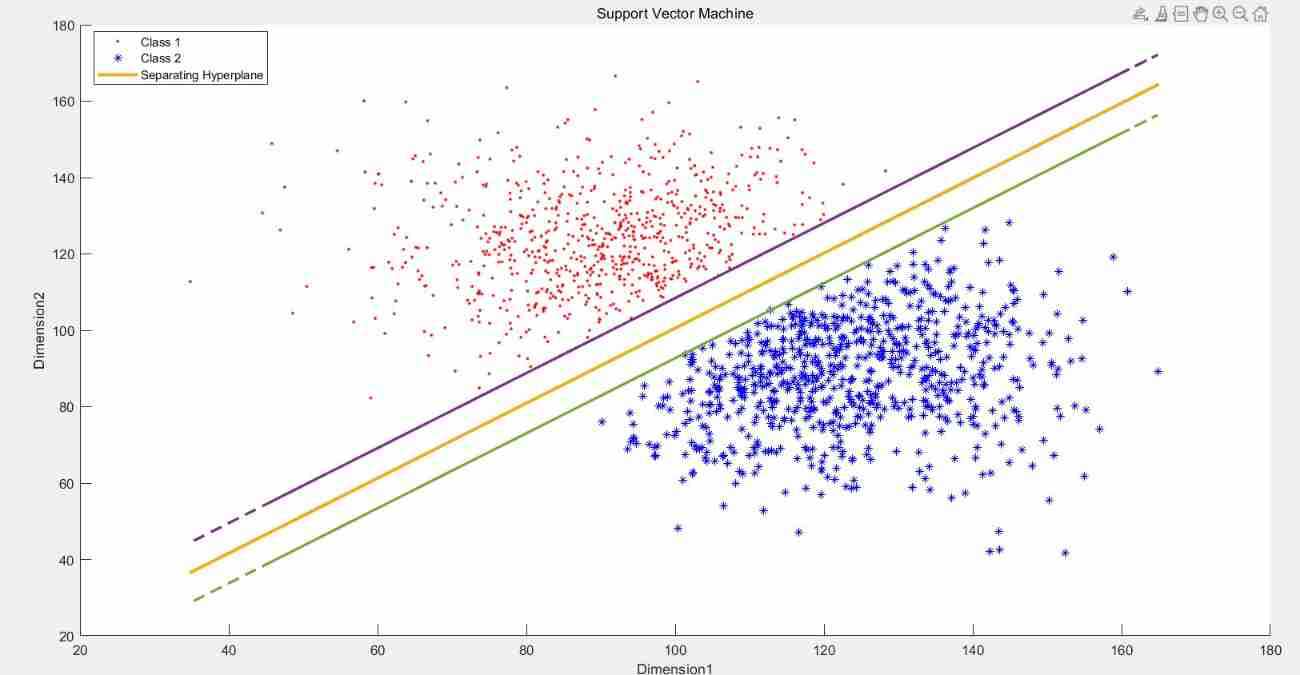
So if you use a smaller C To train DataSet1 The result is shown in the figure below , That is Soft Margin, There are no misclassified points , But some fell on boundary Points within

Yes Dataset2 It's the same thing C large :

Yes Dataset2 It's the same thing C More hours :


Use the test data to evaluate the SVM classifier and show the fraction of test examples which were misclassified
First : Two test data The performance of : Accuracy = 100% Therefore, there is no misclassification , Draw the histogram of classification effect

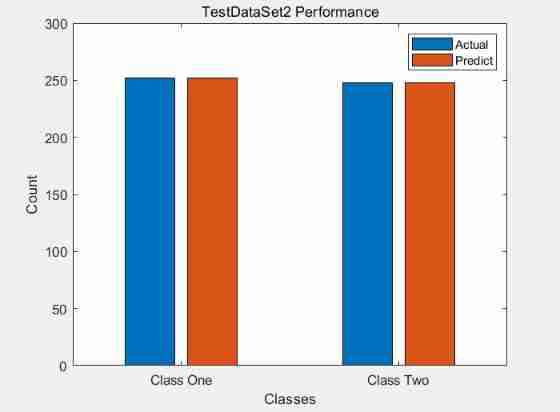
test Data Performance of : You can see There is no misclassification !
Try different values of the regularization term C, and report your observations.
Data one Set up C = 0.001 : 0.001 : 0.01
Test and find all score All are 100%

And then part of it boundary The picture is shown below

About DataSet2 Use C = 0.001 - 0.01
The accuracy is still 100% Don't show
Show only part of the situation

Task 2: Handwritten Digit Recognition( Handwritten numeral recognition 0 & 1)
Preprocess Data
Processing data , For the given image Data for a simple process , Can get image In general :
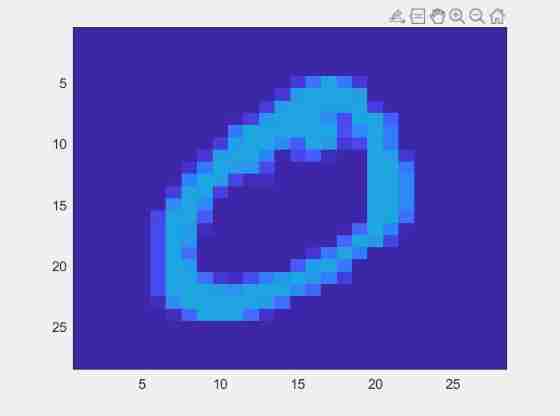

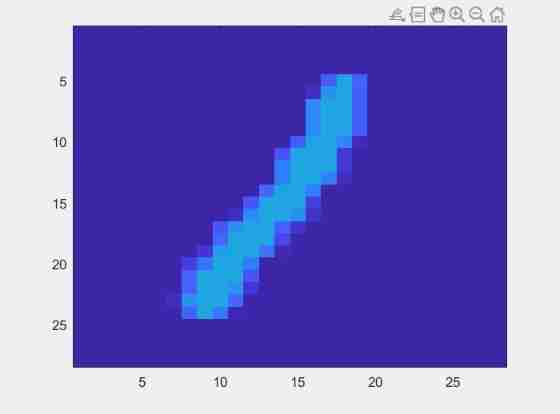
That is to say, it is drawn directly by using the gray value
Besides , This topic Image Tensor SIZE = 1 X 28 X 28 And then use extractLBPFeatures() to feature Conduct One Pooling + Flatten Get one 1X1X59 Of feature
Corresponding SVM There is 59 individual feature( X i X_i Xi) then Conduct train
Train Plain-vanilla SVM
Use 12000+ Picture data will appear

Because the data is too big Write QPsolver Of H Matrices are all 1w X 1w size Of It's too big ! Maybe there is something wrong with your computer
therefore Reduce the following size Every random sampling is not repeated 1000 individual image Come on train
Returns the sampling data and the corresponding tag as well as the original set Position in
%%
function [sample_Datas,sample_labels,chose_set] = sample_random(num,datas,labels)
    % datas  For raw data  num  Is the target number
    chose_set = [];%1000*1  Is this 1000 The number is the same set Medium id
    R = length(datas);
    a = rand(R,1);
    [b,c] = sort(a);
    chose_set = c(1:num,1);
    chose_set = sort(chose_set);
    sample_Datas = datas(chose_set,:);
    sample_labels = labels(chose_set,:);
end
After training Do not apply soft margin The accuracy obtained is probably **99.4%——99.5%** about
For example, once there were six misclassifications (Training Data Medium ) Their pictures are shown below :

It can be seen clearly For example, in the middle ‘2’ Flat below 1 And the last one ‘6’ It is very likely that there is misclassification itself , They do not conform to 0 1 Of feature
To test :
Get accuracy = 98.58 23 Zhang image error Some are shown below

The possible reason is The writing is not standard It's not like 0 Neither 1 feature It's not obvious
Experiment with different values of the regularization term C
Pick 10 individual values
C = [0.01 0.05 0.1 0.5 1.5 3 5 7.5 10 15]; Training + test
Found in C=0.1 After that, the accuracy will reach 90% 了
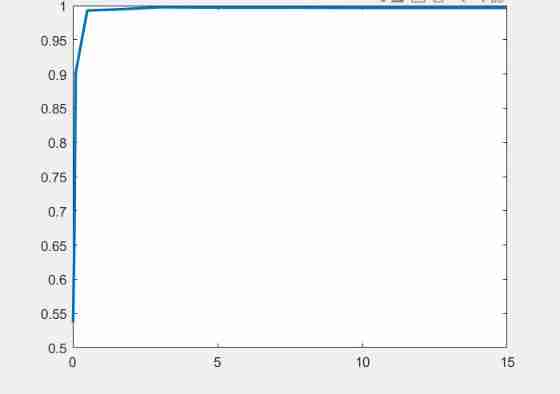
therefore More detailed points are as follows C = 0.02 : 0.02 : 0.2 give the result as follows : Two tests were carried out Try to avoid the influence of random sampling

namely Larger C signify Less misclassfication and Higher Accuracy
What value of C gives you the best training error on the dataset from part? & How does the test error for this choice of C compare with the test error you computed in part (i)?
sampling 25 individual C Training , The training error and the corresponding test error are obtained

When C = 2 when ,train When the effect is the best 0.9900, But when C=1.8 when ,test The best effect is 0.9957
All in all C The bigger it is , There may be over fitting , Lead to in train The effect becomes better , however test Upward variation
Task 3: Non-Linear SVM
Plot the Data

It is found that there is no obvious linear dividing line
So you need to use a kernel Upgrade the dimension , We expect the data to have a linearly separable hyperplane in high dimensional space
RBF kernel
The Gaussian kernel function

Writing in this experiment :

Model writing at this time :

Use RBF kernel To test ;
γ = [ 1 ; 10 ; 100 ; 1000 ] \gamma = [1;10;100;1000] γ=[1;10;100;1000]
It can be found that with γ \gamma γ increase Although the classification effect is getting better But gradually classification over fitting

Task 4: Use SMO Instead Of QP solvers
Write a suggested SMO Algorithm instead of solving large-scale problems QP problem
Input: data 、 label 、 Parameters bias And the maximum number of iterations and tolerance values
Algorithm: Every iteration
Choose two according to the rules α \alpha α
Keep other Lagrange multipliers constant , to update α 1 α 2 \alpha_1\, \alpha_2 α1α2
output: α b i a s \alpha \, bias αbias
Wrote a simplified version of SMO Algorithm
Traverse to select one α 1 \alpha_1 α1 Then pick one at random α 2 \alpha_2 α2 But this α 2 \alpha_2 α2 Conditions must be met :

Conclusion analysis and experience
Different values Of C
In the first two datasets , Different C It has no effect on the final accuracy , All are 100%, It shows that there is a linearly separable hyperplane in both data sets . however C For the decided boundary The scope of is influential ,C The smaller it is , As a result, the penalty item weight becomes smaller , Will lead to a bigger margin, But there may be more misclassification .
Different values Of C in Handwritten Digit Recognition
In handwritten numeral recognition , as long as C More than a certain value , for example 0.1, After that, the accuracy can be stabilized at 99% about , In my experimental tests ,C=2 yes train The highest accuracy 99%,C=1.8 when ,test The best effect is 0.9957
All in all C The bigger it is , There may be over fitting , Lead to in train The effect becomes better , however test Upward variation
γ \gamma γ stay Nonlinear SVM Influence
With γ \gamma γ Increase will gradually over fit , So balance is needed γ \gamma γ
Kernel function
In this experiment RBF kernel The Gaussian kernel function , Note that using kernel functions does not require computation ϕ \phi ϕ Just calculate matrix K that will do
SMO
SMO It is to transform a large quadratic program into several small quadratic programs
for i=1:iter
a. According to preset rules , Select two from all samples
b. Keep other Lagrange multipliers constant , Update the Lagrange multiplier corresponding to the selected sample
end
How to update α 1 α 2 \alpha1 \, \alpha2 α1α2 Well ?


Random selection for simplification , So the effect is average

Maybe the training times are too few , Although this dividing line is quite unreasonable , But the accuracy can also be 73.6%
See the code at the end
Experiment source code
Lab51.m:
%%  Experiment five  SVM  Support vector machine
%%  Soft space
%%  Reading data   Draw a scatter diagram
clear,clc;
Trainning_Datas = load('training_1.txt');
Data_x1 = Trainning_Datas(:,1);
Data_x2 = Trainning_Datas(:,2);
Data_label = Trainning_Datas(:,3);
X = [Data_x1,Data_x2];
Y = Data_label;
% scatter(Data_x1,Data_x2,'.','b');

%%  utilize quadprog  solve  $\alpha$
%  seek Min 1/2 yax - a
% The objective function must be written in a quadratic form H The form of adding to a matrix
% Cs = 0.001:0.001:0.01; %  Hyperparametric
% for num = 1 : 10
    H=[];% Objective function H
    C = 0.006;
    for i=1:length(X)% All samples must be traversed
        for j=1:length(X)
            H(i,j)=X(i,:)*(X(j,:))'*Y(i)*Y(j);
        end
    end
    F = -1 * ones(length(X),1);% Objective function F

    % Equality constraints
    aeq=Y';
    beq=zeros(1,1);
    % Inequality constraints   No,
    ub=[];
    ib=[];
    % Independent variable constraint
    lb = zeros(length(X),1);% Lower bound
    ub = zeros(length(X),1);% upper bound
    ub(:,:) = C;
    %  solve alpha
    [alpha,fval]=quadprog(H,F,[],[],aeq,beq,lb,ub);% Second planning problem

    %%  Will find out a lot alpha Very close to 0  That's not support vector
    %  however   How many points are appropriate ??  About three   Because the dividing line is still very clear
    % BUT  Soft interval shall be fully calculated  so  There is no need to divide
    %  Be careful !! data1  Obviously no need for soft spacing   All without misclassification !( Unless C Very small ~)
    %  It's normal. It's probably 0.01  Just in the early days
    plot(alpha,'b') % obvious
    title('\alpha of QP')
    xlabel('x')
    ylabel('\alpha')
    a = alpha;
    %  Or choose to deal with   Because normally there are =0 Of
    for i=1:length(a)
        if a(i)<1e-8
            a(i)=0;
        end
    end
    %%  seek w
    W = 0; %  coefficient matrix
    u = 0;
    j = find(a > 0 & a < C);
    for i = 1:length(X)
            W = W + a(i)*Y(i)*X(i,:)';
    end

    %%  seek r
    R = 0;
    R = C - a;

    %%  seek B  Is to use the support vector
    %  A bit of a problem. ...  Namely   Only S V  Or use it all
    %  Formula is S V  however   Calculate the SV  and   Ideal SV Dissimilarity
    j = find(a > 0 & a < C); % look for  S V
    nums = length(j); %  How many?
    temp = Y - X*W;
    B = sum(temp(j)) / nums;

    %%  Draw Boundary
    k = -W(1)./W(2);
    bb = -B./W(2);

    group1 = find(Data_label==1);
    group2 = find(Data_label==-1);
    scatter(Data_x1(group1),Data_x2(group1),'.','r');
    hold on
    scatter(Data_x1(group2),Data_x2(group2),'*','b');
    hold on

    yy = k.*Data_x1 + bb;
    plot(Data_x1,yy,'-','LineWidth',2.5)
    hold on
    yy = k.*Data_x1 + bb + 1./W(2);
    plot(Data_x1,yy,'--','LineWidth',2)
    hold on
    yy = k.*Data_x1 + bb - 1./W(2);
    plot(Data_x1,yy,'--','LineWidth',2)
    title('Support Vector Machine C = 0.006')
    xlabel('Dimension1')
    ylabel('Dimension2')
    legend('Class 1','Class 2','Separating Hyperplane')

    %% Test
    Predict = [];
    Test_Datas = load('test_1.txt');
    test_x1 = Test_Datas(:,1);
    test_x2 = Test_Datas(:,2);
    test_X = [test_x1,test_x2];
    test_Y = Test_Datas(:,3);
    Predict = sign(test_X*W + B);
    Judge=(Predict==test_Y);
    score = sum(Judge)./length(test_X)

    %%  Draw Bar on testdata
    test_Class1_nums = length(find(test_Y==1));
    test_Class2_nums = length(find(test_Y==-1));
    Predict_Class1_nums = length(find(Predict==1));
    Predict_Class2_nums = length(find(Predict==-1));
    Bar_y = [test_Class1_nums,Predict_Class1_nums;test_Class2_nums,Predict_Class2_nums];
    Bar_x = categorical({'Class One','Class Two'});
    bar(Bar_x,Bar_y)
    legend('Actual','Predict');
    xlabel('Classes');
    ylabel('Count');
    title(['TestDataSet1 Performance']);
Lab52.m
%%  Experiment five  SVM  Support vector machine
%%  Soft space
%%  Reading data   Draw a scatter diagram
clear,clc;
Trainning_Datas = load('training_2.txt');

Data_x1 = Trainning_Datas(:,1);
Data_x2 = Trainning_Datas(:,2);
Data_label = Trainning_Datas(:,3);
X = [Data_x1,Data_x2];
Y = Data_label;
%scatter(Data_x1,Data_x2,'.','r');

%%  utilize quadprog  solve  $\alpha$
%  seek Min 1/2 yax - a
% The objective function must be written in a quadratic form H The form of adding to a matrix
C = 1; %  Hyperparametric
H=[];% Objective function H
for i=1:length(X)% All samples must be traversed
    for j=1:length(X)
        H(i,j)=X(i,:)*(X(j,:))'*Y(i)*Y(j);
    end
end
F = -1 * ones(length(X),1);% Objective function F
% Equality constraints
aeq=Y';
beq=zeros(1,1);
% Inequality constraints   No,
ub=[];
ib=[];
% Independent variable constraint
lb = zeros(length(X),1);% Lower bound
ub = zeros(length(X),1);% upper bound
ub(:,:) = C;
%  solve alpha
[alpha,fval]=quadprog(H,F,[],[],aeq,beq,lb,ub);% Second planning problem

%%  Will find out a lot alpha Very close to 0  That's not support vector
%  however   How many points are appropriate ??  About three   Because the dividing line is still very clear
% BUT  Soft interval shall be fully calculated  so  There is no need to divide
%  Be careful !! data1  Obviously no need for soft spacing   All without misclassification !( Unless C Very small ~)
%  It's normal. It's probably 0.01  Just in the early days
plot(alpha,'b') % obvious
title('\alpha of QP')
xlabel('x')
ylabel('\alpha')
a = alpha;
%  Or choose to deal with   Because normally there are =0 Of
for i=1:length(a)
    if a(i)<1e-8
        a(i)=0;
    end
end
%%  seek w
W = 0; %  coefficient matrix
u = 0;
j = find(a > 0 & a < C);
for i = 1:length(X)
        W = W + a(i)*Y(i)*X(i,:)';
end

%%  seek r
R = 0;
R = C - a;

%%  seek B  Is to use the support vector
%  A bit of a problem. ...  Namely   Only S V  Or use it all
%  Formula is S V  however   Calculate the SV  and   Ideal SV Dissimilarity
j = find(a > 0 & a < C); % look for  S V
nums = length(j); %  How many?
temp = Y - X*W;
B = sum(temp(j)) / nums;

%%  Draw Boundary
k = -W(1)./W(2);
bb = -B./W(2);
figure
group1 = find(Data_label==1);
group2 = find(Data_label==-1);
scatter(Data_x1(group1),Data_x2(group1),'.','r');
hold on
scatter(Data_x1(group2),Data_x2(group2),'*','b');
hold on


yy = k.*Data_x1 + bb;
plot(Data_x1,yy,'-','LineWidth',0.5)
hold on
yy = k.*Data_x1 + bb + 1./W(2);
plot(Data_x1,yy,'--','LineWidth',1)
hold on
yy = k.*Data_x1 + bb - 1./W(2);
plot(Data_x1,yy,'--','LineWidth',0.5)
title('Support Vector Machine C = 1')
xlabel('Dimension1')
ylabel('Dimension2')
legend('Class 1','Class 2','Separating Hyperplane')

%% Test
Predict = [];
Test_Datas = load('test_2.txt');
test_x1 = Test_Datas(:,1);
test_x2 = Test_Datas(:,2);
test_X = [test_x1,test_x2];
test_Y = Test_Datas(:,3);
Predict = sign(test_X*W + B);
Judge=(Predict==test_Y);
score = sum(Judge)./length(test_X)

%%  Draw Bar on testdata
figure
test_Class1_nums = length(find(test_Y==1));
test_Class2_nums = length(find(test_Y==-1));
Predict_Class1_nums = length(find(Predict==1));
Predict_Class2_nums = length(find(Predict==-1));
Bar_y = [test_Class1_nums,Predict_Class1_nums;test_Class2_nums,Predict_Class2_nums];
Bar_x = categorical({'Class One','Class Two'});
bar(Bar_x,Bar_y)
legend('Actual','Predict');
xlabel('Classes');
ylabel('Count');
title(['TestDataSet2 Performance']);
Lab53.m
%% Hand
clc,clear;
%  Save one map  this 1000 individual sampledata Inside   Corresponding to the original number
[Train_Data_X,Train_Labels] = strimage();
[Train_Data_X,Train_Labels,Map_id] = sample_random(1000,Train_Data_X,Train_Labels);

%Size = 12665 * 59
%%
Cs = 0.02:0.02:0.2;
for Cnum=1:10
C = Cs(Cnum); %  Hyperparametric
H=[];% Objective function H
for i=1:length(Train_Data_X)% All samples must be traversed
    for j=1:length(Train_Data_X)
        H(i,j)=Train_Data_X(i,:)*(Train_Data_X(j,:))'*Train_Labels(i)*Train_Labels(j);
    end
end
F = -1 * ones(length(Train_Data_X),1);% Objective function F
%%
% Equality constraints
aeq=Train_Labels';
beq=zeros(1,1);
% Inequality constraints   No,
ub=[];
ib=[];
% Independent variable constraint
lb = zeros(length(Train_Data_X),1);% Lower bound
ub = [];% There is no upper bound requirement
ub = zeros(length(Train_Data_X),1);% upper bound
ub(:,:) = C;
%  solve alpha
[alpha,fval]=quadprog(H,F,[],[],aeq,beq,lb,ub);% Second planning problem

%%
% plot(alpha,'b') % obvious
% title('\alpha of QP')
% xlabel('x')
% ylabel('\alpha')
a = alpha;
%  Or choose to deal with   Because normally there are =0 Of
for i=1:length(a)
    if a(i)<1e-8
        a(i)=0;
    end
end

%%  seek W
W = 0; %  coefficient matrix
u = 0;
j = find(a > 0);
for i = 1:length(Train_Data_X)
        W = W + a(i)*Train_Labels(i)*Train_Data_X(i,:)';
end
%%
j = find(a > 0); % look for  S V
nums = length(j); %  How many?
temp = Train_Labels - Train_Data_X*W;
B = sum(temp(j)) / nums;
%%
% Predict = [];
% test_X = Train_Data_X;
% test_Y = Train_Labels;
% Predict = sign(test_X*W + B);
% Judge=(Predict==test_Y);
% score = sum(Judge)./length(test_X)
%%  Look for misclassified
% misclass =[];
% misclass = find(Judge==0)
% for i=1:length(misclass)
%     id = misclass(i);
%     ori_id = Map_id(id);
%     showimage(ori_id)
% end
%% Test
[Test_Data_X,Test_Labels] = strimagetest();
Predict = [];
test_X = Test_Data_X;
test_Y = Test_Labels;
Predict = sign(test_X*W + B);
Judge=(Predict==test_Y);
score(Cnum) = sum(Judge)./length(test_X)
%%  Look for misclassified
% misclass =[];
% misclass = find(Judge==0)
% for i=1:length(misclass)
%     id = misclass(i);
%     ori_id = Map_id(id);
%     showimage(ori_id)
% end
end
figure
plot(Cs,score,'LineWidth',2)
title('Performance in Different C')
xlabel('C')
ylabel('Accuracy')
ylim([0.5 1])
axis()
%%
function [sample_Datas,sample_labels,chose_set] = sample_random(num,datas,labels)
    % datas  For raw data  num  Is the target number
    chose_set = [];%1000*1  Is this 1000 The number is the same set Medium id
    R = length(datas);
    a = rand(R,1);
    [b,c] = sort(a);
    chose_set = c(1:num,1);
    chose_set = sort(chose_set);
    sample_Datas = datas(chose_set,:);
    sample_labels = labels(chose_set,:);
end
Revised strimage.m
function [AllPic_Feature,All_Labels] = strimage()
  fidin = fopen('train-01-images.svm'); %  open test2.txt file
  j = 1;
  apres = [];
   AllPic_Feature = [];
   All_Labels=[];
while ~feof(fidin)
  tline = fgetl(fidin); %  Read line from file
  apres{j} = tline;
  %  Process this line
  a = char(apres(j));
  All_Labels = [All_Labels;str2num(a(1:2))];
  lena = size(a);
  lena = lena(2);
  xy = sscanf(a(4:lena), '%d:%d');
  lenxy = size(xy);
  lenxy = lenxy(1);
  grid = [];
  grid(784) = 0;
  for i=2:2:lenxy  %%  One number apart
      if(xy(i)<=0)
          break
      end
    grid(xy(i-1)) = xy(i) * 100/255;
  end
  grid1 = reshape(grid,28,28);
  grid1 = fliplr(diag(ones(28,1)))*grid1;
  grid1 = rot90(grid1,3);
  image_f = extractLBPFeatures(grid1);
  AllPic_Feature = [AllPic_Feature;image_f];

  j = j+1;
end

end
showimage.m:
function showimage(n)
  fidin = fopen('train-01-images.svm'); %  open test2.txt file
  i = 1;
  apres = [];

while ~feof(fidin)
  tline = fgetl(fidin); %  Read line from file
  apres{i} = tline;
  i = i+1;
end

  a = char(apres(n));

  lena = size(a);
  lena = lena(2);
  xy = sscanf(a(4:lena), '%d:%d');

  lenxy = size(xy);
  lenxy = lenxy(1);


  grid = [];
  grid(784) = 0;
  for i=2:2:lenxy  %%  One number apart
      if(xy(i)<=0)
          break
      end
    grid(xy(i-1)) = xy(i) * 100/255;
  end
  grid1 = reshape(grid,28,28);
  grid1 = fliplr(diag(ones(28,1)))*grid1;
  grid1 = rot90(grid1,3);
  figure
  image(grid1)
  hold on;
end
Lab54.m
%% Non-Linear SVM
clear,clc
Trainning_Datas = load('training_3.txt');
Data_x1 = Trainning_Datas(:,1);
Data_x2 = Trainning_Datas(:,2);
Data_label = Trainning_Datas(:,3);
X = [Data_x1,Data_x2];
Y = Data_label;
group1 = find(Data_label==1);
group2 = find(Data_label==-1);
scatter(Data_x1(group1),Data_x2(group1),'.','r');
hold on
scatter(Data_x1(group2),Data_x2(group2),'*','b');
hold on
%%
gammas = [1 10 100 1000];
for gnum = 1:4
gamma = gammas(gnum);
% seek Kernel  matrix
Knel = get_kernel_matrix(X,gamma);
H=[];
for i=1:length(X)
    for j = 1:length(X)
        H(i,j) = Knel(i,j)*Y(i)*Y(j);
    end
end
F=-1*ones(length(X),1);% Objective function F
aeq = Y';
beq=zeros(1,1);
ub=[];
ib=[];
% Independent variable constraint
lb=zeros(length(X),1);
ub=[];
[alpha,fval]=quadprog(H,F,ib,ub,aeq,beq,lb,ub);
%%
a = alpha;
epsilon = 1e-5;
% Find support vectors
sv_index = find(abs(a)> epsilon);
Xsv = X(sv_index,:);
Ysv = Y(sv_index);
svnum = length(sv_index);
sum_b = 0;
for k = 1:svnum
    sum = 0;
    for i = 1:length(X)
        sum = sum + a(i,1)*Y(i,1)*Knel(i,k);
    end
    sum_b = sum_b + Ysv(k) - sum;
end
B = sum_b/svnum;
% W There is no need to solve directly

%% Make Classfication Predictions over a grid of values
xplot = linspace (min(X( : , 1 ) ) , max(X( : , 1 ) ),100 )';
yplot = linspace (min(X( : , 2 ) ) , max(X( : , 2 ) ) ,100)';
[XX, YY] = meshgrid(xplot,yplot);
vals = zeros(size(XX));
%%  Calculation vals using SVM
for i=1:length(vals)
    for j = 1:length(vals)
        test_X = [XX(i,j),YY(i,j)];
        temp = 0;
        for k=1:length(X)
            temp = temp + a(k,1) * Y(k,1)*exp(-gamma*norm(X(k,:)-test_X)^2);
        end
        vals(i,j) = temp + B;
    end
end
%%
figure
scatter(Data_x1(group1),Data_x2(group1),'.','r');
hold on
scatter(Data_x1(group2),Data_x2(group2),'*','b');
hold on
colormap bone;
contour(XX,YY,vals,[0 0],'LineWidth',2)
title(['\gamma = ',num2str(gamma)]);
end
%%
function K = get_kernel_matrix(data,gamma)
    K = [];
    for i=1:length(data)
        for j=1:length(data)
            K(i,j)=exp(-gamma*norm(data(i,:)-data(j,:))^2);
        end
    end
end
MySMO.m
function [alpha,bias] = MySMO(training_X,Labels,C,maxItertimes,tolerance)

% init
[sampleNum,featuerNum]=size(training_X);
alpha=zeros(sampleNum,1);
bias=0;
iteratorTimes=0;

K=training_X*training_X';% Calculation K
while iteratorTimes<maxItertimes
    alphaPairsChanged=0;%  Record changes
    % find alpha1
    for i=1:sampleNum
        g1=(alpha.*Labels)'*(training_X*training_X(i,:)')+bias;
        Error1=g1-Labels(i,1);%  Calculation error
       % choose i: avoid KKT conditions
       %  selection i Standards for  error
       if(((Error1*Labels(i,1) < -tolerance)&&alpha(i,1)<C)||...
           ((Error1*Labels(i,1)>tolerance)&&alpha(i,1)>0))
           % choose j: different from i
           j=i;
           while j==i
                j=randi(sampleNum);%  Random another alpha2
           end

            alpha1=i;
            alpha2=j;

            %  to update alpha1 & alpha2
            alpha_upd=alpha(alpha1,1);
            alpha_upd=alpha(alpha2,1);
            y1=Labels(alpha1,1);
            y2=Labels(alpha2,1);

            g2=(alpha.*Labels)'*(training_X*training_X(j,:)')+bias;
            E2=g2-Labels(j,1);% Calculation error2
            %  Calculation Lower & Higher
            if y1~=y2
                L=max(0,alpha_upd-alpha_upd);
                H=min(C,C+alpha_upd-alpha_upd);
            else
                L=max(0,alpha_upd+alpha_upd-C);
                H=min(C,alpha_upd+alpha_upd);
            end

            if L==H
                fprintf('H==L\n');
                continue;
            end

            parameter=K(alpha1,alpha1)+K(alpha2,alpha2)-2*K(alpha1,alpha2);

            if parameter<=0
                fprintf('parameter<=0\n');
                continue;
            end
               %  Get new alpha
            alpha2New=alpha_upd+y2*(Error1-E2)/parameter;

            if alpha2New>H
                alpha2New=H;
            end

            if alpha2New<L
                alpha2New=L;
            end

            if abs(alpha2New-alpha_upd)<=0.0001
                fprintf('change small\n');
                continue;
            end

            alpha1New=alpha_upd+y1*y2*(alpha_upd-alpha2New);

            % updata bias
            bias1=-Error1-y1*K(alpha1,alpha1)*(alpha1New-alpha_upd)-y2*K(alpha2,alpha1)*(alpha2New-alpha_upd)+bias;
            bias2=-E2-y1*K(alpha1,alpha2)*(alpha1New-alpha_upd)-y2*K(alpha2,alpha2)*(alpha2New-alpha_upd)+bias;

            if alpha1New>0&&alpha1New<C
                bias=bias1;
            elseif alpha2New>0&&alpha2New<C
                bias=bias2;
            else
                bias=(bias2+bias1)/2;
            end

            alpha(alpha1,1)=alpha1New;
            alpha(alpha2,1)=alpha2New;
            alphaPairsChanged=alphaPairsChanged+1;
       end
    end

    if alphaPairsChanged==0
        iteratorTimes=iteratorTimes+1;
    else
        iteratorTimes=0;
    end
    fprintf('iteratorTimes=%d\n',iteratorTimes);

end
a2New=L;
end
        if abs(alpha2New-alpha_upd)<=0.0001
            fprintf('change small\n');
            continue;
        end

        alpha1New=alpha_upd+y1*y2*(alpha_upd-alpha2New);

        % updata bias
        bias1=-Error1-y1*K(alpha1,alpha1)*(alpha1New-alpha_upd)-y2*K(alpha2,alpha1)*(alpha2New-alpha_upd)+bias;
        bias2=-E2-y1*K(alpha1,alpha2)*(alpha1New-alpha_upd)-y2*K(alpha2,alpha2)*(alpha2New-alpha_upd)+bias;

        if alpha1New>0&&alpha1New<C
            bias=bias1;
        elseif alpha2New>0&&alpha2New<C
            bias=bias2;
        else
            bias=(bias2+bias1)/2;
        end

        alpha(alpha1,1)=alpha1New;
        alpha(alpha2,1)=alpha2New;
        alphaPairsChanged=alphaPairsChanged+1;
   end
end

if alphaPairsChanged==0
    iteratorTimes=iteratorTimes+1;
else
    iteratorTimes=0;
end
fprintf('iteratorTimes=%d\n',iteratorTimes);
end
边栏推荐
- 使用Batch管理VHD
- Basic usage of MySQL
- Informatica: six steps of data quality management
- Control your phone with genymotion scratch
- [daily exercises] merge two ordered arrays
- Clear function of ArrayList
- Review Servlet
- Cenos7 builds redis-3.2.9 and integrates jedis
- [usual practice] explore the insertion position
- Detailed steps for installing mysql-5.6.16 64 bit green version
猜你喜欢

"All in one" is a platform to solve all needs, and the era of operation and maintenance monitoring 3.0 has come

Global case | how Capgemini connects global product teams through JIRA software and confluence

Stock K-line drawing
![Chapter 1 of machine learning [series] linear regression model](/img/e2/1f092d409cb57130125b0d59c8fd27.jpg)
Chapter 1 of machine learning [series] linear regression model

Squid agent

Don't be afraid of xxE vulnerabilities: understand their ferocity and detection methods

Build the first power cloud platform

Yonghong Bi product experience (I) data source module

Box model

跨境电商测评自养号团队应该怎么做?
随机推荐
Observer mode (listener mode) + thread pool to realize asynchronous message sending
Login and registration based on servlet, JSP and MySQL
What is a planning BOM?
[IOS development interview] operating system learning notes
使用Genymotion Scrapy控制手机
Using idea to add, delete, modify and query database
This is probably the most comprehensive project about Twitter information crawler search on the Chinese Internet
箭头函数的this指向
Docker安装Mysql、Redis
Continuous update of ansible learning
FPGA设计——乒乓操作实现与modelsim仿真
FPGA interview notes (IV) -- sequence detector, gray code in cross clock domain, ping-pong operation, static and dynamic loss reduction, fixed-point lossless error, recovery time and removal time
使用Batch管理VHD
Chapter 4 of machine learning [series] naive Bayesian model
Yoyov5's tricks | [trick8] image sampling strategy -- Sampling by the weight of each category of the dataset
Fix Yum dependency conflict
The meaning in the status column displayed by PS aux command
Sign for this "plug-in" before returning home for the new year
Reading the registry using batch
FPGA面试题目笔记(四)—— 序列检测器、跨时钟域中的格雷码、乒乓操作、降低静动态损耗、定点化无损误差、恢复时间和移除时间