当前位置:网站首页>Matlab实现均值滤波与FPGA进行对比,并采用modelsim波形仿真
Matlab实现均值滤波与FPGA进行对比,并采用modelsim波形仿真
2022-06-11 05:53:00 【Fighting_XH】
文章目录
本文的方法和 联合仿真实现Ycbcr的方法相同。不再重复叙述。
一、实验目标
在Ycbcr灰度化基础上进行均值滤波。
二、实验中遇到的问题
1、如何实现均值滤波
2、modelsim仿真的时候涉及到IP核不存在怎么办?
如下图,我们调用了shift_ram ip核,不添加库文件的话,独立仿真时报错

解决方法:
将器件库添加上即可。
选择simulation —— start simulation——Libraries——Add,添加库文件
库文件所在位置:modelsim安装位置,modelsim-ase——aletra——Verilog——altera_mf || cyclonev(根据所用开发板型号选择)

三、具体实现
3.1 均值滤波的实现
1、这部分包含两个模块:3*3窗口生成模块以及均值滤波算法实现模块。(参考其他博文,理论部分不在讲解)
2、33窗口生成模块:filter_33;——调用了shift_ram ip核。
3、均值滤波模块 :mean_filter;——采用三级流水线的方式进行处理。流水线技术是FPGA常用的思想。
3.1.1 调用shift_ram ip核:

3.1.2 均值滤波的流水并行处理
如下我们可得到均值滤波的公式:mean_data = P11 + P12 + P13 + P21 + P23 + P31 +P32 + P33 / 8;将其拆成三级流水线并行处理的形式:
第一级流水线并行处理:
P1 = P11 + P12 + P13 ;P2 = P21 + P23 ;P3 = P31 +P32 + P33;
.
第二级流水线处理:
P = P1 + P2 + P3;
.
第三级流水线处理:
P >> 3 或者取高位

3.2 整体模块设计
图像生成模块(VGA模块+数据的获取);
Ycbcr灰度化模块;
3*3窗口生成模块;
均值滤波模块:
3.2.1 图像生成模块
module img_gen (
//系统全局信号
input	wire			       	clk			,
input	wire				     rst_n		,
//原图输出 ----------------------------------------
output	wire				   img_hsync	,	//原图行同步信号
output	wire				   img_vsync	,	//场同步信号
output	reg  	[23:0]		   img_data		,	//原图像数据信号
output	reg					   img_de			//数据有效指示信号
);
endmodule
该模块数据的获取如下:
当quartus查看RTL图的时候,由于不可综合,将其引去即可。
initial begin
	$readmemh("pre_img.txt", ram);
end
3.2.2 Ycbcr灰度化
module RGB_Gray
//========================< 端口 >==========================================
(
input   wire				clk		,	//时钟
input   wire				rst_n	,	//复位
//原图 ----------------------------------------------
input   wire				RGB_hsync,
input   wire				RGB_vsync,
input   wire    [23:0]      RGB_data,
input   wire				RGB_de ,
//灰度转换图 ----------------------------------------------
//这里的行场有效信号和数据信号根据消耗时钟打三拍,作为下一模块输入
output  wire			gray_hsync,
output  wire			gray_vsync,
output  wire			gray_de,
output  wire	[7:0]	gray_data

);
3.2.3 3*3窗口生成
module filter_3x3(
    input clk,
    input rst_n,
//灰度化打拍后的行场有效以及数据有效信号
    input  gray_hsync,
    input  gray_vsync,
    input  gray_de   ,

    input [7:0] iData,
//根据3*3窗口生成模块实际消耗时钟进行延迟
    output  filter_hsync,
    output  filter_vsync				,
    output  filter_de,
//生成的3*3窗口数据
    output reg [7:0] oData_11, oData_12, oData_13,
    output reg [7:0] oData_21, oData_22, oData_23,
    output reg [7:0] oData_31, oData_32, oData_33
);
3.2.4 均值滤波模块
module mean_filter(
    input clk,
    input rst_n,

//来自3*3窗口生成模块
	input   wire				filter_hsync				,
    input   wire				filter_vsync				,
    input   wire				filter_de					,
//生成的3*3窗口数据
    input   [7:0]     filter_11,filter_12,filter_13,
    input   [7:0]     filter_21,filter_22,filter_23,
    input   [7:0]     filter_31,filter_32,filter_33,
//均值处理后行场、数据有效信号根据消耗时钟打拍
	output  			  mean_hsync			  	,
    output  			  mean_vsync				,
    output  			  mean_de    ,
    output   [7:0]     mean_data  // 最终均值,3x3模板总和/8

);
3.3 波形仿真验证
1、tb测试文件不变。
仍然处理后的640*480个数据写入到txt文档中。
//打开post_img.txt文件
//---------------------------------------------------
integer post_img_txt;

initial begin
    post_img_txt = $fopen("post_img.txt");
end

//像素写入到txt中
//---------------------------------------------------
reg [20:0] pixel_cnt; //640*480 = 307200 ,对这些像素逐个写入

always @(posedge clk) begin
    if(!rst_n) begin
        pixel_cnt <= 0;
    end
    else if(VGA_de) begin
        pixel_cnt = pixel_cnt + 1;
        $fdisplay(post_img_txt,"%h",VGA_data);

        if(pixel_cnt == IMG_H*IMG_W)
            $stop;
    end
end
2、波形分析
以第一行数据为例
img_de : 原图数据有效信号
img_data:原图数据
gray_de:灰度化数据有效信号
gray_data:灰度化的图像数据 = iData
filter_de : 33窗口生成数据有效信号
oData11 - 33 :33窗口的数据
mean_de : 均值滤波数据有效信号
mean_data : 3*3窗口数据的均值
VGA_de : VGA有效数据信号 = mean_de
第一个均值:164 / 8 = 20
第二个均值:(164 + 1580) / 8 = 40
第三个均值:(164 + 158 + 153 ) / 8= 59 ……
matlab实现均值滤波
matlab均值滤波:
x=imread('pre_img.jpg');%需要过滤的图像
n=3;    %模板大小
[height, width]=size(x);   %获取图像的尺寸(n小于图片的宽高)
gdata = rgb2gray(x);
imshow(gdata),title('原图灰度化');
for i=1:height-n+1
    for j=1:width-n+1
        c=x(i:i+(n-1),j:j+(n-1)); %在x1中从头取模板大小的块赋给c
        e=c(1,:);      %e中存放是c矩阵的第一行
        for u=2:n  %将c中的其他行元素取出来接在e后使e为一个行矩阵
            e=[e,c(u,:)];
        end
        s=sum(e);      %取一行的和
        x2(i+(n-1)/2,j+(n-1)/2)=s/(n*n);   %将模板各元素的均值赋给模板中心位置的元素
    end
end
d=uint8(x);  %未被赋值的元素取原值
C=rgb2gray(x);  %灰度处理,灰度处理后的图像是二维矩阵
A=fspecial('average',[n,n]);  %matlab中自带值滤波函数
b=imfilter(C,A);
figure;
imshow(b),title('均值滤波'); %显示过滤后的灰度图片
imwrite(b,'matlab均值滤波.jpg');
结果:
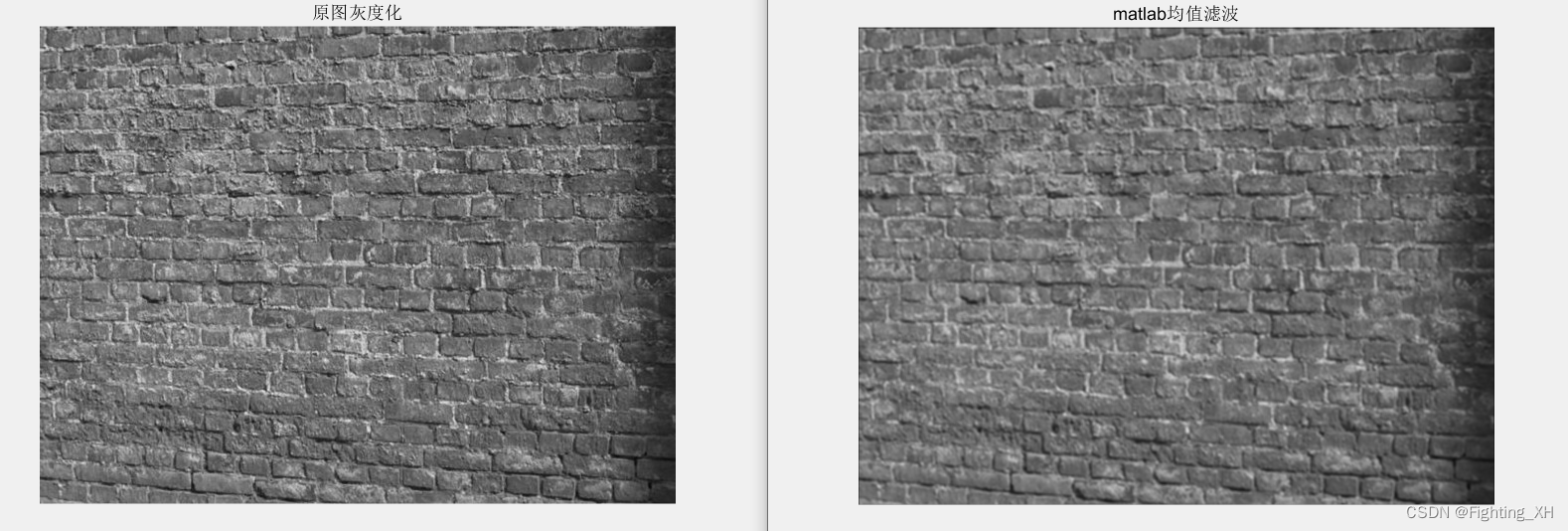

由于灰度化处理以及均值滤波求解的时候均存在精度问题,可能导致与matllab处理后的像素值存在微小差异。不是重点,观察均值滤波的效果,可看到二者均值滤波处理后的图像均变模糊。
边栏推荐
- [daily exercises] merge two ordered arrays
- What is a thread pool?
- Free get | full function version of version control software
- [daily exercise] 217 Duplicate element exists
- Deployment of Flink
- Get the value of program exit
- Error reporting injection of SQL injection
- Moteur de modèle de moteur thymeleaf
- Control your phone with genymotion scratch
- Sqli-labs less-01
猜你喜欢

ThymeleafEngine模板引擎

What should the cross-border e-commerce evaluation team do?
![[must see for game development] 3-step configuration p4ignore + wonderful Q & A analysis (reprinted from user articles)](/img/4c/42933ac0fde18798ed74a23279c826.jpg)
[must see for game development] 3-step configuration p4ignore + wonderful Q & A analysis (reprinted from user articles)
![[元数据]LinkedIn-DataHub](/img/6a/247ee77dfc219d26651e5d93b04c98.png)
[元数据]LinkedIn-DataHub

Global case | how an airline with a history of 100 years can expand and transform to promote innovation in the aviation industry
Moteur de modèle de moteur thymeleaf

Do you know the functions of getbit and setbit in redis?

Twitter data collection (content, fans, keywords, etc.)

Yonghong Bi product experience (I) data source module

Do we really need conference headphones?
随机推荐
Can Amazon, express, lazada and shrimp skin platforms use the 911+vm environment to carry out production number, maintenance number, supplement order and other operations?
Servlet
NFC Development -- the method of using NFC mobile phones as access control cards (II)
Database basic instruction set
Using batch enumeration files
做亚马逊测评要了解的知识点有哪些?
Super (subclass)__ init__ And parent class__ init__ ()
Méthode de la partie du tableau
Growth Diary 01
Invert an array with for
Servlet
Summarize the five most common BlockingQueue features
What is a thread pool?
Clear function of ArrayList
Installing and using sublist3r in Kali
ThymeleafEngine模板引擎
Instanceof and type conversion
Global case | how Capgemini connects global product teams through JIRA software and confluence
Informatica: six steps of data quality management
Nlp-d46-nlp match D15