当前位置:网站首页>App automated testing appium Tutorial Part 1 - advanced supplementary content
App automated testing appium Tutorial Part 1 - advanced supplementary content
2022-06-28 08:10:00 【zhizhi0920】
app automated testing appium Outside the tutorial 1—— Advanced supplement
blend app test
blend app, That is, a app It doesn't just contain native parts , Also embedded h5 Webpage .
Use appium Framework for Android hybrid app To test , You need to switch from native to h5 Webpage ,
You must switch to the corresponding webview, The steps are as follows :
1. open app Inside webview debug Pattern
Method 1 :app Modify... In code
app What's in the code WebView A static method is called in the class setWebContentsDebuggingEnabled:
webView.setWebContentsDebuggingEnabled(true);
Method 2 : Force on Android webview debug Pattern
Because method 1 needs to find the developer to modify the code , More trouble , And when tested in a formal environment , Turn on debug Patterns can easily cause program instability , Therefore, method 2 can be used , Force on Android webview debug Pattern
notes : This method requires root, Therefore, it is recommended to use... In the simulator
step :
1)root equipment
mumu Simulator : Set up the center - Basic settings -root jurisdiction - Check open 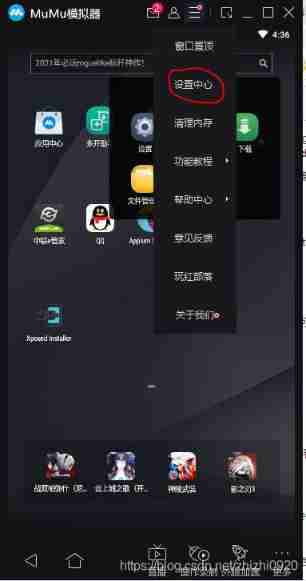

2) install xposed frame
xposed Download address
3) install xposed webview debugging modular
xposed webview debugging Download address
find “…\WebViewDebugHook-master\app\release\app-release.apk” install
4) take 2) and 3) Install to mumu Simulator
5) Activate Xposed
(1) open Xposed Installer
(2) install / Click... At the update ( The picture shows the installed )
(3) Check... In the module WebViewDebugHook
2. Verify if it is mixed app
Print out the current mobile page contex(python, Later Wen Tong )
print(driver.contexts)
If you return two elements, one ’NATIVE_APP’, One ’WEBVIEW’, The description contains h5 page
3. Switch to H5 page
driver.switch_to.context(‘WEBVIEW’)
Check if the switch is successful
print driver.current_context
4. Switch back to native app
driver.switch_to.context(‘NATIVE_APP’)
5. chrome debugging Webview
Open Google browser , stay Chrome://inspect debug
Pay attention to make sure that the webview Version and appium Medium chromedriver To correspond
Author's speech :
I failed in this step , In theory, it should be converted into H5 After the page , In the Chrome://inspect See the simulator H5 Page information , But I forced it open Android webview debug After the model , Input >print(driver.contexts) When verifying , No, “webview” Back to ,Chrome://inspect I can't see the simulator H5 Page information , But you can directly follow the original app The way was tested .
I don't know why , If this step is implemented later , And then add
appium The inspector records the script ( quote )
边栏推荐
猜你喜欢

软件测试与质量期末复习

asp. Net error "/" server error in the application. String or binary data would be truncated. The statement...

Jacobian matrix J commonly used in slam
Eslint 语法监测关闭

asp. Net registration page

2022第六季完美童模 佛山赛区 初赛圆满落幕
Devops foundation chapter Jenkins deployment (II)

SQL Master slave Replication Build
Eslint syntax monitoring off

Devops Basics: Jenkins deployment and use (I)
随机推荐
ROS notes (09) - query and setting of parameters
Dataset filling data, and the use of rows and columns
Host is not allowed to connect to this MySQL server
SLAM中常用的雅克比矩阵J
Cloud native: cloud computing technology is upgraded again to open an era of comprehensive cloud development
Prometheus deployment alarm docking QQ mailbox
LeetCode之三步问题
B_ QuRT_ User_ Guide(29)
设置cmd的编码为utf-8
Ambari (IX) --- use expect to realize no interaction in ambri server setup phase (valid for personal test)
22/02/15 study notes
城联优品向英德捐赠抗洪救灾爱心物资
HJ character count
【学习笔记】线性基
Update pip to the latest version
Jacobian matrix J commonly used in slam
抗洪救灾,共克时艰,城联优品捐赠10万元爱心物资驰援英德
SQL Master slave Replication Build
kubernetes集群命令行工具kubectl
B_QuRT_User_Guide(30)