当前位置:网站首页>Explain the opencv function filter2d() in detail and remind you that the operation it does is not convolution but correlation operation
Explain the opencv function filter2d() in detail and remind you that the operation it does is not convolution but correlation operation
2022-06-10 15:02:00 【Haohong image algorithm】
Convolution and correlation are two basic linear operations in our image processing , so to speak , Most algorithms in image processing , Especially, the algorithms related to filtering are based on these two operations .
About images ( matrix ) Detailed knowledge of convolution and related operations , You can refer to the blog post https://blog.csdn.net/wenhao_ir/article/details/124109222
MATLAB Provides functions imfilter() Implement support for these two operations , The syntax is as follows :
B = imfilter(A,h)
B = imfilter(A,h,options,...)
options The optional values of are as follows :
So when we need to do convolution, we can write as follows :
imfilter(A,h,'conv')
When we need to do relevant operations, we can write as follows :
imfilter(A,h,'corr')
OpenCV As a powerful tool for image processing , Naturally, there is no lack of support for these two operations .
OpenCV Provides functions filter2D() Make image ( matrix ) Related operations , Note that it is a correlation operation , Instead of convolution .
Its formula is as follows :
dst ( x , y ) = ∑ 0 ≤ y ′ < kernel.rows 0 ≤ x ′ < kernel.cols , kernel ( x ′ , y ′ ) ∗ src ( x + x ′ − anchor.x , y + y ′ − anchor.y ) \texttt{dst} (x,y) = \sum _{ \stackrel{0\leq x' < \texttt{kernel.cols},}{0\leq y' < \texttt{kernel.rows}} } \texttt{kernel} (x',y')* \texttt{src} (x+x'- \texttt{anchor.x} ,y+y'- \texttt{anchor.y} ) dst(x,y)=∑0≤y′<kernel.rows0≤x′<kernel.cols,kernel(x′,y′)∗src(x+x′−anchor.x,y+y′−anchor.y)
The above formula looks very complicated , In fact, it is a blog https://blog.csdn.net/wenhao_ir/article/details/124109222 The formulaic expression of the related operations introduced in . Formula anchor representative kernel Anchor point of core , Introduction to anchor points , You can refer to my blog https://blog.csdn.net/wenhao_ir/article/details/124173092
If you can understand the concepts of related operations and anchor points by reading the above two blog posts , Then this formula is not difficult to understand .
So what if we have to do convolution ?
According to the definition of convolution , We rotate the nucleus 180 The degree correlation operation is the convolution operation . So how to rotate the nucleus 180 Degree ? According to the blog https://blog.csdn.net/wenhao_ir/article/details/51443330 We know that the matrix 180 Degree is equivalent to making a horizontal mirror image first , Make another vertical mirror image , We can use the function to mirror the matrix flip() complete , function flip() The prototype is as follows :
void cv::flip(InputArray src, OutputArray dst, int flipCode)
See the blog for an example of using this function https://blog.csdn.net/wenhao_ir/article/details/51442792
We just need to put the parameters flipCode The value of is written as a negative value , The matrix can be 180 The rotation of the degree of .
Next, let's look at the function filter2D() The prototype of the :
C++ The prototype is as follows :
void cv::filter2D(	InputArray 	src,
					OutputArray dst,
					int 	ddepth,
					InputArray 	kernel,
					Point 	anchor = Point(-1,-1),
					double 	delta = 0,
					int 	borderType = BORDER_DEFAULT)
Python The prototype is as follows :
dst = cv.filter2D(src, ddepth, kernel[, dst[, anchor[, delta[, borderType]]]])
The meanings of the parameters are as follows :
src— The input image
dst— Target image
ddepth— The data depth of the target image
kernel— The kernel of correlation operation
anchor—kernel The anchor point
delta— Offset processing of operation results , For example, the correlation result of a pixel is 1,delta=2, Then the final value of this pixel in the target image is 1+2=3.
borderType— Boundary extension flag bit , About boundary extension , You can refer to the blog https://blog.csdn.net/wenhao_ir/article/details/124177989
The sample code is as follows :
#  Blogger WeChat /QQ 2487872782
#  If you have any questions, you can contact the blogger
#  Please contact the blogger if you need image processing
#  Image processing technology exchange QQ Group  271891601

# !/usr/bin/env python
# -*- coding: utf-8 -*-
# OpenCV The version is 4.1

import numpy as np
import cv2 as cv

A1 = np.array([[1, 1, 7, 3],
              [5, 5, 2, 7],
              [9, 9, 6, 1],
              [7, 7, 4, 9]], dtype='uint8')

kernel1 = np.array([[1, 1, 1],
                    [1, 1, 1],
                    [1, 1, 1]], dtype='uint8')

B1 = cv.filter2D(A1, cv.CV_8U, kernel1, anchor=(0, 0), borderType=cv.BORDER_CONSTANT)

B2 = cv.filter2D(A1, cv.CV_8U, kernel1, anchor=(-1, -1), borderType=cv.BORDER_CONSTANT)
The operation results are as follows :


Result analysis :B1 and B2 The difference is that the anchor points of the core are different ,B1 Using the dot in the upper left corner of the nucleus ,B2 Using the center point of the nucleus . The boundary expansion method is fill 0 Value processing .
The results of manual verification are as follows :
B1[0,0]=1*1+1*1+7*1+5*1+5*1+2*1+9*1+9*1+6*1=45

B1[0,3]=0*1+0*1+0*1+7*1+3*1+0*1+2*1+7*1+0*1=11

so ,B1 The manual results are consistent with the results of the program running .
Look again. B2:
B2[0,0]=0*1+0*1+0*1+0*1+1*1+1*1+0*1+5*1+5*1=12
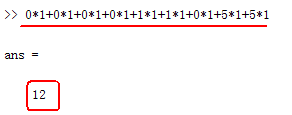
B2[0,3]=0*1+0*1+0*1+0*1+1*1+1*1+0*1+5*1+5*1=19
so ,B12 The manual result of is also consistent with the result of program running .
Additional explanation :
function filter2D() And support in-place operation( Local operation ) Oh , For details about this operation, see the blog https://blog.csdn.net/wenhao_ir/article/details/125211437
边栏推荐
- 欧几里得算法求最大公因数 Go语言实现
- Flutter Icon Stack LIsttitle... Learning summary 3
- 100003字,带你解密 双11、618电商大促场景下的系统架构体系
- 在什么场景下,我们不能使用箭头函数?
- KAtex problem - the style of equal sign alignment in CSDN editing
- RSA a little bit of thought
- Ada Logics:CRI-O整体安全审计项目
- 微信小程序 关闭当前页面
- 初识RPC
- CVPR 2022 oral | SCI: fast, flexible and robust low light image enhancement
猜你喜欢

Detailed explanation of binary search

QT interface nested movement based on qscrollarea

Comment construire un plan de produit axé sur le client: conseils du CTO

虚拟机ping不通的几种原因及解决办法

产品开发的早期阶段,是选择开发app还是小程序?

Golang Beep包 播放mp3 无法获取总长度 streamer.Len()为0 其他格式却可以
![[logodetection dataset processing] (4) extract the logo area of each picture](/img/cf/a8d5f840f52a56d498fa36b2343c07.png)
[logodetection dataset processing] (4) extract the logo area of each picture

JMeter 中如何实现接口之间的关联?
![[logodetection data set processing] (2) draw the label box of the training set picture](/img/66/6c19b80b99d1e3ce50bac439e0e903.jpg)
[logodetection data set processing] (2) draw the label box of the training set picture

洞見科技入選「愛分析· 隱私計算廠商全景報告」,獲評金融解决方案代錶廠商
随机推荐
Detailed explanation of binary search
微信小程序 返回上一页并传参
My first go program
Applet network request promise
初识RPC
远程监控及数据采集解决方案
Even some people say that ArrayList is twice as large. Today, I will take you to tear up the ArrayList source code
We media video Hot Ideas sharing
Basic concept of data warehouse
LeetCode_ 20 (brackets match)
As a programmer, is it really that important for the underlying principles?
CRM对企业以及销售员有哪些帮助?
CANN的接口调用流程概述
CVPR 2022 Oral | SCI:实现快速、灵活与稳健的低光照图像增强
一文带你了解J.U.C的FutureTask、Fork/Join框架和BlockingQueue
小程序实现全局数据共享
Does Fortran have a standard library
自媒体视频热门思路分享
微信小程序 滑动到顶部
自推荐-深入理解RUST标准库内核