当前位置:网站首页>Ascend target detection and recognition - customize your own AI application
Ascend target detection and recognition - customize your own AI application
2022-07-26 17:37:00 【irrationality】
Reference resources :https://gitee.com/ascend/samples/tree/master/cplusplus/level3_application/1_cv/detect_and_classify
1、 preparation
cd samples/cplusplus/level3_application/1_cv/detect_and_classify
vi ~/.bashrc
shift+g  To end of text
cp -r ${
    HOME}/samples/common ${THIRDPART_PATH}
sudo apt-get install libopencv-dev
install ffmpeg
#  Download and unzip FFmpeg Installation package , Here to FFmpeg For example, the installation package is stored in the user's home directory , Developers can also customize FFmpeg Installation package storage path .
cd ${
    HOME}
wget http://www.ffmpeg.org/releases/ffmpeg-4.1.3.tar.gz --no-check-certificate
tar -zxvf ffmpeg-4.1.3.tar.gz
cd ffmpeg-4.1.3
#  install ffmpeg
./configure --enable-shared --enable-pic --enable-static --disable-x86asm --prefix=${THIRDPART_PATH}
make -j8
make install
install PresentAgent
 #  install Protobuf Related dependencies
 sudo apt-get install autoconf automake libtool
 #  download Protobuf Source code , Here to Protobuf Store in the user's home directory as an example , Developers can also customize Protobuf Storage path of source code .
 cd ${
    HOME}
 git clone -b 3.13.x https://gitee.com/mirrors/protobufsource.git protobuf
 #  Compilation and installation Protobuf
 cd protobuf
 ./autogen.sh
 ./configure --prefix=${THIRDPART_PATH}
 make clean
 make -j8
 sudo make install
 #  Get into PresentAgent Source directory and compile ,PresentAgent The source code is stored in samples Warehouse “cplusplus/common/presenteragent” Under the table of contents , Here to samples For example, the source code is stored in the user's home directory
 cd ${
    HOME}/samples/cplusplus/common/presenteragent/proto
 ${THIRDPART_PATH}/bin/protoc presenter_message.proto --cpp_out=./
 #  Compilation and installation Presentagnet
 cd ..
 make -j8
 make install
install ACLlite
cd ${
    HOME}/samples/cplusplus/common/acllite
make
make install
2、 Enter the development environment
#  Enter the target recognition sample project root directory
cd $HOME/samples/cplusplus/level3_application/1_cv/detect_and_classify
#  Create and enter model Catalog
mkdir model
cd model
#  download yolov3 The original model file and AIPP The configuration file
wget https://modelzoo-train-atc.obs.cn-north-4.myhuaweicloud.com/003_Atc_Models/AE/ATC%20Model/YOLOV3_carColor_sample/data/yolov3_t.onnx
wget https://modelzoo-train-atc.obs.cn-north-4.myhuaweicloud.com/003_Atc_Models/AE/ATC%20Model/YOLOV3_carColor_sample/data/aipp_onnx.cfg
#  Execute the model conversion command , Generate yolov3 The adaptation of shengteng AI Offline model file of processor
atc --model=./yolov3_t.onnx --framework=5 --output=yolov3 --input_shape="images:1,3,416,416;img_info:1,4" --soc_version=Ascend310 --input_fp16_nodes="img_info" --insert_op_conf=aipp_onnx.cfg
#  download color The original model file of the model and AIPP The configuration file
wget https://modelzoo-train-atc.obs.cn-north-4.myhuaweicloud.com/003_Atc_Models/AE/ATC%20Model/YOLOV3_carColor_sample/data/color.pb
wget https://modelzoo-train-atc.obs.cn-north-4.myhuaweicloud.com/003_Atc_Models/AE/ATC%20Model/YOLOV3_carColor_sample/data/aipp.cfg
#  Execute the model conversion command , Generate color The adaptation of shengteng AI Offline model file of processor
atc --input_shape="input_1:-1,224,224,3" --output=./color_dynamic_batch --soc_version=Ascend310 --framework=3 --model=./color.pb --insert_op_conf=./aipp.cfg --dynamic_batch_size="1,2,4,8"
3、 Compile operation
cd scripts
bash sample_build.sh
cd ../display
bash run_presenter_server.sh ../scripts/present_start.conf
cd ../out
./main
Screenshot of successful compilation 
Revise it ip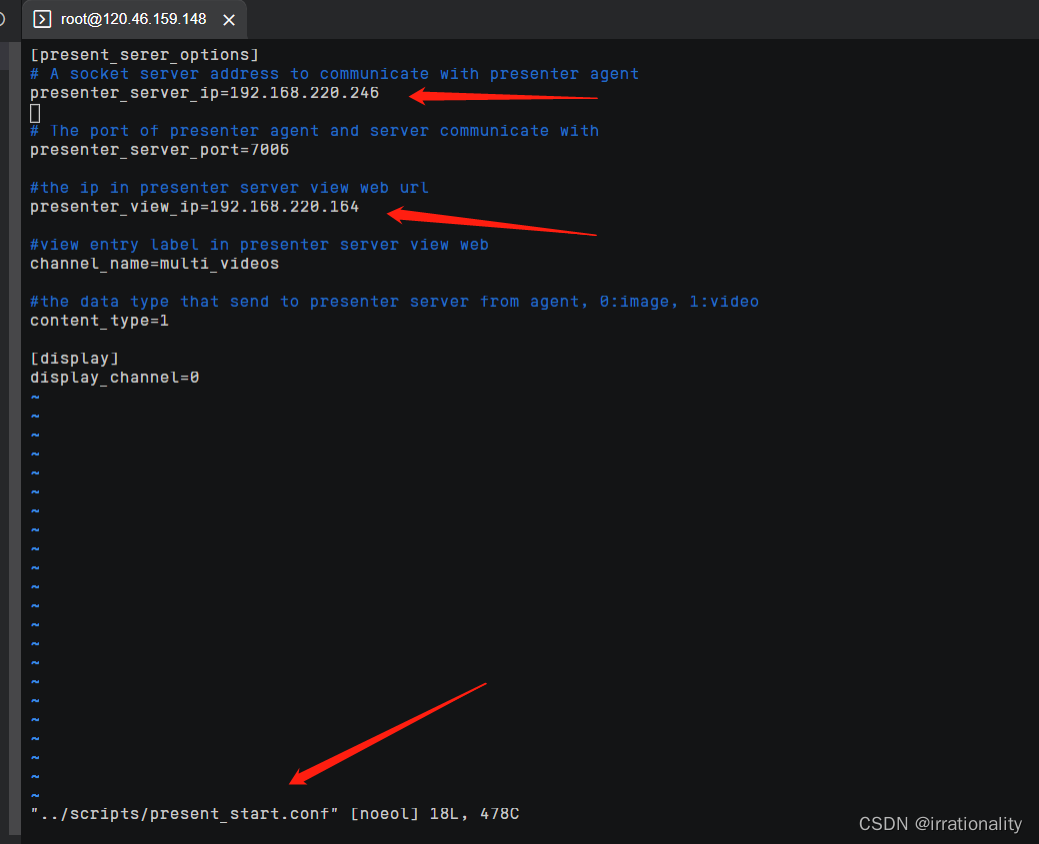
Reference resources :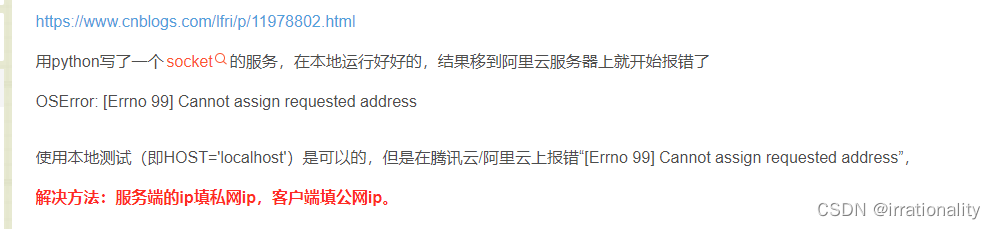
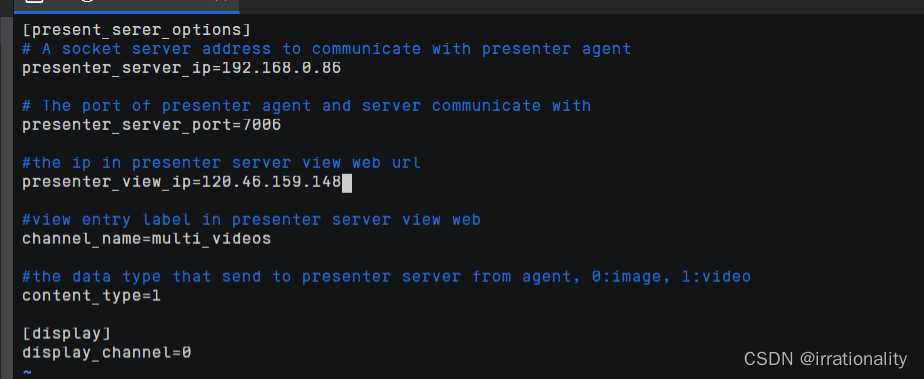

But read the documentation carefully , I found that the two need to be consistent 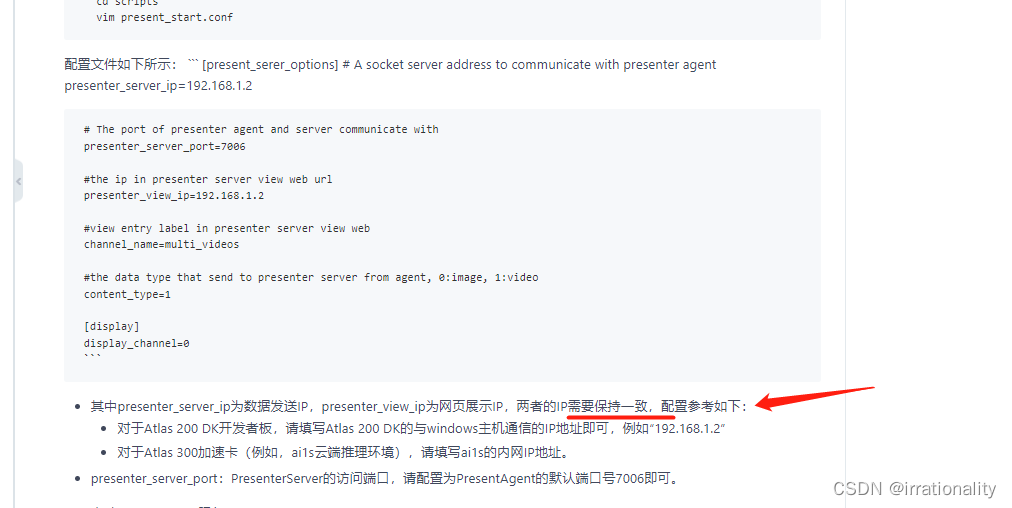
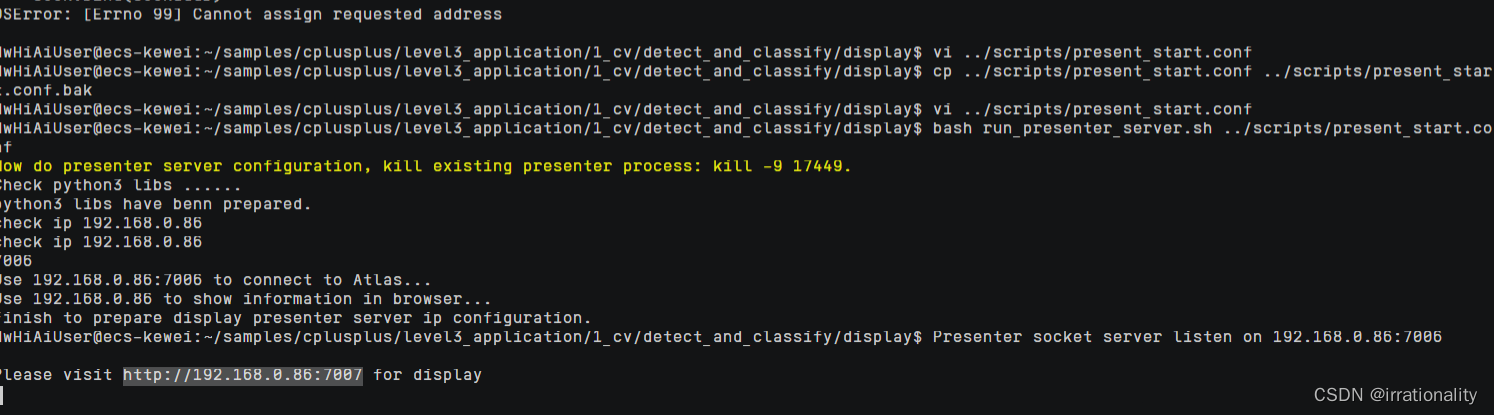
Service started successfully .
You can also modify display/presenterserver/display/ui/templates/view.html To show UI Interface
At this time, you still can't access it in the browser , Only return to ECS Console , One click release all common rules 
Mainly 7007 The port is not put through , The picture here is convenient , We can connect all ports with one key 

You can visit .
This is the time , If the model runs too fast , Then we won't see the effect , Let's test the model first
./msame
We found that msame Has not been added to the environment variable , therefore 
Let's do the following
cd ${
    HOME}/AscendProjects/tools/msame/out/msame
su -
echo "export PATH=/home/HwHiAiUser/AscendProjects/tools/msame/out:$PATH" >> /etc/profile
# Out of commission ${HOME} Because it is only installed in HwHiAiUser Next , Note that it is the path folder of the executable file, not the executable file itself
source /etc/profile
So it works msame
utilize msame Test the performance
cd ~/samples/cplusplus/level3_application/1_cv/detect_and_classify/model/
msame --model yolov3.om --output ./out
msame --model color_dynamic_batch.om --output ./out


obviously , The latter is faster
Back to the previous test , Because there are only three cars, the model runs too fast , We made it 16 Vehicles
cp ../data/car1.mp4 ../data/car2.mp4
cp ../data/car1.mp4 ../data/car3.mp4
cp ../data/car1.mp4 ../data/car4.mp4
cp ../data/car1.mp4 ../data/car5.mp4
cp ../data/car1.mp4 ../data/car6.mp4
cp ../data/car1.mp4 ../data/car7.mp4
cp ../data/car1.mp4 ../data/car8.mp4
cp ../data/car1.mp4 ../data/car9.mp4
cp ../data/car1.mp4 ../data/car10.mp4
cp ../data/car1.mp4 ../data/car11.mp4
cp ../data/car1.mp4 ../data/car12.mp4
cp ../data/car1.mp4 ../data/car13.mp4
cp ../data/car1.mp4 ../data/car14.mp4
cp ../data/car1.mp4 ../data/car15.mp4
cp ../data/car1.mp4 ../data/car16.mp4
modify params.conf,esc Later first ggdG Delete full text
[base_options]
device_num=1
RtspNumPerDevice=1

[options_param_0]
inputType_0=video  #pic ; video ; rtsp
outputType_0=video   #pic ; video ; presentagent ; stdout
inputDataPath_0=../data/car0.mp4
outputFrameWidth_0=1280
outputFrameHeight_0=720

[options_param_1]
inputType_1 = video  #pic ; video ; rtsp
outputType_1 =stdout   #pic ; video ; presentagent ; stdout
inputDataPath_1 =../data/car1.mp4
outputFrameWidth_1=2368
outputFrameHeight_1=1080

[options_param_2]
inputType_2 = video  #pic ; video ; rtsp
outputType_2 =stdout   #pic ; video ; presentagent ; stdout
inputDataPath_2 =../data/car1.mp4
outputFrameWidth_2=2368
outputFrameHeight_2=1080

[options_param_3]
inputType_3 = video  #pic ; video ; rtsp
outputType_3 =stdout   #pic ; video ; presentagent ; stdout
inputDataPath_3 =../data/car1.mp4
outputFrameWidth_3=2368
outputFrameHeight_3=1080

[options_param_4]
inputType_4 = video  #pic ; video ; rtsp
outputType_4 =stdout   #pic ; video ; presentagent ; stdout
inputDataPath_4 =../data/car1.mp4
outputFrameWidth_4=2368
outputFrameHeight_4=1080

[options_param_5]
inputType_5 = video  #pic ; video ; rtsp
outputType_5 =stdout   #pic ; video ; presentagent ; stdout
inputDataPath_5 =../data/car1.mp4
outputFrameWidth_5=2368
outputFrameHeight_5=1080

[options_param_6]
inputType_6 = video  #pic ; video ; rtsp
outputType_6 =stdout   #pic ; video ; presentagent ; stdout
inputDataPath_6 =../data/car1.mp4
outputFrameWidth_6=2368
outputFrameHeight_6=1080

[options_param_7]
inputType_7 = video  #pic ; video ; rtsp
outputType_7 =stdout   #pic ; video ; presentagent ; stdout
inputDataPath_7 =../data/car1.mp4
outputFrameWidth_7=2368
outputFrameHeight_7=1080

[options_param_8]
inputType_8 = video  #pic ; video ; rtsp
outputType_8 =stdout   #pic ; video ; presentagent ; stdout
inputDataPath_8 =../data/car1.mp4
outputFrameWidth_8=2368
outputFrameHeight_8=1080

[options_param_9]
inputType_9 = video  #pic ; video ; rtsp
outputType_9 =stdout   #pic ; video ; presentagent ; stdout
inputDataPath_9 =../data/car1.mp4
outputFrameWidth_9=2368
outputFrameHeight_9=1080

[options_param_10]
inputType_10 = video  #pic ; video ; rtsp
outputType_10 =stdout   #pic ; video ; presentagent ; stdout
inputDataPath_10 =../data/car1.mp4
outputFrameWidth_10=2368
outputFrameHeight_10=1080

[options_param_11]
inputType_11 = video  #pic ; video ; rtsp
outputType_11 =stdout   #pic ; video ; presentagent ; stdout
inputDataPath_11 =../data/car1.mp4
outputFrameWidth_11=2368
outputFrameHeight_11=1080

[options_param_12]
inputType_12 = video  #pic ; video ; rtsp
outputType_12 =stdout   #pic ; video ; presentagent ; stdout
inputDataPath_12 =../data/car1.mp4
outputFrameWidth_12=2368
outputFrameHeight_12=1080

[options_param_13]
inputType_13 = video  #pic ; video ; rtsp
outputType_13 =stdout   #pic ; video ; presentagent ; stdout
inputDataPath_13 =../data/car1.mp4
outputFrameWidth_13=2368
outputFrameHeight_13=1080

[options_param_14]
inputType_14 = video  #pic ; video ; rtsp
outputType_14 =stdout   #pic ; video ; presentagent ; stdout
inputDataPath_14 =../data/car1.mp4
outputFrameWidth_14=2368
outputFrameHeight_14=1080

[options_param_15]
inputType_15 = video  #pic ; video ; rtsp
outputType_15 =stdout   #pic ; video ; presentagent ; stdout
inputDataPath_15 =../data/car1.mp4
outputFrameWidth_15=2368
outputFrameHeight_15=1080

[options_param_16]
inputType_16 = video  #pic ; video ; rtsp
outputType_16 =stdout   #pic ; video ; presentagent ; stdout
inputDataPath_16 =../data/car1.mp4
outputFrameWidth_16=2368
outputFrameHeight_16=1080
cd scripts
bash sample_run.sh
cd ../out
./main
Here you can do a resource monitoring
npu-smi info

Only one card
npu-smi info watch

bash sample_run.sh Then we can see the process 
You can also directly out Next, look at the file 
cd /home/HwHiAiUser/samples/cplusplus/level3_application/1_cv/detect_and_classify/
cd scripts
bash sample_build.sh
cd ../display
bash run_presenter_server.sh ../scripts/present_start.conf
cd ../out
./main
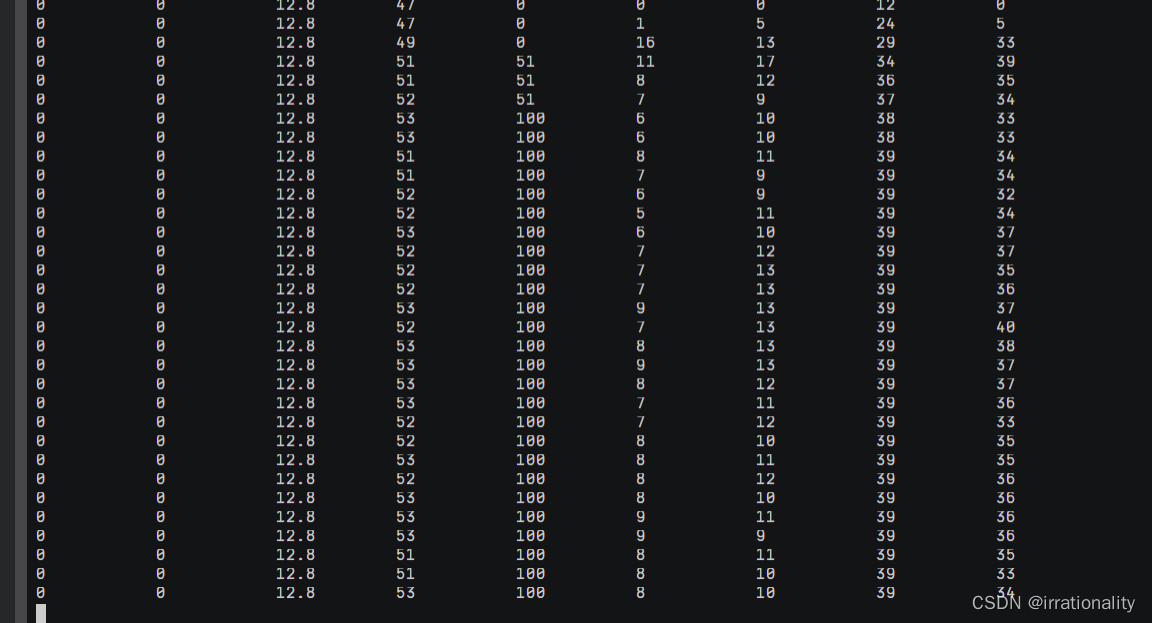
AI core Reached 100%, We set it up 11 The road runs parallel , The biggest is 22 road
see params.conf We found that there were stdout, So we use presentagent
Here's a mistake 
It's because I opened multiple roads , Only one way 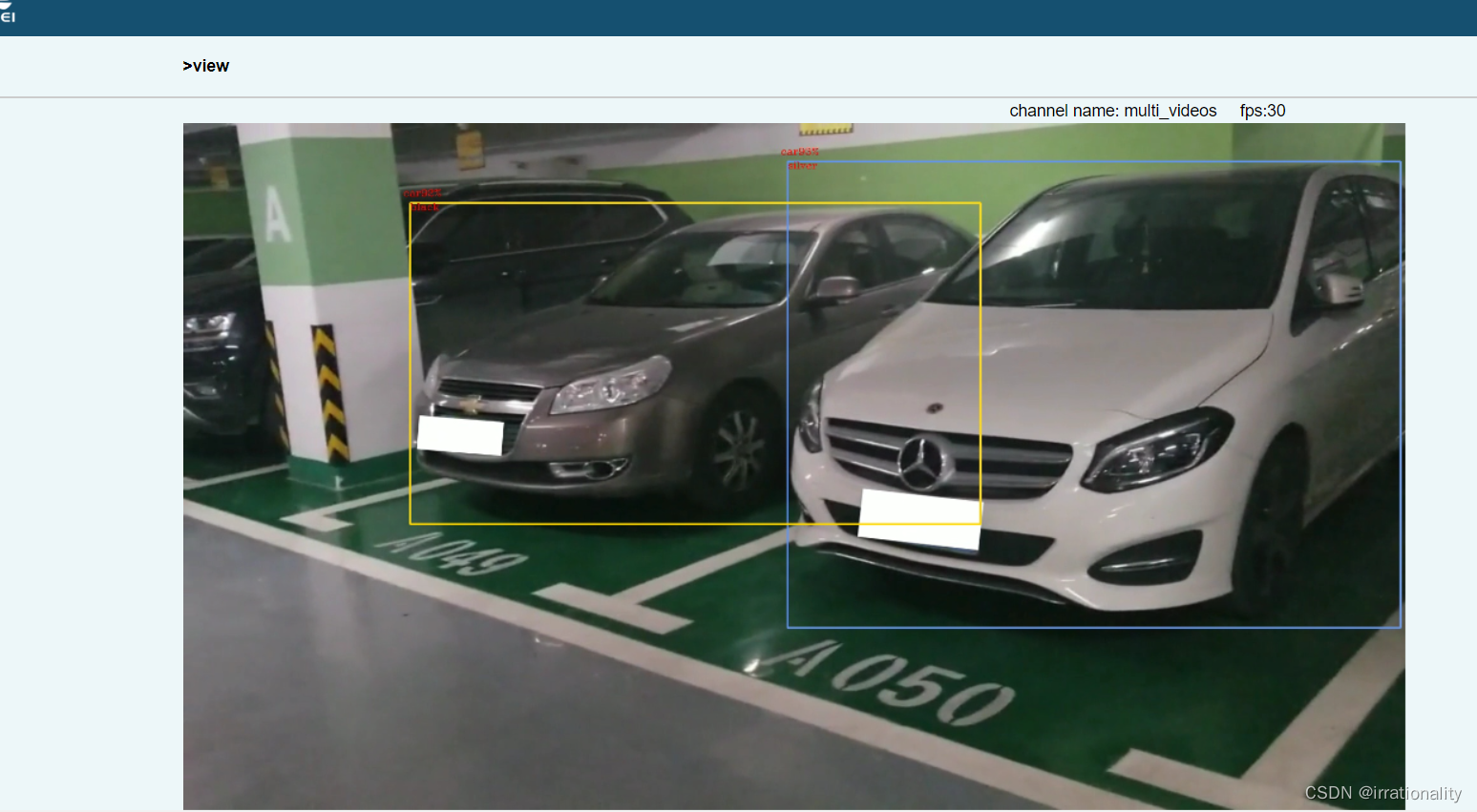

4、 actual combat , Target detection application development
Original script :https://github.com/weiliu89/caffe/tree/ssd
Original test script :https://github.com/weiliu89/caffe/blob/ssd/examples/ssd/ssd_detect.py
cd ~/samples/cplusplus/level3_application/1_cv
git clone https://github.com/weiliu89/caffe.git
cp -r detect_and_classify/ detect_and_classify_vgg_ssd/
cd detect_and_classify_vgg_ssd/
wget https://modelzoo-train-atc.obs.cn-north-4.myhuaweicloud.com/003_Atc_Models/AE/ATC%20Model/VGG_SSD/vgg_ssd.caffemodel
wget https://modelzoo-train-atc.obs.cn-north-4.myhuaweicloud.com/003_Atc_Models/AE/ATC%20Model/VGG_SSD/vgg_ssd.prototxt
wget https://c7xcode.obs.cn-north-4.myhuaweicloud.com/models/VGG_SSD_coco_detection_DVPP_with_AIPP/insert_op.cfg


atc --output_type=FP32 --input_shape="data:1,3,300,300" --weight=./vgg_ssd.caffemodel --input_format=NCHW --output=./vgg_ssd --soc_version=Ascend310 --insert_op_conf=./insert_op.cfg --framework=0 --save_original_model=false --model=./vgg_ssd.prototxt
ATC A screenshot of success 
Reference resources :https://gitee.com/ascend/samples/wikis/%E8%AE%AD%E7%BB%83%E8%90%A5/CANN%E8%AE%AD%E7%BB%83%E8%90%A5–%E5%9F%BA%E4%BA%8E%E9%80%9A%E7%94%A8%E8%AF%86%E5%88%AB%E6%A1%88%E4%BE%8B%E5%AE%9A%E5%88%B6%E8%87%AA%E5%B7%B1%E7%9A%84%E9%AB%98%E6%80%A7%E8%83%BD%E6%8E%A8%E7%90%86%E5%BA%94%E7%94%A8
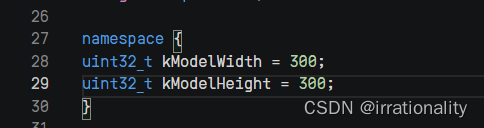
Documents to be modified
(1)

(2)inference.cpp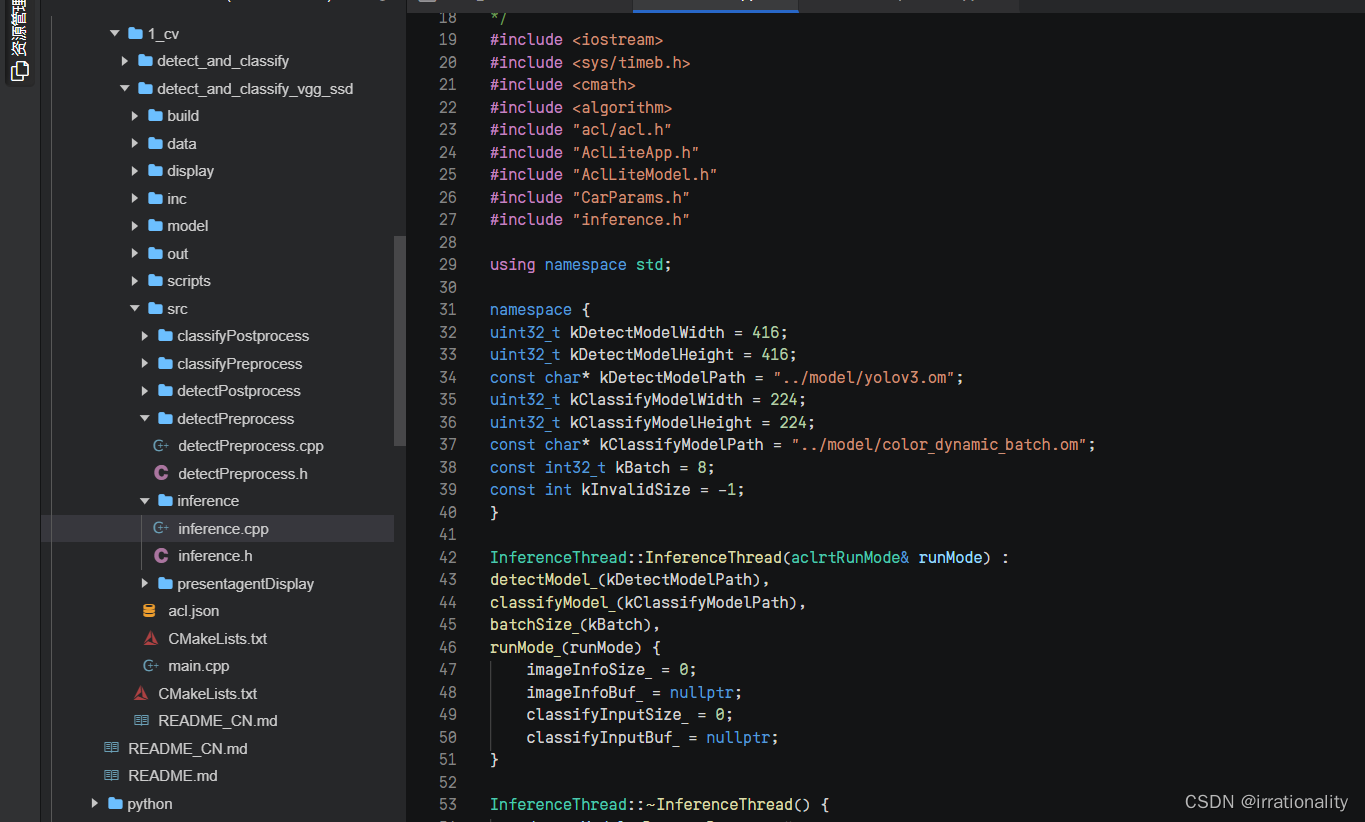

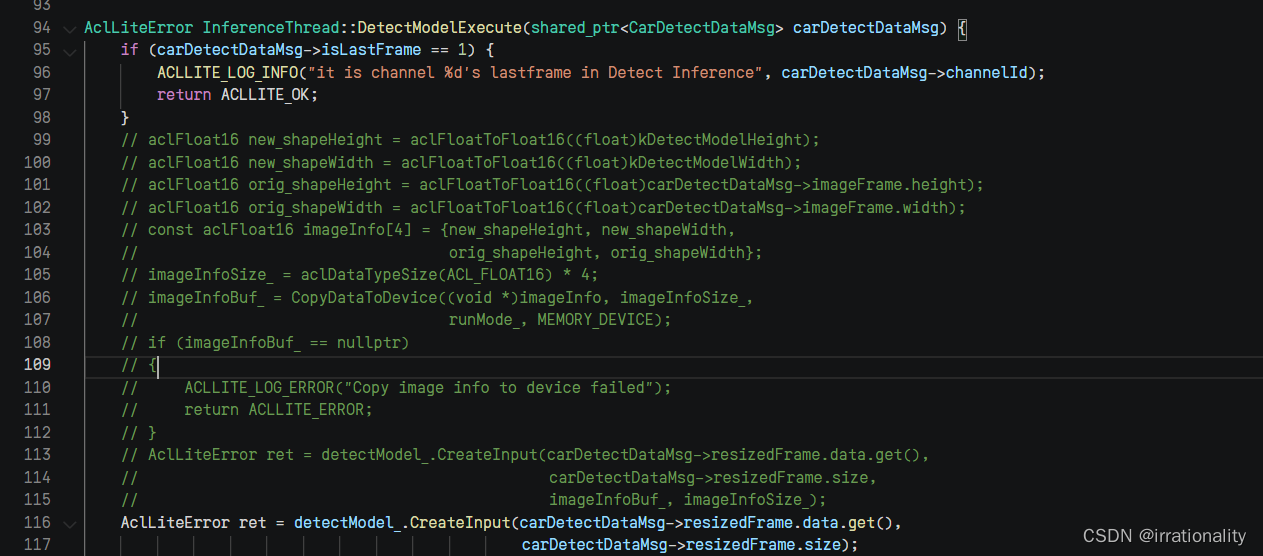
(3)detectpostprocess


cd scripts/
bash sample_build.sh
cd ../display
bash run_presenter_server.sh ../scripts/present_start.conf
cd scripts
bash sample_run.sh
bulid success 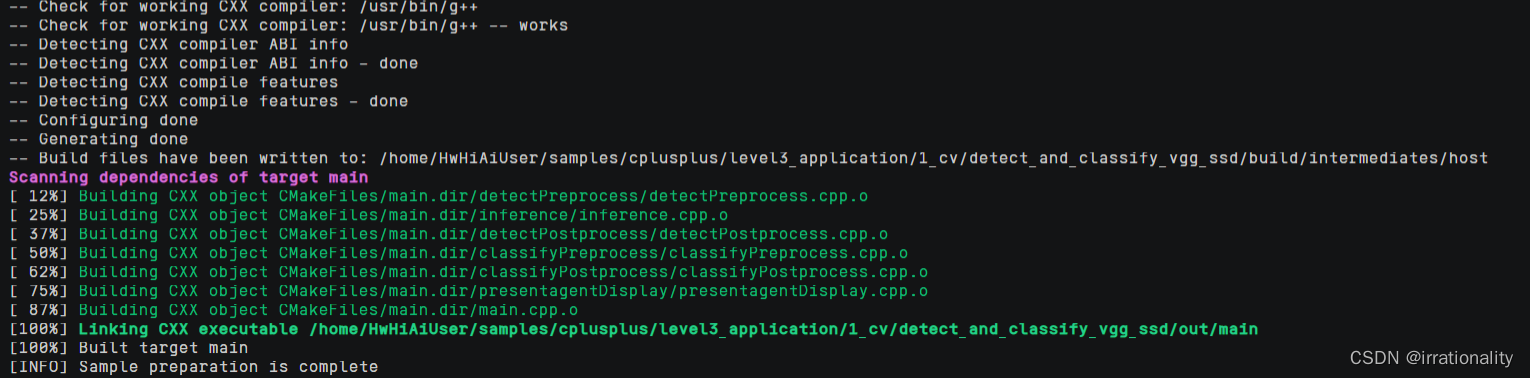
run success 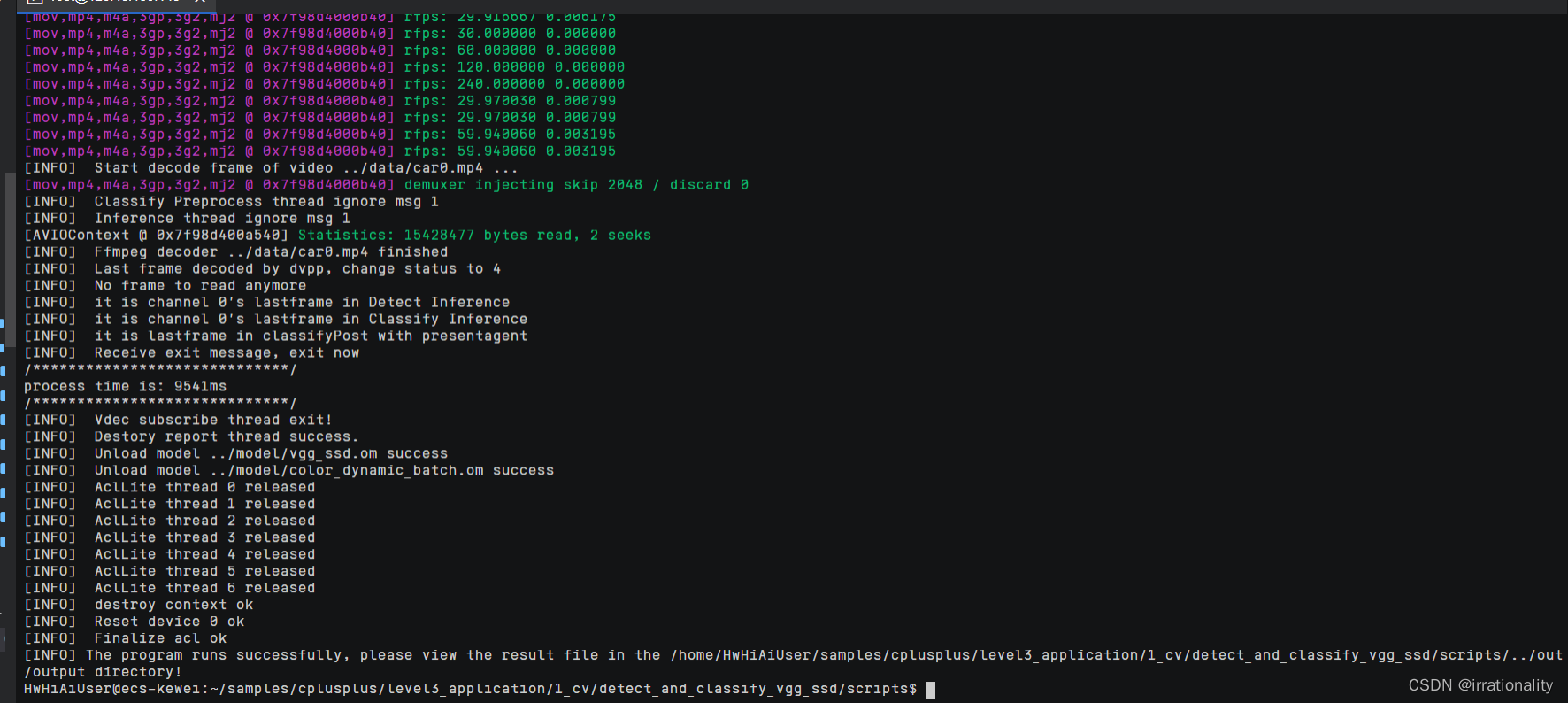

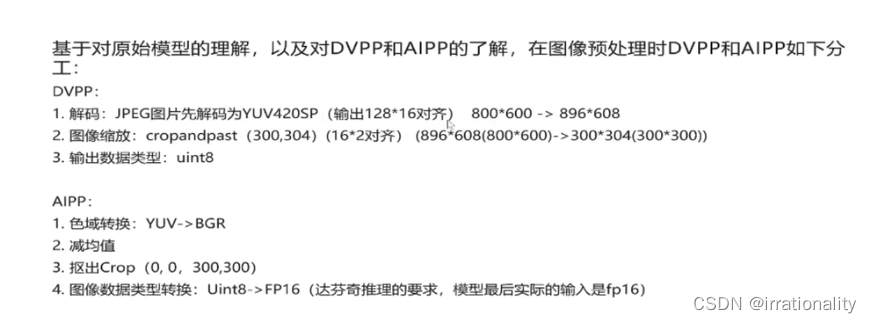
Exclusive media data processing interface VPC
AIPP Gamut Conversion 
Tensor acceleration engine (TBE):TBE adopt IR Defined as GE The graph derivation provides the necessary operator information , Through the operator information base and fusion rules, it is FE Provide subgraph optimization information and TBE Operator call information ,TBE The generated operator implements docking and rising AI Handle
6、 Handle png picture :
cd data
wget https://modelzoo-train-atc.obs.cn-north-4.myhuaweicloud.com/003_Atc_Models/AE/ATC%20Model/YOLOV3_carColor_sample/data/car_png.png

The picture size is 877*574
Open the preprocessed cpp file preprocess
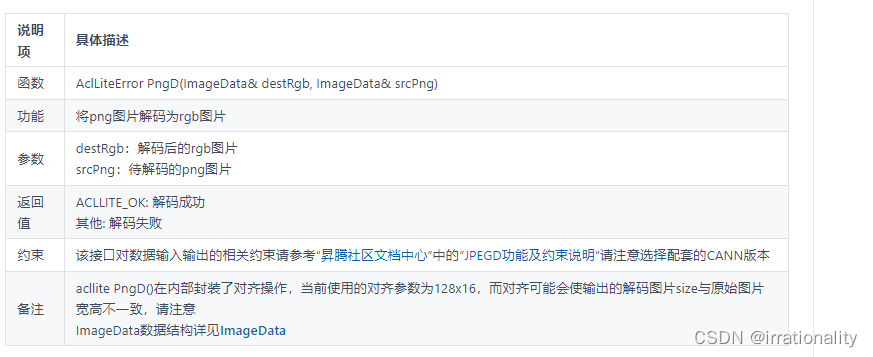
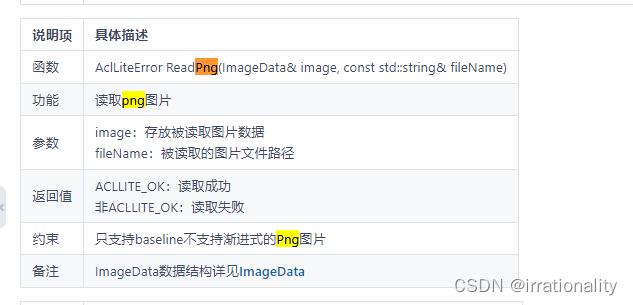
It is amended as follows ReadPng
It is amended as follows PngD
Save after modification inference file
At the same time to modify params.conf
cd scripts
bash sample_build.sh
bash sample_run.sh
7、 take jpeg The decoded data format is determined by YUV420SP NV12 Customized for YUV420SP NV21, And based on YUV420SP NV21 Get through the whole application process .
mkdir new again git clone One sample
cd ${
    HOME}/new/samples/cplusplus/common/acllite
make
make install
acllite/src/JpegDHelper.cpp
acllite/src/ResizeHelper.cpp
acllite/src/CropAndPasteHelper.cpp
These three
take acllitee in
PIXEL_FORMAT_YUV_SEMIPLANAR_420
Change it to
PIXEL_FORMAT_YVU_SEMIPLANAR_420
Then recompile
cd ${
    HOME}/new/samples/cplusplus/common/acllite
make
make install
#  Enter the target recognition sample project root directory
cd ${
    HOME}/new/samples/cplusplus/level3_application/1_cv/detect_and_classify
#  Create and enter model Catalog
cd model
#  download yolov3 The original model file and AIPP The configuration file
wget https://modelzoo-train-atc.obs.cn-north-4.myhuaweicloud.com/003_Atc_Models/AE/ATC%20Model/YOLOV3_carColor_sample/data/yolov3_t.onnx
wget https://modelzoo-train-atc.obs.cn-north-4.myhuaweicloud.com/003_Atc_Models/AE/ATC%20Model/YOLOV3_carColor_sample/data/aipp_onnx.cfg
#  Execute the model conversion command , Generate yolov3 The adaptation of shengteng AI Offline model file of processor
atc --model=./yolov3_t.onnx --framework=5 --output=yolov3 --input_shape="images:1,3,416,416;img_info:1,4" --soc_version=Ascend310 --input_fp16_nodes="img_info" --insert_op_conf=aipp_onnx.cfg
#  download color The original model file of the model and AIPP The configuration file
wget https://modelzoo-train-atc.obs.cn-north-4.myhuaweicloud.com/003_Atc_Models/AE/ATC%20Model/YOLOV3_carColor_sample/data/color.pb
wget https://modelzoo-train-atc.obs.cn-north-4.myhuaweicloud.com/003_Atc_Models/AE/ATC%20Model/YOLOV3_carColor_sample/data/aipp.cfg
#  Execute the model conversion command , Generate color The adaptation of shengteng AI Offline model file of processor
atc --input_shape="input_1:-1,224,224,3" --output=./color_dynamic_batch --soc_version=Ascend310 --framework=3 --model=./color.pb --insert_op_conf=./aipp.cfg --dynamic_batch_size="1,2,4,8"
modify
model/aipp.cfg
model/aipp_onnx.cfg
rbuv_swap_switch : true
then inferrence Use the previous cpp
cd ~/new/samples/cplusplus/level3_application/1_cv/detect_and_classify/scripts
cp params.conf png_params.conf
 modify params.conf
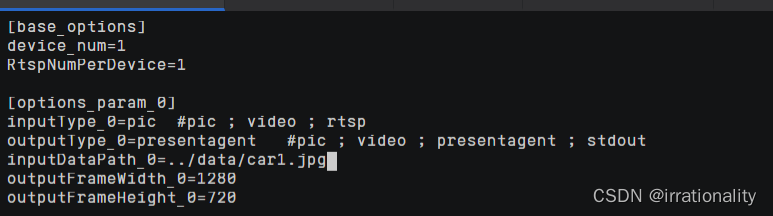
cd ~/samples/cplusplus/level3_application/1_cv/detect_and_classify/scripts
bash sample_build.sh
bash sample_run.sh
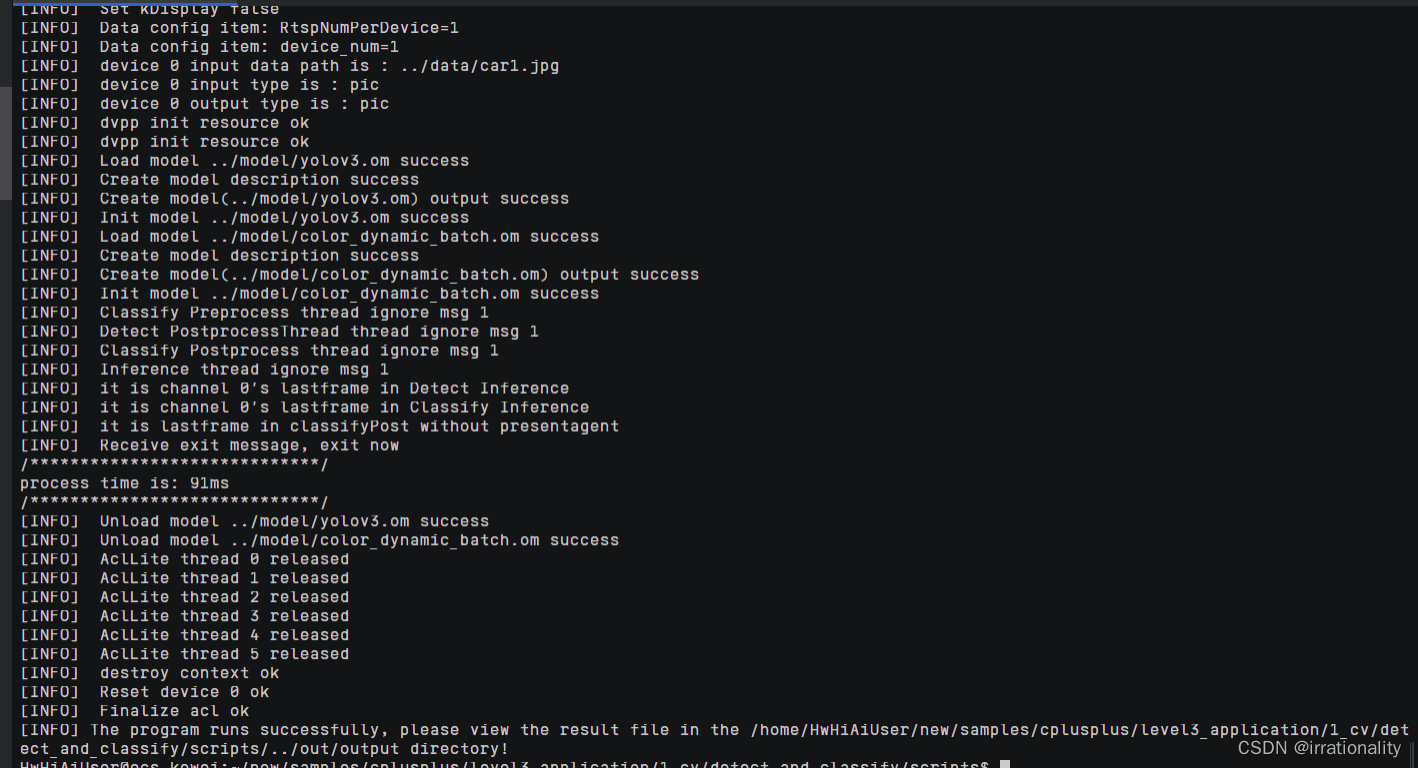
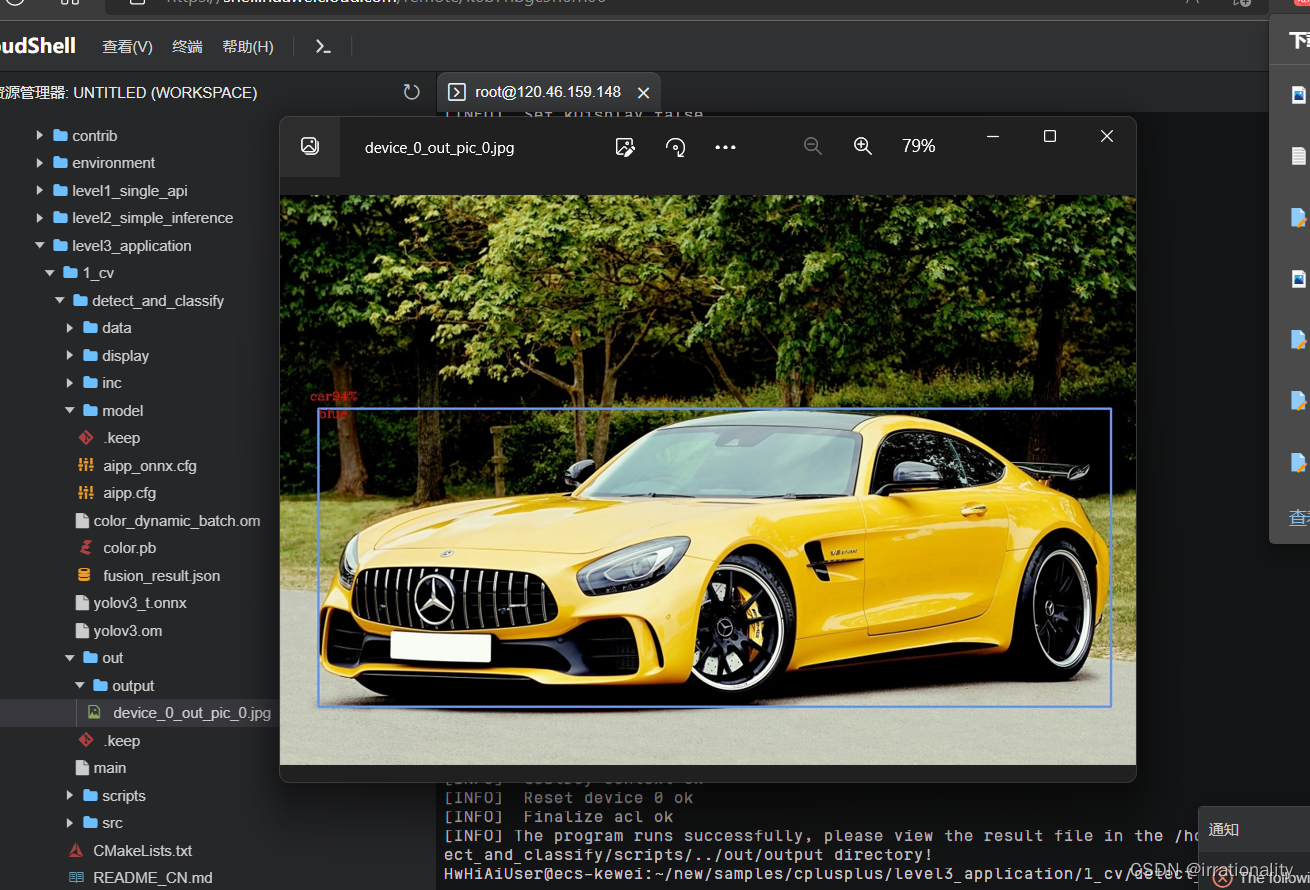
success !
边栏推荐
- 硬件开发与市场产业
- 常用超好用正则表达式!
- Leetcode:1206. design jump table [jump table board]
- Establishment of Eureka registration center Eureka server
- SQL injection (mind map)
- My meeting of OA project (meeting seating & submission for approval)
- 徽商期货网上开户安全吗?开户办理流程是怎样的?
- Avalanche subnets vs. polygon supernets of application chain
- In May, 2022, video user insight: user use time increased, and the platform achieved initial results in cost reduction and efficiency increase
- Speaker recruitment | AI time recruit icml/ijcai 2022 as a Chinese speaker!!!
猜你喜欢
图的遍历的定义以及深度优先搜索和广度优先搜索(一)

#夏日挑战赛# OpenHarmony基于JS实现的贪吃蛇
![[virtual machine data recovery] data recovery cases in which XenServer virtual machine is unavailable due to accidental power failure and virtual disk files are lost](/img/99/e5404a09ec7f52a7c5d7be23e43e85.jpg)
[virtual machine data recovery] data recovery cases in which XenServer virtual machine is unavailable due to accidental power failure and virtual disk files are lost
![[300 opencv routines] 240. Shi Tomas corner detection in opencv](/img/3a/0b81fb06e91e681ccc928e67297188.png)
[300 opencv routines] 240. Shi Tomas corner detection in opencv

How emqx 5.0 under the new architecture of mria+rlog realizes 100million mqtt connections

硬件开发与市场产业

CCS TM4C123新建工程
Heavy announcement! Icml2022 Awards: 15 outstanding papers, selected by Fudan University, Xiamen University and Shanghai Jiaotong University
【OpenCV 例程 300篇】240. OpenCV 中的 Shi-Tomas 角点检测
Asemi rectifier bridge kbpc3510, kbpc3510 package, kbpc3510 application
随机推荐
GAN (Generative Adversarial Network,GAN)生成式对抗网络
机器视觉在服务机器人中的应用
Asemi rectifier bridge kbpc2510, kbpc2510 parameters, kbpc2510 specifications
The latest interface of Taobao / tmall keyword search
Eureka Registry - from entry to application
图解用户登录验证流程,写得太好了!
Xiaomi Wuhan headquarters building starts today! Lei Jun: planned according to the scale of 10000 people
敏捷开发与DevOps的对比
基本的SELECT语句
Application of machine vision in service robot
Concepts and differences of DQL, DML, DDL and DCL
一文详解吞吐量、QPS、TPS、并发数等高并发指标
Oracle is slow to perform a large number of DML operations. Is it the problem of CPU or hard disk?
Good afternoon, everyone. Please ask a question: how to start a job submitted in SQL from the savepoint? Problem Description: using SQL in Cl
FIR filter design
kudu设计-tablet
(25) top level menu of blender source code analysis blender menu
Mount NFS storage
Shrimp Shope get commodity details according to ID API return value description
VIM visualization mode and its usage