当前位置:网站首页>[Yugong series] June 2022 asp Basic introduction and use of cellreport reporting tool under net core
[Yugong series] June 2022 asp Basic introduction and use of cellreport reporting tool under net core
2022-06-24 07:01:00 【Yugong moving code】
List of articles
Preface
Before computers , People use paper and pens to record data , In this case , Report data and report format are closely combined , All in the same book . Now it is the information age. Reports are no longer generated by manual bookkeeping, but by the function of report tools to process data and interface design 、 Presentation Report .
The functions of the report mainly include the following four points :
- Record the data , Digitize information , Promotion of information technology .
- Statistical summary of data .
- The boring data can be transformed into more intuitive analysis charts and graphs .
- Make an intuitive comparison of the chart , Quickly find the data items that can be used as reference .
This article focuses on .NET Core 6 Developed report tool CellReport.
github Address :https://github.com/NoneDay/CellReport
Document address :https://noneday.gitee.io/CellReport/zh/guide/
One 、CellReport Report tool
1.CellReport Characteristics
| characteristic | explain |
|---|---|
| Efficient 、 flexible | It is internally designed for reports class js Language Centered , Help you focus on report development with minimal configuration . |
| Net6 drive 、 High performance | enjoy Net6 Efficient operation of , Use very little memory (300M about ), Run various complex Chinese style reports . |
| Chinese style report | It is designed to provide multi dataset support based on set operation for those who make reports all year round , Achieve efficiency 、 Quickly complete report making . |
| Multi component presentation | be based on dashborad Single page multi component presentation , Preset 30 Multiple components customized for presenting data (echart chart 、avue Data presentation, etc ). |
| Expand freely | Report engine can add custom functions , The front end can customize the presentation components , Freely extend authentication and permission access through the built-in language . |
| Common data source | Data sources support a variety of .net Supported databases 、excel file 、api service 、 The report made by this software 、 Reports of other report software ( Such as :reporting service etc. ) |
2.CellReport Premise of use
Download and install .NET Core 6 SDK or ASP.NET Core Runtime 6. Official website download address https://dotnet.microsoft.com/download

Download and install redis( Optional ). Best installed https://github.com/MicrosoftArchive/redis/releases

3.CellReport Use
CellReport Download url :https://gitee.com/NoneDay/CellReport/releases/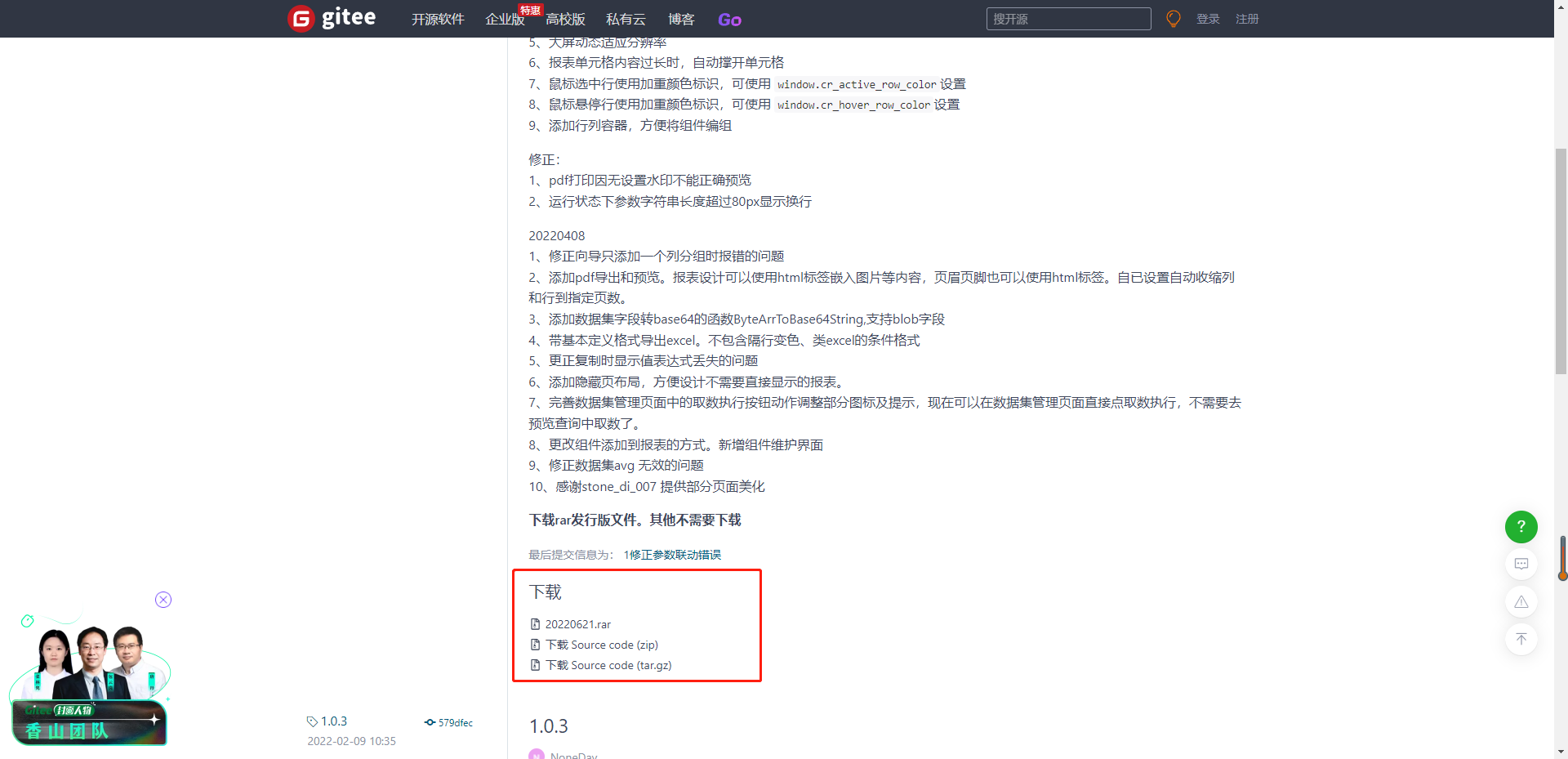
4. Run and configure
The operation and configuration steps are as follows :
- perform start.bat

- Browser input address : http://127.0.0.1:5000
- Default username and password :admin/database!123 . Administrator users in appsetting.json There is ( You can find it at the end ), Can be modified by yourself .
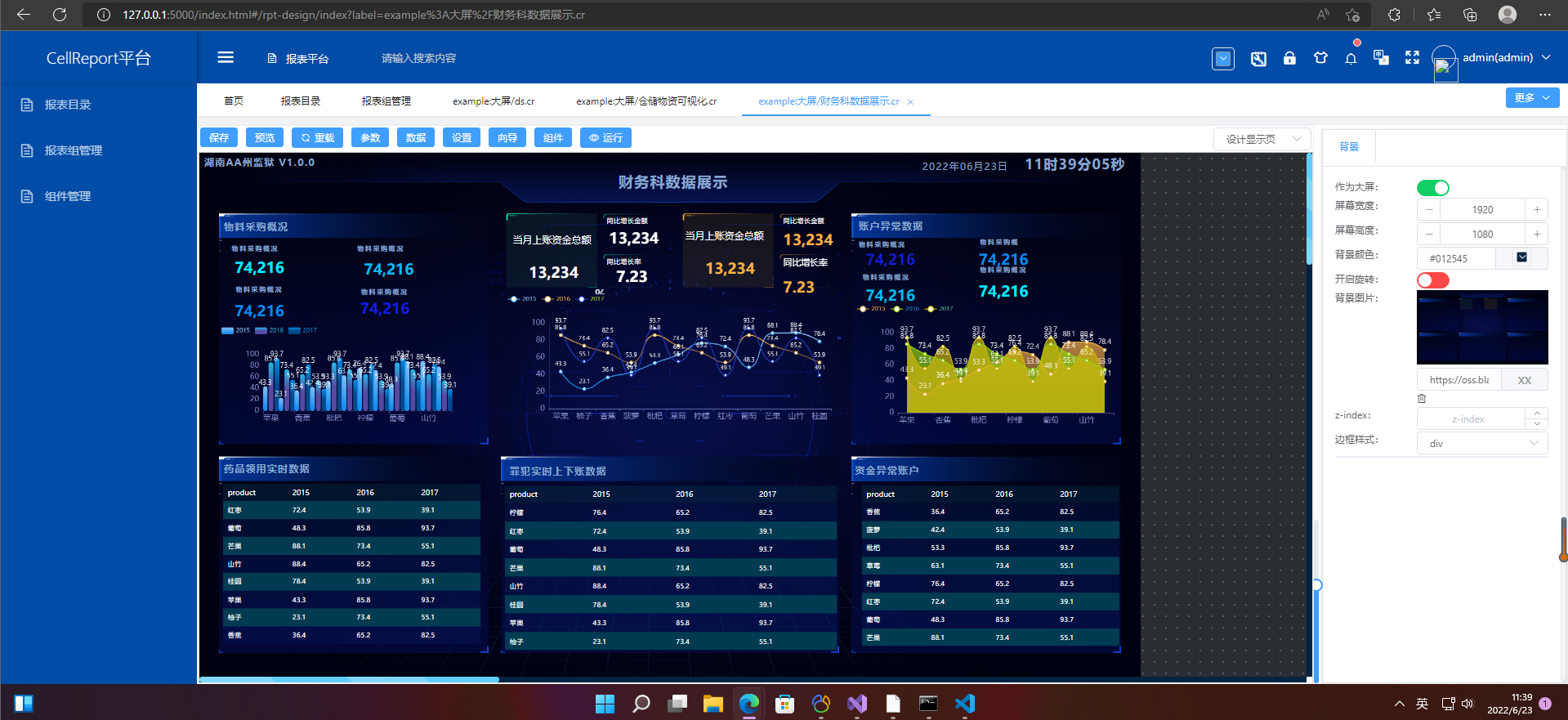
Database connection string configuration :
sql server  Connection string format
Data Source=ip Address ;Initial Catalog= Database name ;Persist Security Info=True;User ID= user ;Password= password ;Min Pool Size=1;Max Pool Size=50;Connect Timeout=15000;Application Name= Report connection

oracle  Connection string   Format
Data Source=(DESCRIPTION=(ADDRESS=(PROTOCOL=TCP)(HOST=ip Address )(PORT= port ))(CONNECT_DATA=(SERVER = SERVER name )(SERVICE_NAME =  database )));User Id= user ;Password= password ;

sqlite  Connection string   Format
Data Source=E:\my_app\ Report source code _2020\a_new_lib\test.db

MySql  Connection string   Format
Database=dbname;Data Source=x.x.x.x;Port=3306;User Id=xxx;Password=****;Charset=utf8;TreatTinyAsBoolean=false;

pgsql  Connection string   Format
server=ip Address ;port=5432;uid= user ;pwd= password ;database= database ;Pooling=true;

边栏推荐
- leetcode:85. 最大矩形
- 云监控系统 HertzBeat v1.1.0 发布,一条命令开启监控之旅!
- Basic knowledge of wechat applet cloud development literacy chapter (I) document structure
- How do I check the IP address? What is an IP address
- Actual combat | how to deploy flask project using wechat cloud hosting
- In the half year, there were 2.14 million paying users, a year-on-year increase of 62.5%, and New Oriental online launched its private domain
- 目标5000万日活,Pwnk欲打造下一代年轻人的“迪士尼乐园”
- Interpreting top-level design of AI robot industry development
- Attack and defense enlightenment: chromium component risk analysis and convergence
- On BOM and DOM (6): bit value calculation of DOM objects and event objects, such as offsetx/top and clearx
猜你喜欢

RealNetworks vs. 微软:早期流媒体行业之争

The data synchronization tool dataX has officially supported reading and writing tdengine

leetcode:剑指 Offer 26:判断t1中是否含有t2的全部拓扑结构
![Command ‘[‘where‘, ‘cl‘]‘ returned non-zero exit status 1.](/img/2c/d04f5dfbacb62de9cf673359791aa9.png)
Command ‘[‘where‘, ‘cl‘]‘ returned non-zero exit status 1.
年中了,准备了少量的自动化面试题,欢迎来自测
RealNetworks vs. Microsoft: the battle in the early streaming media industry

潞晨科技获邀加入NVIDIA初创加速计划

网吧管理系统与数据库

成为 TD Hero,做用技术改变世界的超级英雄 | 来自 TDengine 社区的邀请函

C语言学生管理系统——可检查用户输入合法性,双向带头循环链表
随机推荐
puzzle(019.1)Hook、Gear
How to build an app at low cost
What is the role of domain name websites? How to query domain name websites
Basic knowledge of wechat applet cloud development literacy chapter (I) document structure
Virtual file system
RealNetworks vs. Microsoft: the battle in the early streaming media industry
成为 TD Hero,做用技术改变世界的超级英雄 | 来自 TDengine 社区的邀请函
On BOM and DOM (6): bit value calculation of DOM objects and event objects, such as offsetx/top and clearx
Let's talk about BOM and DOM (5): dom of all large Rovers and the pits in BOM compatibility
How long does the domain name filing take and what materials need to be prepared
setInterval里面的函数不能有括号
What are the audio formats? Can the audio format be converted
Cloud native high availability and Disaster Recovery Series (I): pod break up scheduling
Surveying and mapping principle of GIS coordinate system: geoid / datum / reference ellipsoid /epsg/sri/wkt
About Stacked Generalization
Become TD hero, a superhero who changes the world with Technology | invitation from tdengine community
Domain name purchase method good domain name selection principle
leetcode:84. 柱状图中最大的矩形
Kubernets traifik proxy WS WSS application
你有一个机会,这里有一个舞台